

 Login
Login


 December 22, 2025
|
Voiced by Amazon Polly |
Overview
Modern cloud environments demand robust, scalable, and intelligent network protection. As applications grow in complexity and traffic volumes increase, organizations need security controls that can keep up without introducing latency or operational overhead. AWS Network Firewall delivers exactly that, a fully managed, scalable network security service designed to protect your Amazon VPCs with fine-grained network traffic filtering.
In this blog, we explore real-world use cases, explain how AWS Network Firewall works, outline the deployment steps, and highlight its major security benefits.
Pioneers in Cloud Consulting & Migration Services
- Reduced infrastructural costs
- Accelerated application deployment
Introduction
AWS Network Firewall is a managed, highly available network security service that allows customers to enforce fine-grained traffic filtering at the VPC level. It provides stateful and stateless inspection capabilities, deep packet inspection (DPI), domain filtering, intrusion detection/prevention, and centralized policy management across multiple VPCs.
Unlike traditional firewall appliances, AWS Network Firewall is:
- Fully elastic
- Centrally manageable
- Deeply integrated with AWS Transit Gateway
- Designed for large-scale cloud environments
It simplifies network protection and supports enterprise-grade compliance requirements, without the complexity of manually deploying and operating firewalls.
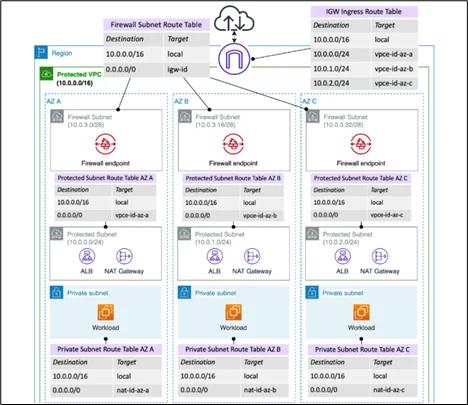
Image Source: AWS Documentation
Use Cases of AWS Network Firewall
Centralized Inspection Architecture
- Organizations with multiple VPCs often need a consistent security layer. AWS Network Firewall enables centralized inspection using Transit Gateway, routing all traffic through a single firewall VPC.
Block Malicious Domains and IPs
- You can enforce domain-based blocking (via Suricata rules), malicious IP blocking, country-based filtering, and threat intelligence feeds.
East-West Traffic Inspection
- Inspect traffic between VPCs to prevent lateral movement of threats.
Egress Control for Compliance
- Meet compliance frameworks (ISO, PCI, CIS) by restricting internet-bound traffic and logging all DNS activity.
Protecting Sensitive Workloads
- Secure workloads such as banking apps, healthcare systems, and government workloads with deep packet inspection and stateful rules.
Intrusion Detection and Prevention (IDS/IPS)
- Enable Suricata-based rule packs to detect attacks, including SQL injection, DDoS patterns, port scans, and known exploit signatures.
Hybrid Cloud Security
- Extend security to traffic flowing between AWS and on-prem via VPN or Direct Connect.
- Replace or Augment Traditional Firewall Appliances
- Remove the operational burden of running physical/virtual firewalls inside VPCs.
High-Level Deployment Steps
Step 1: Create a Firewall Policy
Defines stateless and stateful rule groups, inspection behavior, logging settings, and default actions.
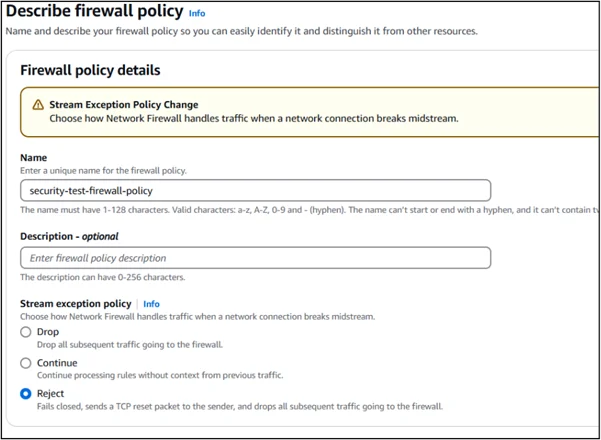
Step 2: Create Rule Groups
Stateless rules for lightweight traffic filtering
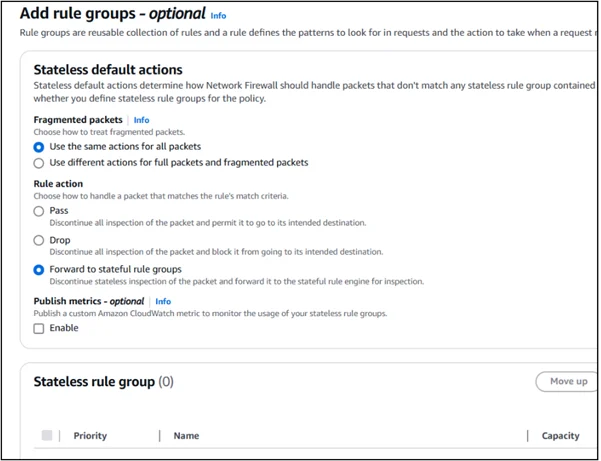
Stateful rules for deep inspection using Suricata-compatible rule sets
Step 3: Deploy the AWS Network Firewall
Create the firewall resource inside a dedicated inspection VPC.
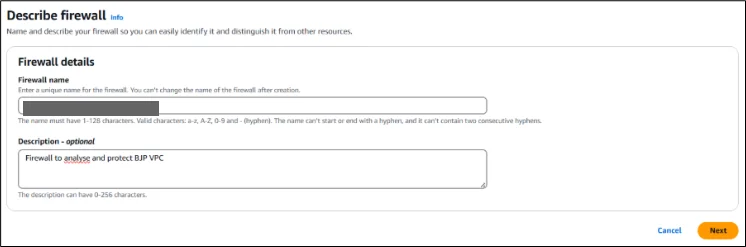
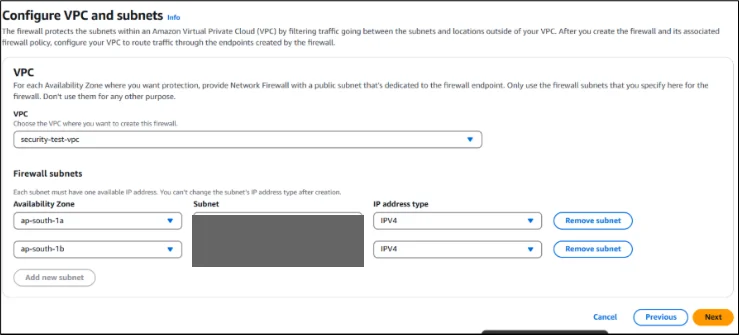
Step 4: Configure Firewall Subnets
Assign subnets in each Availability Zone; firewall endpoints are automatically created.
Step 5: Update Route Tables
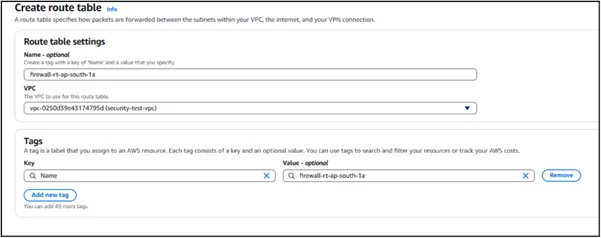
Redirect traffic (ingress, egress, or east-west) through the firewall endpoints by modifying VPC route tables.
Step 6: Integrate with AWS Transit Gateway (Optional)
For centralized inspection, attach VPCs to a TGW and route all inter-VPC or outbound traffic through the firewall VPC.
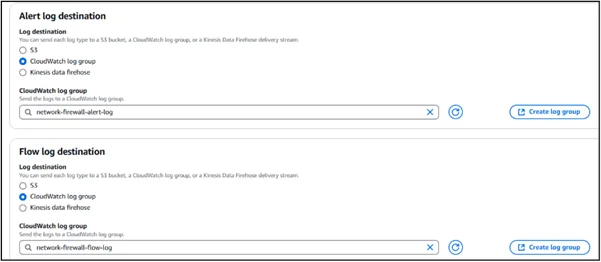
Step 7: Enable Logging
Enable logs for:
- Traffic logs
- Alert logs (e.g., IPS alerts)
- Rule match logs
- Send them to Amazon CloudWatch, Amazon S3, or Amazon Kinesis.
Step 8: Test and Validate
- Perform controlled tests to ensure:
- Unwanted traffic is blocked
- Allowed traffic flows normally
- Logging is functioning
Managed Rule Groups in AWS Network Firewall
AWS provides managed rule groups that simplify security management by continuously updating the rules to protect against new threats.
You can use managed rules from:
- AWS Managed Rules
Provide baseline protection
Cover common exploit patterns, malware signatures, and DNS filtering
- AWS Marketplace Managed Rules (Third-Party Vendors)
Supported vendors include:
- Trend Micro
- Fortinet
- Cisco
- Alert Logic
- Snort-based vendors
These offer advanced threat signatures, threat intel feeds, and compliance-focused rules.
- Custom Suricata Rules
Teams can write their own Suricata rules for:
- Blocking specific domains
- Detecting suspicious patterns
- Enforcing internal organizational policies
Managed rules reduce operational burden by keeping rule signatures updated without manual intervention.
Security Benefits of AWS Network Firewall
- Centralized Security Across Multiple VPCs
- Deep Packet Inspection (DPI)
- Stateful inspection analyzes packet payloads in detail, identifying complex attack patterns.
- Protection From Zero-Day and Known Threats
- Full Visibility With Detailed Logging
- Resilient and Highly Available
- Policy-Driven Access Management
- Integration With Other AWS Security Services
Conclusion
AWS Network Firewall is a powerful, scalable, and fully managed solution for securing modern cloud architectures.
For organizations looking to secure large-scale AWS environments, enforce compliance, or reduce the overhead of traditional firewall appliances, AWS Network Firewall is one of the most effective solutions available today.
Drop a query if you have any questions regarding AWS Network Firewall and we will get back to you quickly.
Empowering organizations to become ‘data driven’ enterprises with our Cloud experts.
- Reduced infrastructure costs
- Timely data-driven decisions
About CloudThat
FAQs
1. What types of traffic can AWS Network Firewall filter?
ANS: – It can filter:
- Traffic to and from Internet Gateways
- Traffic through NAT Gateways
- VPN and AWS Direct Connect traffic
- Specific domains or IP ranges using allow/deny lists
- Packets using deep packet inspection and protocol detection
2. How does AWS Network Firewall differ from Security Groups and NACLs?
ANS: –
- Security Groups – Instance-level, stateful rules
- NACLs – Subnet-level, stateless rules
- Network Firewall – Stateful inspection at the Amazon VPC perimeter with advanced features like managed rule groups, DPI, and intrusion prevention.
3. What are AWS Managed Rule Groups?
ANS: – These are pre-configured rule sets maintained by AWS that detect and block known threats, malicious domains, or suspicious protocols. They save time compared to creating custom rules manually.


WRITTEN BY Akshay Mishra
Akshay Mishra works as a Subject Matter Expert at CloudThat. He is a Cloud Infrastructure & DevOps Expert and AWS Certified. Akshay is experienced in designing, securing, and managing scalable cloud infrastructure on AWS. Proven track record working with government, pharmaceutical, and financial clients in roles such as Cloud Engineer, Associate Solutions Architect, and DevOps Engineer. He is skilled in AWS infrastructure, CI/CD, Terraform, and cloud security, with certification in AWS Security – Specialty.


 PREV
PREV












Comments