

 Login
Login


 February 2, 2026
|
Voiced by Amazon Polly |
Overview
Identity is the new security perimeter in the cloud. As organizations increasingly adopt Amazon Web Services (AWS) to run applications and infrastructure, controlling who can access what is more critical than ever. At the same time, most enterprises already use Microsoft Active Directory (AD) as their centralized identity system for employees, contractors, and administrators.
This blog provides a deep, security-focused overview of integrating AWS with Microsoft AD using AWS IAM Identity Center. It explains why this approach is recommended, how it works at a conceptual level, and what security best practices enterprises should follow to build a scalable, compliant, and future-proof access model.
Pioneers in Cloud Consulting & Migration Services
- Reduced infrastructural costs
- Accelerated application deployment
Introduction
In traditional data centers, identity and access control were largely enforced at the network boundary. In the cloud, that boundary no longer exists. AWS environments are accessible from anywhere, making identity the primary control plane for security.
Many teams start their AWS journey by creating AWS IAM users for engineers and administrators. While this may work initially, it quickly becomes unmanageable as organizations grow. Common problems include:
- Long-lived access keys stored on laptops or CI systems
- Manual user creation and deletion
- Delayed access revocation when employees leave
- Difficulty enforcing MFA consistently
- Poor visibility during audits
AWS IAM Identity Center solves these problems by federating authentication to Microsoft Active Directory, while AWS handles authorization through role-based access. Users sign in using their corporate credentials and receive temporary, scoped access to AWS accounts, without ever creating IAM users.
This model aligns AWS access with enterprise identity strategies, Zero Trust principles, and modern compliance requirements such as SOC 2, ISO 27001, and PCI DSS.
Core Security Best Practices
- Use Microsoft Active Directory as the Single Source of Authentication
Microsoft AD should remain the authoritative identity provider for all human users. AWS IAM Identity Center integrates with AD in three common ways:
- AWS Managed Microsoft AD
- AD Connector
- Self-managed AD
In all cases, authentication happens in AD, not AWS. This ensures:
- Centralized password policies
- Account lockout enforcement
- Unified identity lifecycle management
AWS never stores or validates user passwords, significantly reducing the attack surface.
- Eliminate AWS IAM Users for Human Access
One of the most important security principles is never to create AWS IAM users for employees.
AWS IAM Identity Center provides:
- Browser-based console access
- AWS CLI access using SSO
- Temporary credentials via role assumption
Because credentials are short-lived, the risk of credential theft or accidental exposure is drastically reduced. AWS IAM users should be reserved only for exceptional cases, such as legacy service integrations, and even then, they should be minimized.
- Implement Group-Based Access Control Using AD Groups
Access should never be assigned directly to individual users. Instead, use role-based access control (RBAC) driven by Active Directory groups.
Best practice flow:
- Create security groups in AD (e.g., AD-Cloud-ReadOnly, AD-DevOps)
- Create permission sets in AWS IAM Identity Center
- Map AD groups to permission sets
- Assign them to specific AWS accounts
Example:
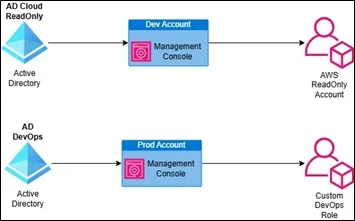
This approach simplifies audits, improves traceability, and enforces least privilege.
- Design Least-Privilege Permission Sets
Permission sets define what actions users can perform once authenticated. Avoid overusing AWS-managed policies, such as A Privileged user.
Recommended approach:
- Create role-specific permission sets
- Use custom AWS IAM policies
- Grant only required services and actions
Examples of common permission sets:
- Infrastructure Admin
- Application Developer
- Read-Only Auditor
- Billing Viewer
Periodic access reviews should be conducted to ensure permissions remain aligned with job responsibilities.
- Enforce Multi-Factor Authentication at the AD Level
Because Microsoft AD handles authentication, MFA must be enforced there.
Best practices include:
- Mandatory MFA for all AWS-access users
- Stronger MFA for privileged roles
- Conditional access based on device or location
This allows consistent MFA enforcement across AWS, on-prem systems, and SaaS applications without configuring MFA individually in each AWS account.
- Use Multi-Account AWS Architecture with Centralized SSO
AWS IAM Identity Center works best when combined with AWS Organizations and a multi-account strategy.
Typical structure:
- Management account
- Security account
- Shared services account
- Workload accounts (Dev, QA, Prod)
SSO enables a single user to securely access multiple AWS accounts using a single login session while still enforcing account-level isolation.
- Centralize Logging, Monitoring, and Auditing
Visibility is essential for security and compliance.
Enable and centralize:
- AWS CloudTrail (all accounts)
- AWS IAM Identity Center audit logs
- AWS Directory Service logs
Logs should be aggregated into a dedicated security account and forwarded to a SIEM or log analytics platform. This allows detection of:
- Unauthorized access attempts
- Privilege escalation
- Suspicious login patterns
- Automate User Lifecycle Management
One of the biggest benefits of AD-based SSO is automatic access lifecycle management.
Typical lifecycle:
- New hire → Added to AD group → AWS access granted
- Role change → Group membership updated → Permissions adjusted
- Employee exit → AD account disabled → AWS access revoked instantly
This eliminates orphaned accounts and reduces operational overhead.
- Restrict Break-Glass and Emergency Access
Even in SSO-based environments, emergency access may be required.
Best practices:
- Create dedicated break-glass IAM roles
- Protect them with strong MFA
- Store credentials securely
- Monitor and audit every usage
Break-glass access should be rare, documented, and reviewed regularly.
Conclusion
Integrating AWS with Microsoft Active Directory using AWS IAM Identity Center is the most secure, scalable, and enterprise-ready approach to AWS access management. It eliminates the risks associated with AWS IAM users, enforces least privilege, and aligns AWS with existing corporate identity governance.
For organizations operating multiple AWS accounts, handling audits, or supporting large engineering teams, AWS IAM Identity Center provides a clean and future-proof SSO architecture. It allows security teams to retain centralized control while enabling developers and administrators to work efficiently.
In modern cloud environments, identity is security, and AWS IAM Identity Center ensures that identity is handled correctly.
Drop a query if you have any questions regarding AWS IAM Identity Center and we will get back to you quickly.
Empowering organizations to become ‘data driven’ enterprises with our Cloud experts.
- Reduced infrastructure costs
- Timely data-driven decisions
About CloudThat
FAQs
1. Is AWS IAM Identity Center suitable for large enterprises?
ANS: – Yes. It is designed for enterprise-scale, multi-account AWS environments.
2. Can this integrate with on-premises Active Directory?
ANS: – Yes, using AD Connector or a trust with AWS Managed Microsoft AD.
3. Are AWS IAM users required at all?
ANS: – Only for exceptional service accounts. Human users should use SSO.


WRITTEN BY Riyazuddin
Riyazuddin works as an Associate Architect – Infra, brings over 15+ years of experience in DevOps, System Design, Networking, and Programming. Skilled in AWS, Azure, Terraform, Docker, Kubernetes, Jenkins, Openshift, Ansible, and Python, he designs scalable, secure systems and drives automation through cloud-native architectures and IaC. Known for his analytical mindset and leadership, he mentors teams and delivers high-impact, enterprise-ready solutions aligned with business goals.


 PREV
PREV












Comments