

 Login
Login


 December 9, 2025
|
Voiced by Amazon Polly |
Overview
Preserving the private IP address of an Amazon EC2 instance is a common requirement in enterprise and production environments. Many internal systems, applications, and security configurations rely on a fixed private IP for communication within an Amazon VPC. When an Amazon EC2 instance is terminated, AWS typically releases its private IP address, which can result in service disruption.
This guide explains a reliable and AWS-supported method for retaining the private IP address using Elastic Network Interfaces (ENIs). It covers both AWS Management Console and AWS CLI approaches, making it suitable for system administrators who prefer manual control as well as automation-friendly workflows.
Pioneers in Cloud Consulting & Migration Services
- Reduced infrastructural costs
- Accelerated application deployment
Introduction
In AWS, Amazon EC2 instances are frequently replaced due to maintenance, upgrades, scaling requirements, or changes to the operating system. While launching a new instance is easy, maintaining the same private IP address is not straightforward because AWS assigns private IPs dynamically.
This blog walks through a step-by-step approach to:
- Create an AMI backup of the existing instance
- Prevent the ENI from being deleted
- Terminate the old instance safely
- Launch a new instance while retaining the original private IP
This approach ensures minimal disruption and avoids changes to existing application configurations.
Key Concept
A private IP address in AWS belongs to an Elastic Network Interface (ENI), not directly to the Amazon EC2 instance. If the ENI survives, the private IP survives.
So, the goal is simple:
- Create an AMI of the old instance
- Prevent the ENI from being deleted
- Terminate the instance
- Attach the same ENI to a new instance
Step 1: Create an AMI of the Old Amazon EC2 Instance
Creating an AMI ensures you can launch a new instance with the same OS, software, and configuration.
Using AWS Console
- Go to the Amazon EC2 Dashboard
- Select the old instance
- Click Actions → Image and templates → Create image
- Enter the image name and description
- Click Create image
Wait until the AMI status shows Available.
Using AWS CLI
|
1 2 3 4 |
aws ec2 create-image \ --instance-id i-0abcd1234efgh5678 \ --name "prod-app-server-ami" \ --description "AMI before preserving private IP" |
Output
|
1 2 3 |
{ "ImageId": "ami-0a1b2c3d4e5f67890" } |
To verify AMI status:
|
1 |
aws ec2 describe-images --image-ids ami-0a1b2c3d4e5f67890 |
Output
|
1 |
"State": "available" |
Step 2: Disable ENI “Delete on Termination”
By default, the primary ENI is deleted when an instance is terminated. This must be disabled.
Using AWS Console
- Select the instance
- Open the Networking tab
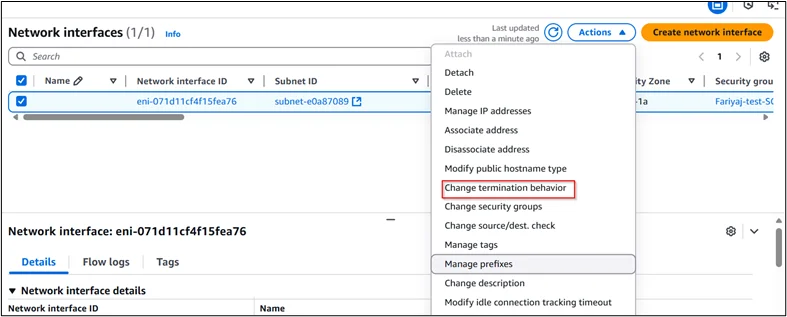
- Click the Network Interface ID (eni-xxxxxx)
- Select the ENI
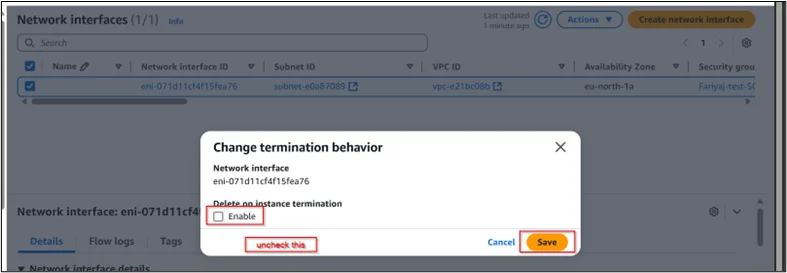
- Click Actions → Change termination behavior
- Uncheck Delete on termination
- Click Save
Using AWS CLI
First, identify the ENI:
|
1 2 3 |
aws ec2 describe-instances \ --instance-ids i-0abcd1234efgh5678 \ --query "Reservations[].Instances[].NetworkInterfaces[].NetworkInterfaceId" |
Output
|
1 2 3 |
[ "eni-0123456789abcdef0" ] |
Now disable delete-on-termination:
|
1 2 3 |
aws ec2 modify-network-interface-attribute \ --network-interface-id eni-0123456789abcdef0 \ --attachment DeleteOnTermination=false |
Command Output
|
1 |
{} |
(An empty output means the command succeeded.)
Step 3: Terminate the Old EC2 Instance
Once the AMI is available and ENI termination protection is disabled, you can safely terminate the old instance.
Using AWS Console
- Select the instance
- Click Instance state → Terminate instance
Using AWS CLI
|
1 |
aws ec2 terminate-instances --instance-ids i-0abcd1234efgh5678 |
Sample Output
|
1 2 3 4 5 6 7 8 9 10 |
{ "TerminatingInstances": [ { "InstanceId": "i-0abcd1234efgh5678", "CurrentState": { "Name": "shutting-down" } } ] } |
At this point:
- The instance is terminated
- ENI still exists
- Private IP is preserved
Step 4: Launch a New Amazon EC2 Instance with the Existing ENI
Now, launch a new Amazon EC2 instance using the AMI and reattach the preserved ENI.
Using AWS Console
- Go to Amazon EC2 → AMIs
- Select the AMI
- Click Launch
- Choose:
- Same VPC
- Same Subnet
- Expand Advanced network configuration
- Select Existing network interface
- Choose the retained ENI
- Complete launch
Important:
The ENI subnet and instance subnet must match.
Using AWS CLI
Launch the instance using the existing ENI:
|
1 2 3 4 5 |
aws ec2 run-instances \ --image-id ami-0a1b2c3d4e5f67890 \ --instance-type t3.medium \ --network-interfaces NetworkInterfaceId=eni-0123456789abcdef0,DeviceIndex=0 \ --key-name prod-keypair |
Sample Output
|
1 2 3 4 5 6 7 |
{ "Instances": [ { "InstanceId": "i-09fedcba876543210" } ] } |
Step 5: Verify the Private IP Address
Using AWS CLI
|
1 2 3 |
aws ec2 describe-instances \ --instance-ids i-09fedcba876543210 \ --query "Reservations[].Instances[].PrivateIpAddress" |
Output
|
1 2 3 |
[ "10.0.2.15" ] |
The private IP matches the old instance
Common Mistakes to Avoid
- Forgetting to disable “Delete on termination”
- Launching the new instance in a different subnet
- Attaching the ENI to multiple instances
- Deleting the ENI accidentally
- Skipping AMI verification
Final Thoughts
Preserving the private IP of an Amazon EC2 instance is a common requirement in production environments. While AWS does not allow directly reserving private IPs on instances, using ENIs provides a clean and supported solution.
This approach ensures:
- Zero internal IP changes
- No firewall or application reconfiguration
- Safe migration and upgrades
By combining AWS Console steps with AWS CLI commands, you can automate and repeat this process reliably across environments.
Conclusion
Retaining the private IP address of an Amazon EC2 instance is crucial when applications or infrastructure rely on static internal IP addresses. Although AWS does not provide a direct way to reserve private IPs on instances, Elastic Network Interfaces offer a powerful and supported solution.
By creating an AMI, preventing ENI deletion, and reusing the same network interface, you can safely replace or upgrade Amazon EC2 instances without impacting internal networking. This method helps maintain application stability, avoids configuration changes, and ensures smooth transitions during instance migrations.
Drop a query if you have any questions regarding Amazon EC2 and we will get back to you quickly.
Empowering organizations to become ‘data driven’ enterprises with our Cloud experts.
- Reduced infrastructure costs
- Timely data-driven decisions
About CloudThat
FAQs
1. Can I preserve a private IP address without using an ENI?
ANS: – No. In AWS, private IP addresses are associated with Elastic Network Interfaces, not directly with Amazon EC2 instances. Preserving the ENI is the only supported method to retain a private IP.
2. Can the preserved ENI be attached to an instance in a different subnet?
ANS: – No. An ENI can only be attached to instances within the same Amazon VPC and subnet where it was originally created.
3. Is this method suitable for production environments?
ANS: – Yes. This is a widely used and AWS-supported approach and is safe for production workloads when performed carefully.


WRITTEN BY Shaikh Mohammed Fariyaj Najam
Mohammed Fariyaj Shakh is a Sr. Research Associate – Cloud Engineer at CloudThat with a strong background in AWS and Azure infrastructure management, security, optimization, and automation. Certified in both AWS and Azure, he has hands-on experience in designing, implementing, and managing highly reliable, secure, and scalable cloud solutions. Well-versed in DevOps practices and tools such as Git, GitHub, AWS CI/CD, Jenkins, Docker, Kubernetes, and Terraform, Fariyaj leverages his expertise in automation, Infrastructure as Code (IaC), and container orchestration to build and manage robust deployment pipelines. Known for his strong troubleshooting skills, he delivers effective and scalable solutions to complex cloud challenges.


 PREV
PREV












Comments