

 Login
Login


 December 1, 2025
|
Voiced by Amazon Polly |
Overview
In today’s fast-paced DevOps environment, deploying applications safely and continuously without downtime is a major challenge. While Argo CD has revolutionized GitOps-based continuous delivery, it can be further enhanced by combining it with Argo Rollouts. This Kubernetes controller enables advanced deployment strategies, such as Canary, Blue-Green, and Progressive Delivery.
In this blog, we’ll explore how Argo CD and Argo Rollouts work together to enable safe, automated, and observable application deployments in Kubernetes.
Pioneers in Cloud Consulting & Migration Services
- Reduced infrastructural costs
- Accelerated application deployment
Introduction to Progressive Delivery
Progressive Delivery is an advanced evolution of Continuous Delivery. Instead of deploying a new version of an application to all users at once, updates are gradually rolled out to a subset of users or environments. This minimizes risk, improves confidence, and allows real-time monitoring of performance before full release.
Common Progressive Delivery strategies include:
- Blue-Green Deployment: Running two identical environments (Blue – current version, Green – new version) and switching traffic after validation.
- Canary Deployment: Rolling out new versions to a small percentage of users, validating performance metrics, then scaling gradually.
- A/B Testing: Testing two versions with specific user groups to measure feature performance.
Argo Rollouts brings these patterns natively to Kubernetes, tightly integrated with Argo CD’s GitOps workflow.
Understanding Argo Rollouts
Argo Rollouts is a Kubernetes controller and set of CRDs (Custom Resource Definitions) that extend the standard Deployment resource to support advanced deployment strategies.
Key Capabilities:
- Canary, Blue-Green, and Experiment-based deployments
- Automated promotion or rollback based on metrics
- Integration with Prometheus, Datadog, and Kayenta
- Real-time status via CLI and Argo CD UI
When used with Argo CD, Rollouts can be managed declaratively through Git, combining GitOps automation with advanced deployment control.
Argo CD + Argo Rollouts Architecture
Here’s how the two tools work together:
- Argo CD continuously monitors a Git repository for application manifests.
- Argo Rollouts replaces the traditional Kubernetes Deployment with its own CRD (Rollout).
- When a change is pushed to Git, Argo CD applies it to the cluster.
- The Rollouts controller manages traffic shifting, health analysis, and automatic rollback if metrics fail.
This combination allows teams to automate safe deployments while keeping Git as the single source of truth.
Example: Canary Deployment with Argo Rollouts
Below is a simplified YAML example of a Canary deployment strategy using Argo Rollouts:
|
1 2 3 4 5 6 7 8 9 10 11 12 13 14 15 16 17 18 19 20 21 22 23 24 25 26 27 |
apiVersion: argoproj.io/v1alpha1 kind: Rollout metadata: name: sample-app spec: replicas: 4 strategy: canary: steps: - setWeight: 25 - pause: {duration: 60s} - setWeight: 50 - pause: {duration: 120s} - setWeight: 100 selector: matchLabels: app: sample-app template: metadata: labels: app: sample-app spec: containers: - name: sample-app image: myrepo/sample-app:v2 ports: - containerPort: 8080 |
How It Works:
- Starts by shifting 25% of traffic to the new version.
- Pauses for 60 seconds for metric evaluation.
- Gradually increases to 50%, then 100% after successful checks.
- If metrics fail, it can automatically rollback to the previous version.

Source: Link
Blue-Green Deployment Example
|
1 2 3 4 5 6 7 8 9 10 11 12 13 14 15 16 17 18 19 20 21 22 23 24 |
apiVersion: argoproj.io/v1alpha1 kind: Rollout metadata: name: bluegreen-app spec: replicas: 4 strategy: blueGreen: activeService: bluegreen-active previewService: bluegreen-preview autoPromotionEnabled: false selector: matchLabels: app: bluegreen-app template: metadata: labels: app: bluegreen-app spec: containers: - name: bluegreen-app image: myrepo/bluegreen-app:v2 ports: - containerPort: 8080 |
How It Works:
- The active service serves current production traffic.
- The preview service runs the new version for testing.
- Once validated, the new version is promoted by switching the active service endpoint.
- Old version is removed after successful verification.
Integrating Argo CD with Argo Rollouts
- Install Argo CD
- kubectl create namespace argocd
- kubectl apply -n argocd -f https://raw.githubusercontent.com/argoproj/argo-cd/stable/manifests/install.yaml
- Install Argo Rollouts
- kubectl create namespace argo-rollouts
- kubectl apply -n argo-rollouts -f https://github.com/argoproj/argo-rollouts/releases/latest/download/install.yaml
- Deploy Rollout Manifests via Git
- Store all rollout YAML files (Canary/Blue-Green) in a Git repository.
- Create an Argo CD Application pointing to that repo.
- Argo CD will sync and manage Rollouts declaratively.
- Visualize Rollout Progress
- Access the Argo CD UI (https://localhost:8080) or
Argo Rollouts dashboard (kubectl argo rollouts dashboard). - View real-time deployment status, traffic weights, and metric analysis.
- Access the Argo CD UI (https://localhost:8080) or
Automated Rollbacks Using Metrics
One of the most powerful features of Argo Rollouts is metric-based analysis.
It can automatically promote or rollback deployments based on thresholds from monitoring tools like Prometheus.
Example snippet:
|
1 2 3 4 5 6 |
analysis: templates: - name: success-rate prometheus: query: rate(http_requests_total{status!~"5.."}[5m]) threshold: 0.95 |
If the success rate drops below 95%, Argo Rollouts automatically reverts to the previous stable version, no manual action is required.
Benefits of Using Argo CD with Argo Rollouts
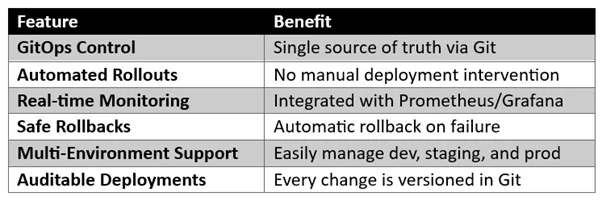
Best Practices
- Use separate branches for different environments (dev/stage/prod).
- Integrate Prometheus alerts for metric-driven rollbacks.
- Keep auto-promotion disabled for critical applications (manual approval).
- Ensure RBAC and SSO are enforced in Argo CD.
- Use Helm or Kustomize for reusable Rollout templates.
Conclusion
Combining Argo CD and Argo Rollouts brings the best of both worlds, GitOps automation and intelligent deployment control.
This integration not only ensures zero-downtime deployments but also adds safety, visibility, and rollback confidence to your release process.
Drop a query if you have any questions regarding Argo CD or Argo Rollouts and we will get back to you quickly.
Making IT Networks Enterprise-ready – Cloud Management Services
- Accelerated cloud migration
- End-to-end view of the cloud environment
About CloudThat
FAQs
1. What is the main difference between Argo CD and Argo Rollouts?
ANS: – Argo CD is a GitOps-based Continuous Delivery tool that ensures your Kubernetes cluster state matches the configuration defined in Git. Argo Rollouts, on the other hand, extends Kubernetes Deployments with advanced deployment strategies, such as Canary, Blue-Green, and Progressive Delivery. In short:
- Argo CD = GitOps automation (sync between Git and cluster)
- Argo Rollouts = Advanced deployment control (progressive release, rollback, metrics-driven decisions)
2. What are the benefits of integrating Argo CD with Argo Rollouts?
ANS: – Integrating both tools brings several advantages:
- Git is a single source of truth, every deployment is version-controlled.
- Automated and safe rollouts, no manual intervention.
- Metric-based rollback automatically reverts if Prometheus/Grafana metrics fail to meet thresholds.
- Zero-downtime deployments, using Canary or Blue-Green strategies.
- Auditability and compliance, all changes tracked through Git commits.
3. How does a Canary deployment work in Argo Rollouts?
ANS: – In a Canary deployment, the new application version is released gradually to a small percentage of users, while the rest continue using the stable version. Example (from the document):
- Deploy 25% of traffic to the new version.
- Pause for metric validation.
- Increase to 50%, then 100% if healthy.
- Managing traffic shifting using service weights.
- Pausing and progressing deployments based on Prometheus metrics.
- Rolling back automatically if thresholds (like success rate < 95%) fail.


WRITTEN BY Akshay Acharya
Akshay Acharya works as a Research Associate at CloudThat. He possesses strong analytical thinking and problem-solving skills, knowledge of AWS cloud services, migration, infrastructure setup, and security, as well as the ability to quickly adopt new technologies and learn.


 PREV
PREV












Comments