

 Login
Login


 March 23, 2026
|
Voiced by Amazon Polly |
In the modern business world, identity security is one of the most important parts of protecting company data and user accounts. With remote work, cloud apps, and mobile access becoming the norm, organizations face increasing threats to user identities. That’s where Microsoft Entra Identity Protection comes in, a powerful Microsoft security service built to help enterprises detect, investigate, and respond to identity risks.
Start Learning In-Demand Tech Skills with Expert-Led Training
- Industry-Authorized Curriculum
- Expert-led Training
Microsoft Entra Identity Protection
At its core, Microsoft Entra Identity Protection helps organizations secure their user identities by evaluating risks in real time. It continuously monitors user logins, device states, locations, and other signals to identify unusual behavior. When suspicious activity is detected, policies are applied to protect the account and prevent further damage.
Here’s a simple way to think about it:
Microsoft Entra Identity Protection is like a smart security guard for your company’s identities, always on watch, always learning, and capable of automatically stopping threats.
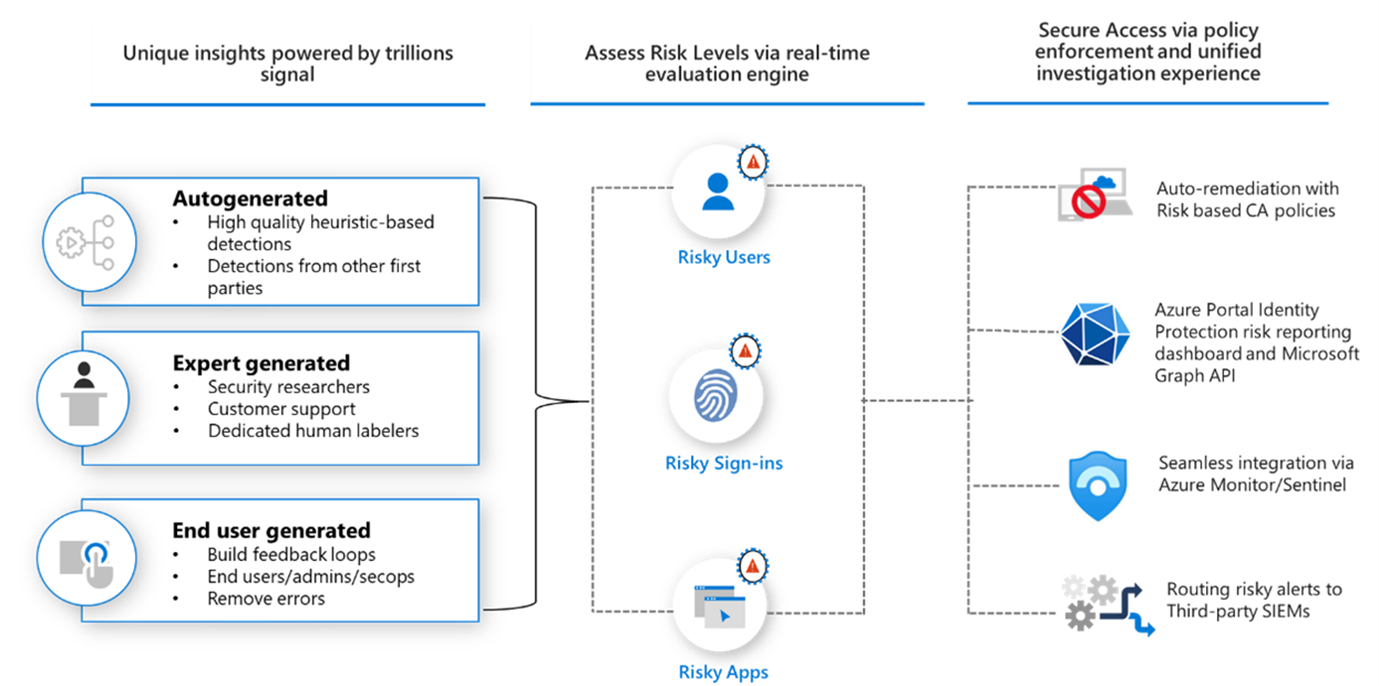
For an overview of how it works, see the Microsoft Entra Identity Protection documentation available on MS Learn, and the diagram below shows the complete range of security features it includes.
Why Identity Security Matters
Before cloud services were common, passwords and simple login checks were enough. But today, attackers use advanced methods like phishing, password spraying, and credential stuffing to breach accounts. Once inside, they can access sensitive files, email systems, and even escalate privileges to take over entire environments.
This is where secure identities become a central part of your security plan. A secure identity ensures that only the right people get access, in the right way, at the right time.
Key Features of Microsoft Entra Identity Protection
- Identity Risk Detection
One of the core strengths of Microsoft Entra Identity Protection is its ability to detect risky behavior using machine learning. It analyzes signals like:
- Unusual sign-in locations or IP addresses
- Impossible travel (when a user logs in from two places too far apart)
- Login attempts from malware-infected devices.
- Anonymous or suspicious IP usage
These risk signals help determine whether a user login is trustworthy.
- Risk-Based Conditional Access
Once a risk is detected, Microsoft Entra Identity Protection can automatically apply protective actions through risk-based conditional access. This means users may be:
- Blocked from signing in
- Required to perform multi-factor authentication (MFA)
- Asked to reset their password
This automation reduces the need for manual IT intervention and ensures fast response to threats.
- Automated Remediation
Instead of waiting hours or days for security teams to react, Microsoft Entra Identity Protection can take immediate action. For example:
- Resetting passwords for high-risk users
- Flagging accounts for review
- Forcing MFA verification
- Blocking risky sign-ins
This automated remediation helps contain threats at the earliest stage.
- Risk Reporting and Insights
Microsoft Entra Identity Protection doesn’t just react it gives you visibility. Administrators can view dashboards showing:
- Number of risky sign-ins
- Identity risk levels (low, medium, high)
- Risky users
- Trends over time
These insights help you tailor policies and strengthen weak areas.
Identity Risk Calculation
Another benefit of Microsoft Entra Identity Protection is the clarity it provides about how risk is measured. It calculates identity risk by evaluating multiple signals, such as:
- Sign-in behavior.
- Device compliance
- Risk detections reported by Microsoft Threat Intelligence
- Unknown or atypical locations
By using advanced analytics and threat intelligence, Identity Protection makes informed decisions, not guesses.
Benefits Organizations Can Achieve with Microsoft Entra Identity Protection
Implementing Microsoft Entra Identity Protection brings several practical benefits:
- Better Security Posture – Risky sign-ins and compromised accounts are flagged and mitigated quickly.
- Reduced Breach Impact – Automated actions stop attackers before they can escalate or move laterally.
- Compliance Support – Many regulations require strong identity controls. Identity Protection helps meet those requirements.
- Improved User Trust – Users can work confidently knowing their accounts are protected from threats.
Getting Started with Identity Protection
Here’s how you can begin using Microsoft Entra Identity Protection:
- Review your current identity environment: identify where users sign in most often and which devices they use.
- Configure risk policies: set up risk-based conditional access based on risk levels.
- Enable automated remediation: let the system take action for high-risk sign-ins.
- Monitor reports regularly: use dashboards to refine policies and understand trends.
Smarter Identity Defense
In today’s threat landscape, identity security is critical, and Microsoft Entra Identity Protection delivers proactive, intelligent defence. Analyzing real-time signals, detecting identity risk, enforcing risk-based conditional access, and enabling automated remediation help stop attacks before they escalate. With strong visibility, reporting, and policy control, Microsoft Entra Identity Protection empowers organizations to reduce breach impact, strengthen compliance, and confidently protect their digital identities.
Upskill Your Teams with Enterprise-Ready Tech Training Programs
- Team-wide Customizable Programs
- Measurable Business Outcomes
About CloudThat


WRITTEN BY Atul Choudhary
Atul Choudhary is a Subject Matter Expert at CloudThat and a Microsoft Certified Trainer with over 15 years of IT industry experience. Specializing in Azure and Hybrid Cloud solutions, he holds multiple certifications including AZ-104, AZ-305, AZ-700, and AZ-800. Atul is known for delivering hands-on, scenario-driven training that bridges the gap between theory and real-world application. At CloudThat, he empowers professionals and organizations to upskill, modernize infrastructure, and accelerate cloud adoption. He is also a certified International Engineering Educator through IUCEE, committed to advancing global technical education.


 PREV
PREV












Comments