

 Login
Login

 June 19, 2026
|
Voiced by Amazon Polly |
If you’re just starting with GitHub Copilot, you may have heard about MCP servers and wondered what they are. In a nutshell, MCP (Model Context Protocol) servers are the latest innovation that expands what AI coding assistants like GitHub Copilot can do. Essentially, an MCP server is a plug-in-like component that allows Copilot to connect with external tools, services, and data sources beyond your code editor and source files. In plain terms, it’s like outfitting your AI coding partner with extra “skills” or GitHub Copilot extensions, so it can fetch information or perform tasks on your behalf. This blog will demystify what MCP servers are, why they matter for developers using Copilot, and how they fit into modern developer AI tooling, all in beginner-friendly language.
Start Learning In-Demand Tech Skills with Expert-Led Training
- Industry-Authorized Curriculum
- Expert-led Training
What Exactly Is an MCP Server?
MCP stands for Model Context Protocol, an open standard that’s making waves in AI-assisted software development. Imagine your favorite coding AI (like Copilot’s underlying model) could lighten your workload by automatically performing additional tasks, like running tests, retrieving documentation, analyzing data, or drafting a pull request, without you having to manually jump between different tools. That’s the promise of the MCP standard. MCP servers are the components (or mini services) that implement this protocol. Each MCP server provides a specific capability or access to an external resource, and it communicates with the AI assistant through standardized messages that both understand. This is much like how GitHub Copilot extensions would work, but standardized across different services and tools for broad compatibility.
Why Do MCP Servers Matter?
For developers, MCP servers are a major step forward in AI-assisted programming. Here’s why they matter for GitHub Copilot users:
- Broader Context & Capability: MCP servers enable Copilot to access up-to-date information and services beyond your codebase. For example, a GitHub MCP server can fetch issue details, create pull requests, and surface data such as CI failures and open bugs. This gives Copilot better context, more relevant suggestions, and the ability to automate routine tasks.
- External Tool Integration: MCP servers enable Copilot to safely use external developer tools via a common protocol. For example, it can query a local database, lint code, or convert documents by calling the appropriate MCP server, without requiring custom integration for each tool.
- Standardization & Future-Proofing: Because MCP is an open standard, teams can build servers that work across many AI assistants, editors, and platforms, not just Copilot. This creates a growing ecosystem and reduces dependence on any one vendor’s plugin system.
How MCP Servers Work
While you don’t need to understand all the under-the-hood details, it can help to know the conceptual basics of how an MCP server fits into Copilot’s architecture. When you ask a Copilot chat session to do something that requires external information, Copilot can send a request to an appropriate MCP server over the standardized MCP interface. The MCP server then performs the action or retrieves the data and returns the results to Copilot in a format it understands. Copilot can incorporate those results into its response to you.
In Visual Studio Code, there’s an MCP extension management interface where you can add or remove these servers. Adding an MCP server is often one-click (just like adding any other extension) and requires minimal setup. Some servers run locally as background services, while others may run remotely (for example, a cloud service provided by GitHub or Azure acting as the MCP server). The key part is that they all speak the same language (the MCP protocol), so Copilot can work with any of them uniformly.
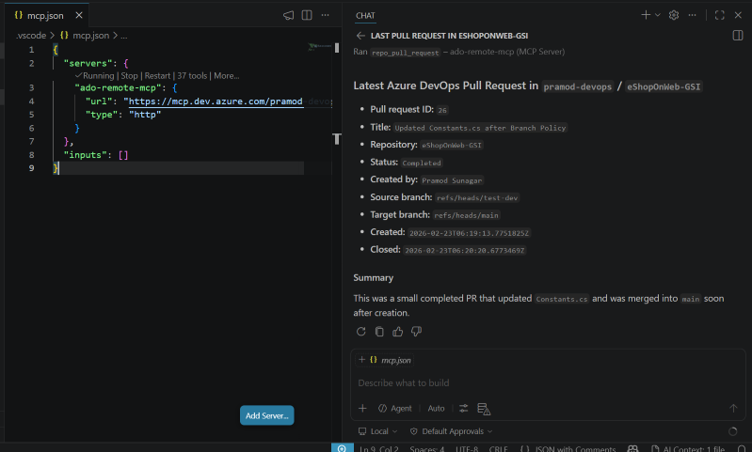
Fig 1: GitHub Copilot with Azure DevOps MCP servers for summarizing the last Pull Request.
GitHub Copilot can work with an Azure DevOps MCP server to extend its capabilities beyond code suggestions and interact directly with development workflow data. In this example, a user asks Copilot to summarize the latest pull request. Copilot sends the request to the MCP server, which securely connects to Azure DevOps, retrieves the required pull request details, and returns the information to Copilot. This shows how MCP servers act as a bridge between Copilot and external platforms, enabling developers to access live project information and perform workflow-related tasks directly within the Copilot experience, without switching between multiple tools.
MCP Servers in the Big Picture of AI Coding Tools
MCP servers are part of a broader shift in developer AI tools, from passive assistants to systems that can take actions. Similar to ChatGPT plugins and function calling, MCP is an open standard, co-developed by organizations including GitHub, that lets AI tools connect to external services in software development.
Upskilling with GitHub Copilot helps developers go beyond basic code completion and learn to use AI effectively for debugging, documentation, testing, and workflow automation. Learning MCP servers adds a new level of value by showing how Copilot can connect to enterprise tools and live data sources, making developers more productive and future-ready. Together, these skills prepare teams to work in a modern AI-assisted development environment where coding, collaboration, and automation increasingly occur within a single, connected experience.
Future of AI Coding
MCP servers make GitHub Copilot more powerful by enabling it to securely connect to external tools, data, and services beyond your code editor, making it a more context-aware and capable AI assistant. They help developers go beyond basic code suggestions by enabling tasks such as retrieving live data, automating repetitive tasks, and integrating with broader development workflows through an open, standardized framework. While beginners may not need to use MCP servers right away, understanding them offers a clear view of where AI-assisted development is heading toward a future where tools like Copilot work seamlessly across your entire developer toolkit to improve productivity and reduce manual effort.
Upskill Your Teams with Enterprise-Ready Tech Training Programs
- Team-wide Customizable Programs
- Measurable Business Outcomes
About CloudThat


WRITTEN BY Pramod Sunagar
Dr. Pramod Sunagar is a Subject Matter Expert and Microsoft Certified Trainer at CloudThat, specializing in Microsoft Azure, DevOps, and GitHub Copilot. With over 12 years of experience in academics and corporate training, he has upskilled more than 2,500 learners through immersive, hands-on sessions. Dr. Sunagar is widely recognized for simplifying complex cloud and DevOps concepts through real-world examples, guided labs and a highly interactive delivery style. His approach blends academic depth with practical application, enabling professionals to confidently apply skills in real-world projects. Backed by a Ph.D. in Text Analytics and multiple Azure certifications, he delivers training across a wide range of roles—from beginners to advanced developers—focusing on certifications such as AZ-400, AZ-204, AZ-900, AI-102, GitHub Copilot, AI-900, DP-900 and SC-900. His passion for teaching, combined with a commitment to learner success, makes him a highly trusted mentor in the cloud and DevOps learning space.


 PREV
PREV












Comments