

 Login
Login


 June 19, 2026
|
Voiced by Amazon Polly |
Introduction
Claude Cowork is Anthropic’s desktop AI agent, a tool that gives Claude direct access to local files and applications so it can execute multi-step tasks from start to finish without any coding. Launched in January 2026, it is now generally available on all paid Claude plans and runs on both macOS and Windows through the Claude Desktop application.
The premise is a simple but meaningful shift: instead of responding to messages and leaving execution to the user, the agent takes the work itself. This blog explores the architecture that makes that possible, the types of tasks it handles well, and what teams should know before deploying it.
Start Learning In-Demand Tech Skills with Expert-Led Training
- Industry-Authorized Curriculum
- Expert-led Training
How Cowork Differs from Standard Chat
Every AI chat interface shares the same fundamental constraint: the conversation is the product, not the output. You receive a response; execution remains with you. An agentic desktop tool like Cowork works differently. It maintains task state across multiple steps, decides which actions to take in sequence, runs scripts or office-format skills as needed, and writes finished output files to the folder you have mounted.
This matters most for knowledge-work tasks that are structured but time-consuming, such as scanning a batch of PDFs for specific data, building a formatted report from multiple spreadsheets, or converting a set of meeting notes into a presentation. These are tasks where the bottleneck is not intelligence but execution, and that is precisely where Cowork adds value. For full product details, see the Claude Cowork product page, which covers supported platforms and current plan availability.
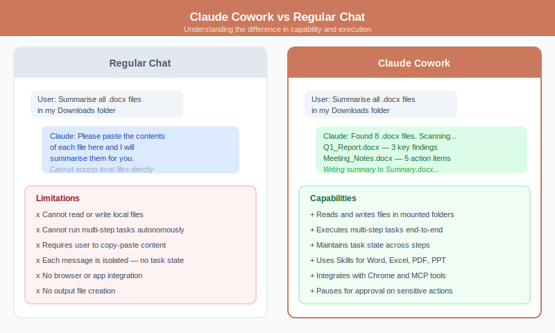
Fig 1: Standard chat versus Claude Cowork, capability, and task execution compared | Source: Author Illustration
The Architecture Behind Autonomous Task Execution
What makes Cowork viable for real desktop AI automation is a combination of scoped file access, a structured execution loop, and a Skills system purpose-built for office formats.
Skills: Office-Format Native Handling
Skills are built-in handlers for Word (.docx), Excel (.xlsx), PowerPoint (.pptx), and PDF files. Rather than treating these as opaque binary data, Skills gives the agent structured read and write access, extracting tables from spreadsheets, populating Word templates, building slide decks from content outlines, or merging and splitting PDF documents. Output files are properly formatted and immediately usable, not raw text dumps that require manual cleanup.
Claude in Chrome and MCP Connectors
For tasks requiring web research, Cowork connects to Claude in Chrome, which lets it visit pages, extract structured data, and fold live information into local file work. MCP connectors extend reach to services like Gmail, Google Drive, and Slack. Enterprise administrators can restrict connector permissions granularly, for example, allowing a Gmail connector to read emails but blocking it from sending, which is a practical governance control for regulated environments.
Human-in-the-Loop Controls
Cowork pauses and requests explicit user approval before any consequential action, such as deleting files, sending data externally, or modifying system settings. The agent can only access the specific folder you mount; it has no access to the rest of the file system. This scoped permission model keeps the tool capable without creating uncontrolled access risk.
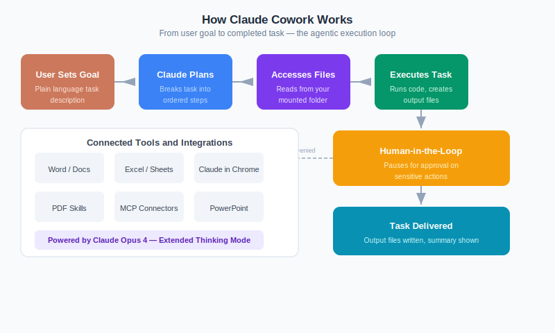
Fig 2: The Cowork agentic execution loop, from user goal to delivered output with approval gate | Source: Author Illustration
Where Cowork Adds the Most Value
The breadth of tasks Cowork can handle is one of its lesser-known strengths. Across business functions, recurring knowledge work that previously demanded hours of manual effort becomes fully delegatable:
- Research and Analysis: Scan folders of PDFs, extract relevant data points, cross-reference multiple spreadsheets, and produce a formatted summary report.
- Finance and Reporting: Extract figures from invoice PDFs, reconcile them against a master spreadsheet, flag discrepancies, and output an exception report ready for review.
- HR and People Operations: Screen a folder of resumes against defined criteria, build a shortlist document with candidate summaries, and populate offer letter templates from a data file.
- Content Production: Convert rough outline documents into structured PowerPoint presentations, or batch-draft multiple documents from a set of briefing notes with consistent formatting.
Teams deploying Cowork across departments can manage access, monitor usage, and set task budgets through Claude’s Team plan. Those exploring broader AI productivity tooling and training for their workforce can review options through AI and cloud training programs, which cover practical AI adoption alongside Azure and platform skills.
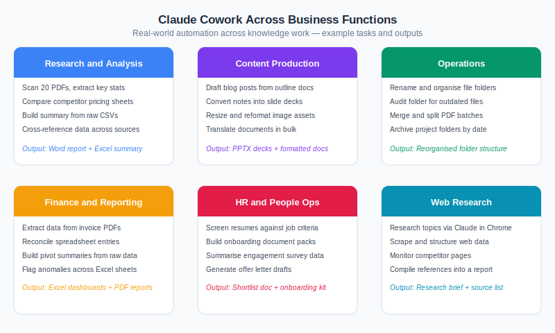
Fig 3: Claude Cowork across six business functions, example tasks, and output types | Source: Author Illustration
Projects and Governance Considerations
A recent addition is the Projects feature, which creates persistent workspaces that retain files, task instructions, and context between sessions. Before Projects, each session started fresh, a limitation for recurring workflows like weekly reporting pipelines or long-running research. Projects address that by connecting a local folder to a named workspace, so the agentic desktop tool picks up where it left off.
On governance, Anthropic currently advises against using Cowork with highly sensitive regulated data during the platform’s maturation phase. Organizations deploying at scale should establish clear policies on which folders are mounted, which connectors are active, and what categories of output require human review before distribution. Admin controls are available through the Claude Enterprise plan.
AI-Powered Workflows
Claude Cowork addresses a gap that has existed in the AI productivity space since the category emerged: the distance between what an AI can advise and what it can actually execute. Its Skills system ensures office-format outputs are professionally formatted. Its human-in-the-loop controls keep consequential actions under user oversight. And its Projects feature enables it to sustain complex knowledge-work workflows across sessions, not just single-shot tasks.
For teams evaluating practical desktop AI automation options, Cowork is one of the more grounded offerings available today, built from observed patterns of how professionals actually need support, rather than a theoretical vision of what AI should eventually do.
Upskill Your Teams with Enterprise-Ready Tech Training Programs
- Team-wide Customizable Programs
- Measurable Business Outcomes
About CloudThat


WRITTEN BY Akshay K S
Akshay is a Tech Lead at CloudThat, specializing in Azure Integrations and DevOps. With 10+ years of experience in consulting and training, He have trained over 10000+ professionals/students to upskill in Azure, AWS, GCP, GitHub, DevOps and Copilot technologies. Known for simplifying complex concepts, hands-on teaching, industry insights, he brings deep technical knowledge and practical application into every learning experience. His areas of expertise include Cloud, DevOps, DevSecOps, GitHub etc. Akshay's passion for teaching and learning reflects in his unique approach to learning and development.


 PREV
PREV












Comments