

 Login
Login


 September 24, 2026
|
Voiced by Amazon Polly |
What will this guide explain about Azure IaC risk control?
This guide explains how Azure Infrastructure as Code (IaC) helps teams change complex environments while limiting the number of resources affected by each deployment. It focuses on practical controls: modular Bicep or Terraform configurations, deployment previews, scoped changes, governance guardrails, and approval-based delivery. Microsoft Learn describes Bicep as a declarative language for deploying Azure resources, while HashiCorp describes Terraform as a workflow that plans changes before applying them.

Fig 1: Azure Infrastructure as Code connects declarative definitions with managed Azure resources.
Start Learning In-Demand Tech Skills with Expert-Led Training
- Industry-Authorized Curriculum
- Expert-led Training
What does Azure IaC change in complex environments?
Azure IaC moves infrastructure changes from ad hoc portal edits into reviewable configuration files. Microsoft Learn describes Bicep as a declarative language for deploying Azure resources, and HashiCorp describes Terraform plan as a way to compare the configuration with the current state before applying changes. This workflow provides engineers with a concrete set of changes to review before altering production resources.
Author recommendation: Store the intended configuration in version control and review the deployment preview before approving a production change.
How does what-if or Terraform plan limit the blast radius?
A deployment preview limits risk by showing the proposed resource changes before the deployment runs. Microsoft Learn states that Azure Resource Manager what-if predicts the changes from a Bicep or ARM deployment without changing existing resources. HashiCorp states that Terraform’s plan creates an execution plan without applying the proposed changes.
For Bicep, use the Azure Command-Line Interface (Azure CLI) command az deployment group what-if to preview a resource-group deployment. Microsoft Learn lists the resource group, subscription, management group, and tenant deployment scopes for what-if.
For Terraform, run terraform plan to compare the declared configuration with the current state. In Terraform, state is the record that maps configuration to managed resources. HashiCorp documents plan output that distinguishes create, in-place update, destroy, and replacement actions.
Author recommendation: Treat every replacement action as a mandatory review trigger because replacement can remove an existing resource and create a new instance.
Author recommendation: Generate or refresh the final plan immediately before applying. HashiCorp notes that an earlier plan can become outdated if another change reaches the target environment before the final apply.
How should you modularize Azure infrastructure?
Modularization keeps related resources together and makes individual changes easier to review. Microsoft Learn explains that Bicep modules encapsulate deployment details, improving readability and reuse. For large estates, teams can apply the same principle by separating infrastructure according to ownership, lifecycle, and dependency boundaries.
- Separate network, identity, compute, data, and monitoring components when more than one team owns them or when they follow independent deployment lifecycles.
- Store environment-specific values in parameter or variable files instead of copying complete infrastructure definitions for each environment.
- Use the resource-group scope when a change affects a single workload and does not require the subscription, management-group, or tenant scope.
- Document dependencies explicitly. For example, exposing the network outputs a compute module requires rather than duplicating network definitions.
- Split a module when it spans multiple ownership teams or independent deployment lifecycles, so a reviewer can evaluate the intended change without reviewing the entire infrastructure estate.
Terraform also supports modules and resource targeting, which focuses a plan on selected resources. HashiCorp documents the -target option and its caveats. Author recommendation: Reserve targeted plans for documented troubleshooting or recovery scenarios rather than routine deployment.
Which Azure guardrails should you use before applying changes?
Governance guardrails add another layer of control after engineers review the deployment plan. Microsoft Learn describes Azure Policy as a service that evaluates resources against business rules and can enforce standards such as allowed regions, required tags, and diagnostic settings. Microsoft also documents Azure resource locks as a control mechanism to prevent accidental deletion or modification.
- Use Azure Policy to enforce documented governance requirements, such as an approved list of regions or mandatory resource tags.
- Use a CanNotDelete lock on resources listed in the organization’s protected-resource register. Microsoft Learn states that authorized users can modify a CanNotDelete-locked resource, but they cannot delete it.
- Require the tag’s owner, environment, application, and cost center when the organization’s tagging standard defines those fields.
- Run every production infrastructure change through a continuous integration and continuous delivery (CI/CD) pipeline, an automated workflow that validates configuration and previews deployment impact before applying a change.
- Require at least one independent engineer to review the configuration and proposed resource actions before production approval.
What practical workflow keeps Azure changes contained?
A controlled workflow isolates the change, previews its impact, reviews the result, applies it through an approved path, and validates the outcome. Microsoft Learn provides what-if commands for Bicep deployments, while HashiCorp documents plan-and-apply workflows for Terraform.
- Create one scoped change in a feature branch and state the intended resource impact in the pull request.
- Run Bicep what-if or Terraform plan against the named target environment.
- Review every create, modify, destroy, and replacement action. Stop the deployment when the plan includes a resource outside the stated scope.
- Ask at least one independent engineer to review the configuration and preview the output before production approval.
- Apply the approved configuration through the pipeline. For Terraform automation, a saved plan is a stored execution plan that allows the apply stage to execute the same reviewed changes.
- Validate the affected service after deployment. Confirm the service health checks and the organization’s required Azure Monitor signals before promoting the change to another environment.
How should teams choose between Bicep and Terraform?
The choice depends on the scope of the infrastructure and the team’s operating model, rather than on a single universal rule. Microsoft Learn positions Bicep as a declarative language for Azure Resource Manager deployments, while HashiCorp’s Terraform workflow supports infrastructure managed through Terraform configuration and state.
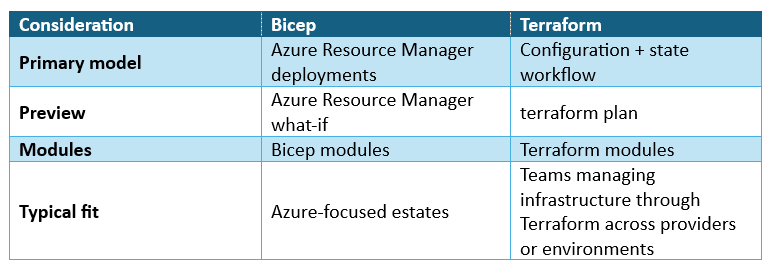
Author recommendation: For either tool, use the same operational rule: scope one change, expose its preview, obtain an independent review, and apply only the approved actions.
How can teams reduce Azure IaC deployment risk?
Teams can reduce Azure IaC deployment risk by scoping each change, previewing proposed resource actions, obtaining an independent review, applying only approved changes, and validating the affected service. This workflow makes the intended impact visible before production deployment.
Bicep what-if, Terraform plan, Azure Policy, resource locks, modular configuration, and approval gates address distinct controls in that workflow. Author recommendation: combine these controls and stop a deployment whenever the preview includes an action outside the approved scope.
Upskill Your Teams with Enterprise-Ready Tech Training Programs
- Team-wide Customizable Programs
- Measurable Business Outcomes
About CloudThat
FAQs
1. What does Azure what-if do?
ANS: – Azure Resource Manager what-if predicts how a Bicep or ARM deployment will change resources without making those changes. Microsoft Learn documents what-if at resource-group, subscription, management-group, and tenant deployment scopes.
2. Does Terraform plan change Azure resources?
ANS: – No. HashiCorp documents Terraform plan as a command that creates an execution plan and does not apply the proposed changes. A later Terraform apply operation performs the approved changes.
3. How can teams protect critical Azure resources from deletion?
ANS: – Teams can use Azure resource locks when their operating model requires deletion protection. Microsoft Learn states that a CanNotDelete lock prevents authorized users from deleting the locked resource while still allowing them to modify it.
4. Why should teams use Bicep modules?
ANS: – Microsoft Learn states that Bicep modules encapsulate deployment details, improve readability, and support reuse. Teams can use modules to separate infrastructure by workload, ownership, or lifecycle.


WRITTEN BY Naved Ahmed Khan
Naved Ahmed Khan is a Research Associate with over 5+ years of experience in Cloud. He is an MCT and also the winner of Top 100 MCT Quality Awards Winner for 2024-25. Naved is known for adding humor into his training making it engaging and fun. He has a passion for IoT services because of his roots in Electrical & Electronics Engineering and his habit of reading fictional novels add an imaginative punch into his training method. With 12 certifications in Azure, he has trained over 1000+ individuals across different verticals like Infra & Architect, Security, Data and AI. His core skillset lies in Networking, Security, Python and Powershell.


 PREV
PREV












Comments