

 Login
Login


 May 22, 2026
|
Voiced by Amazon Polly |
Overview
Kiro introduces a new approach to software development in which AI moves beyond autocomplete to become an active development partner throughout the engineering lifecycle. Built on Amazon Bedrock, Kiro combines conversational development, structured spec-driven execution, steering files, and automated hooks to help developers plan, build, validate, and maintain applications more efficiently. This blog covers how Kiro works, its core capabilities, and how it transforms modern development workflows from reactive coding to AI-partnered engineering.
Pioneers in Cloud Consulting & Migration Services
- Reduced infrastructural costs
- Accelerated application deployment
Introduction
Development tools have been reactive for decades. You write code, and the IDE highlights errors. You run tests, and they show failures. You deploy, and it reports crashes. The cognitive load of planning, structuring, and verifying sits entirely on the developer.
Kiro inverts this. Built by AWS and powered by Amazon Bedrock, Kiro is an AI-native development environment that doesn’t just respond to your code, it understands what you’re building, proposes how to build it, and executes alongside you. Available since 2025 and now in AWS GovCloud regions, it represents a fundamental shift: from “AI-assisted coding” to “AI-partnered development.”
How Kiro Actually Works?
Most development tools are reactive. You type code, they highlight errors. You run tests, and they show failures. You deploy, they report crashes. The developer carries the cognitive load of planning, structuring, and verifying, the tools execute.
Kiro flips this relationship. It’s an AI-native development environment built by AWS that understands what you’re trying to build, helps you plan the approach, and then executes alongside you, writing code, running tests, and validating results while you focus on design decisions.
Released in 2025 and now available in AWS GovCloud regions as of February 2026, Kiro represents a shift from “AI-assisted coding” (autocomplete on steroids) to “AI-partnered development” (a collaborator that reasons about your project).
How Kiro Actually Works?
Kiro operates in two modes that reflect how developers actually think:
Vibe Mode — Conversational. You describe what you want, ask questions, and explore ideas. Kiro responds, writes code, runs commands, and iterates with you in real time. Think of it as pair programming with an AI that has read your entire codebase.
Spec Mode — Structured. For complex features, you define requirements, Kiro generates a design document and implementation tasks, and then works through them systematically. This is where Kiro shines for production-grade development, it doesn’t just write code, it plans the architecture first.
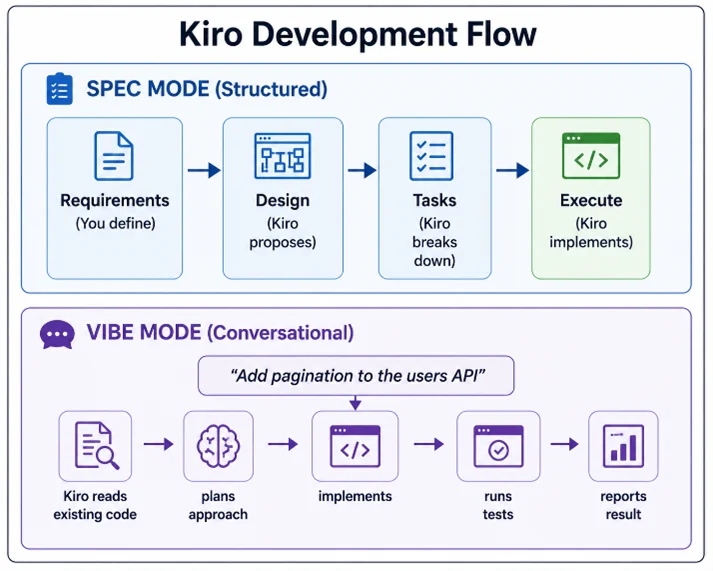
Three Features That Change Daily Workflow
- Steering Files — Persistent Project Context
Every project has unwritten rules. “We use Zod for validation.” “API responses follow this envelope format.” “Never use default exports.” These rules live in developers’ heads and get violated by every new team member.
Kiro’s steering files (.kiro/steering/*.md) permanently encode these rules. Every interaction with Kiro respects them — it won’t suggest patterns that violate your team’s conventions.
Example: .kiro/steering/api-conventions.md
# API Conventions
– All endpoints return { data, error, metadata } envelope
– Use Zod schemas for request validation
– Error responses include correlation IDs
– Pagination uses cursor-based approach, not offset
– All timestamps in ISO 8601 UTC
Once defined, Kiro follows these rules in every code generation, every suggestion, and every review. New team members get the same level of consistency as veterans because the AI enforces it.
- Hooks — Automated Agent Actions
Hooks let you trigger Kiro automatically based on IDE events. Save a TypeScript file? Kiro runs your linter. Create a new component? Kiro generates the test file. Submit a prompt? Kiro checks against your architecture guidelines first.
Example Hook: Auto-lint on save
|
1 2 3 4 5 6 7 8 9 10 11 12 |
{ "name": "Lint on Save", "version": "1.0.0", "when": { "type": "fileEdited", "patterns": ["*.ts", "*.tsx"] }, "then": { "type": "runCommand", "command": "npm run lint --fix" } } |
This isn’t just automation, it’s continuous quality enforcement without context switching.
- Spec-Driven Development — Think Before You Code
For features that span multiple files and require architectural decisions, Spec mode prevents the “just start coding and figure it out” trap:
- You describe the feature in plain language
- Kiro generates requirements — functional, non-functional, edge cases
- Kiro proposes a design — architecture, data flow, API contracts
- You review and refine — this is where your expertise matters
- Kiro breaks it into tasks — ordered, with dependencies
- Kiro executes each task — writing code, creating tests, updating configs
- You review the output — accept, reject, or redirect
The result: features designed before they’re built, with full traceability from requirements to implementation.
Getting Started in 10 Minutes
Step 1: Install Kiro (available as a standalone IDE or VS Code-compatible editor).
Step 2: Open your existing project. Kiro reads your codebase, understands the structure, and respects existing patterns.
Step 3: Create a steering file with your team’s top 5 conventions:
mkdir .kiro/steering
Write your rules in markdown. Kiro picks them up immediately.
Step 4: Try Vibe mode, ask Kiro to implement a small feature. Watch how it reads existing code first, matches your style, and runs verification after.
Step 5: Try Spec mode for your next medium-sized feature. Experience the difference between “AI wrote some code” and “AI planned and built a feature.”
Who Benefits Most
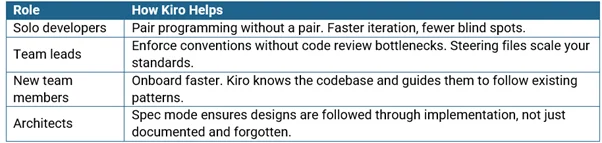
The Shift in Developer Identity
Kiro doesn’t replace developers. It changes what “development” means. Less time typing boilerplate. Less time debugging typos. Less time context-switching between documentation and code and more time designing systems, making architectural decisions, and solving problems that actually require human judgment.
The developers who thrive with Kiro aren’t the fastest typists, they’re the clearest thinkers.
Conclusion
The shift from “writing code” to “designing systems while AI implements” is available today. The developers who adopt this workflow now will set the productivity standard for their teams.
Drop a query if you have any questions regarding Kiro and we will get back to you quickly.
Making IT Networks Enterprise-ready – Cloud Management Services
- Accelerated cloud migration
- End-to-end view of the cloud environment
About CloudThat
FAQs
1. Does Kiro work with existing projects or only new ones?
ANS: – Existing projects. Kiro reads your codebase, understands your frameworks, patterns, and conventions, and generates code that matches them, no migration or setup required beyond installing the IDE.
2. How is Kiro different from GitHub Copilot or Cursor?
ANS: – Copilot excels at line-level autocomplete. Cursor adds chat-based editing. Kiro goes further with spec-driven development (requirements → design → tasks → execution), steering files toward persistent team conventions and adding hooks for automated agent actions. It’s the difference between an autocomplete tool and a development partner.
3. Is my code sent to external servers?
ANS: – Kiro uses Amazon Bedrock as its AI backbone. Your code is processed in accordance with AWS’s data protection policies, it’s not used to train models, and it’s encrypted in transit and at rest. For sensitive workloads, Kiro is available in AWS GovCloud regions.
4. Can I use Kiro in Supervised mode for sensitive codebases?
ANS: – Yes. Supervised mode requires your explicit approval for every file change. Kiro presents changes as individual hunks, you accept or reject each one. This gives you full control while still benefiting from AI-generated code suggestions.


WRITTEN BY Vignesh J
Vignesh Jagadeesan is the Head of Presales at CloudThat with 12+ years of experience driving digital transformation for Public Sector, SMB, and Enterprise customers across India and the USA. He specializes in Cloud Consulting, Data Management, MDM, Analytics, and enterprise modernization. Vignesh has led transformation engagements spanning cloud adoption, analytics, managed services, and enterprise solutioning across government, BFSI, healthcare, retail, manufacturing, and energy sectors, partnering with business stakeholders and cloud partners to deliver scalable, outcome-driven solutions.


 PREV
PREV












Comments