

 Login
Login


 December 8, 2025
|
Voiced by Amazon Polly |
Overview
Setting up a continuous integration pipeline for Terraform deployments doesn’t always require complex state locking mechanisms. This comprehensive guide demonstrates how to implement Terraform automation using AWS CodeBuild while storing state files in Amazon S3, bypassing the need for Amazon DynamoDB-based locking.
Pioneers in Cloud Consulting & Migration Services
- Reduced infrastructural costs
- Accelerated application deployment
When to Consider Simplified State Management
Traditional Terraform deployments often incorporate Amazon DynamoDB for state locking to prevent concurrent modifications. However, certain scenarios make this approach unnecessary:
- Solo development environments where only one person manages the infrastructure
- Sequential deployment patterns with controlled execution timing
- Cost-sensitive projects seeking to minimize AWS service usage
- Prototype and testing environments with relaxed consistency requirements
This simplified approach prioritizes operational efficiency over concurrent access protection.
Architecture Components
Our implementation leverages these core AWS services:
- AWS CodeBuild: Provides the execution environment for Terraform operations
- Amazon S3: Serves dual purposes as a source code repository and state file storage
- AWS IAM: Manages access permissions and security boundaries
- Terraform: Handles infrastructure provisioning and management
Implementation Steps
Setting Up Amazon S3 Storage
Begin by creating an S3 bucket that will serve both as your Terraform code repository and state file storage location. This dual-purpose approach simplifies the architecture while maintaining separation of concerns through proper key prefixes.
aws s3 mb s3://your-terraform-deployment-bucket
AWS CodeBuild Project Configuration
Navigate to the AWS CodeBuild console and create a new build project with these specifications:
Project Settings:
- Choose a descriptive name reflecting your infrastructure’s purpose
- Configure appropriate tags for resource organization
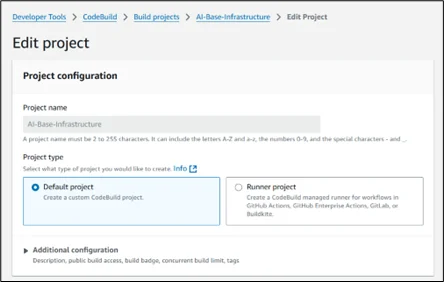
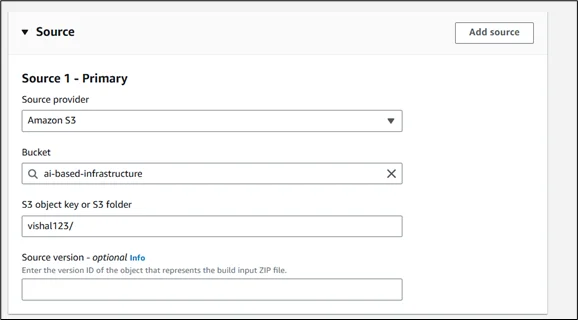
Source Configuration:
- Select Amazon S3 as your source provider
- Specify the bucket containing your Terraform files
- Set the appropriate object key path
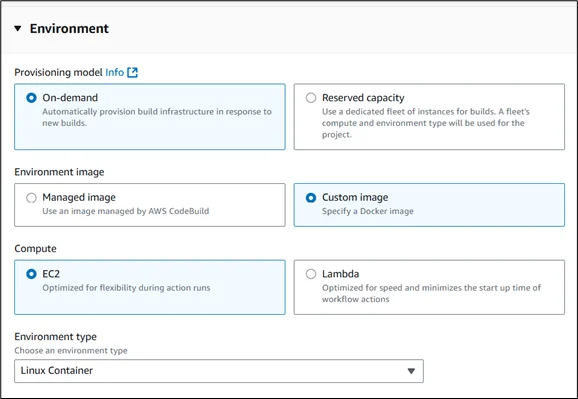
Environment Setup:
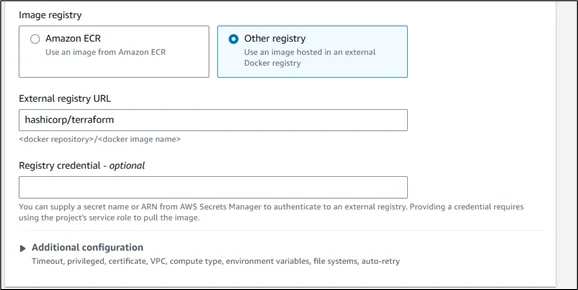
- Choose “Managed image” for standard environments or “Custom image” for specific Terraform versions.
- Select Ubuntu as the operating system
- Use the standard runtime with the appropriate compute size
- Consider using a public Terraform Docker image for consistency
Build Specification:
CreaSet up the build process using a buildspec.yml file structured as shown below:
|
1 2 3 4 5 6 7 8 9 10 11 12 13 14 15 16 17 |
version: 0.2 phases: pre_build: commands: - echo "Initializing Terraform environment" - terraform version build: commands: - echo "Starting Terraform workflow" - terraform init - terraform validate - terraform plan -out=tfplan - terraform apply -auto-approve tfplan artifacts: files: - terraform.tfstate - deployment-plan |
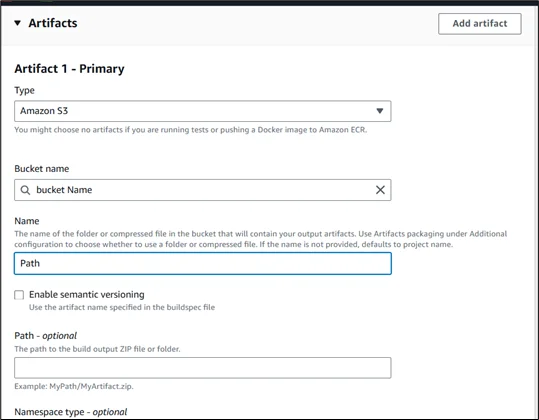
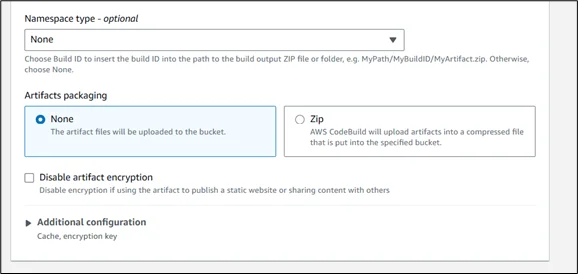
Artifact Configuration:
- Configure Amazon S3 as the artifact destination
- Specify the path for storing generated state files
- Enable artifact encryption for security
Logging Setup:
- Enable Amazon CloudWatch Logs for build monitoring
- Configure appropriate log retention policies
- Set up log streaming for real-time debugging
Service Role Assignment:
When you create an AWS CodeBuild project, AWS automatically generates a service role for it. CodeBuild uses this role to perform actions on other AWS services as part of your build.
To ensure your Terraform deployments run smoothly, you need to attach the appropriate permissions to this role. The role should have access to:
- AWS services used by Terraform: For example, if your Terraform code creates Amazon EC2 instances, Amazon VPCs, AWS IAM roles, or other resources, you must explicitly allow those actions (like ec2:*, iam:*, vpc:*, etc.) in the role’s permissions.
Additionally, if you’re integrating with AWS CodePipeline or using reporting features, the role should also have permissions to access relevant Amazon S3 buckets and create test or coverage reports.
Always follow the principle of least privilege, only grant access to the resources your build needs.
Alternative Approaches and Considerations
Terraform Backend Configuration:
Configure your Terraform backend to use Amazon S3 storage for state file by adding this block to your main configuration:
|
1 2 3 4 5 6 7 |
terraform { backend "s3" { bucket = "your-terraform-deployment-bucket" key = "FolderName /terraform.tfstate" region = Region Name } } |
Conclusion
This streamlined approach to Terraform automation provides an excellent foundation for infrastructure management without the complexity of state locking mechanisms. The combination of AWS CodeBuild’s managed environment and Amazon S3’s reliable storage creates a cost-effective solution suitable for many organizational needs.
While this setup doesn’t include concurrent access protection, it offers simplicity and reliability for controlled deployment scenarios. As your infrastructure requirements evolve, you can easily extend this foundation with additional features, such as state locking, approval workflows, and advanced monitoring.
Drop a query if you have any questions regarding Terraform and we will get back to you quickly.
Making IT Networks Enterprise-ready – Cloud Management Services
- Accelerated cloud migration
- End-to-end view of the cloud environment
About CloudThat
FAQs
1. Do I really need Amazon DynamoDB for state locking in all Terraform projects?
ANS: – No. Amazon DynamoDB is essential for collaborative environments where multiple users or processes might modify infrastructure concurrently. For solo development, testing environments, or sequential deployments, you can safely skip Amazon DynamoDB and use only Amazon S3 for state management.
2. Can I use this setup in a production environment?
ANS: – You can, but it’s advisable only in tightly controlled or single-developer workflows. For larger teams or mission-critical infrastructure, consider adding state locking with Amazon DynamoDB and implementing approval or change control mechanisms.
3. Is it safe to store both the Terraform code and state files in the same Amazon S3 bucket?
ANS: – Yes, as long as you use proper key prefixes to separate code and state files (e.g., src/ and state/). You should also enforce AWS IAM policies that restrict access to only the required paths.


WRITTEN BY Vishal Arya
Vishal is a Research Associate at CloudThat who enjoys working with cloud technologies and AI. He loves learning new tools and breaking down complex topics into simple ideas for others.


 PREV
PREV












Comments