

 Login
Login


 September 24, 2026
What moving from Azure building blocks to Microsoft Fabric’s unified analytics platform means architecturally, operationally and financially.
|
Voiced by Amazon Polly |
Introduction
In creating a financial reconciliation solution on Microsoft Fabric, one of the decisions we made before implementing a pipeline was to use only Fabric services, without direct interactions via the Azure portal. While this might seem like a small thing to mention here, every time we wanted to “just create a storage account,” we had to think about whether it was related to Fabric or if we were going after Azure on instinct.
It is worth posing this question much more often. Although “Azure” and “Fabric” are often considered synonyms in job advertisements and architecture reviews, both names carry the Microsoft label, belong to the same tenant, and are implemented on the Azure infrastructure. Yet, once the construction starts, all similarities become irrelevant – architects are sure that a Fabric entity will work the same way as an already constructed Azure entity. Engineers use Azure-like network rules on a Fabric workspace. And it is precisely this that drives changes in architecture and operations as the platform shifts from Azure to Fabric.
Pioneers in Cloud Consulting & Migration Services
- Reduced infrastructural costs
- Accelerated application deployment
At a Glance
| Dimension | Azure | Microsoft Fabric |
| Product model | Individually provisioned IaaS/PaaS services | Pre-connected SaaS analytics platform |
| Storage | Storage accounts, containers, SAS/keys you manage | OneLake, automatic, no account to create |
| Governance | RBAC at subscription/resource/network level | Roles assigned at the workspace level |
| Billing unit | Each service is metered independently | Pooled capacity (F-SKU) shared across workloads |
| Best fit | Custom infra, deep network control, non-analytics workloads | Unified data engineering, warehousing, BI, and real-time analytics |
Two Different Product Categories
Azure is a multi-service cloud platform with 200+ services that can be deployed independently across computing, storage, networking, and AI, following the IaaS/PaaS model. Microsoft manages the hardware, and you will need to deploy each service independently, connect them, and handle scaling. Fabric is more limited by design, as a SaaS analytics platform combines data engineering, warehousing, data science, real-time intelligence, and Power BI into a single, integrated solution. Instead of a resource, you deploy a workspace, and all the functionality is contained within it. Azure, therefore, offers depth and flexibility at the cost of integration, while Fabric offers out-of-the-box integration at the cost of depth and flexibility.
Where the Conflation Actually Costs You
One of the best examples of how this is achieved through the reconciliation platform is with storage. The system receives four separate sets of data (bank settlements, ERP transactions, gateway transactions, and manual adjustments) and reconciles them by transaction ID within a medallion architecture (bronze, silver, gold). The process starts in Azure with provisioning and includes creating a storage account, creating containers, creating access keys, creating network rules, and finally connecting the Data Factory with all of the above before doing anything with the data. With Fabric, provisioning is gone. The moment a pipeline writes to a lakehouse, the dataset lands in OneLake, a tenant-wide logical lake. In the case of the proof-of-concept, bronze, silver, and gold were schema prefixes within a single Lakehouse rather than separate storage accounts, an approach that makes sense only if one does not see the storage in Fabric as “Azure storage with a new UI”. Two platforms differ not only in the tools they use for the same purpose, but also in the first step of this process.
Governance Looks Different, Not Just Smaller
Governance in Azure is based on resources and networks: RBAC based on subscriptions, resource groups or specific resources and VNets, private endpoints, and firewall rules.
Fabric’s governance model is workspace-oriented, in which administrative roles such as Admin, Member, Contributor, and Viewer apply to everything within the workspace. This model is much easier to comprehend, but completely different from what you would expect. The initial teams to experience friction are usually those that want to duplicate Azure’s RBAC controls in Fabric.
How You Pay for Computing
In Azure, each service is charged individually. The Data Factory, the Synapse DWUs or Spark hours, storage transactions, etc., are all charged and scaled independently.
The fabric is acquired as a shared capacity pool, referred to as an F-SKU, for all workloads in the attached workspaces. While this helps estimate costs more easily, without any sizing and monitoring, an intensive Spark workload will compete with the active dashboard for capacity. The teams are surprised by throttling rather than an invoice, given their perception of “another Azure bill.”
Familiar Names, Different Engines
This is where the confusion lies in terms of the conflation. Fabric contains an actual product known as “Data Factory”, which is the next-generation version of Azure Data Factory; however, this is not the old engine with a different name tag, but rather one that has been rewritten using OneLake.
“Warehousing is the same thing.” Azure Synapse Analytics is a PaaS that you set up and manage yourself using dedicated SQL pools sized in DWUs. The Data Warehouse in Fabric isn’t something you size on its own; it is simply scalable within your Fabric resources. While Microsoft positions Fabric as the future of Synapse, there is no official deprecation date yet.
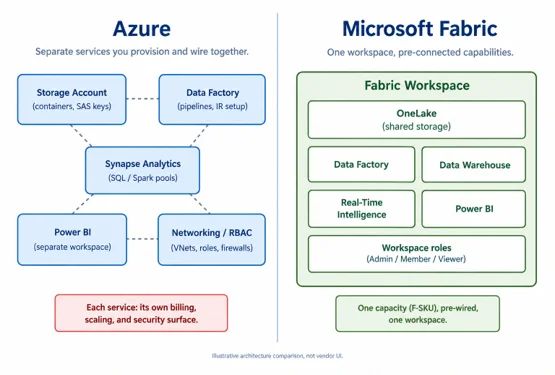
Azure’s model: separate services you provision and connect yourself, versus Fabric’s model: one pre-wired workspace on shared capacity.
When to Reach for Which
Fabric emerges as a stronger default option for greenfield analytics, where data engineering, data warehousing, real-time analytics, and BI all work together, requiring less infrastructure to manage. However, Azure remains a superior option for cases where workloads demand finer network isolation, are not analytics workloads, or need specific capabilities of Synapse that are not currently available on Fabric. Typically, most real architectures will not settle for just one. One common and practical approach could be to use Azure as the platform layer, with Fabric on top for analytics and BI, using OLE DB for SQL Server shortcuts rather than a complete migration.
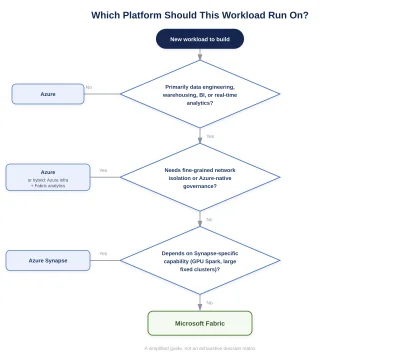
A quick way to double-check a new workload before defaulting to whichever platform is more familiar.
Conclusion
Being specific about the platform isn’t just pedantic. It impacts how you scope your work and how you talk to the customer, and how you avoid mistakes in the middle of your build process that wouldn’t even occur to you otherwise, such as trying to apply an Azure NSG to a Fabric resource. Fabric is its own thing. It has its own storage technology (OneLake), governance model (workspace roles), and compute technology (pooled capacity). It sits on top of Azure but uses common names. Large-scale infrastructure projects should be done on Azure. Unified analytics and BI are done on Fabric.
Upskill Your Teams with Enterprise-Ready Tech Training Programs
- Team-wide Customizable Programs
- Measurable Business Outcomes
About CloudThat
FAQs
1. Is Microsoft Fabric replacing Azure?
ANS: – No. Fabric is a SaaS analytics layer built on Azure infrastructure; it is not a replacement for the full catalogue available in Azure. Most companies use both.
2. Is Fabric Data Factory the same as Azure Data Factory?
ANS: – They share a common name but not an engine. The engine that Fabric uses is designed from scratch for OneLake. Migration requires planning.
3. Do I need to migrate my Azure Data Lake Storage to use Fabric?
ANS: – No. OneLake shortcuts let Fabric reference existing data without moving it.
4. How does Fabric's pricing differ from Azure's?
ANS: – Azure meters each service independently. Fabric is a pooled capacity (an F-SKU) shared across all workloads, which simplifies forecasting but requires monitoring.

- Azure Data Factory
- Azure Migration
- Azure services
- Azure synapse
- Azure vs Fabric
- cloud comparison
- Cloud Data Platform
- Data Engineering
- Data Lakehouse
- Data Platform
- Enterprise Data
- Fabric Architecture
- Microsoft 365
- Microsoft Analytics
- Microsoft Azure
- microsoft cloud
- Microsoft Fabric
- Microsoft Fabric vs Azure
- onelake
- Power BI

WRITTEN BY Aditya Rathore


 PREV
PREV












Comments