

 Login
Login


 August 31, 2026
|
Voiced by Amazon Polly |
Overview
Batch jobs handle compute-intensive workloads that run in the background, such as data processing, AI training, simulations, reporting, and media transcoding.
Traditionally, organizations managed dedicated infrastructure for these workloads, requiring significant effort for provisioning, scaling, scheduling, and monitoring.
AWS Batch and Google Cloud Batch simplify this by automatically provisioning compute resources, scheduling jobs, scaling workloads, and optimizing resource usage.
This article compares both services across architecture, compute, scheduling, networking, security, monitoring, pricing, and cloud integration to help organizations choose the right batch processing platform.
Pioneers in Cloud Consulting & Migration Services
- Reduced infrastructural costs
- Accelerated application deployment
Introduction
Batch processing executes groups of tasks without continuous user interaction. Jobs can be scheduled, queued, prioritized, and executed on demand.
Common workloads include ML training, data processing, financial reconciliation, simulations, rendering, and reporting.
Both AWS Batch and Google Cloud Batch provide automated provisioning, scheduling, retries, logging, autoscaling, and high availability, but differ in orchestration and cloud integration.
Core Best Practices
- Understand the Service Architecture
AWS Batch
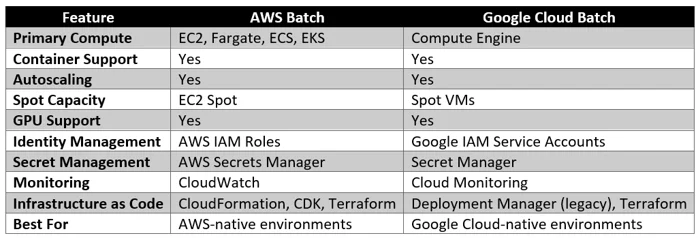
AWS Batch uses job queues and compute environments backed by EC2, Fargate, ECS, or EKS. Its scheduler places jobs based on priority, resources, and requirements.
Google Cloud Batch runs on Compute Engine and dynamically provisions VMs based on job requirements, with machine types, allocation policies, and task groups defined directly in the job configuration.
Overall, AWS Batch offers more orchestration options, while Google Cloud Batch provides a simpler VM-based approach for GCP workloads.
- Choose the Right Compute Resources
Selecting the appropriate compute infrastructure directly affects both performance and cost.
AWS Batch supports:
- EC2 On-Demand Instances
- EC2 Spot Instances
- AWS Fargate
- GPU-enabled instances
- Graviton processors
- Multi-node parallel jobs
Google Cloud Batch supports:
- Compute Engine VMs
- Spot VMs
- GPU instances
- High-memory machines
- Compute-optimized machines
- Confidential VMs
For predictable workloads, reserved or committed capacity may reduce costs. For interruptible workloads, Spot or Spot VMs can significantly improve cost efficiency.
- Containerize Every Batch Job
Containerization ensures consistency across development, testing, and production environments.
Use:
AWS
- Amazon Elastic Container Registry (ECR)
Google Cloud
- Artifact Registry
Benefits include:
- Dependency isolation
- Reproducible deployments
- Simplified scaling
- Faster updates
- Improved portability
Avoid executing workloads directly on unmanaged virtual machines whenever possible.
- Implement Least-Privilege Identity Management
Batch jobs frequently interact with cloud services such as object storage, databases, messaging systems, and monitoring tools.
AWS
Assign dedicated IAM roles to each job.
Avoid granting:
- AdministratorAccess
- PowerUserAccess
Google Cloud
Use dedicated service accounts with minimal IAM permissions.
Restrict access only to required services such as:
- Cloud Storage
- BigQuery
- Cloud SQL
- Secret Manager
Identity management remains one of the most important security controls in any batch processing environment.
- Secure Secrets and Credentials
Never hardcode:
- Database passwords
- API keys
- Authentication tokens
- Certificates
AWS
Use:
- AWS Secrets Manager
- Systems Manager Parameter Store
Google Cloud
Use:
- Secret Manager
Secrets should be retrieved securely during runtime and rotated regularly.
- Optimize Job Scheduling
Efficient scheduling improves throughput while reducing infrastructure costs.
Best practices include:
- Group similar workloads
- Separate high-priority jobs
- Define retry policies
- Configure execution timeouts
- Avoid oversized compute allocations
In AWS Batch, job queues allow administrators to prioritize critical workloads.
In Google Cloud Batch, task groups and allocation policies determine scheduling behavior.
- Monitor Workloads Continuously
Visibility is essential for operational excellence.
AWS Monitoring
Enable:
- CloudWatch Logs
- CloudWatch Metrics
- AWS X-Ray (where applicable)
- EventBridge notifications
Monitor:
- Job failures
- Queue depth
- Resource utilization
- Execution duration
- Retry attempts
Google Cloud Monitoring
Enable:
- Cloud Logging
- Cloud Monitoring
- Cloud Trace
Track:
- Failed jobs
- VM provisioning
- Resource utilization
- Task completion rates
Proactive monitoring enables faster troubleshooting and capacity planning.
- Design for Fault Tolerance
Batch jobs should tolerate failures without data loss.
Recommendations include:
- Implement retry logic
- Make jobs idempotent
- Store intermediate checkpoints
- Archive failed outputs
- Configure dead-letter workflows where appropriate
For long-running workloads, checkpointing prevents restarting from the beginning after interruptions.
- Optimize Costs
Cost optimization is one of the primary reasons organizations adopt managed batch services.
AWS Batch
Reduce costs by:
- Using EC2 Spot Instances
- Selecting Graviton processors
- Scaling compute environments automatically
- Terminating idle resources
Google Cloud Batch
Reduce costs by:
- Using Spot VMs
- Selecting optimal machine families
- Right-sizing VM configurations
- Avoiding unnecessary overprovisioning
Regular cost reviews should be performed using cloud billing dashboards and optimization recommendations.
- Integrate with CI/CD Pipelines
Modern batch applications should be deployed automatically.
AWS Tools
- CodePipeline
- CodeBuild
- GitHub Actions
- Terraform
- AWS CDK
Google Cloud Tools
- Cloud Build
- Cloud Deploy
- GitHub Actions
- Terraform
Automated deployments improve consistency while reducing operational errors.
- Implement Security and Compliance Controls
Batch workloads often process sensitive data, so security should include:
- Encrypt data at rest and in transit
- Apply least-privilege access and restrict network access
- Enable audit logging and appropriate log retention
- Scan container images and regularly patch base images
- Conduct regular IAM reviews and security assessments
- Choose the Right Platform Based on Workload
The best choice depends on your cloud ecosystem and workload requirements.
Choose AWS Batch if:
- Workloads run on AWS, ECS, or EKS
- You need advanced queues or multi-node jobs
- You use Spot Instances for cost savings
Choose Google Cloud Batch if:
- Workloads run on GCP or Compute Engine
- Data is stored in BigQuery or Cloud Storage
- You prefer simpler VM provisioning
Choosing a platform that aligns with your existing cloud environment reduces complexity and speeds deployment.
AWS Batch vs Google Cloud Batch at a Glance
Conclusion
AWS Batch and Google Cloud Batch simplify large-scale batch processing through automated provisioning, scaling, and scheduling.
AWS Batch is ideal for organizations deeply invested in the AWS ecosystem, while Google Cloud Batch fits naturally with GCP workloads.
The right choice depends on your existing cloud infrastructure, data, expertise, security, and cost requirements.
Drop a query if you have any questions regarding AWS Batch or Google Cloud Batch, and we will get back to you quickly.
Empowering organizations to become ‘data driven’ enterprises with our Cloud experts.
- Reduced infrastructure costs
- Timely data-driven decisions
About CloudThat
FAQs
1. What is batch processing in the cloud?
ANS: – Batch processing is the execution of large groups of computational tasks without requiring real-time user interaction. It is commonly used for data processing, analytics, simulations, reporting, and machine learning.
2. What is the main difference between AWS Batch and Google Cloud Batch?
ANS: – AWS Batch uses job queues and compute environments with EC2, ECS, EKS, and Fargate, while Google Cloud Batch dynamically provisions Compute Engine VMs based on job requirements without separate compute environment management.
3. Can both services run containerized workloads?
ANS: – Yes. Both AWS Batch and Google Cloud Batch support Docker containers, enabling consistent deployment and execution across development, testing, and production environments.


WRITTEN BY Riyazuddin
Riyazuddin works as an Associate Architect – Infra, brings over 15+ years of experience in DevOps, System Design, Networking, and Programming. Skilled in AWS, Azure, Terraform, Docker, Kubernetes, Jenkins, Openshift, Ansible, and Python, he designs scalable, secure systems and drives automation through cloud-native architectures and IaC. Known for his analytical mindset and leadership, he mentors teams and delivers high-impact, enterprise-ready solutions aligned with business goals.


 PREV
PREV












Comments