

 Login
Login


 August 26, 2026
|
Voiced by Amazon Polly |
Overview
When we test a web application, it is easy to focus only on what we can see on the screen. We check buttons, forms, menus, messages, and other elements that users interact with. But there is much more happening behind the screen. APIs handle data exchange and business operations in the background.
This is where API testing becomes important. UI testing and API testing have different purposes, and knowing when to use each one can make the testing process more effective.
Pioneers in Cloud Consulting & Migration Services
- Reduced infrastructural costs
- Accelerated application deployment
API Testing
API testing means checking an application’s APIs directly instead of testing them through the user interface. A tester sends a request to an API and checks whether the response is correct.
For example, consider a login feature. When a user enters a username and password and clicks Login, the application sends those details to an API. The API checks the information and sends a response back to the application.
During API testing, testers commonly check:
- Status codes
- Response data
- Request and response headers
- Authentication and authorization
- Error messages
- Response time
- Data validation
Tools such as Postman and Rest Assured are commonly used for API testing.
UI Testing
UI testing focuses on the part of an application that users interact with. The main purpose is to verify that the application behaves correctly from the user’s perspective.
For example, while testing a login page, a tester may check whether the username and password fields work properly, whether the Login button responds to a click, and whether the user is taken to the correct page after entering valid credentials.
UI testing can cover:
- Buttons and links
- Forms and input fields
- Menus and navigation
- Error messages
- Page transitions
- Browser compatibility
- Complete user workflows
Selenium, Playwright, and Cypress are some commonly used tools for UI automation.
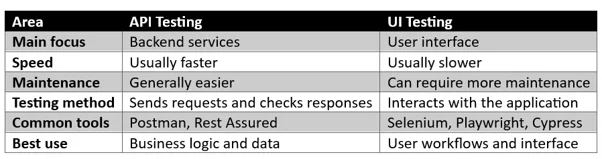
API Testing vs UI Testing
The biggest difference is the layer being tested.
When Should You Use API Testing?
API testing is useful when you want to check backend functionality without going through the UI.
Testing business logic
Suppose an application provides a discount when an order reaches a certain amount. Instead of checking the discount only on the website, you can test the API directly to verify that the correct discount is returned.
Testing different types of data
APIs can be tested with valid, invalid, empty, and unexpected inputs. This makes it easier to check how the backend handles different situations.
Testing authentication
Login APIs, access tokens, user permissions, and authorization rules can be tested directly through API requests.
Faster regression testing
API tests usually run faster than UI tests. This makes them useful when many tests need to be executed repeatedly.
When Should You Use UI Testing?
UI testing is important when the main concern is how the application behaves for an actual user.
Testing complete user journeys
For example, an e-commerce application may have a workflow such as:
Login → Search for a product → Add to cart → Make payment → Logout
A UI test can verify whether the complete journey works correctly.
Testing user interactions
Some issues can only be identified through the interface. A button might not respond correctly, a form could behave unexpectedly, or a navigation link might take the user to the wrong page.
Checking browser behavior
UI testing is also useful for verifying that the application functions properly across supported browsers and various screen sizes.
Should You Choose API Testing or UI Testing?
There is no need to choose only one.
In a real testing project, both approaches can work together. API tests can cover backend functionality and business rules, while UI tests can focus on important user journeys.
For example, a tester could first verify the login API using Postman. Once the API is working correctly, a UI test can check whether a user can enter their credentials and successfully access the dashboard.
This approach can save testing time because not every backend scenario needs to be tested through the UI.
Final Thoughts
API testing and UI testing are both valuable parts of software testing, but they solve different problems.
API testing is a good choice when you need to quickly verify backend logic, data, authentication, and services.
UI testing is the better choice when you need to check user interactions, navigation, workflows, and browser behavior.
A good testing strategy combines both. API testing provides fast coverage of backend functionality, while UI testing confirms that important features work correctly from the user’s perspective.
Drop a query if you have any questions regarding Testing, and we will get back to you quickly.
Making IT Networks Enterprise-ready – Cloud Management Services
- Accelerated cloud migration
- End-to-end view of the cloud environment
About CloudThat
FAQs
1. Is API testing easier than UI testing?
ANS: – API testing is often easier to maintain because it does not depend on UI elements, but both require proper testing knowledge.
2. Can API testing replace UI testing?
ANS: – No. API testing cannot verify things such as buttons, page navigation, or the actual user experience.
3. Which is faster, API or UI testing?
ANS: – API tests are generally faster because they do not require opening a browser or interacting with the application.


WRITTEN BY Nisha D V
Nisha is a Software Tester at CloudThat, specializing in manual and automation testing. She ensures the quality and reliability of web and mobile applications. Passionate about quality assurance, focuses on improving user experience and product stability. She enjoys learning new technologies, exploring testing methodologies, and writing informative blogs in her free time.


 PREV
PREV












Comments