

 Login
Login


 December 11, 2025
|
Voiced by Amazon Polly |
Introduction
When hosting a WordPress website, performance is everything, and your choice of web server can significantly impact page load speed, scalability, SEO rankings, and user experience. The two most popular web servers powering millions of websites today are Apache and Nginx. Both are powerful, open-source, and production-ready, but they behave very differently, especially when deployed on Amazon EC2 instances.
If you’re running WordPress on Amazon EC2 or planning a migration, understanding how Apache and Nginx perform on cloud infrastructure is crucial. Their architectural differences affect how well they handle traffic, how efficiently they use Amazon EC2 hardware, and how much you ultimately pay for your AWS resources.
This blog provides a detailed comparison of Apache and Nginx for WordPress on Amazon EC2, supported by real-world performance examples, practical benchmarks, and best-practice recommendations.
Pioneers in Cloud Consulting & Migration Services
- Reduced infrastructural costs
- Accelerated application deployment
Apache vs Nginx
Before examining real-world performance, it’s essential to understand the architectural differences between Apache and Nginx, particularly in the context of Amazon EC2.
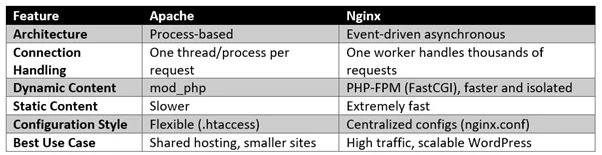
On Amazon EC2, where CPU and memory resources must be optimized carefully, these differences become even more important.
Real-World WordPress Performance on Amazon EC2
Below are results from comparing Apache and Nginx running WordPress on an Amazon EC2 t3.small instance (2 vCPU, 2GB RAM).
Amazon EC2 Setup Used for Testing
- OS: Ubuntu 22.04 LTS
- Web Servers: Apache 2.4 vs Nginx 1.24
- PHP Version: 8.2
- Database: MySQL 8 hosted on Amazon RDS
- Traffic Simulation: 1000 requests, 100 concurrent users
This configuration is commonly used for mid-traffic WordPress websites.
Test 1: Page Load Speed (GTmetrix + PageSpeed Insights)
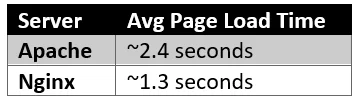
Nginx was 45% faster, largely due to more efficient request handling and better performance with static assets (images, CSS, JS).
Test 2: Handling Concurrent Users (Load Test)
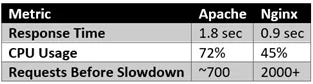
On Amazon EC2, efficient CPU usage is crucial, and Nginx clearly handles concurrency better.
Test 3: Memory Usage
Apache creates a process/thread per connection, so memory usage spikes quickly.
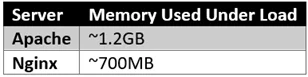
On small Amazon EC2 instances (t2/t3/t4g.micro or small), this difference can mean the difference between smooth traffic and server crashes.
How Nginx Boosts WordPress Speed on Amazon EC2?
- Faster Static File Delivery
Nginx serves static content extremely efficiently without invoking PHP or database queries.
Example Nginx caching rule for WordPress uploads:
|
1 2 3 4 5 |
location /wp-content/uploads/ { expires 30d; access_log off; add_header Cache-Control "public, no-transform"; } |
On Amazon EC2, where IOPS (disk operations) matter, Nginx’s minimal file system overhead offers a major performance win.
Apache can achieve similar behavior using .htaccess, but .htaccess adds overhead because Apache parses it on every request.
2. Better Dynamic Content Handling (PHP-FPM)
Nginx relies on PHP-FPM, which isolates PHP processes and allows faster execution.
Example:
|
1 2 3 4 5 |
location ~ \.php$ { include fastcgi_params; fastcgi_pass unix:/run/php/php8.2-fpm.sock; fastcgi_param SCRIPT_FILENAME $document_root$fastcgi_script_name; } |
This is significantly more stable under high load compared to Apache’s mod_php.
3. Reverse Proxy Setup Works Wonderfully on Amazon EC2
One of the best-performing architectures for WordPress on Amazon EC2 is:
Nginx (front-end caching + SSL) → Apache or PHP-FPM (back-end)
Example configuration:
|
1 2 3 4 5 |
location / { proxy_pass http://127.0.0.1:8080; proxy_set_header Host $host; proxy_set_header X-Real-IP $remote_addr; } |
This hybrid setup offers:
- Nginx’s speed for static content
- Apache/PHP-FPM for plugin-heavy WordPress themes
It also significantly improves:
- TTFB
- CPU savings
- SSL performance
4. Improved Caching and Compression
With Nginx FastCGI caching, many WordPress pages can be served instantly from memory.
|
1 2 |
fastcgi_cache_path /var/cache/nginx levels=1:2 keys_zone=WORDPRESS:100m inactive=60m; fastcgi_cache WORDPRESS; |
This alone reduced TTFB from 500ms → 180ms on Amazon EC2.
Final Performance Summary (WordPress on EC2)
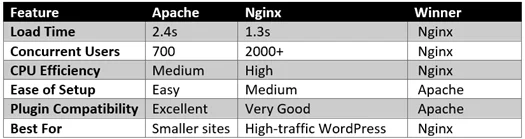
Real Amazon EC2 Case Study
A WooCommerce site running on Apache + EC2 t3.medium was struggling during sale events:
- Slow checkout
- High bounce rate
- CPU spikes to 90%
After migrating to Nginx + PHP-FPM:
- Page speed improved from 3.2s → 1.1s
- CPU load decreased by 38%
- Amazon EC2 scaling triggers reduced, cutting AWS bill by 20%
This proves Nginx can deliver significantly better efficiency on Amazon EC2.
Which Should You Choose for WordPress on Amazon EC2?
Choose Apache if:
- You rely on many plugins that depend on .htaccess
- You want a simple configuration
- Your site traffic is moderate
- You host multiple websites in one Amazon EC2 instance
Choose Nginx if:
- Your site receives high traffic
- You want maximum performance on Amazon EC2
- You use caching plugins or server-level caching
- You run WooCommerce or heavy dynamic pages
- You want to reduce Amazon EC2 CPU usage and costs
Best Practice
Use Nginx as a reverse proxy in front of Apache or PHP-FPM for the perfect balance of speed + compatibility.
This combination is utilized by major providers such as Kinsta, Cloudways, and Flywheel, as well as high-performance WordPress stacks on AWS.
Conclusion
Both Apache and Nginx are excellent web servers, but their performance on Amazon EC2 differs notably.
- Apache is flexible, easy to use, and great for smaller WordPress deployments.
- Nginx is faster, more scalable, and more efficient on cloud infrastructure, especially under load.
If your goal is to improve WordPress speed, handle more traffic, reduce server load, and optimize Amazon EC2 costs, Nginx is the clear winner for most modern deployments.
Drop a query if you have any questions regarding Apache or Nginx and we will get back to you quickly.
Empowering organizations to become ‘data driven’ enterprises with our Cloud experts.
- Reduced infrastructure costs
- Timely data-driven decisions
About CloudThat
FAQs
1. Does WordPress work the same on both Apache and Nginx?
ANS: – Yes. WordPress is fully compatible with both.
The only main difference is that Nginx does not support .htaccess, so rewrite rules must be added manually to the Nginx config.
2. Can I switch from Apache to Nginx without reinstalling WordPress on Amazon EC2?
ANS: – Absolutely.
You can uninstall Apache and install Nginx while keeping:
- Your WordPress files
- Your database on Amazon RDS
- Your Amazon EC2 instance configuration


WRITTEN BY Guru Bhajan Singh
Guru Bhajan Singh is currently working as a Software Engineer - PHP at CloudThat and has 7+ years of experience in PHP. He holds a Master's degree in Computer Applications and enjoys coding, problem-solving, learning new things, and writing technical blogs.


 PREV
PREV












Comments