

 Login
Login


 June 22, 2026
|
Voiced by Amazon Polly |
Introduction
In modern Kubernetes environments, applications generate a large volume of logs across pods, nodes, containers, and services. When workloads run on Amazon EKS, a centralized logging solution becomes essential for troubleshooting issues, monitoring application behavior, detecting failures, and improving operational visibility.
Amazon OpenSearch Service provides a powerful, managed platform for storing, searching, analyzing, and visualizing logs at scale. By sending Amazon EKS logs to OpenSearch, teams can easily query application logs, create dashboards, identify errors, and monitor production workloads from a single place.
Pioneers in Cloud Consulting & Migration Services
- Reduced infrastructural costs
- Accelerated application deployment
Solution Overview
In this blog, we will configure centralized logging for workloads running on Amazon EKS by sending container logs to Amazon OpenSearch Service.
The setup uses Fluent Bit, deployed as a DaemonSet with Helm. Fluent Bit collects logs from all running pods in the Amazon EKS cluster, enriches them with Kubernetes metadata, and forwards them to Amazon OpenSearch Service. Once logs are available in OpenSearch, they can be searched and visualized using OpenSearch Dashboards.
The overall process includes:
- Using existing workloads running on Amazon EKS.
- Installing Fluent Bit using Helm to collect and forward container logs.
- Configuring IAM permissions and OpenSearch role mapping.
- Creating an index pattern in OpenSearch Dashboards.
- Viewing EKS pod logs in OpenSearch Dashboards.
Prerequisites
- An existing Amazon EKS cluster.
- An Amazon OpenSearch Service domain.
- kubectl is configured to access the Amazon EKS cluster.
- Required AWS IAM permissions to create AWS IAM policies, AWS IAM roles, and service accounts.
- Network connectivity between the Amazon EKS worker nodes and the Amazon OpenSearch Service domain.
Steps
- Create a namespace for logging
|
1 |
kubectl create ns logging |
- Create an AWS IAM policy for OpenSearch write access
Fluent Bit needs permission to write logs into OpenSearch. Create one AWS IAM role by name fluent-bit and attach the below policy
|
1 2 3 4 5 6 7 8 9 10 11 12 13 14 15 |
{ "Version": "2012-10-17", "Statement": [ { "Sid": "AllowWriteOpenSearch", "Effect": "Allow", "Action": [ "es:ESHttpPost", "es:ESHttpPut", "es:ESHttpGet", "es:ESHttpHead" ], "Resource": "arn:aws:es:ap-south-1:xxxxxxx:domain/domainname/*" } ] |
3. Create Service account
Attach AWS IAM role to service account
|
1 2 3 4 5 |
serviceAccount: create: true name: fluent-bit annotations: eks.amazonaws.com/role-arn: arn:aws:iam::123456789012:role/fluent-bit |
4. Configure Fluent Bit Config values
|
1 2 3 4 5 6 7 8 9 10 11 12 13 14 15 16 17 18 19 20 21 22 23 24 25 26 27 28 29 30 31 32 33 34 35 36 37 38 39 40 41 42 43 44 45 46 47 48 49 |
[SERVICE] Flush 5 Log_Level info Daemon Off Parsers_File parsers.conf HTTP_Server On HTTP_Listen 0.0.0.0 HTTP_Port 2020 [INPUT] Name tail Tag kube.* Path /var/log/containers/*.log Parser docker DB /var/log/flb_kube.db Mem_Buf_Limit 50MB Skip_Long_Lines On Refresh_Interval 10 [FILTER] Name kubernetes Match kube.* Kube_URL https://kubernetes.default.svc:443 Merge_Log On Keep_Log Off K8S-Logging.Parser On K8S-Logging.Exclude Off [OUTPUT] Name opensearch Match kube.* Host search-my-opensearch-domain.ap-south-1.es.amazonaws.com Port 443 Index eks-logs AWS_Auth On AWS_Region ap-south-1 tls On Suppress_Type_Name On Logstash_Format On Logstash_Prefix eks-logs Retry_Limit False parsers.conf: | [PARSER] Name docker Format json Time_Key time Time_Format %Y-%m-%dT%H:%M:%S.%L Time_Keep On |
5. Install aws-for-fluent-bit using Helm
Run the command below to install fluent bit using helm
|
1 2 3 |
helm upgrade --install aws-for-fluent-bit eks/aws-for-fluent-bit \ --namespace logging \ -f values.yaml |
6. Verify Fluent Bit pods
Run the command below to verify whether the pods are running or not
|
1 |
kubectl get pods -n logging |
7. Configure in OpenSearch
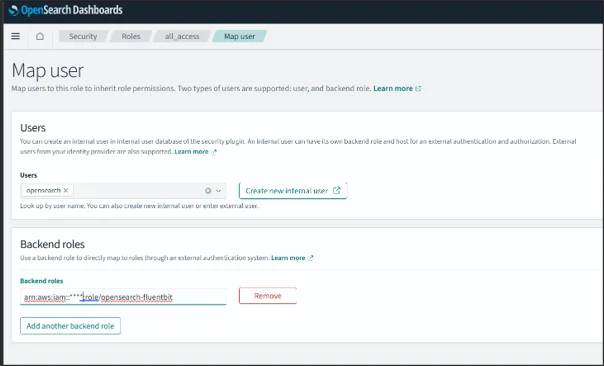
Click on Settings -> Roles -> all_access -> Mapped Users -> Manage Mapping
Note: all_access is not suitable for production for production create dedicated AWS IAM role and allow only necessary write index permissions
In the backend role, add the ARN of the AWS IAM role you created earlier.
IRSA gives the Fluent Bit pod AWS IAM permission to call the Amazon OpenSearch Service endpoint. OpenSearch role mapping grants the AWS IAM role permission within the OpenSearch security plugin to write to the required index.
8. Create Index Pattern
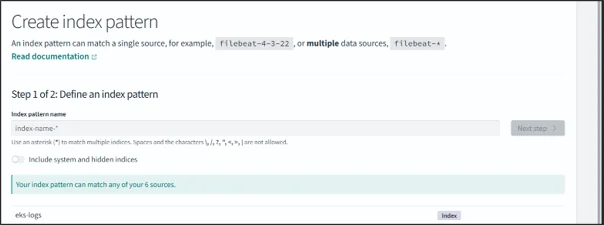
Click on Settings -> Dashboard Management – > Index Pattern -> Create Index Pattern
Create an index pattern with eks-logs.
9. View Logs in OpenSearch Dashboard
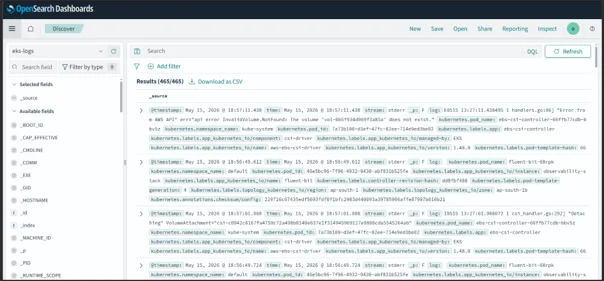
Click Discover, then search eks-logs to see the logs from all the pods inside it.
Note:
If fine-grained access control is enabled in Amazon OpenSearch Service, only creating the AWS IAM role is not enough. The AWS IAM role used by Fluent Bit must also be mapped inside OpenSearch Dashboards.
Key Benefits:
- All pod and container logs from the Amazon EKS cluster are available in one centralized location. This makes it easier to troubleshoot application issues without checking logs pod by pod using kubectl logs
- With OpenSearch Dashboards, teams can quickly search logs by namespace, pod name, container name, error message, or timestamp. This helps reduce the time required to identify and fix production issues.
- This setup can be extended with retention policies, index lifecycle management, alerts, and fine-grained access control to make it suitable for production workloads.
Conclusion
Sending logs from Amazon EKS to Amazon OpenSearch Service provides a reliable and centralized logging solution for Kubernetes workloads. By using Fluent Bit with Helm, the deployment becomes easier to manage, upgrade, and maintain across different environments.
Drop a query if you have any questions regarding Amazon EKS, and we will get back to you quickly.
Making IT Networks Enterprise-ready – Cloud Management Services
- Accelerated cloud migration
- End-to-end view of the cloud environment
About CloudThat
FAQs
1. Can we send logs from only selected namespaces?
ANS: – Yes. Fluent Bit filters can be configured to include or exclude logs based on namespace, pod name, labels, or log content.
2. Does Fluent Bit collect logs from all pods?
ANS: – Yes. By default, Fluent Bit reads container logs from:
|
1 |
/var/log/containers/*.log |


WRITTEN BY Suryansh Srivastava
Suryansh is an experienced DevOps Consultant with a strong background in DevOps, Linux, Ansible, and AWS. He is passionate about optimizing software development processes, ensuring continuous improvement, and enhancing the scalability and security of cloud-based production systems. With a proven ability to bridge the gap between IT and development teams, Surayansh specializes in creating efficient CI/CD pipelines that drive process automation and enable seamless, reliable software delivery.


 PREV
PREV












Comments