

 Login
Login
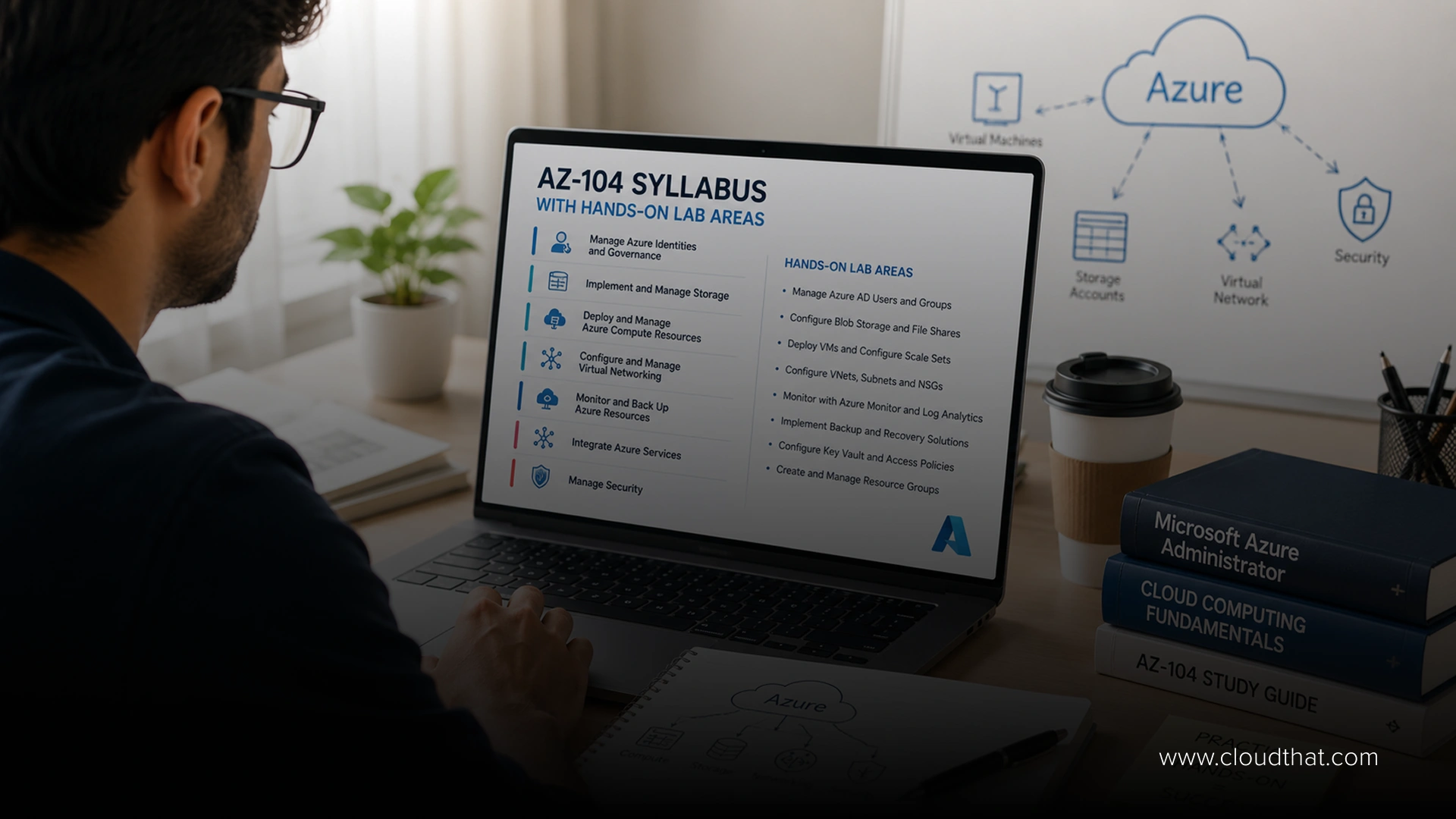

 July 29, 2026
|
Voiced by Amazon Polly |
Introduction
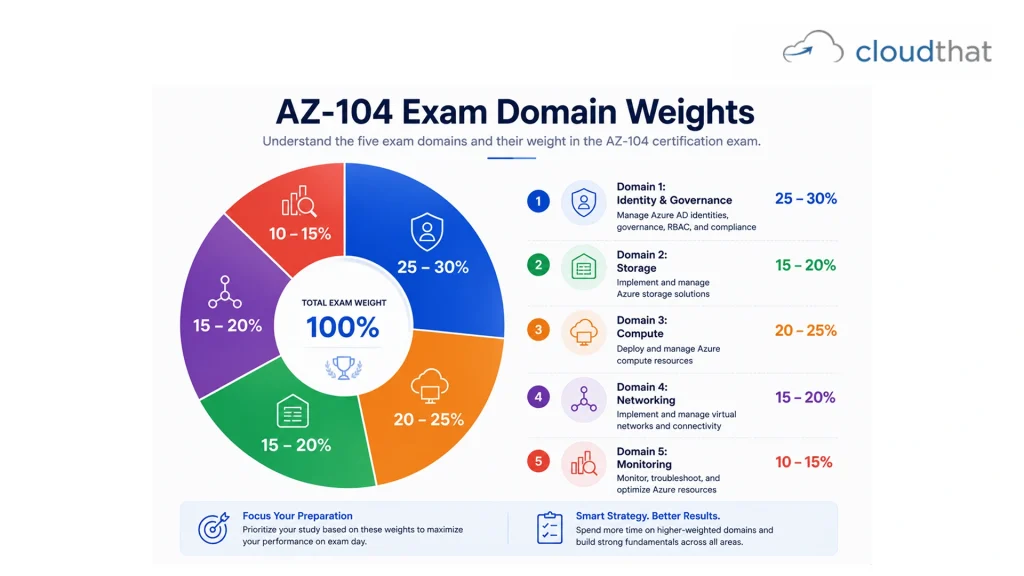
The AZ-104 (Azure Administrator) exam covers five major domains: manage Azure identities and governance (25-30%), implement and manage storage (15-20%), deploy and manage compute resources (20-25%), implement and manage virtual networking (15-20%), and monitor and maintain resources (10-15%). Total exam time is 120 minutes for 40-60 questions.
Most domains require hands-on experience configuring services directly in the Azure portal or CLI. Studying just theory bombs the exam. Real lab experience where you provision resources, troubleshoot failures, and connect components builds the practical knowledge the exam tests.
Understanding the syllabus lets you allocate study time strategically. Spend more time on heavier-weighted domains proportionally.
Accelerate Your Azure Career Without Quitting Your Job
- Authorized Training
- Live Hands-on Labs
- Flexible Batches
The AZ-104 Exam at a Glance
Before diving into domains, understand the format.
The AZ-104 is a 120-minute exam with 40 to 60 multiple-choice questions. You pass with a score of 700 out of 1,000. That sounds straightforward until you realize question difficulty varies wildly. Some questions are straightforward: “Which Azure service manages centralized identity?” Others are scenario-based: “Your organization needs to grant temporary permissions to external contractors without creating permanent accounts. Design a solution.” The scenarios require you to think like an administrator, not just recall facts.
The exam is proctored online. You need a quiet space, a functioning webcam, and stable internet. Most test-takers prepare for 8 to 12 weeks while working full-time. That timeline assumes 8 to 10 hours of weekly study, including hands-on labs.
Here’s the strategic insight: the five domains aren’t equally distributed randomly. They’re weighted toward operational reality. Identity management and governance dominate, as every action in Azure requires proper access control and compliance. That’s why it’s the heaviest domain, accounting for 25-30% of the exam. Compute resources rank second at 20-25% because infrastructure largely revolves around running workloads. Storage and networking support those workloads. Monitoring keeps everything running.
Understanding domain weights means you allocate study time proportionally. Don’t spend equal time on each domain. Spend more on the heavier ones.
Domain 1: Manage Azure Identities and Governance (25-30%)
This is the foundation of Azure administration.
Here’s why: before you can deploy, manage, or restrict anything in Azure, you need to answer a fundamental question: Who is allowed to do what? That’s identity and access management. Get this wrong and security collapses. Applications fail. Data leaks. Compliance audits fail.
The AZ-104 expects you to understand this deeply. This domain covers multiple interconnected topics.
Azure Active Directory (AD) and Microsoft Entra ID
Azure AD is the bedrock. Microsoft Entra ID (the rebranded name for Azure AD) manages user identities, device identities, and service principals. You need to understand how to create users, manage groups, configure roles, and enforce policies. Not just the mechanics of clicking buttons, but why certain configurations matter. For example, why would you use managed identities for applications instead of storing credentials? Because managed identities rotate automatically and eliminate secret management overhead.
Role-Based Access Control (RBAC)
RBAC determines what authenticated users can actually do. You need to understand built-in roles like Owner, Contributor, and Reader. More importantly, you need to know when to create custom roles for specific organizational needs. You should be able to look at a scenario and determine the minimum permission set required (the principle of least privilege). That’s the kind of thinking the exam tests.
Governance and Compliance
Governance topics like Azure Policy, management groups, and subscriptions matter because large organizations need ways to enforce consistency across hundreds of resources. A company wants all resources to be tagged with the “cost center” and “environment” metadata. Azure Policy enforces that automatically. Administrators who understand governance prevent chaos as organizations scale. For organizations managing sensitive data, security and compliance certifications often complement Azure Administrator knowledge.
Hands-On Lab Focus: Create Azure AD users and groups. Configure RBAC on resource groups. Assign managed identities to virtual machines. Create and assign Azure Policy definitions. Walk through scenarios where you troubleshoot access issues.
Domain 2: Implement and Manage Storage (15-20%)
Storage is where data lives.
Every application needs to store something. Files, databases, logs, backups, media. Azure offers multiple storage solutions optimized for different needs. The AZ-104 expects you to choose the right solution for the problem.
Storage Accounts
Storage Accounts are the foundation. You create them and configure access. But here’s what’s not obvious: storage account performance, redundancy, and access tiers significantly affect cost and performance. A storage account with “Read-Access Geo-Redundant Storage” (RA-GRS) costs more but provides better disaster recovery. Standard vs Premium storage has different performance profiles. Understanding these tradeoffs is operational knowledge the exam tests.
Blob Storage
Blob Storage handles unstructured data: images, videos, logs, backups. You need to understand blob containers, blob types (block blobs, page blobs, append blobs), and access tiers (Hot, Cool, Archive). The practical angle: archived data sitting unused should be in the Archive tier to cut costs. Moving frequently accessed data to the Hot tier improves performance. Knowing when to move data between tiers is an administrator’s responsibility.
File Shares and Other Storage Types
File Shares provide SMB-based file access for applications and users. Understanding when to use File Shares vs Blob Storage is practical knowledge. File Shares support Windows ACLs. Blob Storage doesn’t. If you’re migrating legacy applications expecting Windows file permissions, File Shares is the answer.
Table Storage and Queue Storage are legacy but still tested. Table Storage provides NoSQL storage for semi-structured data. Queue Storage enables asynchronous messaging between application components. You don’t need to be a master, but you need to recognize them and understand their use cases.
Managed Disks
Disk Storage (managed disks) is different. These are virtual hard drives attached to virtual machines. Understanding disk types (Standard HDD, Standard SSD, Premium SSD, Ultra SSD), performance characteristics, and when to use each is operational knowledge. For organizations migrating workloads from on-premises, cloud migration consultancy helps with storage architecture decisions.
Hands-On Lab Focus: Create storage accounts with different redundancy options. Configure blob containers and upload data. Set up access tiers. Create file shares and mount them. Configure storage account firewalls and private endpoints. Troubleshoot storage connectivity issues.
Domain 3: Deploy and Manage Azure Compute Resources (20-25%)
Compute resources run your workloads.
Virtual Machines (VMs) are the most obvious compute resource. You need to understand VM sizing (different CPU, memory, and performance combinations), operating system choices (Windows and Linux), and image selection. More importantly, you need to understand the operational aspects: how to resize VMs (which sometimes requires downtime), how to manage disks attached to VMs, and how to configure backups.
Multiple Compute Options
But VMs aren’t the only compute option. App Service runs web applications and APIs without you having to manage infrastructure. You upload code, and it runs. Container Instances run containers without managing Kubernetes complexity. Azure Kubernetes Service (AKS) runs containerized workloads at scale. Azure Batch processes large-scale parallel jobs. Understanding which compute service fits different scenarios is key.
Organizations modernizing applications often use containerization. App modernization services can guide whether to lift-and-shift VMs or refactor into containers.
VM Extensions and Configuration
VM extensions extend VM functionality. The Custom Script Extension runs scripts on VMs. Desired State Configuration (DSC) manages configuration. Understanding extensions means you can automate post-deployment configuration instead of logging in manually.
Scale Sets and Auto-Scaling
Scale Sets create multiple identical VMs that scale automatically based on demand. Understanding how to configure scale sets and auto-scaling rules is operational knowledge. A web application scaling from 2 VMs during night hours to 20 VMs during peak traffic demands properly configured scale sets.
Containers and Kubernetes
Container fundamentals are becoming essential. You don’t need to be a Docker expert, but you should understand that containers are lightweight, portable ways to package applications. Azure Container Registry (ACR) is your image repository. Azure Container Instances runs containers without orchestration overhead. AKS runs them at scale with Kubernetes orchestration.
Hands-On Lab Focus: Create VMs with different sizes and operating systems. Configure VM disks and snapshots. Deploy App Service applications. Configure scale sets with auto-scaling rules. Create container registries and deploy containers. Configure VM extensions for post-deployment configuration.
Domain 4: Implement and Manage Virtual Networking (15-20%)
Networking connects everything.
Virtual Networks (VNets) are your network boundary in Azure. Think of them as your private network space. You define address ranges, create subnets, and control traffic flow. Subnetting is more than just dividing address space. It’s about network segmentation for security and organization.
Network Security and Traffic Control
Network Security Groups (NSGs) are firewalls. They filter traffic at the network level, both inbound and outbound. You create rules that allow or block specific ports and protocols. Understanding CIDR notation and how to write effective NSG rules is essential. A poorly designed NSG either blocks legitimate traffic or allows unintended access.
User-Defined Routes (UDRs) control traffic flow between subnets and to external networks. Instead of using default routing, you can direct traffic through Network Virtual Appliances (NVAs) for additional inspection or control.
Load Balancing and Traffic Distribution
Load Balancers distribute incoming traffic across multiple resources. The Basic Load Balancer is simpler and free. The Standard Load Balancer offers higher availability and more features. Choosing between them depends on your requirements.
Application Gateway is a Layer 7 (application layer) load balancer. It understands HTTP and HTTPS, allowing routing based on URL paths or hostnames. A single public IP can route traffic to different applications based on the request URL. That’s powerful for managing multiple applications.
Advanced Connectivity
Azure ExpressRoute provides dedicated, private network connectivity to Azure. Instead of routing traffic over the public internet, you get a private connection. That’s critical for large organizations needing consistent performance and security.
VPN Gateway enables site-to-site VPN connections between on-premises networks and Azure. It’s how you securely connect your office network to your Azure infrastructure.
Hands-On Lab Focus: Create virtual networks and subnets. Configure network security groups with various rules. Create load balancers and configure backend pools. Deploy Application Gateway and configure routing rules. Set up VPN gateways. Test connectivity between resources using network watcher tools.
Domain 5: Monitor and Maintain Azure Resources (10-15%)
What you don’t monitor, you can’t manage.
Azure Monitor is the central tool. It collects metrics (such as CPU usage), logs (application and system), and traces (request flows across systems). Dashboards visualize this data. Alerts trigger when metrics exceed thresholds. Without monitoring, you’re flying blind. A VM could be running at 99% CPU for hours, and you’d never know until applications time out.
Log Analytics and Querying
Log Analytics enables sophisticated log querying using Kusto Query Language (KQL). You write queries to find patterns in logs. “Show me all failed login attempts in the last 24 hours.” “Which resources consumed the most bandwidth?” “What configuration changed yesterday?” Monitoring isn’t just dashboards. It’s the ability to investigate and understand what’s happening.
Backup and Recovery
Backup and Recovery are operational necessities. Azure Backup automatically backs up VMs, databases, and file shares. You configure backup frequency and retention. Understanding backup policies and recovery point objectives (RPO) is critical. If your backup runs daily, you can lose up to 24 hours of data. Is that acceptable? If not, you need more frequent backups.
Service Health and Recommendations
Service Health informs you about Azure service incidents. If a data center goes down, you see it here. This isn’t your application health. It’s Azure infrastructure health.
Azure Advisor provides recommendations. “This VM is unused and costing money.” “This disk doesn’t have backups configured.” “This application isn’t using a load balancer for high availability.” Acting on recommendations improves efficiency and reliability.
Organizations requiring proactive infrastructure management benefit from managed services that handle continuous monitoring and optimization.
Hands-On Lab Focus: Create monitoring alerts for VM metrics. Query logs using Log Analytics and KQL. Configure backup policies for VMs and databases. Create runbooks for automated responses. Set up dashboards visualizing resource health.
Understanding Hands-On Lab Priorities
Theory teaches concepts. Labs embed them in memory.
The AZ-104 is heavily practical. You won’t pass memorizing facts. You’ll gain hands-on lab experience where you provision, configure, and troubleshoot resources.
Prioritize labs in this order:
High Priority Labs (study these deeply):
- RBAC configuration because it appears on most exams.
- Virtual Network creation and NSG rules because networking touches every deployment.
- VM provisioning and configuration because VMs are fundamental workloads.
- Storage account creation and access because data is critical.
Medium Priority Labs (study thoroughly):
- App Service deployment.
- Container services basics.
- Load balancer configuration.
- Azure Policy implementation.
- Monitoring and logging setup.
Lower Priority Labs (understand but less critical):
- Advanced networking topics like ExpressRoute and advanced monitoring features like Application Insights integration.
The key insight: labs aren’t supplementary. They’re central to exam preparation. Spend more time in labs than watching videos. The exam tests operational competence, not theoretical knowledge.
Study Strategy by Domain Weight
Your study allocation should mirror exam weighting.
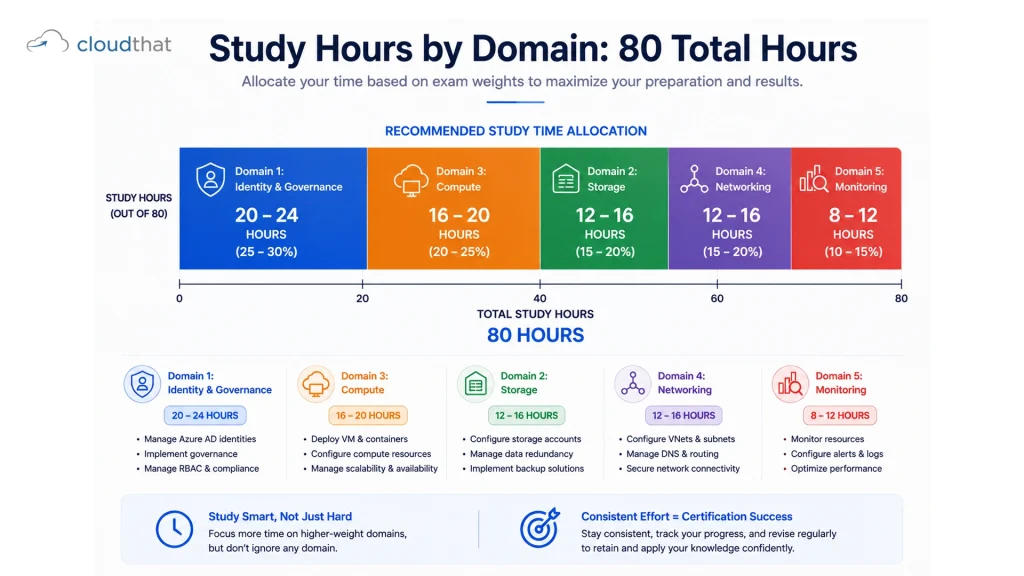
If you have 80 total study hours:
- Domain 1 (25-30%): 20-24 hours
- Domain 3 (20-25%): 16-20 hours
- Domain 2 (15-20%): 12-16 hours
- Domain 4 (15-20%): 12-16 hours
- Domain 5 (10-15%): 8-12 hours
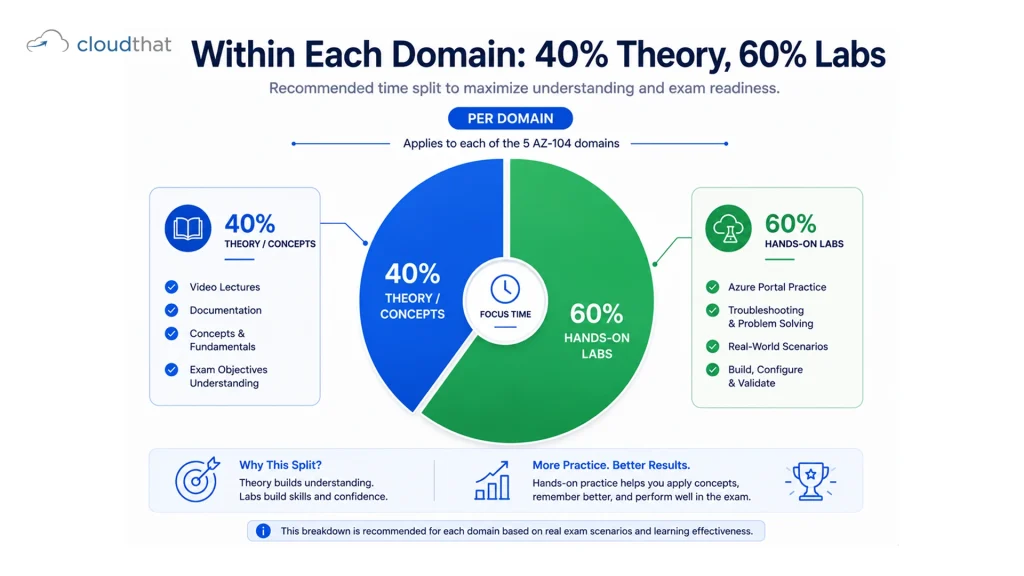
Within each domain, split study time between understanding concepts (40%) and hands-on labs (60%). Watching a 2-hour video on RBAC is useful. Spending 3 hours in Azure Portal configuring RBAC, creating roles, assigning permissions, and troubleshooting access issues is what gets you exam-ready.
Also: start studying with a real Azure subscription (or free trial). Free courses are valuable for concepts but worthless for hands-on practice if you can’t actually touch Azure resources.
CloudThat’s Comprehensive Approach to AZ-104 Preparation
When preparing for the AZ-104, you need training that covers the full syllabus systematically while emphasizing hands-on lab experience throughout.
CloudThat’s Azure Administrator certification training is designed exactly for this. It walks through each domain aligned to the official exam syllabus, with instructors who actively manage Azure infrastructure for enterprise clients. Rather than generic video lectures, CloudThat instructors bring war stories from real deployments. They explain not just what RBAC is, but why a company’s RBAC strategy determines whether they can scale operations without security disasters. They explain storage redundancy options by walking through scenarios where companies chose wrong and faced outages.
The hands-on lab component is where preparation gets serious. The Azure Mastery Pass includes 17 Azure certifications and dedicated administrator tracks, with labs that cover every domain and subdomain in this syllabus. You don’t just watch someone configure an NSG. You configure one yourself, intentionally misconfigure it to see what breaks, then fix it. You deploy scale sets and watch them auto-scale. You create managed identities and understand why they’re superior to stored credentials. That hands-on repetition embeds knowledge.
CloudThat also provides study materials organized by domain, practice quizzes that simulate exam difficulty and format, and direct access to instructors for questions when you hit confusing concepts. The corporate training model means that if you’re upskilling a team, the Capability Development Framework ensures everyone reaches project readiness simultaneously through consistent training and real-world lab scenarios.
Ready to schedule your exam preparation? Check the training calendar for upcoming AZ-104 cohorts and live instructor-led sessions.
Conclusion
The AZ-104 syllabus is comprehensive but not random. It tests the full operational scope of Azure administration, which is what organizations need from their administrators. Understanding the domain breakdown, the weight distribution, and the hands-on lab priorities transforms preparation from overwhelming to strategic.
Study proportionally to domain weight. Spend the bulk of time on identity and compute. Allocate meaningful time to storage and networking. Use monitoring and logging knowledge to validate your deployments. Most importantly, prioritize hands-on lab experience. Labs transform theoretical knowledge into operational judgment. That judgment is what the exam measures and what employers actually need.
Ready to prepare systematically? Explore the Azure Mastery Pass for comprehensive AZ-104 training that combines instructor-led sessions with hands-on labs aligned with this syllabus, or review individual Azure certification programs to build a focused study plan.
Key Takeaways
- The AZ-104 covers five domains, with identity and governance dominating at 25-30% of the exam weight, so allocate study time proportionally.
- Domain 1 (Identity and Governance) is the foundation, as access control underpins all Azure administration.
- Domain 3 (Compute) ranks second in importance because workloads are central to infrastructure operations.
- Domains 2, 4, and 5 (Storage, Networking, Monitoring) support compute resources and are tested less heavily but remain essential.
- Hands-on labs should comprise 50-60% of study time; theory alone won’t help you with scenario-based exam questions.
- Understanding RBAC, NSGs, managed identities, and backup policies is critical because they appear on most exams.
- Virtual Networks, scale sets, and storage account configuration require practical experience, not just theoretical knowledge.
- Monitoring and logging knowledge is tested less heavily but represents operational reality, so study it as you prepare.
- The exam is 120 minutes with 40-60 questions and a passing score of 700 out of 1,000.
- Study allocation should prioritize frequently tested topics such as identity, compute, and storage over specialized topics such as ExpressRoute.
- Practical, hands-on experience with Azure services matters more than memorized facts when preparing for the AZ-104.
Become an Azure Expert in Just 2 Months with Industry-Certified Trainers
- Career-Boosting Skills
- Hands-on Labs
- Flexible Learning
About CloudThat
FAQs
1. How long should I study for the AZ-104 exam?
ANS: – Most professionals studying full-time while working invest 8 to 12 weeks, at 8 to 10 hours per week. That’s 64 to 120 hours total. If you already have Azure experience, you might compress it to 6 weeks. If you’re new to cloud, budget 12 to 16 weeks. The timeline matters less than depth. Rushing through material superficially wastes time.
2. What's the best order to study the domains?
ANS: – Study Domain 1 (Identity and Governance) first because access control underlies everything. Then Domain 3 (Compute) because workloads are central. Then Domain 2 (Storage) because data is fundamental. Then Domain 4 (Networking) because it connects everything. Finally, Domain 5 (Monitoring) because it validates everything else works. That progression builds understanding logically.
3. Can I pass the AZ-104 without hands-on lab experience?
ANS: – Unlikely. The exam is scenario-heavy and tests practical judgment. You might memorize enough facts to pass multiple-choice sections, but scenario-based questions demand operational experience. Spending 60% of study time in hands-on labs is the difference between passing and failing.
4. Are there topics in the AZ-104 syllabus that rarely appear on exams?
ANS: – Some topics appear less frequently. Table Storage and Queue Storage are legacy services that are occasionally encountered. ExpressRoute is highly specialized and appears less often than VPN Gateway. But Microsoft can test anything on the syllabus, so you can’t skip topics entirely. Just allocate less time to rarely tested topics after mastering frequently tested areas.
5. What's the difference between AZ-104 and the older AZ-102 exam?
ANS: – Microsoft retired AZ-102. AZ-104 is the current Azure Administrator certification. It incorporates newer Azure services and features. If you studied for AZ-102, you’ll recognize many concepts, but the curriculum and exam questions have evolved. Use the current AZ-104 syllabus.
6. How soon after preparing should I take the exam?
ANS: – Take the exam within 2 weeks of finishing structured study. Knowledge peaks near the end of studying. Waiting months means you’ll forget details. Most people schedule the exam during preparation to create urgency and maintain focus.

WRITTEN BY Himisha Raval
Himisha Raval is a Digital Marketing Manager at CloudThat with a strong command of search engine optimization, web analytics, link building, and content strategy. She brings a data-driven approach to digital marketing, helping IT companies strengthen their online presence, improve search rankings, and generate consistent leads across channels. Beyond execution, she plays an active role in ideation, campaign strategy, and website performance optimization. Outside of work, she balances her analytical side with a love for travel, nature painting, and dancing.


 PREV
PREV












Comments