

 Login
Login


 June 23, 2026
|
Voiced by Amazon Polly |
Introduction
Software delivery has evolved rapidly, and AI is becoming a core part of modern CI/CD pipelines. As teams release applications more frequently and manage increasingly complex codebases, traditional processes such as code reviews, security checks, and deployment approvals can become bottlenecks.
By integrating Azure DevOps with Azure OpenAI Service, organizations can automate and enhance these critical stages using AI-powered insights. From intelligent code reviews and security analysis to deployment recommendations, AI helps teams improve speed, consistency, and software quality.
In this blog, we’ll explore how to build an AI-powered CI/CD pipeline in Azure DevOps, covering the architecture, implementation, security considerations, and a practical end-to-end workflow.
Pioneers in Cloud Consulting & Migration Services
- Reduced infrastructural costs
- Accelerated application deployment
Why Is It Needed?
The pain points driving the need for AI-augmented pipelines are well-documented:
- The Review Bottleneck
On average, code reviews take 4–24 hours in busy teams. AI provides an instant first-pass review within seconds, flagging logic errors, anti-patterns, and missing test cases before a human even looks at the PR.
- Rising Security Threats
Supply chain attacks, OWASP Top 10 vulnerabilities, and accidentally committed secrets are persistent risks. AI-driven security scanning catches these at the PR stage, not in production.
- Deployment Risk
Without data-driven deployment gates, teams either delay releases or ship too fast. AI models trained on historical deployment data compute a risk score and recommend Proceed, Stage, or Block.
4. Release Note Fatigue
Writing accurate release notes is tedious. AI auto-generates them from commit messages, PR descriptions, and linked work items, saving 30–60 minutes per release.
AI does not replace human engineers, it elevates them by handling repetitive cognitive tasks so humans can focus on architecture, strategy, and creative problem-solving.
AI Use Cases in Azure DevOps
- AI-Assisted Code Review
When a Pull Request is created, Azure Pipelines triggers an Azure Function that sends the code changes to Azure OpenAI. The AI reviews the code for quality, coding standards, error handling, security risks, and performance issues, then posts feedback directly to the PR.
- PR Summarization
AI generates a concise summary of large pull requests, highlighting key changes, affected components, and review focus areas, helping reviewers quickly understand the context.
- Automated Test Generation
Based on the modified code, AI suggests unit tests for uncovered scenarios, helping teams improve test coverage and software reliability.
- Security Vulnerability Analysis
In addition to tools like SonarQube and Microsoft Defender for Cloud, AI analyzes code context to identify potential security vulnerabilities and risky coding patterns that traditional scanners may miss.
- Deployment Risk Assessment
Before production deployment, AI evaluates factors such as code change size, affected services, historical incidents, and system health to generate a deployment risk score and recommend approval actions.
4. Architecture
The architecture follows an event-driven pattern where Azure DevOps webhooks act as event producers and Azure Functions serve as lightweight AI orchestrators.
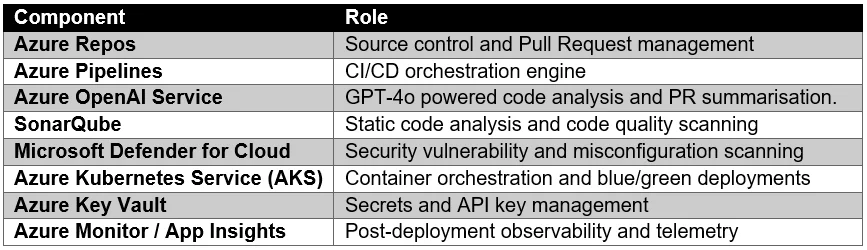
The data flow is unidirectional: code changes flow left-to-right from repo to pipeline to AI services to deployment target, while telemetry and risk signals flow right-to-left back into pipeline decisions. This avoids circular dependencies and keeps each gate independently testable.
Implementation
- Setting Up the Pipeline
Create a multi-stage Azure DevOps pipeline with stages for AI Review, Build, Test, Security Scan, Risk Assessment, and Deployment. Store secrets securely using Azure Key Vault.
- Integrating Azure OpenAI
Deploy an Azure Function that uses Managed Identity to connect to Azure OpenAI securely. The function analyzes PR changes and returns structured AI insights.
- Automating PR Reviews
Configure Azure DevOps Service Hooks to trigger AI reviews whenever a Pull Request is created or updated. AI feedback is automatically posted as PR comments.
- Generating AI Release Notes
After successful deployments, AI generates release notes from commits, work items, and PR details, then publishes them to the project documentation.
- AI-Based Deployment Gates
Before production deployment, AI evaluates deployment risk using application metrics and change data. Low-risk deployments proceed automatically, while high-risk changes require manual approval.
Security Considerations
- Protecting Secrets
Store secrets in Azure Key Vault, use Managed Identity for secure access to Azure OpenAI, and enable secret rotation, soft delete, and purge protection.
- Responsible AI Practices
Remove sensitive data before sending requests to AI, require human approval for high-risk deployments, and maintain audit logs of AI-generated decisions.
- Compliance and Governance
Enforce security scans through Azure Policy, monitor pipelines using Defender for DevOps, maintain audit trails in Azure Monitor, and align with standards such as ISO 27001, SOC 2, and GDPR.
7. Real-World Demo: End-to-End Flow
The diagram below shows the complete journey of a code change through the AI-powered pipeline, from developer push to production deployment and monitoring.

Step-by-Step Walkthrough
- Git Commit: Developer pushes a feature branch. Azure Repos receives the push and creates or updates a Pull Request.
- PR Created: Azure DevOps fires a Service Hook webhook to the AI Orchestration Azure Function.
- AI Review: The Function sends the diff to Azure OpenAI GPT-4o. Structured code review, PR summary, and test suggestions post as PR comments within 8–12 seconds.
- Security Scan: SonarQube and Microsoft Defender for DevOps run in parallel. Findings are annotated on the PR and surfaced in the Security Posture dashboard.
- Build and Test: Azure Pipelines executes unit tests, integration tests, and container image builds. Coverage delta is reported.
- AI Gate: The Risk Assessment Function computes a deployment risk score. Low and Medium risks auto-approve; High risk pages the on-call engineer.
- Deploy to AKS: Blue/Green deployment rolls out via Helm. Traffic shifts 100% to the new version after a 5-minute observation window.
- Monitor: Azure Application Insights and Azure Monitor track error rates, latency, and SLO compliance. Anomalies feed back into the next deployment’s risk model.
Future of AI-Driven DevOps
- Agentic AI in Pipelines
Agentic AI can automatically analyze issues, suggest fixes, create pull requests, and monitor deployments with minimal human intervention.
- Self-Healing Pipelines
AI-powered pipelines can detect failures, trigger rollbacks, and automatically notify teams, improving reliability and reducing downtime.
- Autonomous Platform Engineering
AI will help teams provision infrastructure, optimize cloud costs, manage Kubernetes resources, and enforce policies using natural-language commands rather than manual configuration.
Conclusion
AI-powered CI/CD pipelines are transforming software delivery by making development faster, smarter, and more secure. By integrating Azure DevOps with Azure OpenAI, teams can automate code reviews, security analysis, release documentation, and deployment decisions. This reduces manual effort, improves consistency, and enables engineers to focus on innovation rather than repetitive tasks. While human oversight remains essential, AI serves as a powerful assistant throughout the software delivery lifecycle. As technologies such as Agentic AI and autonomous platform engineering mature, AI-driven DevOps will become a standard practice for modern engineering teams.
Drop a query if you have any questions regarding Azure Pipelines, and we will get back to you quickly.
Making IT Networks Enterprise-ready – Cloud Management Services
- Accelerated cloud migration
- End-to-end view of the cloud environment
About CloudThat
FAQs
1. Does AI code review replace human reviewers?
ANS: – No. AI acts as a first-pass reviewer, identifying common issues such as code quality, security risks, and missing tests. Human reviewers still make the final decisions on architecture, business logic, and maintainability.
2. How much does Azure OpenAI integration cost?
ANS: – Costs depend on usage, but AI-powered PR reviews are generally inexpensive compared to the engineering time saved. Optimizations such as response caching can further reduce costs.
3. What if the AI gives incorrect recommendations?
ANS: – AI suggestions should be treated as guidance, not final decisions. Teams should validate recommendations, maintain manual approval processes, and continuously improve accuracy through feedback.


WRITTEN BY Deepika N
Deepika N works as a Senior Research Associate - DevOps and holds a Master’s degree in Computer Applications. She is passionate about DevOps and related technologies. Deepika has strong expertise in AWS and Azure DevOps, Kubernetes (EKS), Terraform, and CI/CD pipelines. She is proficient in infrastructure as code, automation, monitoring, security enforcement, and multi-cloud deployment strategies. Skilled in version control, infrastructure documentation, cloud-native technologies, and managing production workloads, container platforms, and DevSecOps practices, Deepika brings comprehensive hands-on experience to her role.


 PREV
PREV












Comments