

 Login
Login


 August 25, 2026
|
Voiced by Amazon Polly |
Overview
In this blog, we will explore the new Kubernetes version rollback capability available with Amazon Elastic Kubernetes Service (Amazon EKS), designed to provide a safer recovery path during cluster upgrades. The feature allows administrators to return an EKS cluster to its previously running Kubernetes version. EKS also uses Cluster Insights to evaluate the cluster before a rollback and identify potential concerns, such as node version compatibility and add-on dependencies. By providing a controlled rollback mechanism without requiring administrators to rebuild the cluster, this capability simplifies recovery and gives organizations greater confidence when adopting newer Kubernetes versions.
Pioneers in Cloud Consulting & Migration Services
- Reduced infrastructural costs
- Accelerated application deployment
Introduction
Managing Kubernetes clusters on supported and secure versions is an important part of maintaining a reliable container platform. However, upgrading the control plane can be a high-risk operation because issues discovered after the upgrade may be difficult to reverse. In environments that run multiple clusters, teams often rely on extensive testing, staged rollouts, approval processes, and extended validation periods to reduce the risk of upgrade-related disruptions. These precautions can make organizations hesitant to adopt newer Kubernetes releases, potentially leaving clusters on older versions for longer than intended.
Amazon EKS introduces Kubernetes version rollback to provide an additional layer of protection during this process. When an upgrade causes unexpected issues, administrators can revert the cluster to its previous Kubernetes version within the supported seven-day rollback period. The rollback moves the cluster back to the previously running version rather than placing it in an emulated state. EKS also performs readiness checks via Cluster Insights and supports a force option once administrators have evaluated the identified issues. Together, these capabilities make Kubernetes upgrades more recoverable and help teams approach version adoption with greater confidence.
Version Rollback Support in EKS Auto Mode
EKS Auto Mode simplifies the deployment and operation of production-ready Kubernetes clusters by automating key infrastructure components, including compute, networking, and storage. When using version rollback with Auto Mode, the control plane and managed worker nodes must transition back to the earlier Kubernetes version as part of the same process. The node rollback follows the configured Pod Disruption Budgets (PDBs), so the overall operation time can vary with the workload and disruption settings.
To provide administrators with greater flexibility, EKS Auto Mode includes a cancel API that can be used to stop an ongoing node rollback. This is useful when the rollback is taking longer than expected or when administrators need to reconsider their recovery strategy. After canceling the operation, administrators can modify the Pod Disruption Budgets as needed and then choose how to proceed.
During a rollback, EKS respects the configured Pod Disruption Budgets by default to help maintain application availability. If faster node replacement is required, administrators can review, modify, or remove the applicable disruption budgets based on their workload requirements.
Exploring Kubernetes Version Rollback
On the cluster configuration page, administrators can access the version rollback option through the Actions menu.
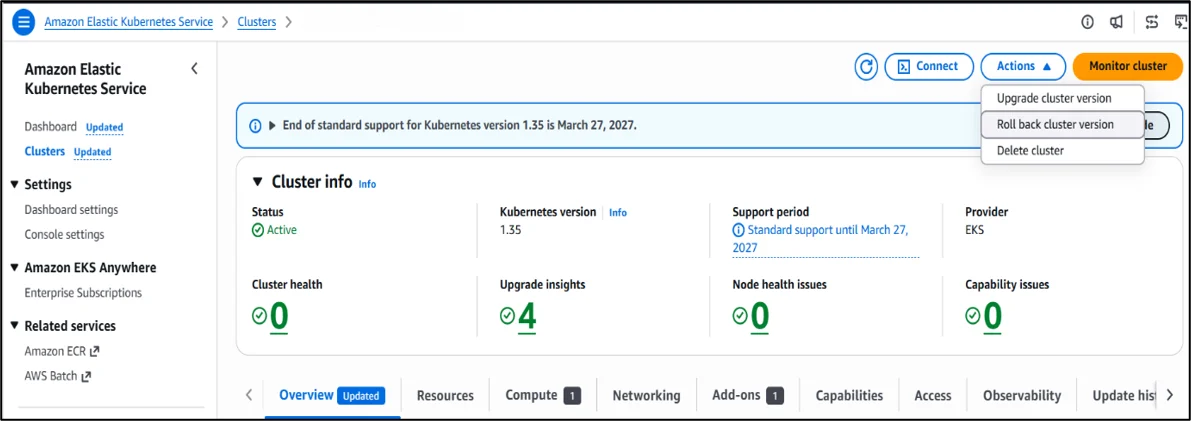
Before proceeding with the rollback, check the rollback insights for any warnings or conditions that could impact the operation. This view provides an overview of node health and identifies items that require attention.
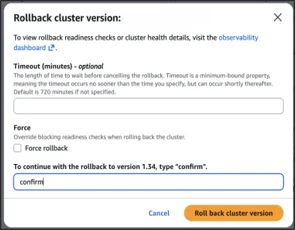
Once the rollback was confirmed, the process started successfully. The cluster continued serving workloads without interruption during the rollback. The control plane operation took approximately 15–20 minutes, comparable to the duration of a typical Kubernetes upgrade. In an EKS Auto Mode cluster, the nodes were rolled back in a controlled manner based on the configured disruption budget settings.
Conclusion
Hence, the new Amazon EKS Kubernetes version rollback capability provides administrators with a safer, more controlled path to recover from upgrade issues. By allowing clusters to revert to their previously running version within seven days, EKS reduces the risk of prolonged downtime or complex rebuilds. Combined with Cluster Insights, disruption-aware node rollback, and the flexibility to cancel or adjust Pod Disruption Budgets, this feature empowers teams to adopt newer Kubernetes releases with confidence. Ultimately, rollback support strengthens operational resilience, simplifies recovery, and ensures organizations can keep their Kubernetes environments secure and up to date without sacrificing stability.
Drop a query if you have any questions regarding Amazon EKS, and we will get back to you quickly.
Making IT Networks Enterprise-ready – Cloud Management Services
- Accelerated cloud migration
- End-to-end view of the cloud environment
About CloudThat
FAQs
1. Does rollback also apply to managed node groups?
ANS: – Yes. In EKS Auto Mode, both the control plane and managed worker nodes are rolled back together. Node rollback respects Pod Disruption Budgets to maintain workload availability.
2. What happens if my add ons are incompatible with the previous version?
ANS: – Before rollback, Cluster Insights evaluates add‑on dependencies and node compatibility. If issues are detected, administrators can either resolve them or use the force rollback option after reviewing the risks.
3. Is rollback available for all Kubernetes versions?
ANS: – Rollback is supported only for versions that are still within Amazon EKS support policy. If the previous version has already reached the end of support, a rollback will not be possible.


WRITTEN BY Abhilasha D
Abhilasha D works as a Research Associate-DevOps at CloudThat. She is focused on gaining knowledge of the cloud environment and DevOps tools. Abhilasha is interested in learning and researching emerging technologies and is skilled in dealing with problems in a resourceful manner.


 PREV
PREV












Comments