

 Login
Login


 December 5, 2025
|
Voiced by Amazon Polly |
Introduction
Amazon Elastic Block Store (EBS) snapshots are widely used for backups, disaster recovery, and protecting application data. As organizations grow, the number of snapshots they maintain increases rapidly, especially when they are required to store backups for extended periods due to compliance or audit requirements. Keeping snapshots in the standard storage tier can become expensive when older snapshots are rarely accessed.
To help with this, AWS introduced the EBS Snapshot Archive Tier, designed for long-term backup storage at significantly lower costs. AWS has also improved the speed at which snapshots can be restored, even if they have been saved for months or years. With recent enhancements to Instant Restore, organizations can recover their volumes faster and with less effort than ever before, making it easier than ever to build backup strategies that are both flexible and affordable.
Pioneers in Cloud Consulting & Migration Services
- Reduced infrastructural costs
- Accelerated application deployment
Understanding the Amazon Elastic Block Store Snapshot Archive Tier
Archive Tier is a storage class within Amazon Elastic Block Store that allows you to store older snapshots at significantly lower costs compared to the standard tier. This works best for backups that you must keep because of rules, compliance requirements, or audits.
Key features of the Archive Tier:
- Much cheaper than the standard Amazon Elastic Block Store snapshots.
- Ideal for long-term storage where frequent snapshot retrieval is not required.
- Ideal for snapshots that are several months or years old, rather than recent snapshots you use daily for development.
- This tier can be utilized in regulated industries, such as banking, healthcare, and government, where strict regulations must be adhered to.
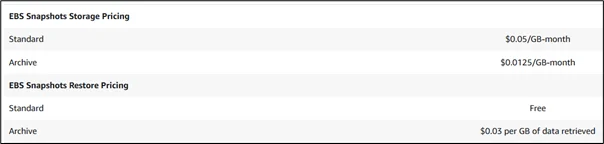
Figure: Source
Not every snapshot is supposed to be accessed instantly in the Archive Tier. It’s all about saving money for data that you need to store for a long time.
How Archiving Works?
By moving a snapshot to the Archive Tier, it is placed in a deep storage class, where AWS optimizes for the lowest storage costs. Archived snapshots retain the same security posture, with encryption, integrity, and durability remaining completely untouched.
To retrieve archived snapshots, you must restore them to the standard tier. AWS currently supports the following two restore modes:
- Standard retrieval has a lower cost but takes a few hours
- Expedited retrieval has a higher cost but faster retrieval for urgent needs
Once a snapshot is restored to the standard tier, you can create volumes from it as usual.
What is Instant Restore?
Originally, restoring a snapshot, even from the standard tier, had required waiting until data blocks were fully downloaded to the volume from Amazon S3-backed snapshot storage. This delayed the speed at which systems could recover.
AWS introduced Instant Restore to reduce wait time. With the latest updates, restoration is now even faster and more predictable.
Key improvements include:
- Restoration without waiting for the complete preloading of snapshot data.
- Faster I/O performance right after restore, since the needed blocks are fetched lazily.
- Enhanced readiness for large EBS volumes, resulting in a reduced Recovery Time Objective (RTO).
- Improved integration with archival workflows, where even archived snapshots can be restored more quickly after being moved back to the standard tier.
These enhancements enable you to bring applications online faster, even after retrieving older snapshots.
How do Archive Tier and Instant Restore Work Together?
The Archive Tier helps with long-term storage costs, while enhancements to Instant Restore address recovery speed. They work together to provide a balanced strategy, where organizations can achieve:
- Store years of snapshots at a low cost.
- Retrieve only what they need, when they need it.
- Restore volumes quickly once the snapshot is back in the standard tier.
- Reduce downtime and shrink disaster recovery windows.
This combination helps lower both storage costs and recovery time, two key factors in creating dependable backup and disaster recovery workflows.
Ideal Use Cases
- Compliance Backups
It is common for sectors such as finance and healthcare to retain data for several years. The Amazon EBS Snapshot Archive Tier reduces the cost of such long-term backups.
- Periodic System Snapshots
Teams that produce daily or weekly snapshots, for example, can migrate older backups to the archive tier and retain only the most recent in standard storage.
- Disaster Recovery at Low Cost
Companies can store older snapshots at a lower cost and utilize Amazon EBS Instant Restore to recover critical systems in the event of disruptions quickly.
- Log and Batch Data
Archived snapshots are ideal for logs or batch data that need to be retained but are rarely accessed.
- Application Baselines
Large systems that store baseline snapshots for major releases can archive to maintain a history without incurring high storage charges.
Operational Considerations
Although these features greatly enhance snapshot flexibility, there are some points that teams should keep in mind:
- Archived snapshots must first be restored to the standard tier before they can be used.
- Retrieval time varies based on the retrieval mode requested (standard versus expedited).
- Access patterns drive costs, so frequent data restoration may increase costs.
- Good lifecycle policies that automate archiving and retrieval are crucial.
- Performance after restore depends partly on access patterns, because data loads lazily.
Planning retrieval frequency and storage costs helps a team design efficient retention policies.
Conclusion
The Amazon EBS Snapshot Archive Tier, in conjunction with the enhancements to Amazon EBS Instant Restore, provides teams with a straightforward way to manage long-term backups without concerns about slow recoveries. By moving older snapshots to a lower-cost storage class, organizations can retain data they may need for compliance or internal use without incurring the high cost of storing snapshots that are rarely accessed.
Drop a query if you have any questions regarding Amazon EBS Snapshot and we will get back to you quickly.
Empowering organizations to become ‘data driven’ enterprises with our Cloud experts.
- Reduced infrastructure costs
- Timely data-driven decisions
About CloudThat
FAQs
1. What is the Amazon EBS Snapshot Archive Tier?
ANS: – It is a low-cost storage class designed for long-term retention of older EBS snapshots, ideal for compliance, audits, and rarely accessed backups.
2. When should I use the Archive Tier for my snapshots?
ANS: – Use it for snapshots that are several months or years old and not needed for frequent access, such as compliance records, old system snapshots, logs, or baseline versions.
3. How do I retrieve a snapshot from the Archive Tier?
ANS: – You retrieve an archived snapshot by restoring it to the standard tier. Standard retrieval takes a few hours, while expedited retrieval is faster but costs more. Once it’s back in the standard tier, you can use it to create volumes as usual.


WRITTEN BY Sujay Adityan
Sujay works as a Research Associate in the Data & AIoT team at CloudThat, with a background in Data Science. He is skilled in data analytics, machine learning, cloud computing, Python programming, and working with large-scale databases and networks. Sujay has contributed to multiple AI/ML and Generative AI projects for both internal teams and clients. Passionate about continuous learning, he aspires to become a proficient software developer, creating meaningful, technology-driven solutions that make a real impact.


 PREV
PREV












Comments