

 Login
Login


 September 25, 2026
|
Voiced by Amazon Polly |
Amazon Bedrock Managed Knowledge Base gives teams a fully managed way to ground generative AI applications and agents in enterprise data. This article explains how Managed Knowledge Base works, what AWS manages, which data sources it supports, how retrieval and access controls work, and when to choose it over a customer-managed Knowledge Base.
Start Learning In-Demand Tech Skills with Expert-Led Training
- Industry-Authorized Curriculum
- Expert-led Training
What is Amazon Bedrock Managed Knowledge Base?
Amazon Bedrock Managed Knowledge Base is a managed retrieval-augmented generation (RAG) capability in Amazon Bedrock. RAG retrieves relevant information from enterprise data and supplies that context to a generative AI model before it produces an answer.
AWS manages the ingestion, storage, indexing, and retrieval infrastructure. You connect supported data sources and use the knowledge base from your AI application or agent.
This means your team does not have to provision and maintain its own vector database infrastructure. AWS manages the underlying datastore, including embeddings, text, metadata, and raw files.
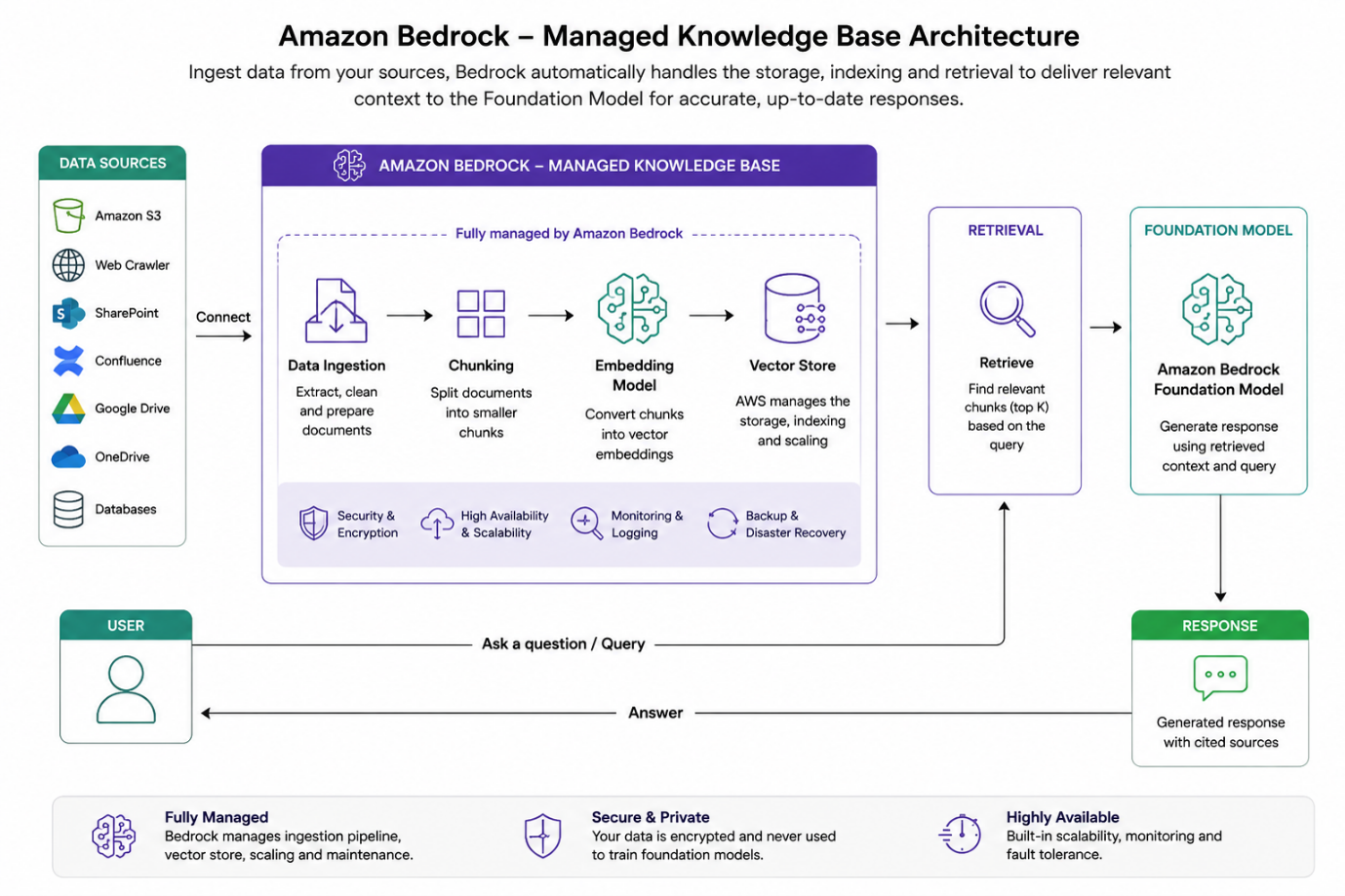
Fig 1: Amazon Bedrock Managed Knowledge Base simplifies enterprise RAG with fully managed ingestion, retrieval, and AI-powered responses.
How does Amazon Bedrock Managed Knowledge Base simplify RAG?
Managed Knowledge Base removes several infrastructure decisions from a RAG architecture. AWS manages the ingestion pipeline, datastore setup, and retrieval infrastructure, allowing teams to spend more time on data quality, evaluation, security, and application behavior.
The service also provides managed defaults for embedding and reranking. Embeddings convert content into numerical representations that help the system find semantically similar information. Reranking improves the ordering of retrieved results so that the most relevant content appears higher in the results.
AWS also allows you to choose a supported custom Bedrock embedding model when you create the knowledge base and configure reranking at query time.
The main benefit is operational simplicity: instead of maintaining the retrieval layer yourself, your team can focus on whether the retrieved information actually answers users’ questions.
Which data sources can Amazon Bedrock Managed Knowledge Base connect to?
The current draft identifies seven data source connectors: Amazon S3, Confluence, Microsoft SharePoint, Google Drive, Microsoft OneDrive, Web Crawler, and Custom. AWS documentation should be treated as the source of truth for current connector availability and regional support.
These connectors allow enterprise content from multiple systems to enter a common retrieval workflow. That can reduce the need to build separate ingestion pipelines for every source.
AWS also provides parsing and chunking capabilities. Chunking divides large documents into smaller sections that the retrieval system can search individually.
Advanced indexing can process supported visual content in PDF, DOCX, PPT, and PPTX files, as well as supported audio and video formats. Always verify the current AWS documentation for the exact formats and configuration supported by your workload.
How does retrieval work in Managed Knowledge Base?
Managed Knowledge Base supports semantic hybrid retrieval and agentic retrieval.
Semantic search looks for content based on meaning, while keyword search looks for matching terms. Hybrid retrieval combines both approaches, allowing an application to handle questions that contain either exact terminology or broader concepts.
Agentic retrieval is designed for more complex questions. According to AWS documentation, the Agentic Retriever can create a query plan, perform multi-step retrieval, evaluate intermediate results, and continue retrieving information when additional context is required.
At query time, you can use two important APIs:
- Retrieve returns relevant source content so your application can decide how to use it.
- RetrieveAndGenerate combines retrieval with model generation and can return citations to the retrieved source content.
A simple design rule is:
Use Retrieve when your application needs control over the retrieved context. Use RetrieveAndGenerate when you want Amazon Bedrock to combine retrieval and generation.
How does Managed Knowledge Base handle embeddings and reranking?
Managed Knowledge Base provides a service-managed embedding option and managed reranking. AWS manages the infrastructure required for the default embedding and reranking experience.
You can also select a supported Bedrock embedding model when you create the knowledge base. The current draft lists Amazon Titan Text Embeddings V2, Cohere Embed English v3, Cohere Embed Multilingual v3, Cohere Embed v4, and Amazon Nova Multimodal Embeddings as supported custom choices.
There is an important architectural constraint: you cannot change the embedding model type after creating the knowledge base. If your architecture later requires a different embedding approach, AWS requires you to create a new knowledge base.
AWS also notes that a knowledge base created with a custom embedding model cannot use the managed reranker.
For this reason, decide on your embedding strategy before creating the production knowledge base, and first test the selected model against representative queries.
Can the Managed Knowledge Base process multimodal data?
Yes. Managed Knowledge Base can process additional modalities through advanced indexing.
The current draft identifies support for visual content in PDF, DOCX, PPT, and PPTX files, as well as audio formats such as MP3, WAV, M4A, FLAC, and OGG, and video formats such as MP4, MOV, and M4V.
This capability matters when enterprise knowledge contains more than text. For example, a company may store product information in documents containing diagrams, training recordings in audio files, or demonstrations in video files.
However, do not assume that every file behaves identically. Before production deployment, test at least 20 representative files that cover the formats your application expects to process, and verify the resulting retrieval quality.
How does document-level access control work?
Managed Knowledge Base supports ACL-aware retrieval for supported data sources. ACL, or access control list, defines which users or groups can access specific documents.
ACL-aware retrieval can filter results according to document-level permissions. However, AWS explicitly distinguishes this capability from authentication and authorization.
Your application must authenticate the user and provide verified identity information. Managed Knowledge Base can then use that identity context to filter retrieval results where the selected data source supports ACL-aware retrieval.
For enterprise applications, test this behavior with at least three user permission scenarios before production:
- A user who should access the document.
- A user who should not access the document.
- A user whose permissions changed after ingestion.
This helps verify that retrieval respects the expected access boundaries.
How do you create an Amazon Bedrock Managed Knowledge Base?
You can create a Managed Knowledge Base through the Amazon Bedrock console or API.
The basic workflow is:
- Open the Knowledge Base creation experience and choose Create Managed Knowledge Base.
- Configure the knowledge base name, description, IAM role, and encryption settings.
- Select the managed embedding option or a supported custom Bedrock embedding model.
- Select and configure a supported data source connector.
- Configure parsing and chunking if the default settings do not meet your requirements.
- Enable advanced indexing when your workload requires supported multimodal processing.
- Configure log delivery if your operational design requires it.
- Create the knowledge base and start ingestion.
The current AWS documentation cited in the draft states that console creation generally takes 2–5 minutes, although customer-managed KMS keys can increase creation time.
After connecting a data source, start an ingestion job to synchronize the content. AWS provides the StartIngestionJob API for this workflow.
What is the difference between Managed and customer-managed Knowledge Bases?
The biggest difference is who controls the retrieval infrastructure.
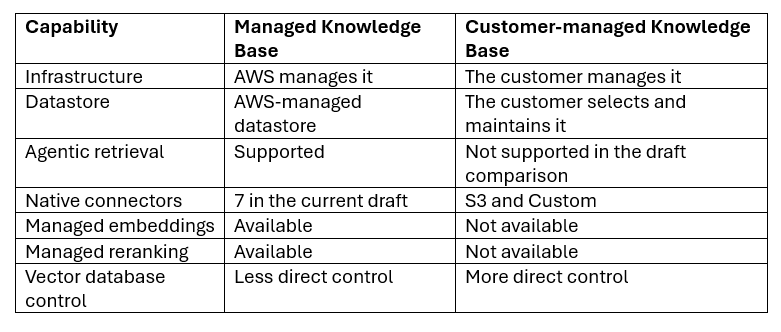
Choose the Managed Knowledge Base when your priority is reducing infrastructure management for retrieval and using AWS-managed capabilities.
Choose a customer-managed approach when your architecture requires direct control over the underlying datastore or specific infrastructure configuration.
When should you choose Amazon Bedrock Managed Knowledge Base?
Choose Managed Knowledge Base when you want to build an enterprise RAG or agentic retrieval application without operating the underlying retrieval infrastructure yourself.
It is a strong fit when your architecture requires supported enterprise connectors, managed ingestion and indexing, hybrid or agentic retrieval, multimodal processing, and document-level access filtering.
Before making the decision, evaluate these five areas:
- Required data sources
- AWS Region availability
- Access-control requirements
- Embedding and retrieval requirements
- Expected cost and retrieval volume
Then test the shortlisted architecture with representative enterprise questions before committing to production.
What should you validate before production deployment?
A production-ready Managed Knowledge Base needs more than a successful ingestion job. Validate the data, retrieval quality, permissions, security, and operational behavior before connecting real users.
Use this five-step validation checklist:
- Validate the data: Confirm that the required documents exist in the connected sources.
- Validate chunking: Test whether retrieved chunks contain enough context to answer representative questions.
- Validate retrieval: Run at least 20 representative queries and review the returned source chunks.
- Validate permissions: Test authorized and unauthorized users against documents with different ACLs.
- Validate operations: Confirm encryption, logging, authentication, Region availability, and expected retrieval volume.
Pay particular attention to citations. If the application uses RetrieveAndGenerate, verify that citations point to the source content you expect users to trust.
For teams building these skills, Advanced Generative AI Development on AWS covers RAG, Amazon Bedrock Knowledge Bases, agentic AI, security, observability, testing, and cost optimization.
Developing Generative AI Applications on AWS also includes hands-on work with Amazon Bedrock Knowledge Bases and RAG applications.
Managed RAG Made Simple
Amazon Bedrock Managed Knowledge Base takes away a lot of the infrastructure work involved in building an enterprise RAG. AWS handles ingestion, indexing, retrieval, and the underlying datastore, so teams can focus more on building and improving their GenAI applications.
Before taking it to production, test your data, retrieval quality, access controls, security, and cost. If you want to build RAG applications without managing the retrieval infrastructure yourself, Managed Knowledge Base gives you a simpler way to get there.
Upskill Your Teams with Enterprise-Ready Tech Training Programs
- Team-wide Customizable Programs
- Measurable Business Outcomes
About CloudThat
FAQs
1. What is Amazon Bedrock Managed Knowledge Base?
ANS: – Amazon Bedrock Managed Knowledge Base is a managed RAG capability that handles the underlying infrastructure for ingestion, storage, indexing, and retrieval. You connect supported data sources and use the knowledge base from your generative AI application or agent.
2. What data sources does Amazon Bedrock Managed Knowledge Base support?
ANS: – The current draft lists seven connectors: Amazon S3, Confluence, Microsoft SharePoint, Google Drive, Microsoft OneDrive, Web Crawler, and Custom. Check the current AWS documentation for Region-specific availability before deployment.
3. Does Amazon Bedrock Managed Knowledge Base use a vector database?
ANS: – AWS manages the underlying datastore for Managed Knowledge Base, including embeddings, text, metadata, and raw files. You therefore do not need to provision and maintain the underlying vector datastore yourself.
4. Can I choose my own embedding model?
ANS: – Yes. You can select a supported Bedrock embedding model when you create the knowledge base. Because AWS does not allow the embedding model type to change after creation, select and test your embedding strategy before creating the production knowledge base.
5. Is ACL filtering the same as authorization?
ANS: – No. ACL-aware retrieval filters documents based on supplied identity context, but it does not authenticate or authorize users. Your application must authenticate the user and provide verified identity information to the retrieval workflow.


WRITTEN BY Priya Kanere
Priya Kanere is an AWS Subject Matter Expert and Champion AWS Authorized Instructor at CloudThat, specializing in cloud technologies, Python, data analytics, machine learning and generative AI. With extensive experience in training and mentoring, she has trained over 3,000 professionals to upskill in emerging technologies. Known for simplifying complex concepts through hands-on teaching and connecting theory with real-world applications, she brings deep technical knowledge and practical insights into every learning experience. Priya’s passion for empowering learners reflects in her unique approach to learning and development.


 PREV
PREV












Comments