

 Login
Login


 September 23, 2026
|
Voiced by Amazon Polly |
This post explains what Zero Trust Architecture is, why a large share of implementations fail, and what specific actions prevent that failure. Zero Trust Architecture continuously verifies every user, device, and request rather than trusting anything within the network perimeter. Gartner’s 2024 survey of 303 security leaders found that 63% of organizations have fully or partially implemented a Zero Trust strategy, yet 35% report a failure that disrupted their rollout. This post breaks down exactly why, using named sources throughout.
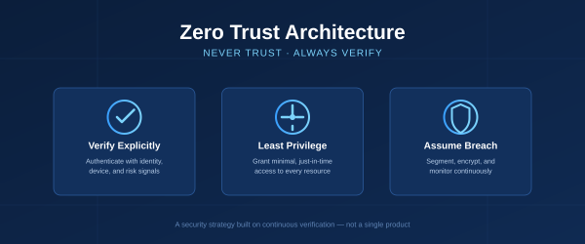
Fig 1: Zero Trust Architecture secures access through continuous verification and least-privilege controls.
Start Learning In-Demand Tech Skills with Expert-Led Training
- Industry-Authorized Curriculum
- Expert-led Training
What Is Zero Trust Architecture?
Zero Trust Architecture replaces implicit network trust with continuous verification of every access request, regardless of location. Microsoft’s Zero Trust adoption framework overview defines it in terms of three principles, which this section breaks down.
- Verify explicitly- the system authenticates and authorizes each request using identity, device health, location, and workload signals.
- Use least-privilege access- administrators grant only the permissions a task requires, often through just-in-time access instead of standing credentials.
- Assume breach- security teams segment networks, encrypt data at rest and in transit, and monitor continuously to limit lateral movement.
Why Do Most Zero Trust Implementations Fail?
Gartner reports that 35% of organizations encounter a failure that disrupts their Zero Trust rollout, and most programs cover only half the environment while mitigating a quarter or less of overall enterprise risk. Six causes explain most of these failures.
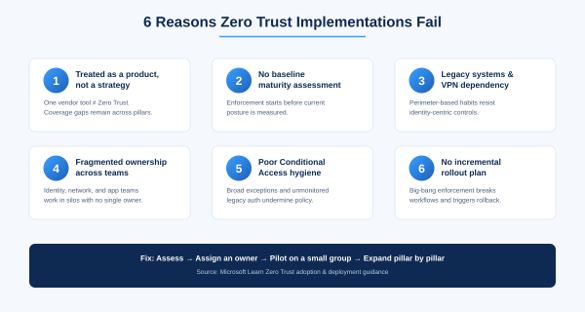
Fig 2: Six common reasons Zero Trust implementations fail and how to address them.
1. Treating Zero Trust as a Product, not a Strategy
A team buys a single vendor’s SSO or firewall tool and calls the project complete. Zero Trust spans six domains: identity, endpoints, network, data, apps, and infrastructure, so one product covers roughly one-sixth of the scope. Gartner found that 78% of organizations investing in Zero Trust allocate less than 25% of their overall cybersecurity budget to it, reinforcing the pattern of buying a single tool rather than funding a coordinated program.
- A point solution protects its own domain but leaves the other five exposed.
- Coordinated policies across all six domains reduce risk; isolated tools do not.
2. Skipping a Baseline Maturity Assessment
Teams that skip a baseline assessment carry blind spots for months because they never establish what “secure” looks like for their own environment. Microsoft’s Zero Trust Assessment automates the check across Entra, Intune, Azure networking, and Purview that most teams would otherwise skip.
- Run the assessment before writing any policy.
- Rank the resulting gaps by risk, not by ease of fix.
- Set a 90-day remediation target for the top three gaps.
3. Legacy Systems and VPN Dependency
The Zscaler ThreatLabz 2025 VPN Risk Report found that 65% of organizations plan to replace their VPNs within the year, and 92% worry that VPN vulnerabilities expose them to ransomware. Networks built around perimeter trust resist identity-centric controls, and line-of-business applications that still authenticate with outdated protocols become the reason a rollout stalls before reaching full coverage.
Azure virtual WAN security guide shows how to replace flat VPN access with segmented, firewall-enforced network zones.
4. Fragmented Ownership Across Teams
Identity, network, data, and app teams often set policy independently. In a typical case, the identity team tightens Conditional Access while the network team leaves VLANs flat and unsegmented; each team meets its own target, but the combined attack surface barely shrinks. Gartner’s finding that most Zero Trust programs mitigate a quarter or less of overall enterprise risk traces directly back to this kind of siloed execution.
- Assign one accountable owner to sign off on policy changes across all domains.
- Require that domain teams report progress against the same shared metric.
5. Weak Conditional Access Hygiene
Conditional Access sits at the center of Zero Trust enforcement, but broad exceptions and unmonitored legacy authentication protocols undermine it. The Conditional Access policy walkthrough documents the specific exception patterns that most commonly reopen the gaps a policy was meant to close.
6. No Incremental Rollout Plan
Enforcing every policy tenant-wide on day one breaks business workflows and triggers rollback. Microsoft Learn’s Zero Trust deployment guidance and Azure zero trust architecture both recommend the same sequence: pilot on a small group, measure the impact, then expand pillar by pillar.
How Can Organizations Avoid Zero Trust Failure?
Organizations that succeed run a phased program with a single accountable owner rather than a one-time deployment. Six actions cut failure risk:
- Run a formal maturity assessment before writing policy.
- Assign a single cross-functional owner for the entire program.
- Start with identity and Conditional Access, then expand to network and data pillars.
- Pilot every policy on a limited group before tenant-wide enforcement.
- Retire legacy VPN and legacy authentication protocols on a fixed 12-month timeline.
- Review policy telemetry every month, not once a year.
Zero Trust is not a destination; it is an operating model that evolves alongside new devices, applications, and attack techniques. Organizations that succeed assign an executive sponsor, set a realistic multi-year timeline, and track metrics pillar by pillar instead of chasing a single “Zero Trust complete” checkbox.
Building Successful Zero Trust
Zero Trust Architecture replaces implicit, perimeter-based trust with continuous verification of every user, device, and request, built on three principles: verify explicitly, use least-privilege access, and assume breach. Gartner found that 35% of organizations encounter a failure that disrupts their Zero Trust rollout, most often because the organization buys a single point product, skips a baseline maturity assessment, keeps legacy VPNs and outdated protocols in place, splits ownership across disconnected teams, lets Conditional Access exceptions accumulate, or enforces policy tenant-wide without piloting first. Organizations that succeed treat Zero Trust as an ongoing operating model, with one accountable owner, a realistic multi-year timeline, and pillar-by-pillar metrics, rather than a one-time checkbox.
Upskill Your Teams with Enterprise-Ready Tech Training Programs
- Team-wide Customizable Programs
- Measurable Business Outcomes
About CloudThat
FAQs
1. What are the three principles of Zero Trust Architecture?
ANS: – The three principles are Verify Explicitly, Use Least-Privilege Access, and Assume Breach. Together they replace implicit network trust with continuous, signal-based verification of every request.
2. Is Zero Trust a product or a framework?
ANS: – Zero Trust is a security strategy and framework that organizations implement through coordinated policies across identity, device, network, app, and data controls. No single vendor product delivers Zero Trust on its own.
3. What is the first step in implementing Zero Trust?
ANS: – The first step is a baseline maturity assessment, such as Microsoft’s Zero Trust Assessment, followed by MFA, Conditional Access, and identity governance controls, before teams expand into the network and data pillars.
4. Why do Zero Trust implementations fail?
ANS: – Gartner attributes most failures to six causes: treating Zero Trust as a single product, skipping a baseline assessment, relying on legacy VPNs, fragmented team ownership, weak Conditional Access hygiene, and enforcing policy tenant-wide without a phased pilot.
5. Does Zero Trust replace VPNs?
ANS: – Zero Trust reduces reliance on traditional VPNs through identity-driven access, and the Zscaler ThreatLabz 2025 VPN Risk Report found that 65% of organizations plan to replace their VPNs within the year. Zero Trust does not eliminate network security; it adds continuous verification on top of it.
6. How does Microsoft support Zero Trust?
ANS: – Microsoft supports Zero Trust through Microsoft Entra ID, Intune, Defender XDR, Purview, Azure Firewall, and Sentinel, which together cover identity, endpoints, data protection, network segmentation, and continuous monitoring.


WRITTEN BY Nikita Khandal
Nikita Khandal is a Research Associate specializing in cloud security, identity, and AI technologies. With experience in cloud computing, cybersecurity, and software development, she has supported and trained learners across Azure and Microsoft Security fundamentals. Holding certifications like AZ‑900, AI‑900, SC‑900, MS‑900, SC‑200, and SC‑300, she brings strong technical depth and practical insights to every learning experience. Known for simplifying complex concepts through hands‑on, real‑world examples, Nikita blends clarity and relevance in her teaching. Her passion for AI‑driven security and continuous learning shapes her unique approach to skill development.


 PREV
PREV











Comments