

 Login
Login


 June 18, 2026
|
Voiced by Amazon Polly |
Performance is a critical factor when working with larger Power BI models. Slow report load times, high memory consumption, and inefficient queries can affect business users and decision-making. At this point, it is necessary to focus on VertiPaq Optimization Techniques.
VertiPaq is an in-memory engine that provides rapid analysis in Power BI. At the same time, its performance depends heavily on the data model’s structure.
Start Learning In-Demand Tech Skills with Expert-Led Training
- Industry-Authorized Curriculum
- Expert-led Training
Understanding the VertiPaq Engine:
Source: Data Monzart
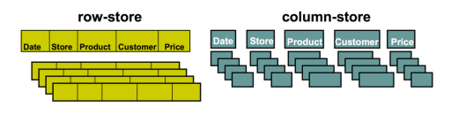
VertiPaq uses columnar storage. This means that Power BI only looks at the columns it needs. It does not have to look at everything. This makes Power BI work better.
VertiPaq also has a way to make the data smaller. This helps because it uses memory. It still lets you get to the data quickly.
These things are important for making Power BI work well. These are the reasons Power BI performs so well with VertiPaq.
Why is VertiPaq Optimization important:
Without optimization, even well-designed reports can have performance problems.
- Large datasets consume a lot of memory, which slows queries and lengthens refresh times.
- As models get bigger, bad design choices make these problems worse. Reports become less responsive.
- Using VertiPaq Optimization Techniques helps keep models scalable, enabling them to handle large workloads without slowing down.
- Applying these techniques ensures reports stay fast and responsive with large datasets.
- VertiPaq Optimization Techniques are essential for handling enterprise-level workloads.
Reduce Column Cardinality:
- The number of values in a column, also known as column cardinality, is really important for VertiPaq compression.
- When a column has many values, such as unique identifiers or free text, it is very hard to compress and uses a lot of memory.
- On the other hand, columns with fewer unique values are compressed more efficiently and perform faster.
- So, optimizing column cardinality is about changing the columns when we can, for example, replacing text values with numbers or putting ranges into groups.
- This way, we can improve the column cardinality. It helps with VertiPaq compression.
Choose Appropriate Data Types:
VertiPaq. Processes data differently depending on its type.
- The VertiPaq system is good at handling data types, especially integers.
- These numeric data types are better than strings because they take up less space and are faster to use.
- The VertiPaq system also works with dates and Boolean values when they are stored in the right format, not as text.
- This helps the VertiPaq system store. Find data more quickly.
- Choosing the data types for the VertiPaq system is simple and can make a big difference in how well it works.
- Data types are important for the VertiPaq system to operate efficiently.
Measures vs Calculated Columns:
The choice between measures and calculated columns has a significant impact on performance.
- Calculated columns are stored in memory. This makes the dataset bigger.
- Measures differ because they are calculated when the query is run. So, it is better to use calculated column measures.
- This way, developers can ensure the model remains simple and performs well.
- They can also move transformations to the part of the system that prepares the data.
- This helps keep the model lightweight and efficient.
- By doing this, the model will be easier to work with. Will run faster.
- Measures are a choice because they do not take up a lot of space, as calculated columns do.
- This is why developers like to use measures when they can.
Optimize Model Design
- VertiPaq’s performance depends on a data model.
- The best way to do this is to use a star schema design for VertiPaq.
- This means you connect fact tables to dimension tables, which makes things much simpler and helps VertiPaq run queries more efficiently.
- You should also try to avoid making things too complicated with relationships, like having too many or too much filtering in both directions, because this can really slow down VertiPaq.
- If you keep your data model clean and easy to understand, VertiPaq can create query plans that work better and deliver the results you need.
Relationship with Modern Power BI Practices:
- VertiPaq optimization works together with modern Power BI practices such as Power BI models, TMDL in Power BI, and CI/CD in Power BI.
- These things help us build analytics solutions that’re fast and easy to maintain.
- You get to learn about VertiPaq optimization and how it helps with performance tuning and enterprise modeling techniques for Power BI.
Optimized Power BI Performance
VertiPaq optimization is a critical aspect of building high-performing and scalable Power BI solutions. By reducing column cardinality, selecting appropriate data types, favoring measures over calculated columns, and designing efficient star-schema models, organizations can significantly improve query performance, reduce memory consumption, and accelerate report responsiveness. When combined with modern Power BI practices such as semantic modeling, TMDL, and CI/CD processes, VertiPaq optimization forms the foundation of enterprise-grade analytics solutions. Investing time in optimizing the VertiPaq engine enables businesses to deliver faster insights, support larger workloads, and maintain reliable performance at scale, ultimately helping decision-makers access the information they need quickly and effectively.
Upskill Your Teams with Enterprise-Ready Tech Training Programs
- Team-wide Customizable Programs
- Measurable Business Outcomes
About CloudThat


WRITTEN BY Mohan Krishna Kalimisetty
Mohan Krishna is a Subject Matter Expert at CloudThat. He has 10+ years of experience as a Power BI developer and he has worked on different projects and various technologies like Power BI, SQL Server, Azure Analysis Services, SQL Integration Services, Excel, etc. He has developed Visualization, Dashboard and reports using reporting tools. He loves training people on cutting-edge technologies.


 PREV
PREV












Comments