

 Login
Login


 March 23, 2026
|
Voiced by Amazon Polly |
As analytics projects evolve, the management of semantic models becomes as relevant as report development. With the advent of TMDL in Power BI, the development of models is gradually aligning with software engineering principles, versioning, collaboration, and the use of reusable model elements. This article examines how TMDL is transforming the interaction between developers and data professionals with models, its significance in the context of enterprise BI, and its place in the Power BI development process.
Start Learning In-Demand Tech Skills with Expert-Led Training
- Industry-Authorized Curriculum
- Expert-led Training
What is TMDL:
Tabular Model Definition Language is a text-based form of semantic models in Power BI. Rather than developing models using a graphical interface only, developers can now directly interact with structured metadata files containing definitions of tables, measures, relationships, and model attributes. This shift introduces several advantages:
- Transparency in model structure
- Easier collaboration across teams
- Compatibility with source control systems
- Faster bulk changes and automation
Unlike earlier formats, TMDL organizes semantic models into readable files and folders. This makes it easier to track changes, compare versions, and maintain consistency across environments.
How TMDL Fits into Modern Power BI Development
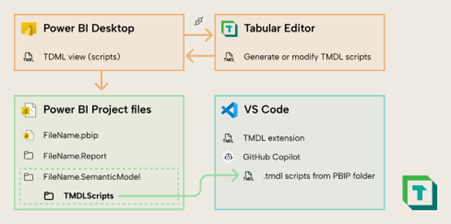
Fig 1: TMDL‑based model‑as‑code workflow with Tabular Editor and Power BI.
The introduction of TMDL aligns Power BI development with engineering workflows. Instead of relying solely on manual UI edits, developers can manage model definitions as code.
Key implications include:
- Model-as-code approach: Semantic models can be scripted, reviewed, and deployed systematically.
- Version control compatibility: Git-based workflows allow tracking changes over time.
- Collaboration: Multiple developers can work on different model components simultaneously.
- Automation potential: Reusable templates and scripts can standardize development.
These capabilities make Power BI semantic models more scalable in enterprise environments where governance and reproducibility are essential.
Practical Value for BI Teams
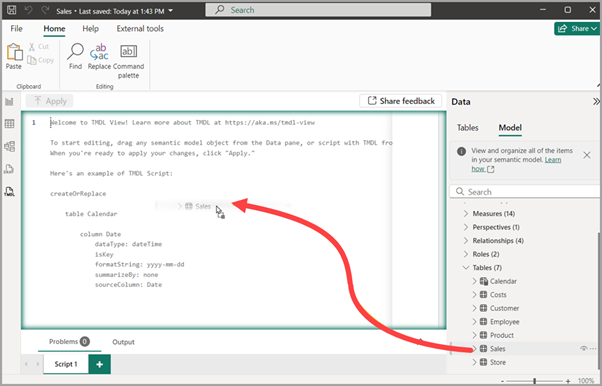
Source: Microsoft Learn
Organizations adopting TMDL see value across multiple roles: developers, analysts, and data engineers.
Batch Editing and Model Maintenance
With text-based metadata, teams can quickly apply changes across multiple objects.
- Update measures in bulk
- Standardize naming conventions
- Apply consistent formatting and properties
This reduces manual effort and improves model consistency.
Reusability Across Projects
Reusable components are easier to maintain:
- Tables can be replicated across models
- Standard logic can be templated
- Governance rules become easier to enforce
Such practices are particularly useful in large BI programs where similar data models appear across departments.
Improved Collaboration
TMDL supports shared development workflows:
- Developers can review model changes like code
- Merge conflicts become manageable
- Documentation improves naturally through structured files
TMDL and the Future of BI Development
The emergence of TMDL signals a shift in how business intelligence tools are evolving. BI is no longer only about dashboards; it is increasingly about engineering reliable semantic layers.
With Microsoft’s ecosystem expanding, TMDL integrates naturally with:
- Version control tools
- Developer environments
- Data platform services
- Continuous deployment pipelines
For professionals building enterprise analytics solutions, understanding TMDL in Power BI becomes essential, not just optional.
When Should You Use TMDL
TMDL is especially relevant in scenarios where:
- Multiple developers collaborate on models
- Enterprise governance is required
- Semantic models are reused across projects
- Automation and CI/CD pipelines are in place
It may not be necessary for very small, single-developer projects, but it becomes highly valuable as complexity grows.
Role in Enterprise Data Strategy
As organizations invest in analytics platforms, semantic models serve as the foundation for reporting, AI, and decision-making.
TMDL contributes by:
- Enabling structured model lifecycle management
- Supporting consistent data definitions
- Improving reliability in analytical outputs
This makes it an important element in building trustworthy enterprise BI systems.
Model-Driven BI Development
TMDL introduces a new paradigm in Power BI development, one where semantic models are treated as structured, manageable assets rather than opaque configurations. By enabling collaboration, automation, and version control, it strengthens the foundation of enterprise analytics.
For BI professionals, the key takeaway is simple: mastering semantic models is no longer just about designing them visually. Understanding how they are defined, maintained, and versioned is becoming equally important.
As organizations scale their analytics initiatives, Tabular Model Definition Language will play a central role in ensuring models remain consistent, reusable, and production-ready.
Upskill Your Teams with Enterprise-Ready Tech Training Programs
- Team-wide Customizable Programs
- Measurable Business Outcomes
About CloudThat


WRITTEN BY Mohan Krishna Kalimisetty
Mohan Krishna is a Subject Matter Expert at CloudThat. He has 10+ years of experience as a Power BI developer and he has worked on different projects and various technologies like Power BI, SQL Server, Azure Analysis Services, SQL Integration Services, Excel, etc. He has developed Visualization, Dashboard and reports using reporting tools. He loves training people on cutting-edge technologies.


 PREV
PREV











Comments