

 Login
Login


 March 17, 2026
|
Voiced by Amazon Polly |
Microsoft 365 Copilot has matured from an intelligent drafting assistant into a context‑aware collaborator. Work IQ and Context IQ are at the heart of this shift, enabling Copilot to understand how work happens and to ground its responses in precise, relevant content. This isn’t another “how‑to” guide kind of blog, but it is an insider’s look at what these capabilities mean for everyday work and why they matter for leaders, operators, and specialists.
Start Learning In-Demand Tech Skills with Expert-Led Training
- Industry-Authorized Curriculum
- Expert-led Training
What’s New in Upgrade
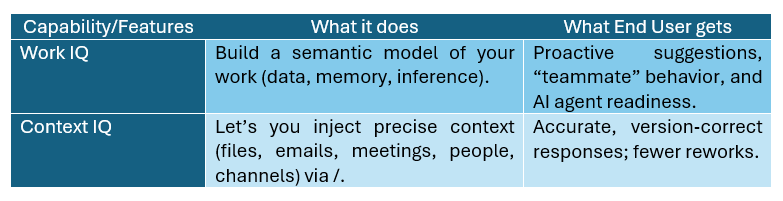
Work IQ is the intelligence layer that lets Copilot “know you, your job, and your company”, mapping real collaboration patterns, preserving memory of preferences, and using inference to anticipate needs. Think of it as your organization’s living work‑graph that respects permissions and compliance.
Context IQ is the precision instrument in the user’s hands. Insert the right files, emails, meetings, people, or Teams channels straight into a prompt (via /), so Copilot’s output is grounded in the exact context you intend.
Together, they transform Copilot into a teammate that anticipates and a tool that does not guess.
Quick Comparison & Flow of Intelligence

Fig 1: How Work IQ and Context IQ power Microsoft 365 Copilot with proactive, context-aware actions.
This flow shows how Microsoft 365 Copilot combines intelligence and context: Work Signals like emails, files, and meetings feed into Work IQ, which applies data, memory, and inference to anticipate needs, while Context IQ grounds user prompts with specific files or channels. Both converge in Copilot to deliver proactive suggestions and agent handoffs, resulting in accurate actions such as drafting, summarizing, scheduling, or escalation.
Real scenarios & Use Cases
Scenario 01: You are preparing a monthly operations review. Copilot surfaces occupancy trends, links the right stakeholders, and anticipates the sustainability KPI that the VP often asks about. You accept a suggested briefing outline, and Copilot drafts the narrative tied to real files and meetings. That’s Work IQ in action- context remembered, patterns inferred.
Scenario 02: Suppose your prompt is as follows:
“Draft a proposal using /Q1_F&B_forecast and /MenuDesign_v4.”
Context IQ grounds the response to those exact items (and only the ones you can access), eliminating outdated attachments and off‑brand language. The result feels right the first time.
Scenario 03: While planning a renovation, you type:
“Summarize risks from /Renovation‑Ops channel and draft stakeholder notes.”
Context IQ brings in the Teams channel context; Copilot ties it back to related documents the team actually cares about, thanks to Work IQ’s organizational understanding.
Scenario 04: Copilot notices a vendor delay email, a silent design file, and a budget review on your calendar. It suggests notifying stakeholders and creating a Planner task with due dates. You decide, Copilot executes. That’s Work IQ’s inference at work.
Learn More and Build Your MS 365 Copilot Skills
Gain hands-on experience through immersive labs and real-world projects that simulate government and enterprise scenarios such as AI-powered citizen services, traffic optimization, and agricultural analytics.
Courses like MS 4023 – Explore MS 365 Copilot chat and MS 4004-Optimize productivity with Copilot for Microsoft 365 will help you get started with Microsoft 365 Copilot Chat, craft effective prompts, and use its AI-powered features to enhance productivity, streamline work, and collaborate securely in real time.
Context-Aware AI Evolution
Work IQ and Context IQ are complementary: one makes Copilot aware; the other keeps it precise. For end users, the practical impact is fewer reworks, faster preparation, and confidence that AI outputs align with the real flow of work. For organizations, this marks a credible step toward agent‑operated workflows, under enterprise governance, no gimmicks, just context‑rich productivity.
Upskill Your Teams with Enterprise-Ready Tech Training Programs
- Team-wide Customizable Programs
- Measurable Business Outcomes
About CloudThat
FAQs
1. Is Work IQ a feature I can turn on/off?
ANS: – No, Work IQ is an intelligence layer inside Microsoft 365 Copilot that continuously analyzes work signals within your permitted scope. Admin controls live in Copilot/tenant governance, not a simple toggle.
2. How is Context IQ different from search?
ANS: – Context IQ isn’t just search. It lets you inject specific, permission‑respecting items (files, emails, meetings, people, Teams channels) into prompts, so Copilot can ground its answer in your chosen context.
3. Will Copilot access content I’m not allowed to see?
ANS: – No. Both Work IQ and Context IQ respect Microsoft 365 permissions, sensitivity labels, and compliance boundaries via the Microsoft Graph.
4. Do these capabilities help outside Office documents?
ANS: – Yes. Their effects appear across Teams, Outlook, SharePoint, and Copilot Chat—proactive suggestions, channel‑aware summaries, and grounded replies.
5. Are Teams channels supported in Context IQ?
ANS: – Yes. Microsoft added Teams channels to Context IQ prompts (rolled out globally in Oct 2025), letting you reference channel content directly.
6. What enables Copilot’s proactive behavior?
ANS: – Work IQ’s Data–Memory–Inference model connects signals across your digital workspace, predicts next actions, and suggests agent handoffs.
7. How does this set Microsoft apart?
ANS: – The deep integration with Microsoft Graph and permission‑aware context makes Copilot’s understanding and grounding distinctive versus generic API plug‑ins.


WRITTEN BY Rahul Mehta
Rahul Mehta is a Subject Matter Expert at CloudThat, specializing in Microsoft and VMware technologies, Generative AI, and cloud security. With over 19 years of experience in the IT training domain, he has trained more than 1000 professionals to upskill in areas such as Microsoft 365 Copilot, Microsoft Team Administration, Azure Security and Compliance, VMware Data Centre Virtualization. Known for simplifying complex concepts and delivering hands-on, impactful training, he brings deep technical knowledge and practical application into every learning experience. Rahul's passion for continuous learning and emerging technologies reflects in his unique approach to learning and development


 PREV
PREV












Comments