

 Login
Login


 February 25, 2026
|
Voiced by Amazon Polly |
Introduction
Amazon ECS has revolutionized containerized application deployment by eliminating the complexity of infrastructure management. One of its most powerful features is auto scaling based on demand, ensuring optimal performance while maintaining cost efficiency.
While Amazon ECS provides built-in metrics like CPU and memory utilization, real-world scenarios often require more nuanced scaling triggers. This post explores implementing custom metric-based auto-scaling for Amazon ECS services using Amazon SQS queue depth.
Pioneers in Cloud Consulting & Migration Services
- Reduced infrastructural costs
- Accelerated application deployment
Why Custom Metrics Matter?
Traditional auto-scaling relies on predefined metrics such as CPU and memory utilization. However, these don’t always reflect true demand. Consider an architecture with a frontend receiving requests, worker tasks processing asynchronously, and an Amazon SQS queue buffering between them. Workers could be idle while messages pile up in the queue. This is where custom metrics become essential.
The Use Case: Voucher Processing Application
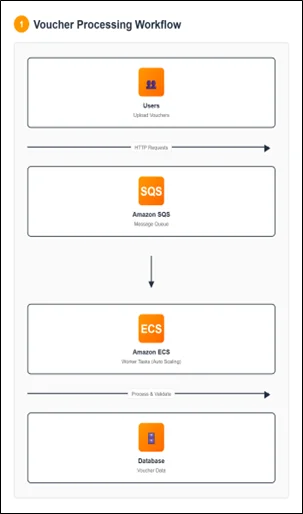
We have an asynchronous application allowing users to upload vouchers to check their balance and validity. The architecture includes Amazon ECS tasks for handling uploads, an Amazon SQS queue for storing metadata, and worker tasks for processing vouchers. Real-world applications experience variable load patterns. Fixed task counts create two problems: under-provisioning during peaks increases latency, while over-provisioning during quiet periods wastes money.
Understanding the Scaling Challenge
The naive approach of scaling based on ApproximateNumberOfMessagesVisible has a critical flaw: an absolute message count doesn’t indicate the required tasks. 1,000 messages might be fine with 10 tasks if processing is fast, but problematic with 100 tasks if processing is slow.
The key insight: consider both the messages waiting and processing time per task alongside your acceptable latency threshold.
The Solution: Backlog Per Task Metric
The solution is a custom “backlog per task” metric that represents the messages each task should handle to maintain the desired service level.
Calculating Backlog Per Task
Formula:
Backlog Per Task = ApproximateNumberOfMessages / Number of Running ECS Tasks
Acceptable Backlog Per Task (Target Value):
Acceptable Backlog Per Task = Acceptable Latency / Average Processing Time Per Message
Example:
– Queue has 1,500 messages, service has 10 tasks
– Backlog per task = 150 – With 10s acceptable latency and 0.1s processing time
– Target = 100 messages per task
– Since 150 > 100, scale to 15 tasks (1,500/100)
Architecture Components
The solution consists of five components:
- Amazon ECS Service
Manages worker tasks with auto scaling policies
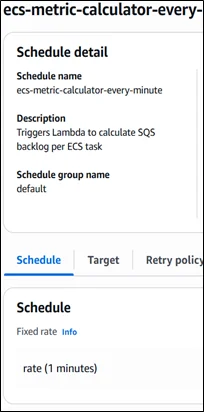
- Amazon EventBridge Scheduled Event
Triggers AWS Lambda every 5 minutes
- AWS Lambda Function
Retrieves Amazon SQS metrics, calculates backlog per task, and publishes to CloudWatch
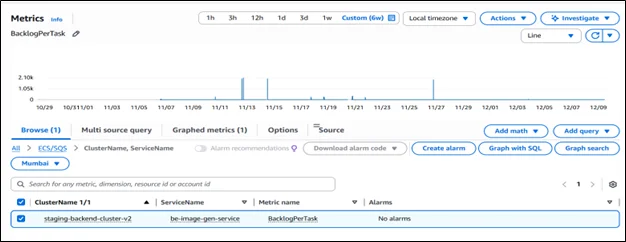
- Amazon CloudWatch Custom Metric
Stores backlog per task for scaling decisions
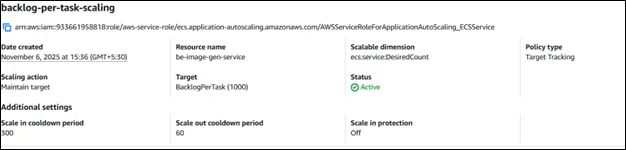
- Target Tracking Scaling Policy
Monitors the metric and adjusts task count
Solution Architecture Diagram
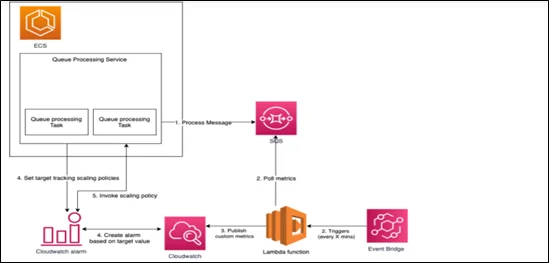
Flow: Amazon EventBridge triggers AWS Lambda → calculates backlog per task → publishes to Amazon CloudWatch → triggers scaling policy → Amazon ECS adjusts task count.
Implementation Details
AWS Lambda Function Code Structure
|
1 2 3 4 5 6 7 8 9 10 11 12 13 14 15 16 17 18 19 20 21 22 23 24 25 26 27 28 29 30 31 32 33 34 35 36 37 38 |
// Pseudo code structure exports.main = async function(event, context) { try { // 1. Get environment variables const clusterName = process.env.ECS_CLUSTER_NAME const serviceName = process.env.ECS_SERVICE_NAME // 2. Get approximate number of messages from SQS const approximateNumberOfMessages = await getQueueAttributes( process.env.QUEUE_URL, ({Attributes}) => Attributes["ApproximateNumberOfMessages"] ) // 3. Get number of running ECS tasks const numberOfActiveTaskInService = await getNumberOfActiveTaskInService( clusterName, serviceName, ({taskArns}) => taskArns.length ) // 4. Calculate backlog per task const backlogPerTask = approximateNumberOfMessages / numberOfActiveTaskInService // 5. Publish metric to CloudWatch const metricData = await putMetricData(backlogPerTask, clusterName, serviceName) return { statusCode: 200, body: metricData }; } catch(error) { // Error handling return { statusCode: 400, body: JSON.stringify(error) } } } |
Benefits of This Approach
- Right-Sized Capacity
Maintain exactly the capacity needed for your SLA
- Cost Optimization
Scale down during low-traffic, pay only for what you need
- Performance Consistency
Maintain acceptable queue depth and latency
- Operational Simplicity
Self-managing with no manual intervention
- Flexibility
Easily adjust targets and adapt to different patterns
Real-World Considerations
Choosing the Right Polling Interval
- The Amazon EventBridge schedule determines how frequently your metric updates:
- 5 minutes (recommended): Balanced responsiveness and cost
- 1 minute: More responsive, higher cost
- 10 minutes: Lower cost, slower reactions
Handling Edge Cases
Zero Running Tasks: If your service scales down to zero (during maintenance or errors), the Lambda function should handle division by zero:
|
1 2 3 |
const backlogPerTask = numberOfActiveTaskInService > 0 ? approximateNumberOfMessages / numberOfActiveTaskInService : 0; |
Empty Queue: When the queue is empty, the metric will be zero, which is correct and will trigger scale-in if appropriate.
Scale-in Protection
Amazon ECS services use a scale-in cooldown period (default 300 seconds) to prevent rapid task termination that could impact availability.
Monitoring and Troubleshooting
Key Metrics to Monitor
- Custom Metric (Backlog Per Task): Verify it’s being updated every 5 minutes
- Amazon ECS Service Desired Count: Track how the service scales over time
- Amazon ECS Service Running Count: Ensure tasks start successfully
- Amazon SQS ApproximateNumberOfMessages: Original queue depth
- Amazon SQS ApproximateAgeOfOldestMessage: Verify messages aren’t waiting too long
Common Issues and Solutions
Issue 1: Metric Not Updating
- Check AWS Lambda logs, AWS IAM permissions, and Amazon EventBridge rule status
Issue 2: Service Not Scaling
- Verify scaling policy attachment, Amazon CloudWatch alarms, and task limits
Issue 3: Over-Scaling
- Lower target value or adjust the scale-in cooldown period
Step-by-Step Deployment Guide
Prerequisites
An existing Amazon ECS cluster and service, an Amazon SQS queue, AWS CLI or Console access, and AWS IAM permissions to create AWS Lambda functions, Amazon EventBridge rules, and Amazon CloudWatch metrics.
Step 1: Create an AWS IAM Role for AWS Lambda with permissions for Amazon SQS, Amazon ECS, Amazon CloudWatch metrics, and Amazon CloudWatch Logs.
Step 2: Create an AWS Lambda Function with Node.js runtime, paste the code, set environment variables (ECS_CLUSTER_NAME, ECS_SERVICE_NAME, QUEUE_URL), and attach the AWS IAM role.
Step 3: Create an Amazon EventBridge Rule with a schedule expression rate(5 minutes), set Lambda as the target, and enable the rule.
Step 4: Test AWS Lambda Function, verify Amazon CloudWatch Logs for successful execution, and check Amazon CloudWatch Metrics for the custom metric.
Step 5: Configure Amazon ECS Auto Scaling with a target tracking policy, select a custom metric, set the target value, configure min/max task counts, and set cooldown periods.
Step 6: Validate by adding messages to the Amazon SQS queue, wait for AWS Lambda invocation, check metric updates, and observe Amazon ECS scaling activity.
Best Practices
- Start with Conservative Targets
Begin with higher backlog targets, optimize gradually
- Monitor Activity
Create CloudWatch dashboards for scaling patterns
- Test Behavior
Simulate load spikes in non-production
- Document Your Calculations
Record processing times and SLA requirements
- Set Up Alerts
Monitor Lambda errors and scaling anomalies
Conclusion
Custom metrics-based auto-scaling enables highly responsive, cost-efficient applications that maintain consistent performance regardless of load. The “backlog per task” metric ensures worker tasks scale precisely to meet demand while honoring SLAs.
Drop a query if you have any questions regarding Amazon ECS and we will get back to you quickly
Empowering organizations to become ‘data driven’ enterprises with our Cloud experts.
- Reduced infrastructure costs
- Timely data-driven decisions
About CloudThat
FAQs
1. Why not use CPU/memory for scaling?
ANS: – They don’t reflect queue demand. Workers can be idle while messages accumulate.
2. How to set the target value?
ANS: – Use: Acceptable Latency ÷ Processing Time Per Message.
3. What if tasks scale to zero?
ANS: – Handle division by zero: set backlog to 0 when no tasks run.


WRITTEN BY Kapu Jagadeesh Suresh


 PREV
PREV












Comments