

 Login
Login


 February 10, 2026
|
Voiced by Amazon Polly |
Overview
Most agents are impressive in a demo environment but fail when deployed because of one key issue: they forget. When a container restarts, an AWS Lambda function may time out, or a workflow requires human approval after several hours. All agents lose their in-memory state and start from scratch. AWS describes how to address this using LangGraph (graph-based agent orchestration) and Amazon DynamoDB, with Amazon DynamoDBSaver, a checkpointing library for LangGraph and Amazon DynamoDB. AWS manages this. With Amazon DynamoDBSaver, you are able to store where the agent is in the graph. This includes inputs, intermediate outputs, next nodes to execute, and task-related data. This allows long-running workflows to be resumed and ensures agents fail gracefully while safely scaling agents across many concurrent workers.
Pioneers in Cloud Consulting & Migration Services
- Reduced infrastructural costs
- Accelerated application deployment
Introduction
Agents are increasingly used for real business processes, such as onboarding flows, ticket triage, procurement approvals, customer support, and investigation playbooks. They are not one-turn chats, but rather multi-turn workflows with complex logic, tool calls, retries, and human-in-the-loop delays. In the traditional LangGraph prototype, the state is typically held in memory, e.g., via an in-memory checkpoint. This works fine for an experiment, but it is not suitable for production. AWS documentation highlights the disadvantages of an ephemeral checkpointer: it loses all state upon restart, has difficulty with multi-worker deployments, and cannot resume state after an interruption. Durable state management is the clear distinction between a chatbot and an agent you can trust.
Core idea LangGraph checkpoints and Amazon DynamoDB persistence
The behaviour of the LangGraph is depicted as a graph where the ‘node’ does the work (makes a call to the LLM, executes a tool, etc.), and the edges map the control flow together. LangGraph allows the agent to save state at a ‘super-step’ as a checkpoint using a DynamoDBSaver. It is composed of a snapshot of the state of the graph, or a StateSnapshot, which includes the config, state (metadata), values (channel state), next nodes to execute, and task info (including errors and interrupts). Amazon DynamoDB Saver allows the agent to save state so it can later resume from a precise point in the process.
This unlocks three production capabilities:
- Resume: Continue the workflow from the pause, then wait for human approval or other system delays.
- Recover: Restart safely when failures occur without losing progress.
Scale: simultaneously run multiple worker processes and keep correct state storage.
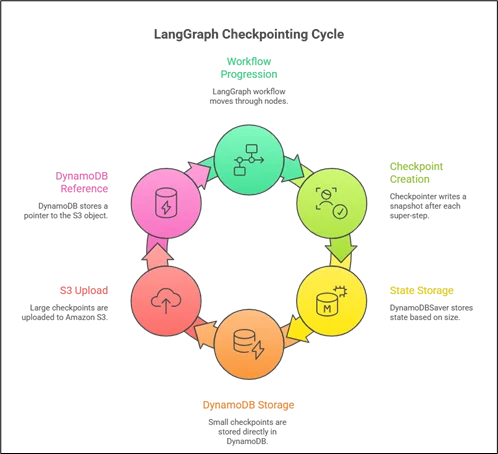
Amazon DynamoDBSaver features that matter in production
- Intelligent payload handling (Amazon DynamoDB and Amazon S3)
Moreover, there is a limit on item size in Amazon DynamoDB. Hence, if the agent state is larger (e.g., the chat history, the documents retrieved, or the results returned by tools), it exceeds the safe size for storage in the database. This is mitigated in the Amazon DynamoDB Saver by using a small checkpoint in Amazon DynamoDB and large checkpoints in Amazon S3, with a pointer in Amazon DynamoDB.
- Time to Live (TTL) for automatic
Amazon DynamoDBSaver has a TTL option (e.g., “ttl_seconds”) that can eliminate older checkpointed data after a specified period. This can be very useful for a temporary workflow, a test, or any other case where the older thread state has no value and should not incur any cost.
- Compression to reduce cost
Amazon DynamoDB Saver introduces optional checkpoint compression to reduce the size of the checkpoint data stored. This can reduce the cost of writing to Amazon DynamoDB and the cost of storage in Amazon S3 while maintaining the state information within the checkpoint.
- Clear access pattern and IAM permissions
AWS outlines Amazon DynamoDB table access needs, such as GetItem, PutItem, Query, BatchGetItem, and BatchWriteItem for working efficiently with checkpoint storage and retrieval. This makes it easier to lock down least-privilege IAM roles for your agent infrastructure.
Real-world use case: Human-in-the-loop approval
Enhanced checkpoints are a great tool for cases where we need to pause a workflow. AWS offers this as an example: a workflow is invoked, a human looks at it in a separate UI/process, and then the workflow continues later from a stored state. This would be great for domains where accuracy and errors are very costly, such as financial transactions, law, and security, where an agent needs to “sleep.”
Implementation tips (what teams usually miss)
- Specify a reliable Thread_id scheme, which maps each user/session/work item to a deterministic thread ID to ensure the reliability of the state retrieval upon retries and deployments.
- Treat checkpoints as audit artifacts: store associated debugging information, such as errors, interrupts, tool versions, and prompt versions. The checkpoints store task information, such as errors and interrupts.
- Plan retention: Set individual TTLs based on workload (e.g., hours for chat, weeks for cases) and verify that the requirements match.
- Load testing: if expecting high throughput, use batch APIs where possible, e.g., BatchGetItem, BatchWriteItem, as highlighted by AWS for checkpoint access.
Conclusion
LangGraph allows developers to create agents of considerable intelligence and statefulness; however, agents’ readiness depends on the quality and consistency of states. AWS offers DynamoDBSaver Connector: a persistence layer designed specifically for LangGraph and Amazon DynamoDB. It saves states at every superstep and allows agents to resume and recover reliably.
Drop a query if you have any questions regarding LangGraph and we will get back to you quickly.
Empowering organizations to become ‘data driven’ enterprises with our Cloud experts.
- Reduced infrastructure costs
- Timely data-driven decisions
About CloudThat
FAQs
1. What does “durable AI agent” really mean?
ANS: – This means the workflow state will be persisted, so that in case of failures, the agent can continue where it left off instead of having to start over. This is what Amazon DynamoDBSaver does for LangGraph’s checkpoints.
2. What is a LangGraph checkpoint precisely?
ANS: – A checkpoint is a snapshot of the graph state, taken at every super step in the form of StateSnapshot, containing config, metadata, state channel values, next nodes, and task information, including errors and interrupts.


WRITTEN BY Nekkanti Bindu
Nekkanti Bindu works as a Research Associate at CloudThat, where she channels her passion for cloud computing into meaningful work every day. Fascinated by the endless possibilities of the cloud, Bindu has established herself as an AWS consultant, helping organizations harness the full potential of AWS technologies. A firm believer in continuous learning, she stays at the forefront of industry trends and evolving cloud innovations. With a strong commitment to making a lasting impact, Bindu is driven to empower businesses to thrive in a cloud-first world.


 PREV
PREV












Comments