

 Login
Login


 December 17, 2025
|
Voiced by Amazon Polly |
Moving your systems to the cloud can feel like a big task. Many teams worry about downtime, data loss and whether their apps will work the same way after moving. These worries are common and completely normal.
This is why Azure Migrate is so helpful. It gives you a clear and simple way to start your cloud migration journey. You do not have to rebuild everything or make sudden changes. Azure Migrate guides you step by step so you can move your workloads safely and calmly. It reduces guesswork, removes confusion and lets you modernize your systems slowly after the move.
Start Learning In-Demand Tech Skills with Expert-Led Training
- Industry-Authorized Curriculum
- Expert-led Training
Simplifying Azure Migrate
Azure Migrate is a free tool from Microsoft. It brings everything you need for migration into one place. Instead of using multiple tools for checking, assessing and migrating workloads, you get a single, unified dashboard.
Azure Migrate scans your servers, apps and databases. It shows you what can be moved, how ready things are and how much it might cost once you migrate to Azure. This makes your workload migration easier because you know what to expect. You can think of Azure Migrate as a friendly guide. It helps you understand your current setup and gives you the confidence to start your cloud journey at your own pace.
Azure Migrate Making Cloud Migration Easier
Many businesses delay their cloud migration because of fear. They worry that something might break or that the cloud will cost more than planned. These are real concerns. Azure Migrate helps remove these worries by giving clear information upfront. It tells you:
- if your systems are ready for the cloud,
- how they will perform in Azure,
- and what your cloud costs may look like.
This transparency gives teams peace of mind. When you know the facts early, your workload migration becomes smoother. You can plan more effectively and avoid surprises. Azure Migrate is especially useful for businesses with older systems. Instead of guessing and hoping things will work, you get real insights based on your actual environment.
A Smooth and Safe Workload Migration
One of the best aspects of Azure Migrate is how it facilitates the migration process. Traditional migrations often require extended downtime; however, Azure Migrate tools can replicate your servers and databases while they remain online. Your users do not feel the impact because the migration happens quietly in the background.
This makes workload migration less stressful. You can test everything in Azure before making the switch. You can move when you are ready, not when the technology forces you to. This calm and safe approach is helpful for businesses that cannot afford downtime or disruption.
Modernizing Your Workloads
After your migration, you enter the world of Azure modernization. The best part is that you can modernize gradually. You do not need to upgrade everything on day one. You can start with minor improvements like:
- Move a database to a managed service
- Convert an app to use containers
- Reduce maintenance by using platform services
- Try serverless options for specific workloads
These changes add up over time. They make your environment faster, safer and easier to manage. Your simple cloud migration naturally turns into long-term Azure modernization.
To summarize the entire migration process, the diagram below, taken from the Microsoft documentation, demonstrates the Migration Phases, which can be good steps to start learning about the migration process.
Learn More about Azure Migrate
For someone who wants to start their journey on the migration process, they can refer to the Microsoft documentation explaining the entire process of Migration with all the Migration Phases as described in the diagram below.
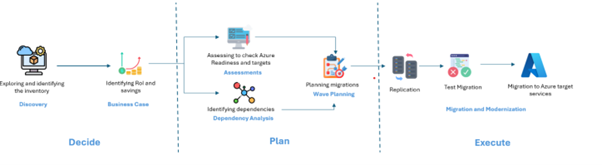
Source: Microsoft Learn
However, another way to start your learning is to explore Azure Migrate, cloud migration, workload migration and Azure modernization in more depth by opting for the courses below:
- Migrate SQL Server workload to Azure SQL Database
- Configure and migrate to Azure Data for PostgreSQL
In addition, these Azure training programs help you build skills for real-world projects. They cover different areas of cloud migration, planning and modernization so you can learn at your own pace and gain confidence step by step. You can explore these Azure migration-focused trainings and choose the one that best fits your learning goals.
Simplifying Cloud Migration
Azure Migrate simplifies cloud migration by eliminating confusion and providing clear guidance. It helps you understand what you have, what you can move and how to move it safely. Your workload migration becomes smoother because you can test, review and switch over when you feel ready. And once your workloads are in Azure, you can gradually start Azure modernization to improve performance, reduce maintenance and save costs. Azure Migrate is one of the simplest and most reliable ways to begin your cloud journey without stress.
Upskill Your Teams with Enterprise-Ready Tech Training Programs
- Team-wide Customizable Programs
- Measurable Business Outcomes
About CloudThat


WRITTEN BY Atul Choudhary
Atul Choudhary is a Subject Matter Expert at CloudThat and a Microsoft Certified Trainer with over 15 years of IT industry experience. Specializing in Azure and Hybrid Cloud solutions, he holds multiple certifications including AZ-104, AZ-305, AZ-700, and AZ-800. Atul is known for delivering hands-on, scenario-driven training that bridges the gap between theory and real-world application. At CloudThat, he empowers professionals and organizations to upskill, modernize infrastructure, and accelerate cloud adoption. He is also a certified International Engineering Educator through IUCEE, committed to advancing global technical education.


 PREV
PREV












Comments