

 Login
Login


 December 17, 2025
|
Voiced by Amazon Polly |
Managing local administrator accounts on Azure Virtual Machines is a task that requires a balance between operational convenience and strong security controls. Misconfigured admin access is one of the most common attack vectors for compromised VMs. This blog explores best practices, recommended architectures and Azure-native tools that help you securely manage local admin accounts across Windows and Linux VMs.
Start Learning In-Demand Tech Skills with Expert-Led Training
- Industry-Authorized Curriculum
- Expert-led Training
Why Local Admin Account Security Matters
Local admin accounts provide complete control over an Azure VM, including software installation, OS configuration, policy updates, credential extraction and more. If these accounts are mismanaged or left with weak passwords, they become an ideal entry point for attackers.
Common risks include:
- Default usernames like admin or root
- Password reuse across multiple VMs
- Weak or non-rotated credentials
- Orphaned admin accounts after employee exit
- Persistent RDP/SSH ports exposed to the internet
Azure provides a robust set of tools to mitigate these risks.
1. Create Local Admins Securely at Provisioning
When deploying an Azure VM, you may choose to set a local admin account. You should:
- Avoid predictable usernames: Use unique, non-standard admin names.
- Use SSH keys for Linux and passwordless approaches where possible: SSH keys reduce brute-force attack surfaces.
- Enforce Azure Policy: Azure Policy can block VM creation unless it uses secure admin configurations.
2. Use Entra ID login Instead of Local Accounts
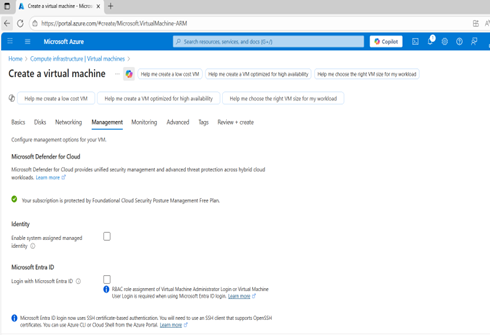
Source: Create a virtual machine – Microsoft Azure
Azure allows Entra ID-based authentication for both Windows and Linux VMs. This removes the need for traditional local admin credentials and enables identity-based access.
Benefits of Entra ID login
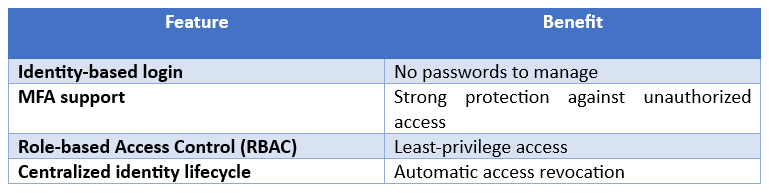
Example RBAC roles
- Virtual Machine Administrator Login
- Virtual Machine User Login
Assign these roles at VM, resource group or subscription level.
3. Rotate Local Admin Passwords Automatically with Azure Automation or Key Vault
Using Azure Key Vault and VM Extensions, you can automatically rotate local admin passwords.
- Sample PowerShell script (for Windows VM password rotation)
|
1 2 3 4 5 6 7 8 9 10 11 12 13 14 15 16 17 18 19 20 21 22 23 24 25 26 27 |
$vmName = "MyVM" $resourceGroup = "RG1" $newPassword = (New-Guid).Guid Set-AzVMOperatingSystem ` -ResourceGroupName $resourceGroup ` -VMName $vmName ` -Windows ` -ComputerName $vmName ` -Credential (New-Object System.Management.Automation.PSCredential("SecAdmin",(ConvertTo-SecureString $newPassword -AsPlainText -Force))) # Store password in Azure Key Vault (optional) Set-AzKeyVaultSecret -VaultName "KV-Prod" -Name "$vmName-admin" -SecretValue (ConvertTo-SecureString $newPassword -AsPlainText -Force) |
This approach ensures non-reusable, auto-rotated and securely stored admin credentials.
4. Use Just-in-Time Access Instead of Permanent Ownership
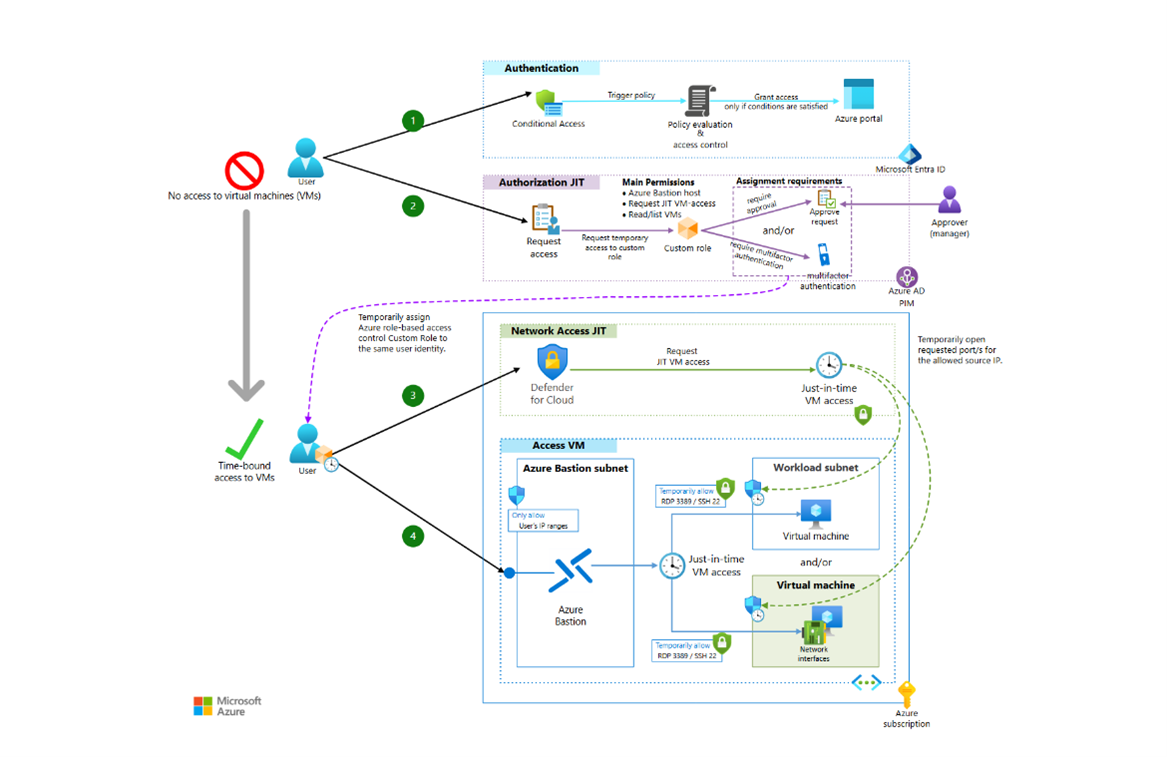
Source: Multilayered protection for Azure virtual machines – Azure Architecture Center
A major Azure VM security best practice is using Just-in-Time access via Microsoft Defender for Cloud.
JIT access ensures that admin access (RDP/SSH) is closed by default and opened only for approved, time-bound requests.
How JIT improves security
- Closes RDP/SSH ports automatically
- Limits approved IP ranges
- Allows time-bound access (e.g., 1 hour)
- Logs all access requests
This dramatically reduces exposure to brute-force attacks.
For a more detailed overview of Microsoft Defender for Cloud, please refer to courses like the AZ-500: Microsoft Azure Security Technologies certification.
5. Disable Built-in Administrator Accounts
For Windows VMs, disable the built-in Administrator account unless required for break-glass situations.
Sample command to disable built-in admin:
|
1 |
net user Administrator /active:no |
For Linux VMs, avoid direct root access. Prefer sudo privilege elevation instead.
6. Use Azure VM Extensions to Enforce Security
Azure VM extensions such as:
- Custom Script Extension
- Desired State Configuration (DSC) Extension
- Azure Monitor Agent
- Guest Configuration Extensiom
can enforce consistent admin account policies across a fleet of VMs.
Example DSC snippet to block local admin creation:
|
1 2 3 4 5 6 7 8 9 |
User Administrator { UserName = "Admin" Ensure = "Absent" } |
7. Monitor and Audit Admin Access
Enable Azure-native logging:
Recommended logs
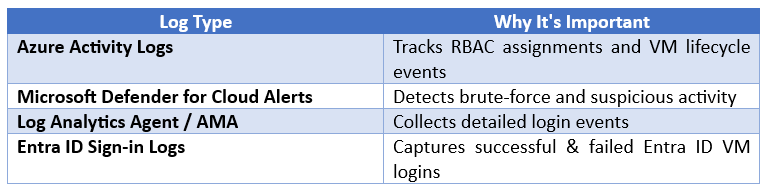
Set alerts for:
- Failed RDP/SSH attempts
- Creation of unexpected local admin accounts
- Password reset attempts
- RBAC role changes
8. Implement Break-Glass Accounts Carefully
Break-glass (emergency access) admin accounts must:
- Be stored securely (Key Vault or password manager)
- Have long, random passwords (128+ bits)
- Be audited regularly
- Never be used for daily operations
This ensures operational continuity without compromising security.
9. Use Network Security Controls
Local admin accounts are only as secure as your network exposure.
Best practices:
- Keep RDP/SSH closed to the internet
- Use Azure Bastion for browser-based secure access
- Use NSGs & firewalls to restrict traffic
- Enforce private IP-only admin access via VPN/ExpressRoute
Secure Azure VM Access
Managing local admin accounts on Azure VMs is not just about setting a strong password, it requires a layered, identity-driven and automated approach. By integrating Entra ID login, Just-in-Time access, password rotation, Azure Policy and Key Vault, you significantly reduce the attack surface and achieve a secure, resilient VM environment.
Whether you manage a single VM or hundreds across production, adopting these best practices ensures consistent, controlled and auditable Azure VM access aligned with modern cloud security principles.
Upskill Your Teams with Enterprise-Ready Tech Training Programs
- Team-wide Customizable Programs
- Measurable Business Outcomes
About CloudThat


WRITTEN BY Kunal Khadke
Kunal Khadke is a Subject Matter Expert and Microsoft Certified Trainer at CloudThat, with a strong focus on Microsoft Azure Infrastructure and security. With 10+ years of experience in cloud, he has trained over 5000 professionals. Kunal has a strong passion for empowering IT professionals and organizations on their cloud journey. He has hands-on experience in cloud architecture, deployment, and security. He delivers practical, real-world training that bridges the gap between certification and implementation. Kunal has trained professionals across industries, helping them master Azure services such as Virtual Networks, Azure Active Directory, Security, Networking, and more. Known for his clear teaching style and deep technical knowledge, Kunal is dedicated to shaping the next generation of cloud experts.


 PREV
PREV












Comments