

 Login
Login


 December 17, 2025
|
Voiced by Amazon Polly |
In modern multi-cloud architectures, secure communication between workloads across different platforms, such as AWS and Google Cloud Platform (GCP), is essential. Traditionally, service account keys were used to authenticate external systems to Google Cloud, but static credentials create substantial security risks if leaked or mishandled.
Workload Identity Federation (WIF) provides a highly secure and scalable solution by allowing AWS workloads to access Google Cloud resources without storing or using service account keys.
In this blog, we explore how an AWS EC2 instance can securely access Google Cloud Storage (GCS) via WIF, enabling robust hybrid-cloud connectivity.
Start Learning In-Demand Tech Skills with Expert-Led Training
- Industry-Authorized Curriculum
- Expert-led Training
Why Workload Identity Federation?
Workload Identity Federation creates a trusted identity bridge between AWS and Google Cloud. Instead of distributing long-lived service account keys, an AWS workload assumes an AWS IAM role, which is then authorized to impersonate a Google service account.
For more information on identity federation concepts, refer to Google Cloud’s official documentation.
Benefits
- Eliminates exposure of service account keys
- No manual rotation or credential management
- Designed for multi-cloud and hybrid workloads
- Built-in auditing and monitoring via Cloud Audit Logs
Architecture Overview
Below is a conceptual identity flow behind the integration:
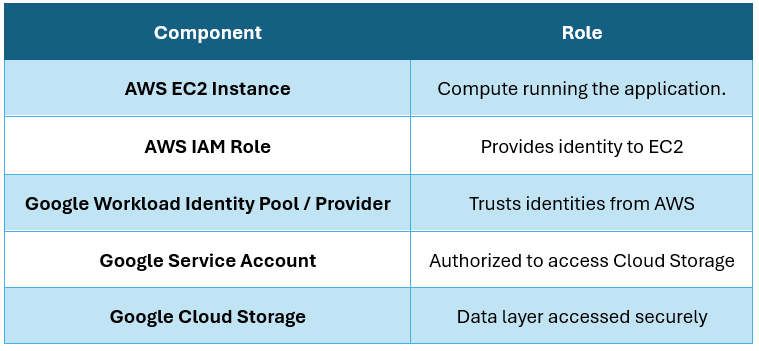
End-to-End Authentication Flow
EC2 Instance → assumes AWS IAM Role → AWS STS issues identity token → GCP Workload Identity Pool validates token → permissions are granted via Google Service Account impersonation → application accesses GCS.
At no point is a service account key stored or exchanged.
Setting Up the Integration (High-Level Guide)
While each cloud involves several configuration actions, the essential workflow can be summarized into three phases:
Step 1 – Configure Identity Trust in Google Cloud
- Create a Service Account with the required Storage permissions
(e.g., Storage Viewer or Storage Admin) - Create a Workload Identity Pool and Provider that trusts AWS IAM roles
- Allow the Pool to impersonate the Service Account
Step 2 – Configure AWS IAM Role for EC2
- Create an IAM Role for EC2 with permissions to obtain STS tokens
- Configure the trust relationship so AWS can represent EC2’s identity to Google Cloud
Step 3 – Deploy Application on EC2
- Run the required application code with Google authentication libraries
- The application automatically exchanges AWS role credentials for federated access to GCP
- No service account key file is needed – authentication happens dynamically
Code Example – Accessing GCS from EC2
|
1 2 3 4 5 6 7 |
from google.cloud import storage client = storage.Client() for bucket in client.list_buckets(): print(bucket.name) |
If WIF is configured correctly, the output displays GCS buckets accessible to that service account.
Expected Result
The application running on AWS EC2 will successfully access Google Cloud Storage using short-lived, automatically rotated credentials, with no dependency on service account key files.
Best Practices
- Apply least-privilege IAM roles on both clouds
- Regularly review federation permissions and audit logs
- Avoid enabling key downloads for the service account
- Monitor token exchange logs via Cloud Logging / Cloud Audit Logs
For additional insights into identity access management, identity federation and hybrid cloud security, explore the various training programs that different platforms, such as CloudThat, offer.
Keyless Multi-Cloud Security
Workload Identity Federation fundamentally shifts how multi-cloud workloads authenticate. By replacing service account keys with secure, short-lived identity tokens, organizations can:
- Improve security
- Reduce operational overhead
- Enable seamless hybrid cloud connectivity
With WIF in place, applications running on AWS EC2 can interact with Google Cloud Storage and any other GCP API in a secure, automated and keyless manner, paving the way for scalable multi-cloud deployments.
Upskill Your Teams with Enterprise-Ready Tech Training Programs
- Team-wide Customizable Programs
- Measurable Business Outcomes
About CloudThat


WRITTEN BY Laxmi Sharma
Laxmi Sharma is a Subject Matter Expert at CloudThat, specializing in Google Cloud Platform. With 12+ years of experience in Cloud Domain. She has trained over 3000+ professionals/students to upskill in Cloud domain. Known for simplifying complex concepts and hands-on teaching, she brings deep technical knowledge and practical application into every learning experience. Laxmi's passion for learning & explaining new things to others reflects in her unique approach to learning and development.


 PREV
PREV












Comments