

 Login
Login


 December 2, 2025
|
Voiced by Amazon Polly |
Introduction
Modern cloud environments require frictionless onboarding, automatic access governance, and auditable workflows. Manually managing AWS IAM users, permissions, and temporary access is inefficient, error-prone, and non-compliant.
This blog presents a full Zero-Touch AWS IAM Automation System that integrates:
- HR System → SSO User Sync
- Role-Based Permission Assignment
- Approval Workflows via Enterprise Communication Platform
- Time-Bound (JIT) Access with Automatic Revocation
- Audit Logging + Central Dashboard
The design is cloud-native, scalable, and fully automated.
Pioneers in Cloud Consulting & Migration Services
- Reduced infrastructural costs
- Accelerated application deployment
Objective
Zero-Touch AWS IAM Automation delivers:
- Automated user provisioning into AWS IAM Identity Center (SSO)
- Department/role-based permission allocation
- Auto-deprovisioning on HR offboarding
- Automated approval workflow for elevated access
- Just-In-Time (JIT) access with auto-expiry
- Extension workflow with manager approval
- A central audit dashboard
- End-to-end automation, no manual AWS IAM actions
Scope
- Auto-create/update/deactivate SSO users from HR events
- Department → Permission Set auto-mapping
- Approval workflow through communication platform (Slack/Webhook/Custom Portal)
- Time-Bound Access (1h, 4h, 24h, custom)
- Auto-revoke via AWS Step Functions timers
- Extension request system
- Central dashboard for admins and auditors
- Full audit logging (assign, approve, revoke, extend)
Key Features
- HR → SSO Sync
Any HR system (CSV/API/Webhook) triggers:
- Onboarding → Create SSO user
- Role change → Update permissions
- Offboarding → Remove access instantly
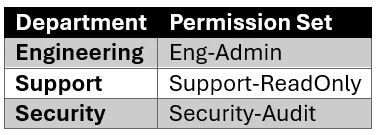
- Department-Based Permission Assignment
Example mapping:
- Approval Workflow
Approvers receive a message via any communication/notification platform:
- Approve
- Reject
- Request more info
- Just-In-Time Access
User selects:
- Permission Set
- Duration (hours or days)
- Optional justification
- Auto-Revoke Engine
AWS Step Functions keeps a timer and automatically removes access at expiry.
- Audit Dashboard
Shows:
- User lifecycle events
- Permission history
- Active time-bound access
- Approvals & revocations
Architecture Overview
- HR System → Triggers event (onboard/update/offboard).
- Amazon API Gateway → Receives HR event.
- Sync AWS Lambda → Creates or updates SSO user via SCIM.
- Amazon DynamoDB/Amazon RDS → Stores metadata, mappings, and access records.
- User Portal (React) → Self-service access request & history.
- Amazon EventBridge → Routes request events.
- Approval Engine → Sends approval message through the notification platform.
- AWS Step Functions → Approval + Grant + Wait + Revoke workflow.
- AWS IAM Identity Center → Assign/remove permission sets.
- Audit Store → Logs all events.
- Admin Dashboard → Visibility for security teams.
Tech Stack
- Frontend: React + Tailwind
- Backend: Python/Node.js Lambdas
- SSO: AWS IAM Identity Center
- Database: Amazon DynamoDB or Postgres
- Workflow: Amazon EventBridge + AWS Step Functions
- Notifications: Webhooks / Slack / Custom Platform
- Security: AWS KMS, AWS IAM, AWS CloudTrail
- Infra: Terraform
End-to-End Workflow
- HR System → SSO User Creation
Example HR event:
|
1 2 3 4 5 6 |
{ "event": "user_onboard", "email": "alice.smith@example.com", "department": "Engineering", "name": "Alice Smith" } |
AWS Lambda Code (Python): Create SSO User via SCIM
|
1 2 3 4 5 6 7 8 9 10 11 12 13 14 15 16 17 18 19 20 21 22 23 24 25 26 |
import boto3 import requests SCIM_ENDPOINT = "<scim-url>" SCIM_TOKEN = "<token>" def lambda_handler(event, context): user = event["user"] payload = { "userName": user["email"], "name": { "givenName": user["name"].split()[0], "familyName": user["name"].split()[-1] }, "emails": [{"value": user["email"], "primary": True}], "active": True } response = requests.post( f"{SCIM_ENDPOINT}/Users", headers={ "Authorization": f"Bearer {SCIM_TOKEN}", "Content-Type": "application/json" }, json=payload ) return {"status": "created", "response": response.json()} |
- Department → Permission Set Auto-Assignment
Mapping stored in Amazon DynamoDB:
|
1 2 3 4 |
{ "department": "Engineering", "permission_set_arn": "arn:aws:sso:::permissionSet/EngAdmin" } |
Permission Assignment AWS Lambda
|
1 2 3 4 5 6 7 8 9 10 11 12 |
import boto3 sso = boto3.client('sso-admin') def assign_permission(instance_arn, user_id, perm_set_arn, account_id): sso.create_account_assignment( InstanceArn=instance_arn, TargetId=account_id, TargetType="AWS_ACCOUNT", PermissionSetArn=perm_set_arn, PrincipalType="USER", PrincipalId=user_id ) |
- Self-Service Portal → Request Time-Bound Access
Example request from React Portal API:
|
1 2 3 4 5 6 |
{ "email": "alice.smith@example.com", "permission_set": "SecAudit", "duration_hours": 4, "justification": "Debugging security logs" } |
Generic Approval Message Example
Can be sent via Slack, webhook, custom portal, or internal messaging system:
|
1 2 3 4 5 6 7 8 |
{ "title": "Access Request", "user": "Alice Smith", "requested_permission": "SecAudit", "duration_hours": 4, "approve_url": "<url>", "reject_url": "<url>" } |
Terraform Snippet — SSO Permission Set
|
1 2 3 4 5 6 7 |
resource "aws_ssoadmin_permission_set" "security_audit" { name = "Security-Audit" instance_arn = var.sso_instance_arn description = "Audit-level access for security team" session_duration = "PT4H" } |
Amazon DynamoDB for Department Mapping
|
1 2 3 4 5 6 7 8 9 |
resource "aws_dynamodb_table" "department_mapping" { name = "department-permission-mapping" billing_mode = "PAY_PER_REQUEST" hash_key = "department" attribute { name = "department" type = "S" } } |
- Approval logs
- User lifecycle (create/update/deactivate)
- Expired and revoked access
- Historical reports
Built in React using an API backend.
Conclusion
This Zero-Touch AWS IAM Automation System removes all manual AWS IAM operations and replaces them with:
- Automated HR-driven onboarding
- Policy-driven permissions
- Self-service access
- Automatic revocation
- Auditable approvals
- Time-bound elevated access
Drop a query if you have any questions regarding Zero-Touch AWS IAM and we will get back to you quickly.
Empowering organizations to become ‘data driven’ enterprises with our Cloud experts.
- Reduced infrastructure costs
- Timely data-driven decisions
About CloudThat
FAQs
1. What problem does Zero-Touch AWS IAM User & Permission Lifecycle Automation solve?
ANS: – It eliminates manual AWS IAM user management by automating the entire identity lifecycle, user creation, permission assignments, access approvals, and time-bound revocation. This reduces human error, enforces least privilege, and ensures compliance through complete auditability.
2. How does the system auto-provision and deprovision users?
ANS: – The automation listens to events from the HR system (via CSV, API, or webhook). For onboarding, an AWS Lambda function creates an SSO user via SCIM API. For role changes, the system updates assigned permission sets. For offboarding, it immediately removes all permissions and disables the SSO user, ensuring no stale access remains.
3. How is Just-In-Time (JIT) Access implemented?
ANS: – JIT Access is triggered from a self-service portal where a user selects a permission set and duration. AWS Step Functions then handles the workflow:
- Send approval request
- Wait for the decision
- Grant temporary access
- Wait until the selected duration expires
- Auto-revoke permissions


WRITTEN BY Rajveer Singh Chouhan
Rajveer works as a Cloud Engineer at CloudThat, specializing in designing, deploying, and managing scalable cloud infrastructure on AWS. He is skilled in various AWS services as well as automation tools like Terraform and CI/CD pipelines. With a strong understanding of cloud architecture best practices, Rajveer focuses on building secure, cost-effective, and highly available solutions. In his free time, he keeps up with the latest advancements in cloud technologies and enjoys exploring infrastructure automation and DevOps tools.


 PREV
PREV












Comments