

 Login
Login

 September 3, 2026
|
Voiced by Amazon Polly |
Introduction
Infrastructure as Code (IaC) has revolutionized cloud infrastructure management by enabling engineers to provision resources through code instead of manual processes. With Terraform, infrastructure becomes version-controlled, consistent, and repeatable across environments. However, in real-world environments, manual changes, production fixes, autoscaling, and external automation can cause the deployed infrastructure to drift away from the Terraform configuration, leading to inconsistencies that require careful management.
This mismatch is known as Infrastructure Drift.
Infrastructure drift is one of the most common operational challenges faced by DevOps and Platform Engineering teams. If left unmanaged, it can lead to deployment failures, unexpected infrastructure modifications, security risks, compliance violations, and increased operational complexity.
In this blog, we’ll explore the most common infrastructure drift scenarios, understand why they occur, and discuss the most effective strategies for managing each one.
Pioneers in Cloud Consulting & Migration Services
- Reduced infrastructural costs
- Accelerated application deployment
What is Infrastructure Drift?
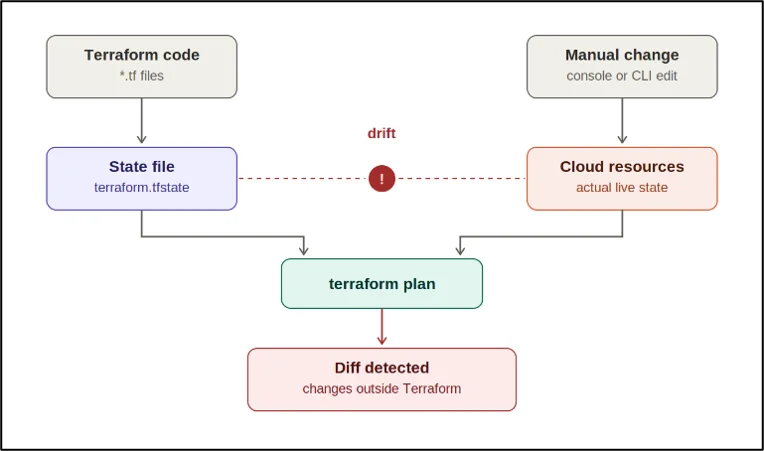
Terraform maintains infrastructure by comparing three different components:
- Terraform Configuration – The desired infrastructure defined in .tf files.
- Terraform State – Terraform’s record of the deployed resources.
- Actual Cloud Infrastructure – The resources currently running in the cloud provider.
Under normal circumstances, all three remain synchronized.
Infrastructure drift occurs whenever the actual cloud infrastructure differs from what Terraform expects. During a Terraform plan, Terraform refreshes its state by querying the cloud provider and comparing the live infrastructure with the desired configuration. Any differences are reported as proposed changes.
While detecting drift is straightforward, deciding how to respond requires understanding why the drift occurred.
Scenario 1: Manual Changes from the Cloud Console
The most common source of drift is manual modification of infrastructure through the cloud provider’s console.
For example, an engineer may increase the size of an EC2 instance, modify a security group rule, or change an Application Load Balancer configuration directly in AWS to troubleshoot an issue. Although these changes solve the immediate problem, Terraform is unaware of them because the configuration files were never updated.
How to Manage It
First, determine whether the change was intentional or accidental.
If the modification was temporary, Terraform should restore the infrastructure by applying the original configuration. If the change represents a permanent improvement, update the Terraform code first, then apply the changes to ensure the infrastructure, state, and code remain aligned.
The best practice is to treat Terraform as the single source of truth and avoid direct console changes unless necessary.
Scenario 2: Emergency Production Fixes
Production outages often require immediate action.
Engineers may temporarily increase Auto Scaling capacity, update firewall rules, or modify load balancer configurations directly in production to restore service availability. While these emergency fixes help resolve incidents quickly, they frequently remain undocumented.
The next Terraform deployment may unknowingly overwrite those changes, potentially reintroducing the original issue.
How to Manage It
Emergency fixes should never remain as undocumented manual changes.
Once the incident is resolved:
- Document the changes.
- Review whether they should become permanent.
- Update the Terraform configuration accordingly.
- Deploy the updated code through the normal CI/CD pipeline.
Including infrastructure reconciliation in the post-incident review process helps prevent recurring drift.
Scenario 3: Resources Created Outside Terraform
Organizations often adopt Terraform after their cloud environments have already been established. Existing resources such as VPCs, S3 buckets, IAM roles, Route 53 hosted zones, or CloudWatch log groups may already exist but are not managed by Terraform.
Recreating these resources can introduce unnecessary downtime and operational risk.
How to Manage It
Instead of creating duplicate resources, import the existing infrastructure into Terraform.
After importing:
- Create the corresponding Terraform configuration.
- Validate the imported state.
- Run terraform plan to verify there are no unexpected modifications.
This approach enables Terraform to manage existing infrastructure without service disruption.
Scenario 4: Multiple Automation Tools Managing the Same Resource
Infrastructure may also be modified by Kubernetes controllers, AWS Auto Scaling Groups, Karpenter, Lambda functions, CloudFormation stacks, or configuration management tools.
For example, Karpenter continuously adjusts Amazon EKS worker nodes based on workload demand. Terraform interprets these changes as drift, even though they are expected behavior.
How to Manage It
When another automation tool intentionally manages certain resource attributes, Terraform should ignore those specific fields.
Using the lifecycle.ignore_changes configuration prevents Terraform from repeatedly attempting to restore values that are expected to change dynamically.
This approach is commonly used for:
- Desired instance count
- Autoscaling parameters
- Replica counts
- Controller-managed metadata
Only the attributes managed externally should be ignored, not the entire resource.
Scenario 5: Accidental Resource Deletion
Infrastructure drift can also occur when resources are unintentionally deleted.
Examples include:
- IAM Roles
- Security Groups
- CloudWatch Alarms
- Route Tables
- Subnets
Terraform still maintains these resources in its state file, but they no longer exist in the cloud environment.
How to Manage It
Running terraform plan immediately identifies missing resources.
For stateless resources, Terraform can safely recreate them during the next deployment. For stateful services such as databases, storage volumes, or production messaging systems, recreation may result in data loss. Recovery procedures should always be validated before allowing Terraform to rebuild these resources.
Scenario 6: Terraform State Drift
Sometimes the infrastructure itself is correct, but Terraform’s state file no longer reflects reality.
This can happen because of:
- Interrupted deployments
- Backend migration
- Failed state updates
- State restoration from backups
Terraform begins reporting unexpected changes even though the infrastructure is functioning correctly.
How to Manage It
A refresh-only operation synchronizes the Terraform state with the live infrastructure without modifying cloud resources.
Once the state has been refreshed, review the remaining differences carefully. If the infrastructure now represents the desired configuration, update the Terraform code to match before the next deployment.
Scenario 7: Intentional Infrastructure Changes
Not every infrastructure change represents a problem.
Business requirements evolve continuously.
Examples include:
- Increasing database storage
- Upgrading instance types
- Expanding node capacity
- Adding new security rules
These changes often originate as manual updates before being formalized.
How to Manage It
Rather than forcing the infrastructure back to its previous configuration, update the Terraform code to reflect the new desired state accurately.
Once approved through version control, apply the updated configuration to ensure that code, infrastructure, and state remain synchronized.
Conclusion
Infrastructure drift is an inevitable part of managing modern cloud environments. As organizations scale, manual configuration changes, emergency production fixes, external automation tools, and evolving business requirements can cause deployed infrastructure to diverge from the Terraform configuration. While drift cannot always be prevented, it can be effectively managed by choosing the appropriate remediation strategy, whether that’s reverting changes, updating Terraform code, importing existing resources, refreshing the state, or ignoring intentionally dynamic attributes. By adopting strong governance, Infrastructure as Code best practices, and automated drift detection, organizations can minimize operational risks, improve deployment consistency, and maintain secure, reliable, and predictable cloud infrastructure.
Drop a query if you have any questions regarding Infrastructure drift, and we will get back to you quickly.
Making IT Networks Enterprise-ready – Cloud Management Services
- Accelerated cloud migration
- End-to-end view of the cloud environment
About CloudThat
FAQs
1. How can I detect infrastructure drift in Terraform?
ANS: – The most common way to detect infrastructure drift is to run Terraform plan. Terraform compares the desired configuration in your .tf files with the current infrastructure and reports any differences. Teams can also automate terraform plan through CI/CD pipelines or scheduled jobs to detect drift regularly.
2. Should I use lifecycle.ignore_changes to prevent Terraform drift?
ANS: – Use lifecycle.ignore_changes only when another system, such as an Auto Scaling service, Kubernetes controller, or Karpenter, intentionally manages specific resource attributes. It should be used carefully because ignoring too many attributes can hide unintended configuration changes or security issues.
3. What is the best way to prevent Terraform infrastructure drift?
ANS: – The best approach is to treat Terraform as the single source of truth for infrastructure changes. Avoid manual cloud console modifications wherever possible, enforce infrastructure changes through version control and CI/CD pipelines, regularly run drift detection, and ensure emergency production changes are reflected in Terraform code.


WRITTEN BY Sidda Sonali
Sidda Sonali is a Research Associate at CloudThat with a strong passion for DevOps and cloud-native technologies. She is committed to mastering modern DevOps practices and staying abreast of the latest advancements in cloud services. Sonali has hands-on experience with tools such as Terraform, Amazon EKS, Kubernetes, and Docker, and is proficient in implementing CI/CD pipelines, managing Infrastructure as Code (IaC), and automating cloud deployments. Her expertise extends to container orchestration, deployment automation, and building secure, scalable infrastructures across diverse cloud environments.


 PREV
PREV












Comments