

 Login
Login


 March 11, 2026
|
Voiced by Amazon Polly |
Overview
Web applications are constantly exposed to security threats such as SQL injection, cross-site scripting (XSS), malicious bots, and distributed denial-of-service (DDoS) attacks. Protecting applications from these threats is critical to maintaining availability, performance, and user trust. AWS Web Application Firewall (AWS WAF) is a managed security service that helps protect web applications by filtering and monitoring incoming HTTP and HTTPS requests.
AWS WAF allows you to create custom security rules that control traffic to your applications. It integrates seamlessly with services like Amazon CloudFront, Application Load Balancer (ALB), and Amazon API Gateway, enabling you to block malicious requests before they reach your application.
In this blog, we will explore AWS WAF features and walk through a step-by-step guide to configuring AWS WAF to protect a web application.
Pioneers in Cloud Consulting & Migration Services
- Reduced infrastructural costs
- Accelerated application deployment
Introduction
AWS WAF is designed to give organizations fine-grained control over the traffic accessing their web applications. Instead of relying solely on network-level security, AWS WAF operates at the application layer (Layer 7), allowing it to inspect web requests and apply rules based on IP addresses, request headers, query strings, request body, and more.
With AWS WAF, you can use AWS-managed rule groups for common threats or create custom rules tailored to your application’s needs.
Diagram
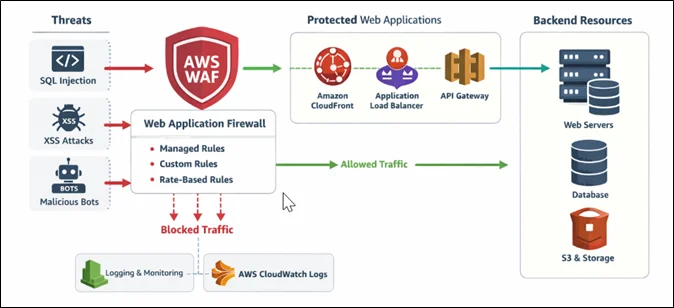
Key Features of AWS WAF
- Managed Rule Groups
AWS provides preconfigured rule sets that protect against common vulnerabilities such as SQL injection and cross-site scripting.
- Custom Rules
You can create your own rules to allow, block, or count requests based on specific conditions, such as IP address, country, headers, or request patterns.
- Rate-Based Rules
AWS WAF can automatically block IP addresses that send excessive requests, helping protect against brute-force attacks and traffic floods.
- Real-Time Monitoring
AWS WAF integrates with Amazon CloudWatch, allowing you to monitor traffic patterns, rule matches, and blocked requests in real time.
- Seamless AWS Integration
AWS WAF works directly with Amazon CloudFront, Application Load Balancers, and Amazon API Gateway without requiring additional infrastructure.
Step-by-Step Guide
Step 1: Open AWS WAF Console
- Log in to the AWS Management Console
- Search for AWS WAF & Shield
- Select AWS WAF
- Choose the appropriate Region (for ALB or API Gateway)
- CloudFront WAF is global
You will land on the AWS WAF dashboard.
Step 2: Create a Web ACL
A Web ACL (Access Control List) defines the rules that inspect incoming web requests.
Steps:
- Click Create Web ACL
- Enter:
- Web ACL Name (example: web-app-waf)
- Resource type (CloudFront / ALB / API Gateway)
- Select the AWS resource you want to protect
- Set default action:
- Allow requests
- OR Block requests
Click Next.
Step 3: Add Managed Rules
Managed rules provide immediate protection against known threats.
Steps:
- Click Add rules
- Choose Add managed rule groups
- Select:
- AWS Managed Rules – Core rule set
- SQL injection rule set
- Known bad inputs rule set
- Review rule behavior
- Click Add rules
These rules automatically block common attack patterns.
Step 4: Create Custom Rules (Optional)
Custom rules allow advanced control over traffic.
Example: Block traffic from a specific IP
- Click Add rule
- Choose Rule builder
- Define:
- Match condition: IP address
- Action: Block
- Save the rule
You can also create rules based on:
- Country
- Request headers
- URI paths
- Query parameters
Step 5: Configure Rate-Based Rules
Rate-based rules protect against request flooding.
Steps:
- Click Add rule
- Choose Rate-based rule
- Set request limit (example: 2000 requests per 5 minutes)
- Choose action: Block
- Save rule
This helps prevent brute-force and bot attacks.
Step 6: Review and Create Web ACL
- Review all rules and priorities
- Confirm logging and metrics settings
- Click Create Web ACL
AWS WAF is now actively protecting your application.
Step 7: Monitor WAF Traffic
Go to:
- AWS WAF → Web ACLs → Traffic Overview
You can view:
- Allowed requests
- Blocked requests
- Rule match counts
- Traffic trends
Logs can be sent to Amazon CloudWatch, Amazon S3, or Amazon Kinesis Data Firehose for analysis.
Conclusion
Following the steps in this guide, you can quickly deploy AWS WAF, attach it to your web resources, and start monitoring traffic in real time. A properly configured AWS WAF acts as a critical security layer, ensuring your web applications remain secure, available, and resilient against modern threats.
Drop a query if you have any questions regarding AWS WAF and we will get back to you quickly.
Knowledgeable Pool of Certified IT Resources with first-hand experience in cloud technologies
- Hires for Short & Long-term projects
- Customizable teams
About CloudThat
FAQs
1. Which AWS services can AWS WAF protect?
ANS: – AWS WAF helps mitigate application-layer attacks and works together with AWS Shield to provide DDoS protection.
2. How is AWS WAF priced?
ANS: – Pricing is based on the number of Web ACLs, rules, and web requests processed. It follows a pay-as-you-go model.
3. Can I test rules before blocking traffic?
ANS: – Yes. AWS WAF allows you to set rules in “Count” mode to monitor traffic before enforcing blocking actions.


WRITTEN BY Ravi Kose
Ravi Kose works as a Senior Research Associate at CloudThat. He is a skilled cloud and infrastructure professional with a strong focus on managing infrastructure, security, and cloud migration projects. Ravi has hands-on experience designing secure, scalable, and efficient cloud architectures. With a solid understanding of cloud best practices and tools, he ensures smooth and secure transitions during cloud adoption and modernization initiatives. In his free time, he enjoys exploring emerging cloud technologies and deepening his expertise in DevOps and security practices.


 PREV
PREV












Comments