

 Login
Login


 June 17, 2026
|
Voiced by Amazon Polly |
In modern cloud environments, organizations manage access across multiple AWS accounts, applications, and users. As teams scale, managing identities and permissions using traditional IAM users becomes complex, error-prone, and difficult to audit.
AWS IAM Identity Center (formerly AWS Single Sign-On) provides a centralized way to manage workforce access to AWS accounts and business applications. It enables secure, scalable, and simplified identity management through single sign-on (SSO), centralized permission control, and seamless integration with external identity providers.
This blog explains how AWS IAM Identity Center simplifies access management, covers key concepts such as permission sets and identity sources, outlines its architecture, and explains why it is essential for enterprise-grade AWS environments.
Start Learning In-Demand Tech Skills with Expert-Led Training
- Industry-Authorized Curriculum
- Expert-led Training
Key Benefits of AWS IAM Identity Center
Organizations adopting IAM Identity Center to gain several advantages:
- Centralized Access Management – Manage user access to multiple AWS accounts from a single place
- Single Sign-On (SSO) – Users log in once to access AWS accounts and applications
- Scalability – Easily manage thousands of users and accounts
- Integration with Identity Providers – Works with Active Directory and external IdPs (SAML 2.0)
- Fine-Grained Permissions – Uses permission sets to define access levels
- Improved Security – Supports MFA and strong authentication mechanisms
- Audit and Compliance – Centralized logging with CloudTrail
Understanding Core Concepts
- What is AWS IAM Identity Center?
AWS IAM Identity Center is a centralized identity and access management service that enables secure access to:
- Multiple AWS accounts
- Cloud applications (e.g., Salesforce, Microsoft 365)
Instead of managing IAM users in each account, IAM Identity Center provides a central identity layer where:
- Users authenticate once (SSO)
- Access is assigned centrally
- Permissions are consistently applied
- Identity Sources
IAM Identity Center supports multiple identity sources:
- Built-in Identity Store – Users and groups managed directly in AWS
- Microsoft Active Directory Integration – Sync users from on-premises or AWS Managed AD
- External Identity Providers via SAML 2.0
This flexibility allows organizations to integrate existing identity systems without duplication.
- What Are Permission Sets?
Permission sets define what users can do in AWS accounts.
They are similar to IAM roles but centrally managed.
Each permission set includes:
- IAM policies (managed or custom)
- Session duration
- Optional inline policies
Once assigned, IAM Identity Center automatically creates IAM roles in target accounts.
- Account Assignments
Access is granted by assigning:
- Users or groups
- Permission sets
- AWS accounts
How AWS IAM Identity Center Simplifies Access Management (Step-by-Step)
Step 1: Enable IAM Identity Center
You enable IAM Identity Center from the AWS Management Console and integrate it with AWS Organizations for multi-account environments.
Step 2: Choose Identity Source
Select your identity provider:
- Built-in directory
- Active Directory
- External IdP (SAML-based)
Step 3: Create Permission Sets
Define roles such as:
- Administrator
- Developer
- Read-only access
Attach IAM policies to these permission sets.
Step 4: Assign Users and Groups
Grant access by assigning:
- Users/groups
- Permission sets
- AWS accounts
IAM Identity Center automatically provisions roles in each account.
Step 5: Enable Secure Access
Users access AWS via a centralized login portal:
- One login (SSO)
- MFA enforcement
- Temporary credentials (no long-term access keys)
Step 6: Monitor and Audit
You can track activity using:
- AWS CloudTrail for API activity
- Amazon CloudWatch for monitoring
- Access reports for auditing
Real-World Use Cases
- Multi-Account Enterprise Access
Organizations using multiple AWS accounts for:
- Production
- Development
- Testing
IAM Identity Center provides centralized access control across all accounts.
- Workforce Identity Federation
Companies integrate with existing identity providers, such as Active Directory, so employees can log in with corporate credentials.
- Secure Developer Access
Developers receive temporary, role-based access rather than long-term IAM credentials, thereby improving the security posture.
- SaaS Application Access
IAM Identity Center enables SSO access to cloud applications such as:
- Salesforce
- Microsoft 365
- Custom enterprise apps
Architecture Overview
IAM Identity Center architecture includes:
- Central identity store or external IdP
- AWS Organizations integration
- Permission sets mapped to IAM roles
- AWS accounts as resource targets
- SSO access portal for users
- Logging and monitoring integration
Below is the IAM Identity Center architecture, which eliminates the need to manage IAM users in each account and ensures consistent access control across accounts.
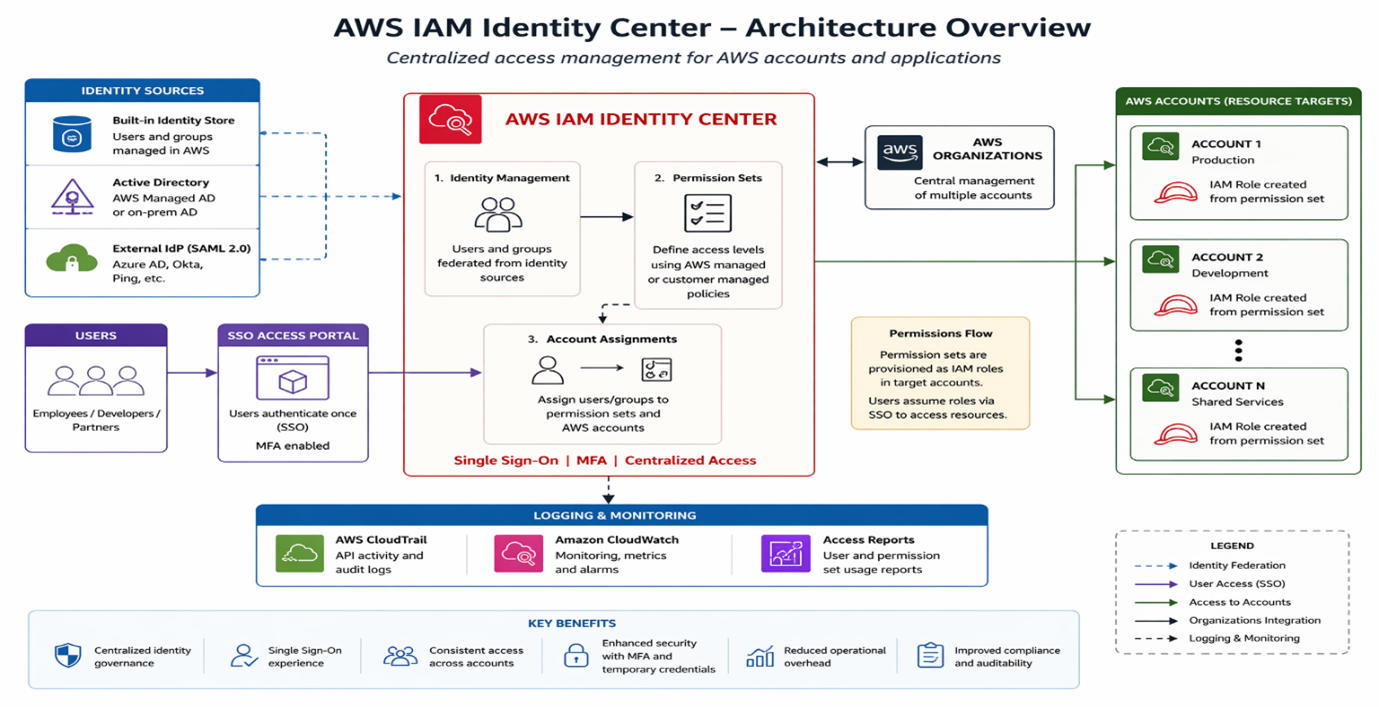
Fig 1: Centralized access management with AWS IAM Identity Center architecture.
Why Enterprises Choose AWS IAM Identity Center
Compared to traditional IAM user management, IAM Identity Center provides:
- Centralized identity governance
- Simplified multi-account access
- Strong security with MFA and temporary credentials
- Seamless integration with enterprise identity systems
- Reduced operational overhead
- Better compliance and auditability
Enterprises prefer IAM Identity Center because it aligns with modern identity federation practices.
Modern AWS Access Governance
AWS IAM Identity Center is a foundational service for simplifying identity and access management in AWS. By centralizing authentication and authorization, organizations eliminate the complexity of managing IAM users across multiple accounts.
With features like SSO, permission sets, identity federation, and centralized auditing, IAM Identity Center enables secure, scalable, and efficient access management.
It is not just an identity service; it is the backbone of modern AWS access governance.
Upskill Your Teams with Enterprise-Ready Tech Training Programs
- Team-wide Customizable Programs
- Measurable Business Outcomes
About CloudThat


WRITTEN BY Avinash Singh Bundela
Avinash Singh Bundela is a Subject Matter Expert at CloudThat, specializing in AWS Architecting / AWS DevOps and AWS Security. With 14 years of experience in Training and Consultancy, he has trained over 10000+ professionals/students to upskill in Multiple Technologies. Known for simplifying complex concepts and delivering interactive hands-on sessions, he brings deep technical knowledge and practical application into every learning experience. Avinash’s passion for continuous learning reflects in his unique approach to learning and development.


 PREV
PREV











Comments