

 Login
Login

 August 6, 2026
|
Voiced by Amazon Polly |
Introduction
Quick Answer: OpenAI Codex is an AI model that translates natural language into executable code across multiple environments. You write what you want in plain English, and Codex writes the code. It works inside your IDE (VS Code, JetBrains), via API, through CLI tools, and in cloud workflows. Built for Python, JavaScript, TypeScript, Java, Go, and 10+ other languages, Codex handles everything from boilerplate to complex logic. Yes, it’s free to experiment with. No, you won’t lose your job. It’s a productivity lever you learn to master.
You’re 20 minutes into a mundane function. Your fingers are tired. Your brain is tired. The problem is solved. You just need to write it. Again.
Copy-paste from Stack Overflow. Type out the imports. Handle the edge cases. Test the obvious stuff. Fix the obvious bugs. Roll your eyes at yourself for forgetting that semicolon.
That’s where Codex enters the scene.
It’s not sci-fi. It’s not going to write your entire app while you sip coffee. But it will sit with you while you work. It will suggest the next 10 lines based on what you just typed. It will auto-complete that boring utility function before you even finish naming it. It will save you hours of mechanical work so you can focus on the thinking.
And the best part? It’s already accessible. Right now. In your editor.
Advance Your Career with OpenAI Training
- Build AI Applications
- GPT-5 & OpenAI APIs
- Hands-on Projects
What Actually Is OpenAI Codex
OpenAI Codex is the code-writing sibling of GPT-3. But where GPT-3 speaks in prose and paragraphs, Codex speaks in functions, classes, and executable statements.
OpenAI Codex isn’t a single model anymore. It’s OpenAI’s full agentic coding platform, and it now sits at the center of dedicated training tracks like CloudThat’s Codex Deployment Practitioner Program, built specifically for teams rolling it out in production. What launched in April 2025 as a CLI tool has grown into a system available through the ChatGPT web app, a dedicated Codex CLI, a desktop app for Windows and macOS, and integrations across major IDEs.
Under the hood, it’s no longer just “GPT-3 that learned GitHub.” Codex now runs on purpose-built reasoning models tuned specifically for engineering work: GPT-5.3-Codex, a faster low-latency “Spark” variant clocked at roughly 15x earlier speeds, and now GPT-5.4 and GPT-5.6-based builds with context windows up to 272,000 tokens. This kind of shift, from a code-completion tool to a full generative AI programming assistant, is covered in more depth in CloudThat’s breakdown of top generative AI programming tools.
It’s also expanded well past writing functions. In March 2026, OpenAI added Codex Security, an agent that hunts for and patches vulnerabilities on its own. By that same month, Codex had crossed 2 million weekly active users, and OpenAI started pitching it as an enterprise agent platform, not just for code, but for broader technical work, the same shift toward practical, applied skills that CloudThat’s AI Technical Practitioner Program is built around.
But here’s where it stops being magic and starts being a tool: Codex is only as good as your prompt. Tell it “write me a function to sort an array” and it will. But tell it “write me a function that takes a list of user objects with timestamps, filters out entries older than 24 hours, then sorts by engagement score in descending order, returning only the user ID and score” and suddenly you get something precise. Useful. Production-ready.
The jump from generic to specific is where Codex transforms from a curiosity into an actual time-saver.
How Codex Works Across Different Environments
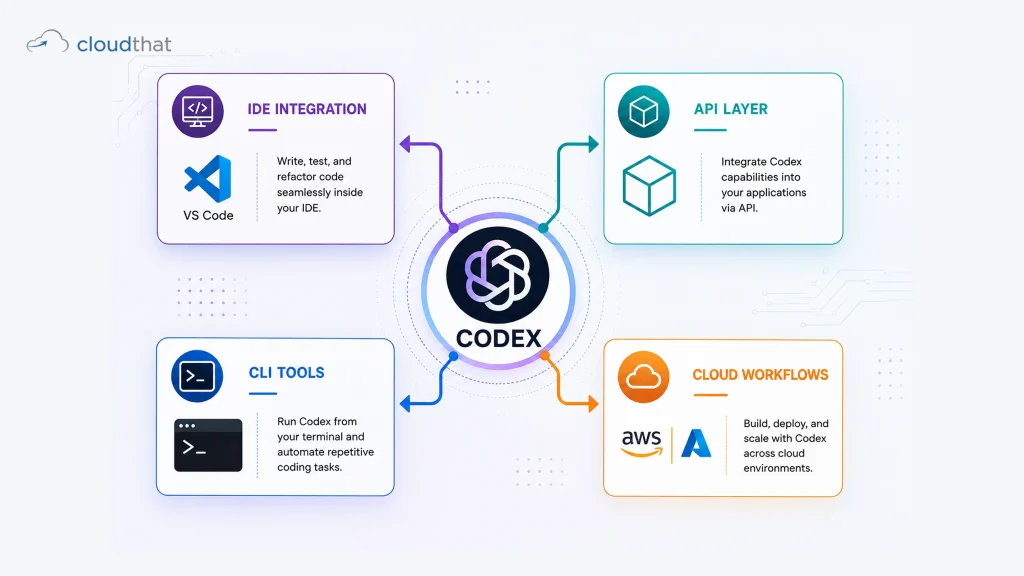
Codex isn’t a single product. It’s an API. A foundation. A capability you can bolt into whatever workflow you already use.
Think of it like electricity. The power source is the same. But you can plug in a lamp, a refrigerator, or an industrial welder, and suddenly it does something completely different.
The IDE Integration (The Most Common Path)
Your editor is your home. VS Code. JetBrains. Sublime. GitHub’s Copilot is the public face of Codex inside IDEs. You type a comment describing what you want. You hit Tab. Codex suggests the next lines. You accept or ignore it. You keep moving.
The magic is the speed. The magic is the reduction in cognitive load. You’re not hunting for the method name or remembering the exact parameter order. You’re just accepting suggestions and building.
The API Layer (For The Builders)
Want to embed Codex into your own product? Your SaaS app? Your internal tool? Use the API. Send natural language. Get code back. Integrate it anywhere. This is where companies start building entire code-generation platforms on top of Codex.
CLI Tools and Custom Workflows
Some developers build command-line tools that pipe Codex into their build system. “Generate documentation for this file.” “Write unit tests for this function.” “Convert this SQL to Python.” The API is flexible enough to power whatever you imagine.
Cloud Workflows: The Enterprise Play
Enterprises are doing the most interesting things with Codex right now. They’re automating infrastructure code. They’re generating boilerplate across microservices. They’re using it in CI/CD pipelines to catch incomplete implementations before they ship. This is where Codex moves from “cool developer toy” to “strategic tool.”
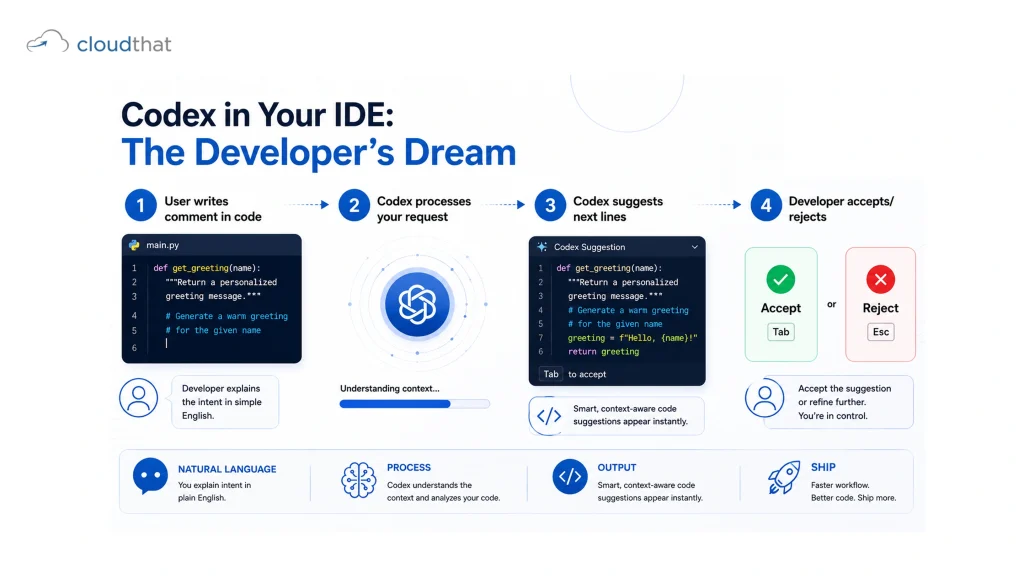
Codex in Your IDE: The Developer’s Dream
Let’s be specific. You’re in VS Code. You’re building a FastAPI endpoint. Here’s how it actually feels in practice.
You write:
# Get all users from database, filter by active status, return paginated response
def get_active_users(
Codex suggests:
skip: int = 0, limit: int = 10, db: Session = Depends(get_db)
) -> List[UserSchema]:
users = db.query(User).filter(User.is_active == True).offset(skip).limit(limit).all()
return users
You hit Tab. It fills in. You don’t have to remember the SQLAlchemy syntax. You don’t have to remember the pagination pattern. You don’t have to think. You just accept and move on.
Is it always perfect? No. Sometimes it suggests verbose code when something simpler works. Sometimes it misunderstands intent. But even when it’s 70% right, that’s still 70% of the cognitive load removed.
The real shift happens after using Codex for a week. You start trusting it. Your typing gets faster. Your commenting gets more deliberate. You’re actually describing your intent more clearly because you know Codex will translate it. Your code gets better because you’re thinking more clearly about what you want.
And here’s the kicker: you’re learning. Every time Codex suggests something you weren’t sure about, you see a pattern. You see a convention. You internalize it. In six months, you’re writing code faster, and you’re doing it with less effort and more clarity.
Using Codex via API and CLI Tools
Not everyone works in an IDE. Some people build tools. Some people automate. Some people integrate.
If you’re hitting the Codex API directly, you’re in different territory. You control the prompt. You manage the parameters. You define what “temperature” means (basically, how creative vs conservative the suggestions are).
Temperature too high? You get wild, creative code that might not actually work. Temperature too low? You get safe, predictable, boring code. It’s a dial you tune based on what you’re building.
Here’s a practical example: You’re building an internal documentation generator. Users describe what they need. You feed that description to Codex via the API. It generates a Markdown file. You store it. You’re done.
Or you’re building infrastructure. You pass Codex the requirements. It generates Terraform code. You review it. You apply it. Infrastructure as code, just faster.
CLI wrappers make this even nicer. Some developers build command-line interfaces that take natural language input and pipe it through Codex. “codex ‘write a python function to validate email addresses'” returns a production-ready function. You save it. You move on.
The constraint here is cost and latency. Every API call counts. Every millisecond matters when you’re building production systems. But the ROI is there if you’re doing this at scale.
Codex in Cloud Workflows and Production
This is where Codex gets serious.
Teams are using Codex to automate code generation in CI/CD pipelines. They’re using it to generate boilerplate for new microservices. They’re using it to auto-document functions. They’re using it to generate test cases based on function signatures.
Imagine this workflow: A new PR comes in. Your system uses Codex to generate tests for any new functions. It generates documentation. It checks for common patterns you want enforced. All automated. All by leveraging Codex.
The constraint, again, is cost and control. Codex is fast, but it’s not free. You’re paying per API call. So you optimize. You only run it on specific files. You cache results. You control it carefully.
But when you get it right? When you integrate Codex into your deployment pipeline and suddenly your team is moving 30% faster? That’s when you understand why enterprises are investing in this.
The Real Limitations Nobody Mentions
Codex is incredible. And it has boundaries.
First: It hallucinates. Sometimes it generates code that looks right but doesn’t work. It confidently suggests a method that doesn’t exist. You need to verify. You need to test. You need to review. If you copy-paste blindly, you will ship bugs.
Second: It doesn’t understand your specific codebase. It doesn’t know your internal libraries. It doesn’t know your conventions. You need to provide context. Your comments need to be specific. Your prompts need to be detailed.
Third: Security and privacy. You’re sending code to OpenAI’s servers. If you’re working with proprietary code or sensitive systems, you need to be careful. Your security team needs to sign off. Your compliance team needs to review.
Fourth: It’s expensive at scale. Free tier is great for experimentation. But in production, with thousands of requests per day, the costs add up. You need to think about ROI.
Fifth: Codex is a junior developer, not a senior one. It’s great at writing code that already exists a million times. It’s great at boilerplate. It’s great at translating specs into implementation. It’s not great at architecture. It’s not great at design decisions. Those still need you.
Learning Path: From Curious to Codex Power User
You don’t need a course to play with Codex. You can start today. In your IDE. Free.
But if you want to master it. If you want to understand how to integrate it into your workflows. If you want to learn the AI and ML foundations that make tools like this possible. That requires deliberate learning.
CloudThat’s AI/ML Certification courses teach you the foundational concepts behind large language models. You’ll understand how models are trained, how they generate predictions, and why they sometimes fail. You’ll move from “Codex is magic” to “Codex is a tool I understand.”
For developers ready to go deeper into generative AI systems, the Integrated Program in AI and Data Science covers LLM engineering from the ground up. You’ll learn to fine-tune models. Build RAG pipelines. Design multi-agent systems. Everything that makes AI-powered coding possible.
And if you’re building with Codex in production environments, CloudThat’s GenAI Consulting services can help you design the architecture. Optimize the costs. Train your team. Integrate it into your CI/CD properly.
The progression is real. Codex starts as a curiosity. It becomes a habit. Then it becomes part of your workflow. Finally, it becomes something you architect for. Each stage requires different knowledge and skills.
Why CloudThat Is Your Go-To for Codex Mastery
Here’s the reality: Understanding Codex requires understanding what’s happening under the hood. It requires knowing how language models work, how prompt engineering shapes outputs, and how to integrate AI into production systems responsibly.
CloudThat’s trainers are AWS Premier Tier Training Partners who’ve worked on real generative AI implementations. They’ve built with Codex. They’ve deployed LLM systems in production. They understand not just the theory but the actual constraints you’ll face when you take this from toy project to production.
The AWS Mastery Pass and Azure-focused programs give you hands-on labs where you actually build with these tools. You don’t just watch videos. You write code that calls Codex APIs. You see the failures. You understand the boundaries. You become dangerous with the technology.
Plus, CloudThat’s Corporate Training for Enterprises can customize programs for your team. You want to integrate Codex into your specific codebase? You want to build safeguards for security and performance? Your team gets training that applies directly to your systems.
The difference between “understanding Codex” and “being able to architect with Codex” is having practitioners teach you. Not theorists. Not people who read about it. People who’ve built it. That’s CloudThat’s edge.
Conclusion
OpenAI Codex is not the future. It’s happening now. And learning to use it well is the difference between staying in the game and falling behind.
Start with GitHub Copilot in your IDE. Play with it. Feel how it changes your workflow. Then move deeper. Learn the API. Integrate it into your systems. Understand the AI foundations so you’re not just copy-pasting but actually architecting with this technology.
Ready to move from “using Codex” to “mastering generative AI systems”? Explore CloudThat’s comprehensive GenAI and AI/ML training programs where you’ll build production-grade LLM systems, learn multi-agent architectures, and understand how to integrate this technology responsibly into your organization.
Key Takeaways
- Codex is an AI model that translates natural language into working code across IDEs, APIs, CLIs, and cloud systems.
- It excels at boilerplate, common patterns, and translating specs into implementation quickly.
- Your IDE integration (via GitHub Copilot) is the easiest entry point for learning how code generation AI actually works in practice.
- API access and CLI wrappers enable you to integrate Codex into custom tools, build systems, and production workflows.
- Temperature tuning and prompt engineering directly impact output quality. Vague prompts get vague code. Specific prompts get specific code.
- Codex hallucinates sometimes. Always verify, test, and review before trusting its output in production.
- Cost matters at scale. Free tier is perfect for learning. Production use requires budgeting for API calls.
- Understanding the AI foundations (language models, training, prompting) makes you exponentially more effective at using Codex.
- Security review is necessary if you’re handling proprietary code or sensitive systems.
- Codex is a junior developer tool, not a senior architect. Use it for what it’s designed for, and you’ll move fast.
Already in IT? Switch to Cloud & Earn 55% More
- Weekend Batches
- Dedicated Career Support
- Official AWS Labs
About CloudThat
FAQs
1. Is OpenAI Codex the same thing as GitHub Copilot?
ANS: – No. GitHub Copilot uses Codex as its foundation, but Copilot is a specific IDE integration with UI, telemetry, and a subscription model. Codex is the underlying API and model. Think of it like the difference between the Android operating system and a specific Android phone.
2. Can I use Codex for free?
ANS: – Yes. OpenAI offers free trials and has an affordable free tier for API experimentation. For IDE integration via GitHub Copilot, there’s a free tier for students and open-source maintainers. Check OpenAI’s official documentation for current pricing.
3. What programming languages does Codex support?
ANS: – Codex was trained on code across dozens of languages: Python, JavaScript, TypeScript, Java, Go, C, C++, Rust, Kotlin, SQL, Shell, and more. It works best with languages it saw most in training data (Python and JavaScript), but it handles others well.
4. Can Codex replace me as a developer?
ANS: – No. Codex handles the mechanical parts of coding. Architecture, design decisions, debugging complex systems, understanding user needs. Those are still you. Codex makes you faster. Not obsolete.
5. How do I start using Codex in my workflow?
ANS: – Easiest path: Install GitHub Copilot in VS Code. Start typing code comments describing what you want. Hit Tab to accept suggestions. That’s it.
6. Is my code safe when I use Codex?
ANS: – Check OpenAI’s data usage policies before sending sensitive proprietary code. For most projects, it’s fine. For classified or highly confidential work, confirm with your security team first.

WRITTEN BY Himisha Raval
Himisha Raval is a Digital Marketing Manager at CloudThat with a strong command of search engine optimization, web analytics, link building, and content strategy. She brings a data-driven approach to digital marketing, helping IT companies strengthen their online presence, improve search rankings, and generate consistent leads across channels. Beyond execution, she plays an active role in ideation, campaign strategy, and website performance optimization. Outside of work, she balances her analytical side with a love for travel, nature painting, and dancing.


 PREV
PREV












Comments