

 Login
Login

 September 2, 2026
|
Voiced by Amazon Polly |
Introduction
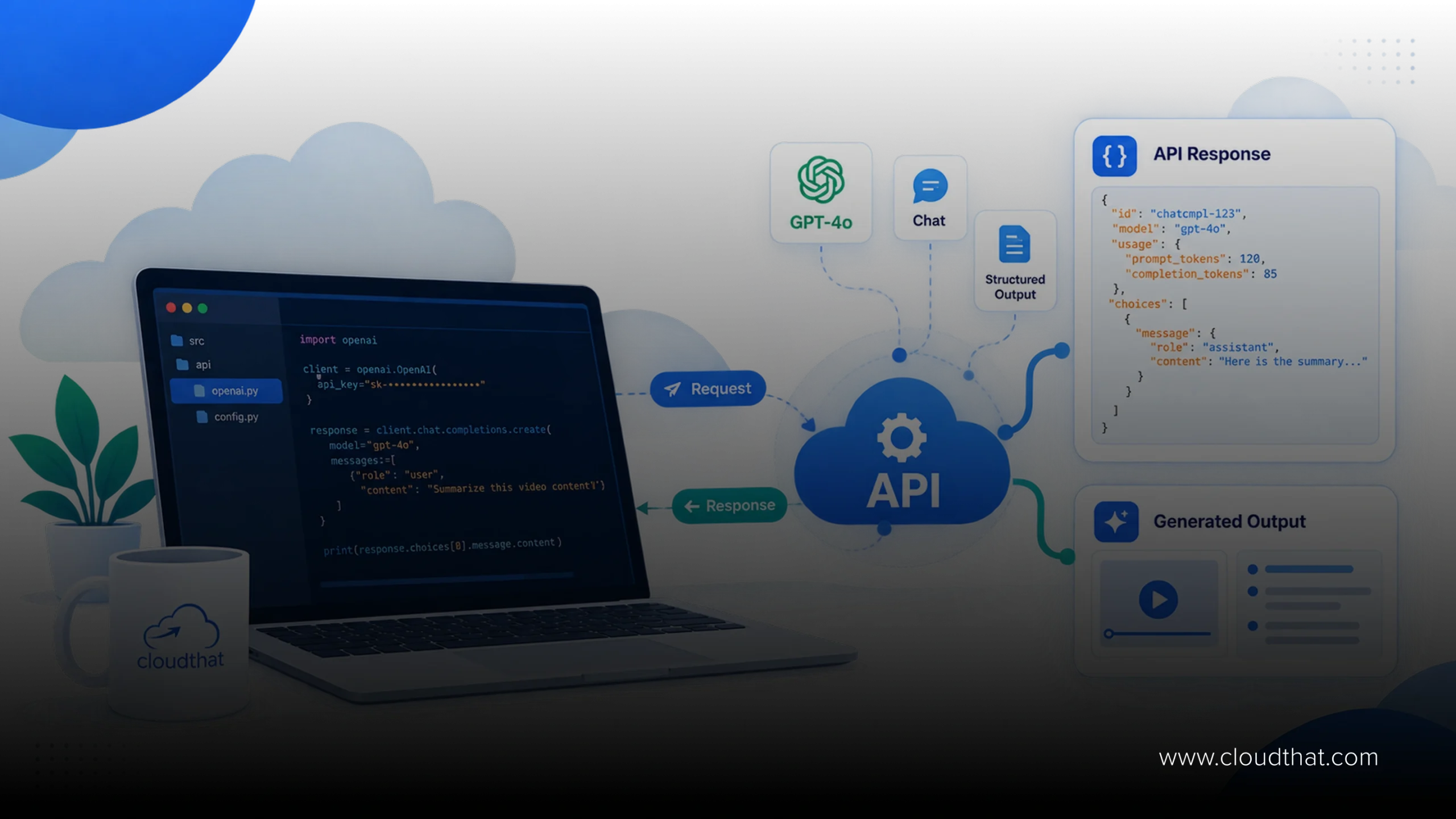
The OpenAI API lets developers call OpenAI’s models programmatically instead of using the ChatGPT interface. Its Responses API unifies text generation, tool calling, and structured outputs into one request pattern, replacing the older Chat Completions flow for most new builds. Teams use it for chatbots, document processing, and agentic workflows that call external tools. OpenAI API integration typically needs an API key, a request payload, and a response handler, paired with cost monitoring and structured schemas so responses parse reliably downstream.
You have probably typed a prompt into ChatGPT and thought, why can’t my own product do this. That is exactly what the OpenAI API is built for, putting the same models behind an interface your application can call directly. The hard part is not calling it once, it is building something reliable around it, since responses vary in format, tool calls fail silently, and costs creep up once real users show up. This guide breaks down how it works today, including the Responses API, tool calling, structured outputs, and where enterprise teams use it in production.
Advance Your Career with OpenAI Training
- Build AI Applications
- GPT-5 & OpenAI APIs
- Hands-on Projects
What Is the OpenAI API and Why Developers Are Building on It
The OpenAI API is a programmatic interface that lets you send text, images, or files to OpenAI’s models and get back a response your application can use, without anyone opening ChatGPT. You authenticate with a key, send a request over HTTPS, and get JSON back.
What makes it different from ChatGPT is control. You set the system instructions, the tools the model can call, and the exact output format, so a support team can restrict answers to its own knowledge base while a finance team forces every response into a fixed schema before it touches a database. OpenAI’s platform documentation covers models ranging from lightweight options to reasoning-heavy ones built for multi-step problems, but the real gap is between a demo and a production system, and that is where most teams get stuck.
Getting Started: Keys, Endpoints and Your First Call
Every call needs three things: a key, an endpoint, and a payload. Generate the key from your account, store it as an environment variable, and never hardcode it into frontend code, since a key exposed in a client bundle gets scraped and abused within hours. The request is a POST call with a model name, an input array, and optional parameters like temperature, and the response comes back as JSON you parse and log. Keep the first build narrow, one endpoint, one model, one scoped task, and you have the foundation for real OpenAI API integration rather than a demo that breaks the moment someone types something unexpected.
The Responses API: What Changed and Why It Matters
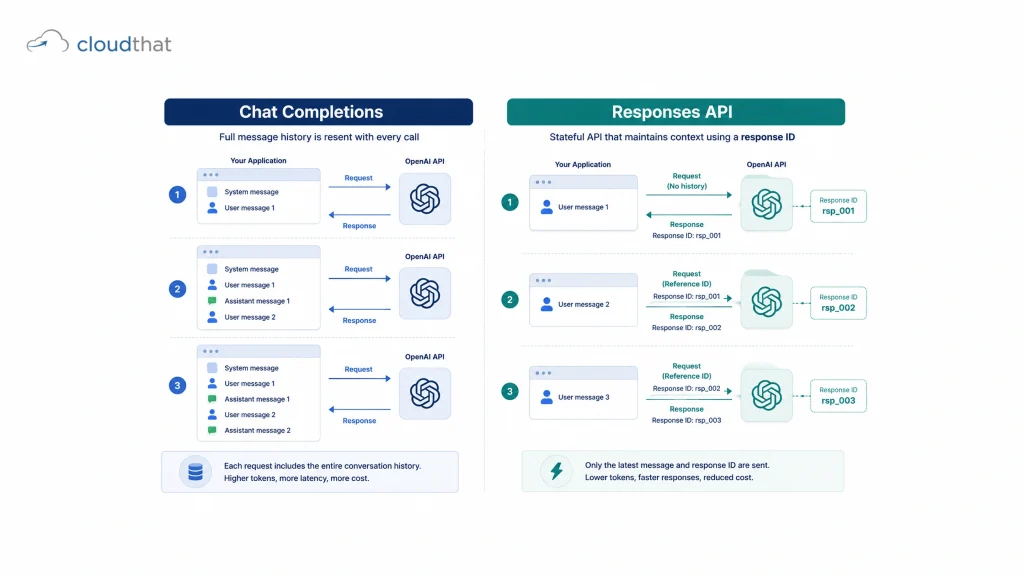
OpenAI introduced the Responses API as a unified way to work with its models, combining what used to require separate calls to Chat Completions and the Assistants API. If you are starting a new project, this is the recommended starting point.
How It Differs from Chat Completions
Chat Completions required managing the full conversation history yourself, resending the entire message array with every call. The Responses API can hold state on OpenAI’s side using a response ID, so you reference the previous turn instead of resending the thread, cutting payload size and reducing the chance of dropping context. It also supports tool calling, file search, and structured outputs within one request object instead of stitching together separate API surfaces, which simplifies integration and saves you from building a custom memory layer for a follow-up question five messages later.
Tools and Function Calling
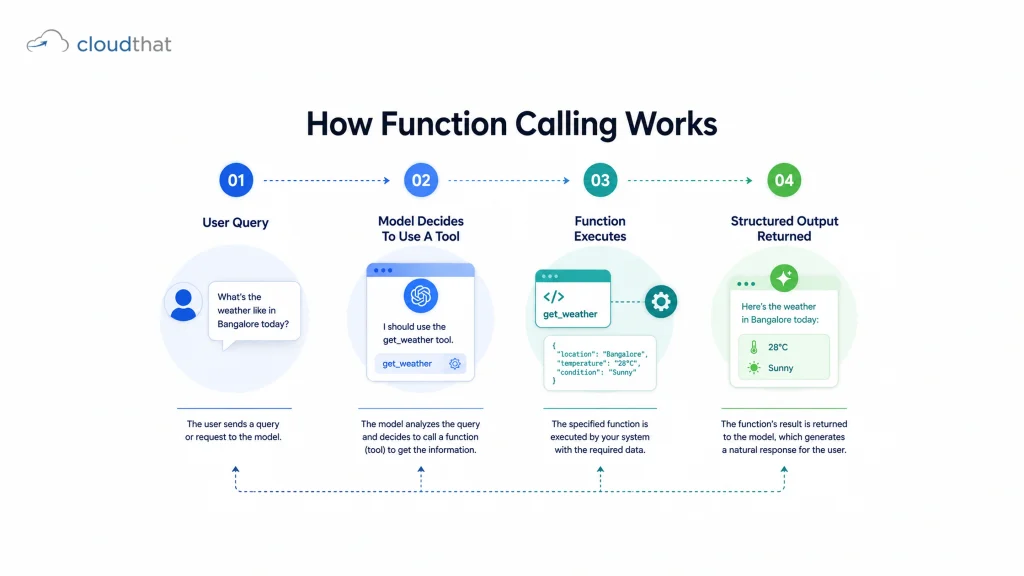
Function calling is what turns a language model into something that can act. You define a function, its name, its parameters, and what it does, and the model decides when to call it based on the user’s request. Build a tool called get_order_status that takes an order_id, and the model calls it with a valid order_id pulled from the message. The model never runs your code, it tells you what to run and you decide whether to execute it, whether that is querying a database, triggering a CRM update, or pulling live pricing before answering. This is where the integration work earns its keep, since usefulness scales with how well the model connects to your actual systems.
Structured Outputs: Getting Responses You Can Trust
Structured outputs solve a problem every team hits eventually: the model returns text that looks right but does not parse cleanly. They let you define a strict schema, and the OpenAI API guarantees the response matches it, field for field, instead of hoping the formatting holds. This matters most when extracting invoice line items or classifying support tickets, where your code cannot afford defensive parsing scattered everywhere. Gartner’s research on generative AI lists output reliability as a top blocker for enterprises moving GenAI pilots into production, and structured outputs address that gap directly.
OpenAI API Integration Patterns for Production Systems
A production integration looks nothing like a weekend prototype. It needs retry logic for rate limits, logging for every request, cost tracking per feature, and fallback behavior when the API is slow, usually through a middleware layer rather than a direct frontend call that handles authentication and business rules and can swap models without touching the client application. Teams on AWS often pair this with infrastructure such as Lambda, and some evaluate multi-model strategies alongside platforms like AWS Bedrock for workloads needing model flexibility. Every call costs tokens, and tokens cost money, so per-user rate limits, caching, and picking the right model tier for each task instead of defaulting to the most powerful one everywhere keep an integration financially sustainable as usage scales.
Enterprise Use Cases Built on the OpenAI API
Enterprises are not just building chatbots anymore. Common patterns include document pipelines that extract structured data from contracts, internal copilots that draft first-pass reports, support triage that classifies tickets before a human sees them, and code review assistants that flag issues before a pull request reaches a senior engineer. None of these treat the API as a standalone product, they wrap it in business logic and connect it to real data through tools, which is the actual work of enterprise GenAI that teams tend to underestimate.
Common Mistakes Teams Make During Integration
The most common mistake is treating a working demo as production-ready, when one clean answer can fall apart the moment a real user asks something ambiguous. The second is skipping structured outputs and parsing free-form text with regex instead, which breaks silently the moment the model shifts phrasing. The third is underestimating cost and latency at scale, since a thousand concurrent users on the same flow is a very different problem from one test call.
Why CloudThat Is the Right Place to Build Real OpenAI API Skills
Reading about the OpenAI API and shipping a working integration are two different skill levels, and most teams find that out mid-project. CloudThat’s AI/ML and GenAI training tracks take practitioners from understanding model APIs to building tool-calling, structured-output, and retrieval-backed applications through hands-on labs, not slide decks.
The Integrated Program in AI & Data Science covers the practical skills behind production-grade AI applications, while CloudThat’s training catalog includes GenAI courses on prompt design and tool orchestration, the same fundamentals that carry into working with the API. Enterprises running larger AI adoption programs pair this with the GenAI Innovation Center, CloudThat’s consulting practice for GenAI strategy and production rollouts, while cohorts upskilling together use the Capability Development Framework, a role-based path from skill assessment to hands-on labs. As an AWS Premier Tier Training Partner with 14+ years in cloud and AI training, CloudThat’s trainers are practitioners running real AI engagements, not instructors reading from a curriculum.
Conclusion
The OpenAI API has moved well past chatbot novelty. With the Responses API, native tool calling, and structured outputs, it is a serious building block for production systems, provided your team respects the engineering discipline it demands. Start narrow, get the fundamentals right, and scale the integration once you trust what it returns.
Explore CloudThat’s AI/ML and GenAI Training Programs to Build Production-Ready OpenAI API Skills.
Key Takeaways:
- The OpenAI API gives direct, programmatic access to OpenAI’s models beyond the ChatGPT interface.
- The Responses API unifies conversation state, tool calling, and structured outputs in one request.
- Function calling lets the model trigger real actions instead of generating text alone.
- Structured outputs enforce a strict schema, removing the need for fragile text parsing.
- A working demo is not the same as a production-ready integration.
- Enterprise use cases span document processing, support triage, copilots, and code review.
- Middleware layers, not direct client calls, are standard for enterprise integration.
- Cost and latency planning should start before scale, not after users complain.
- API keys must stay server-side; exposing them client-side is a common, costly mistake.
- Structured outputs cut parsing failures but do not remove the need for content validation.
About CloudThat
FAQs
1. What is the difference between the OpenAI API and ChatGPT?
ANS: – ChatGPT is a consumer product. It gives developers direct programmatic access to the same models with control over prompts, tools, and output format.
2. Is the Responses API replacing Chat Completions entirely?Is the Responses API replacing Chat Completions entirely?
ANS: – Chat Completions still works, but the Responses API is the recommended path for new builds since it combines state, tool calling, and structured outputs in one request.
3. How does OpenAI API integration handle rate limits?
ANS: – Rate limits apply per account tier and model. Production integrations include retry logic with backoff and request queuing during traffic spikes.
4. Do structured outputs guarantee the model never makes mistakes?
ANS: – They guarantee format, not factual accuracy. You still need validation logic for the actual content, not just the shape of the data.
5. What is function calling used for?
ANS: – It lets the model request a specific action, like looking up an order, so responses are grounded in real data instead of training knowledge alone.
6. Is the OpenAI API expensive to run at scale?
ANS: – It depends on model choice, token volume, and caching. Lighter models for simple tasks keep an integration cost-efficient as usage grows.

WRITTEN BY Himisha Raval
Himisha Raval is a Digital Marketing Manager at CloudThat with a strong command of search engine optimization, web analytics, link building, and content strategy. She brings a data-driven approach to digital marketing, helping IT companies strengthen their online presence, improve search rankings, and generate consistent leads across channels. Beyond execution, she plays an active role in ideation, campaign strategy, and website performance optimization. Outside of work, she balances her analytical side with a love for travel, nature painting, and dancing.


 PREV
PREV












Comments