

 Login
Login


 December 23, 2025
|
Voiced by Amazon Polly |
Introduction
Migrating source code from AWS CodeCommit to another Git provider may initially appear complex, especially for teams managing production-grade repositories with multiple branches, tags, and long commit histories. However, Git’s distributed architecture and AWS CodeCommit’s standards-based implementation make migration both reliable and predictable when executed correctly.
Organizations may choose to migrate from AWS CodeCommit to platforms such as GitHub, GitLab, or Bitbucket for various reasons, including ecosystem preferences, collaboration features, and standardization of organization-wide tooling. Regardless of the destination, the primary objective remains the same, to preserve repository integrity while minimizing disruption to development workflows.
This guide provides a clear, step-by-step approach to migrating an AWS CodeCommit repository to another Git provider while retaining all branches, tags, and commit history. It also covers validation, post-migration activities, and best practices to ensure a smooth transition.
Pioneers in Cloud Consulting & Migration Services
- Reduced infrastructural costs
- Accelerated application deployment
Prerequisites
Before starting the migration, ensure the following prerequisites are met:
- Access to the AWS Management Console with permissions for AWS CodeCommit
- Credentials (username/token or SSH key) for the target Git provider
- Git installed on your local machine (Git 2.x or later recommended)
- A new, empty repository created on the destination Git platform
- Network access allowing outbound connections to both AWS CodeCommit and the target provider
Ensuring these prerequisites in advance reduces the risk of mid-migration failures.
Step-by-Step Guide
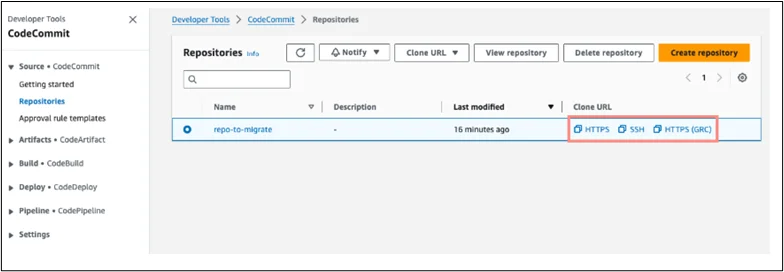
Step 1: Capture the Clone URL from AWS CodeCommit
Log in to the AWS Management Console and navigate to the AWS CodeCommit service. Select the repository you want to migrate and copy its HTTPS clone URL (or SSH URL if your environment uses SSH-based authentication).
This URL serves as the source reference for cloning the repository locally.
Step 2: Clone the Repository Locally
To preserve all branches, tags, and references, you must perform a mirrored clone instead of a standard clone.
|
1 |
git clone --mirror https://your-aws-repository-url your-aws-repository |
The –mirror option ensures the clone includes every Git reference, making it ideal for full-fidelity migrations.
Replace your-aws-repository-url with the URL of your AWS CodeCommit repository.
Replace your-aws-repository with a name for this repository. Example:
|
1 |
git clone --mirror https://git-codecommit.us-east-2.amazonaws.com/v1/repos/MyDemoRepo my-demo-repo |
Step 3: Add the New Remote
Navigate into the mirrored repository directory:
|
1 |
cd my-demo-repo |
Inside the mirrored directory, add the new remote:
|
1 |
git remote add newprovider https://gitprovider.com/your-org/target-repo.git |
At this stage, your local repository is connected to both the source (CodeCommit) and the destination provider.
Step 4: Push the Mirror to the New Git Provider
Push all repository data, including branches, tags, and commit history, to the new Git provider:
|
1 |
git push newprovider –mirror |
Step 5: Validate Your Migration
After the push completes, validate the migration by:
- Checking that all branches exist in the new repository
- Verifying tags and release references
- Reviewing commit history consistency
|
1 |
git clone https://gitprovider.com/your-org/target-repo.git |
Step 6: Update Local Repository to Use the New Remote
Update your local repo to point to the new remote:
|
1 2 3 4 |
git remote set-url origin https://gitprovider.com/your-org/target-repo.git git fetch origin git checkout main git pull |
Step 7: Update CI/CD and Branch Protections
After migration, update all downstream integrations:
- Modify CI/CD pipelines to reference the new repository URL
- Reconfigure webhooks, deploy keys, and secrets
- Reapply branch protection rules and approval policies
Failing to update pipelines is one of the most common post-migration issues.
Step 8: Notify Your Team
Communicate the migration clearly to your development teams. Share:
- The new repository URL
- Updated contribution workflows
- Any changes in authentication or access controls
Clear communication helps prevent accidental pushes to the deprecated repository.
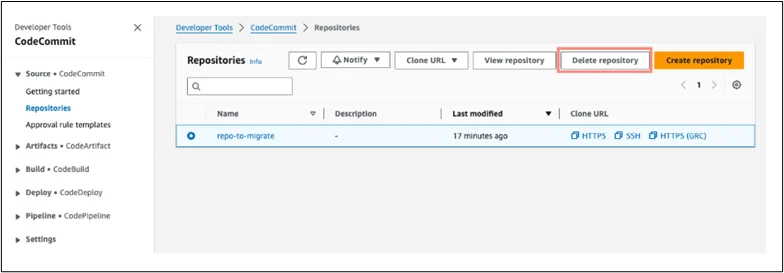
Step 9: Remove the Old AWS CodeCommit Repository
Once the migration is fully validated and teams have transitioned, you may delete the old AWS CodeCommit repository. This step should only be performed after confirming that:
- All data exists in the new repository
- CI/CD pipelines are functioning correctly
No active workflows depend on AWS CodeCommit
Advanced Use Cases
For complex environments, additional approaches may be required:
- Incremental syncs during phased migrations
- Platform-specific tools for GitHub, GitLab, or Bitbucket
- Multiple repository migrations using automation scripts
These scenarios are common in large enterprise environments and benefit from careful planning.
Why This Matters to Teams?
A well-executed migration provides tangible benefits:
- No loss of commit history or metadata
- Minimal developer downtime
- Consistent branching and tagging strategy
- Improved alignment with organizational tooling standards
By following a structured approach, teams can migrate with confidence, ensuring productivity and compliance are not compromised.
Final Thoughts
Migrating from AWS CodeCommit to another Git provider does not have to be a risky or disruptive process. With the correct use of mirrored cloning and a structured validation process, organizations can preserve repository integrity while transitioning smoothly to a new platform.
Drop a query if you have any questions regarding AWS CodeCommit and we will get back to you quickly.
Empowering organizations to become ‘data driven’ enterprises with our Cloud experts.
- Reduced infrastructure costs
- Timely data-driven decisions
About CloudThat
FAQs
1. Why migrate from AWS CodeCommit to another Git provider?
ANS: – Organizations may migrate for better integrations, advanced features, or compliance requirements offered by other platforms.
2. Will commit history and tags be preserved during migration?
ANS: – Yes, using the –mirror option ensures all branches, tags, and commit history are retained.
3. Can I migrate to GitHub, GitLab, or Bitbucket using these steps?
ANS: – Absolutely. These steps apply to any Git-based provider.


WRITTEN BY Ayush Agarwal
Ayush Agarwal works as a Subject Matter Expert at CloudThat. He is a certified AWS Solutions Architect Professional with expertise in designing and implementing scalable cloud infrastructure solutions. Ayush specializes in cloud architecture, infrastructure as code, and multi-cloud deployments, helping organizations optimize their cloud strategies and achieve operational excellence. With a deep understanding of AWS services and best practices, he guides teams in building robust, secure, and cost-effective cloud solutions. Ayush is passionate about emerging cloud technologies and continuously enhances his knowledge to stay at the forefront of cloud innovation. In his free time, he enjoys exploring new AWS services, experimenting with technologies, and trekking to discover new places and connect with nature.


 PREV
PREV












Comments