

 Login
Login


 March 23, 2026
|
Voiced by Amazon Polly |
In today’s cloud-first world, organizations are under constant pressure to reduce costs while maintaining high availability and performance. As businesses scale their workloads on Microsoft Azure, the challenge becomes clear: how do you optimize architecture without compromising reliability?
Optimization and reliability are often perceived as trade-offs. However, with the right architectural principles, design patterns, and Azure-native services, you can achieve both.
In this blog, we’ll explore practical strategies to optimize Azure architecture while maintaining enterprise-grade reliability.
Start Learning In-Demand Tech Skills with Expert-Led Training
- Industry-Authorized Curriculum
- Expert-led Training
1. Start with the Azure Well-Architected Framework
Before diving into cost optimization or performance tuning, align your architecture with the Microsoft Azure Well-Architected Framework.
A strong foundation for achieving this balance begins with the Microsoft Azure Well-Architected Framework. This framework is built around five critical pillars: Reliability, Security, Cost Optimization, Operational Excellence, and Performance Efficiency. Instead of treating cost savings as a standalone objective, organizations should align every optimization decision with these pillars.
2. Choose the Right Compute Strategy
Compute is often the largest cost component in Azure environments. Selecting the correct compute model is critical.
Use Platform-as-a-Service (PaaS) Wherever Possible
Compute resources often represent the largest portion of Azure spending. Adopting Platform-as-a-Service (PaaS) solutions such as Azure App Service, Azure Functions, and Azure Kubernetes Service (AKS) significantly reduces operational overhead. These managed services provide built-in patching, scaling, and infrastructure management, inherently improving system reliability while lowering administrative effort.
PaaS services reduce operational overhead and improve reliability since Azure manages patching, scaling, and infrastructure maintenance.
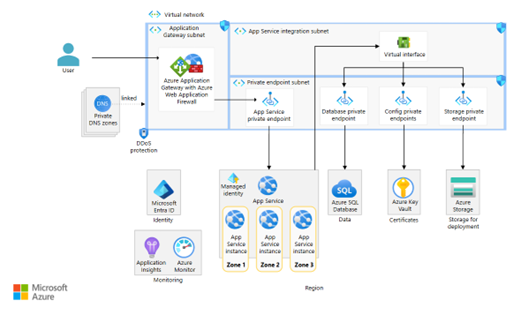
Fig 1: Highly available zone-redundant web application
Right-Size Virtual Machines
When virtual machines are required, organizations should focus on right-sizing VMs, enabling auto-scaling, and leveraging Reserved Instances or Savings Plans for predictable workloads. This approach ensures that performance requirements are met without paying for unused capacity and plans for predictable workloads.
3. Architect for High Availability (Without Over-Engineering)
Designing for high availability does not necessarily mean deploying every workload across multiple regions. Instead, architecture decisions should be driven by business impact analysis. Using Availability Zones can protect critical applications from datacenter-level failures while maintaining cost efficiency. Less critical systems may rely on Availability Sets or single-zone deployments with robust backup strategies. Multi-region architecture should be reserved for mission-critical or globally distributed applications and can be implemented using services such as Azure Traffic Manager or Azure Front Door.
But remember multi-region increases cost and complexity. Use it based on business impact analysis, not assumptions.
Designing multi-region and zone-redundant architectures is a key focus area in advanced Azure architecture training programs and the Azure Solutions Architect certification path.
4. Optimize Storage Without Compromising Durability
Storage decisions significantly impact both cost and reliability.
Choose the Right Redundancy Option
Azure offers multiple redundancy models:
- LRS (Locally Redundant Storage)
- ZRS (Zone-Redundant Storage)
- GRS (Geo-Redundant Storage)
- RA-GRS (Read-Access Geo-Redundant Storage)
Use GRS only when geo-redundancy is required. For non-critical workloads, LRS or ZRS may be sufficient.
Tier Your Storage
Use storage tiers wisely:
- Hot – Frequently accessed data
- Cool – Infrequently accessed data
- Archive – Rarely accessed long-term data
This approach ensures cost efficiency without sacrificing durability.
5. Implement Intelligent Scaling
Scaling incorrectly is one of the biggest causes of overspending.
Another essential optimization principle is implementing intelligent scaling. Improper scaling configurations are a common cause of cloud overspending. Enabling auto-scaling through Virtual Machine Scale Sets, App Service Auto-Scale, or the AKS Horizontal Pod Autoscaler ensures applications automatically scale out during peak demand and scale in during low-usage periods. This maintains consistent performance and availability without unnecessary resource consumption.
This maintains performance and availability while controlling costs.
6. Design for Failure (Resiliency Patterns)
Reliability improves when you assume components will fail.
Reliability further improves when systems are designed with failure in mind. Implementing resiliency patterns, such as retry mechanisms with exponential backoff and circuit breakers, prevents cascading failures in distributed systems. For database workloads, adopting managed services such as Azure SQL Database or Azure Cosmos DB provides built-in replication, automated backups, and high availability. Leveraging these managed database services eliminates the operational burden of maintaining complex failover mechanisms on self-managed virtual machines.
7. Monitor, Measure, and Optimize Continuously
Optimization is not a one-time exercise.
Use Azure Monitoring Tools
Continuous visibility is equally important. Optimization is not a one-time effort but an ongoing process. Using monitoring solutions such as Azure Monitor, Azure Log Analytics, and Application Insights.
Monitoring enables:
- Early detection of performance bottlenecks
- Proactive scaling decisions
- Failure prediction
Without visibility, reliability suffers.
8. Implement Cost Governance Without Risk
Cost control should not introduce reliability risks.
Use Budgets and Alerts
Set cost budgets and configure alerts to:
- Avoid unexpected spikes
- Identify runaway workloads
Tag Resources Properly
Tagging helps:
- Allocate cost to business units
- Identify idle resources
- Enforce governance policies
Use Azure Policy to enforce standards across subscriptions.
9. Backup and Disaster Recovery Strategy
No optimization strategy is complete without a robust backup and disaster recovery (DR) plan. Services such as Azure Backup and Azure Site Recovery enable organizations to define clear Recovery Time Objectives (RTOs) and Recovery Point Objectives (RPOs). Regular testing of disaster recovery procedures ensures that the organization remains prepared for real-world incidents. An untested recovery plan cannot guarantee reliability.
10. Adopt a FinOps + DevOps Culture
Architecture optimization is not just technical—it’s cultural.
- Encourage DevOps teams to design cost-aware solutions
- Integrate cost checks in CI/CD pipelines
- Continuously review resource utilization
When teams understand cost implications, architecture naturally becomes optimized and reliable. To learn and earn certification on Azure certification, use trusted platforms for Azure Administration training.
Resilient Azure Architectures
Optimizing Azure architecture without sacrificing reliability is not about blindly reducing resources. It’s about making informed architectural decisions.
By leveraging Azure-native services, auto-scaling mechanisms, appropriate redundancy models, and continuous monitoring, organizations can achieve:
✔ High availability
✔ Performance efficiency
✔ Cost optimization
✔ Operational excellence
Optimization and reliability are not opposites. When implemented strategically, they strengthen each other. As an Azure professional, your goal should be to design architectures that are resilient by design and optimized by default.
Upskill Your Teams with Enterprise-Ready Tech Training Programs
- Team-wide Customizable Programs
- Measurable Business Outcomes
About CloudThat


WRITTEN BY Kunal Khadke
Kunal Khadke is a Subject Matter Expert and Microsoft Certified Trainer at CloudThat, with a strong focus on Microsoft Azure Infrastructure and security. With 10+ years of experience in cloud, he has trained over 5000 professionals. Kunal has a strong passion for empowering IT professionals and organizations on their cloud journey. He has hands-on experience in cloud architecture, deployment, and security. He delivers practical, real-world training that bridges the gap between certification and implementation. Kunal has trained professionals across industries, helping them master Azure services such as Virtual Networks, Azure Active Directory, Security, Networking, and more. Known for his clear teaching style and deep technical knowledge, Kunal is dedicated to shaping the next generation of cloud experts.


 PREV
PREV












Comments