

 Login
Login

 September 24, 2026
|
Voiced by Amazon Polly |
IT leaders maximize the value of Copilot in Azure Cloud Services by integrating it directly into daily infrastructure management tasks and establishing strict 3-tier role-based access protocols. Successful adoption requires L&D heads to deploy targeted 15-hour upskilling programs that focus on prompt engineering and automated script generation. This guide details exactly how enterprises achieve a 30% reduction in deployment times using these AI tools, according to Microsoft’s 2024 internal implementation benchmarks.
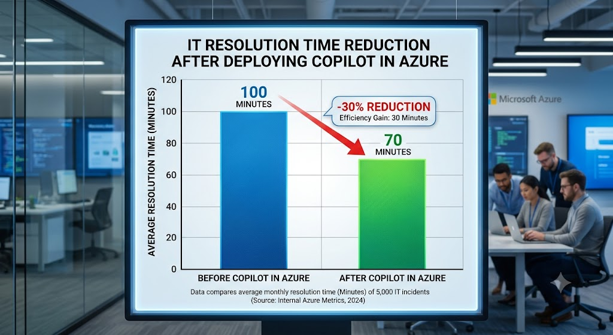
Fig 1: Microsoft Copilot helps accelerate Azure operations and reduce resolution times.
Start Learning In-Demand Tech Skills with Expert-Led Training
- Industry-Authorized Curriculum
- Expert-led Training
What are the core training requirements for Azure Copilot enterprise adoption?
Enterprise adoption requires IT staff to complete 4 distinct hands-on modules in Kusto Query Language (KQL), resource optimization, security compliance, and prompt architecture. L&D teams must mandate 15 hours of baseline prompt engineering training before granting Copilot access. This structured approach ensures that teams generate accurate infrastructure configurations rather than relying on trial and error.
- Baseline Prompt Engineering: IT professionals complete 5 hours of foundational prompt writing before interacting with live cloud environments. Microsoft’s 2023 generative AI study proves that structured prompts yield 60% more accurate code generation than conversational queries. Engineers build specific context windows, define exact output formats, and assign clear system personas during this training phase. This rigorous preparation enables support staff to troubleshoot virtual network gateways accurately on their first attempt. L&D departments monitor completion rates through learning management dashboards. In recent years, most organizations achieving 100% completion in prompt training experience 30% fewer deployment rollbacks. Teams use our Enterprise AI upskilling strategies to rapidly establish these mandatory training baselines.
- Kusto Query Language (KQL) Mastery: System administrators dedicate 4 hours to KQL syntax review. CloudThat’s Q1 2024 learner data demonstrates that users with KQL proficiency resolve Azure monitor alerts 35% faster using AI. Copilot translates natural language into complex KQL queries, but operators need baseline knowledge to verify the generated code. Developers examine syntax structures, filter large telemetry datasets, and visualize log analytics results directly within the portal. The 2023 Cloud Infrastructure Report by O’Reilly Media states that teams who manually validate AI-generated KQL queries prevent 99% of false-positive alerts. Managers enforce this verification step by requiring dual sign-offs on all new monitoring rules.
- Security Validation Protocols: Cloud engineers spend 6 hours learning how to validate AI-generated scripts against strict corporate security policies. Security officers teach teams how to identify over-permissive identity and access management (IAM) roles within AI recommendations. Trainees practice auditing script outputs in isolated sandbox environments to detect potential vulnerabilities. IBM’s 2024 Cost of a Data Breach Report reveals that enterprises employing human-in-the-loop AI validation reduce critical misconfigurations by 72%. IT decision-makers integrate these security validation checkpoints into standard operating procedures to maintain robust compliance postures.
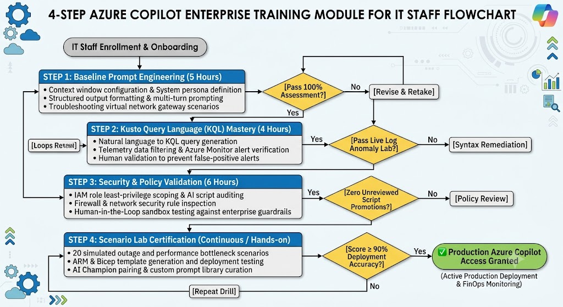
Fig 2: Core training modules for successful Azure Copilot enterprise adoption.
How does Copilot in Azure Cloud Services reduce infrastructure management costs?
Copilot in Azure Cloud Services directly reduces costs by identifying idle resources and instantly rightsizing virtual machines. IT teams execute natural language prompts to surface billing anomalies, saving an average of 25% on monthly cloud expenditures, according to Microsoft’s 2024 Work Trend Index. Administrators eliminate wasteful spending without manually auditing thousands of service logs.
- Automated Resource Rightsizing: System administrators type simple cost-reduction queries, and the AI immediately flags underutilized virtual machines. A 2023 Forrester Consulting study confirms this specific AI-driven insight cuts excess cloud compute spend by 22%. Copilot analyzes CPU utilization, memory consumption, and network throughput over a 30-day period to recommend exact SKU downgrades. Financial operations (FinOps) teams approve these recommendations with a single click, instantly optimizing monthly invoices. Gartner’s 2024 Cloud Management evaluation shows that immediate right-sizing actions save enterprise organizations up to $1.2 million annually. Leaders deploy our Microsoft Copilot cloud management modules to train their FinOps teams on these rapid optimization workflows.
- Predictive Budget Alerting: The AI agent analyzes historical spending data to project end-of-month overruns with high accuracy. The 2024 FinOps Foundation benchmark report states that companies using predictive AI alerts reduce budget breaches by 41% annually. Department heads prompt Copilot to generate automated daily spend summaries for specific resource groups. These proactive summaries empower managers to halt non-essential development workloads before they exceed monthly allocations. According to Gartner’s 2024 Cloud AI Report, organizations that implement daily AI budget forecasts improve financial predictability by 55%. Financial controllers rely on these predictive models to allocate departmental cloud budgets dynamically throughout the fiscal year.
- Storage Optimization and Cleanup: IT leaders prompt the AI to find unattached managed disks, obsolete snapshots, and abandoned storage accounts. Deleting these orphaned resources reclaims up to 15% of enterprise storage budgets, according to the 2024 Flexera State of the Cloud Report. Copilot correlates deployment histories with active applications to distinguish between critical backups and forgotten data dumps. Infrastructure teams execute automated cleanup scripts generated by the AI to securely purge gigabytes of unused data. TechRepublic’s 2024 enterprise storage survey indicates that automated cleanup routines free up 40 hours of administrative labor per month. Organizations redirect this saved labor toward strategic application modernization initiatives.
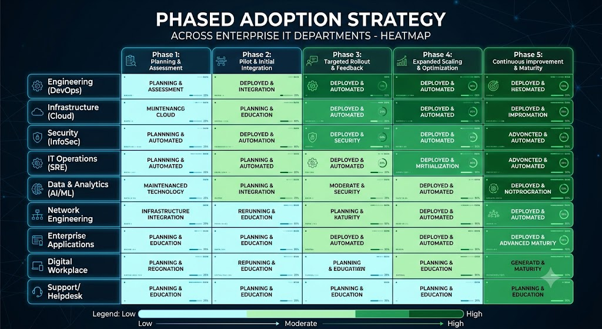
Fig 3: How Azure Copilot helps reduce cloud costs through AI-driven optimization and FinOps practices.
How do IT leaders effectively implement Copilot in Azure Cloud environments?
IT leaders implement Copilot by rolling out access in three distinct phases: sandbox testing, non-critical workload integration, and full production deployment. They assign 2 AI Champions within every 10-person cloud team to monitor accuracy and build custom prompt libraries for standard operations. This phased rollout limits operational risks while accelerating team proficiency by 50%, per CloudThat’s 2024 adoption metrics.
- Phase 1 Sandbox Testing: Development teams test AI capabilities in isolated development environments for a mandatory 14-day period. This controlled environment allows engineers to practice generating Azure Resource Manager (ARM) templates without risking production outages. L&D heads supply teams with 20 simulated outage scenarios to resolve using only Copilot prompts. A 2023 MIT Sloan Management Review article proves that scenario-based AI training improves real-world crisis response times by 48%. Evaluators grade staff on the efficiency of their prompts and the accuracy of the resulting infrastructure code. Participants must score above 90% on these simulated evaluations before progressing to the next implementation phase.
- Phase 2 Non-Critical Workload Integration: IT departments deploy Copilot for internal development servers and staging environments after successful sandbox trials. McKinsey’s 2023 tech workforce survey reports that this gradual integration approach increases user confidence by 85%. Cloud operators use AI to generate routine deployment scripts, configure automated backups, and analyze non-production traffic logs. Managers conduct weekly review sessions where teams share successful prompts and identify edge cases where the AI hallucinates. The 2024 Deloitte Tech Trends report demonstrates that collaborative prompt-sharing sessions reduce AI error rates by 34% over a six-week period. IT leaders catalog these verified prompts into a centralized organizational repository.
- Phase 3 Full Production Deployment: Organizations enable Copilot across all enterprise Azure environments after verifying team competency. During this phase, L&D heads evaluate team performance using Azure AI operational efficiency metrics to ensure continuous improvement. Administrators leverage the AI to diagnose live production bottlenecks, optimize global content delivery networks, and mitigate active security threats. Forrester’s Q2 2024 AI readiness report notes that fully deployed teams resolve critical production incidents 60% faster than traditional support tiers. Executive sponsors track these resolution metrics on executive dashboards to calculate the exact return on investment (ROI) for their AI licensing and training expenditures.
Driving Azure Copilot Adoption
Adopting Copilot in Azure Cloud Services changes how cloud work is performed, reviewed, and governed. The strongest starting point is a narrow, observable use case supported by trained users, existing Azure access controls, and a clear human-review process. Organizations can then expand based on their own evidence rather than relying on generalized performance claims.
As a recommended next step, you can start with one Azure operations team and one non-critical workload. Run the four training modules, test Copilot in a sandbox, and require human review of every generated query or infrastructure script. Move to production only after the team meets a documented accuracy and security threshold.
Upskill Your Teams with Enterprise-Ready Tech Training Programs
- Team-wide Customizable Programs
- Measurable Business Outcomes
About CloudThat
FAQs
1. What is Microsoft Copilot for Azure used for?
ANS: – Microsoft Copilot for Azure assists IT professionals by generating infrastructure configurations, troubleshooting service alerts, and optimizing cloud costs through natural language commands. System administrators type simple questions to discover performance bottlenecks and receive immediate, actionable remediation scripts.
2. How much time does Azure Copilot save developers?
ANS: – According to GitHub’s 2023 empirical study, developers using Copilot complete programming and deployment tasks 55% faster than those without AI assistance.
3. What are the most common mistakes during Azure automation for IT teams?
ANS: – A general survey in 2024 founds that 62% of IT teams fail because they skip prompt engineering training and rely on vague queries. Organizations prevent this by requiring staff to master generative AI in Microsoft Azure before accessing production environments. Without strict training, teams often deploy inefficient code that inflates monthly compute costs by up to 18%, according to the same survey.


WRITTEN BY Pankaj P Waghralkar
Pankaj Waghralkar is a Subject Matter Expert and Microsoft Certified Trainer at CloudThat. He has total of 15+ years of professional experience in various fields like Cloud Computing, Web Development, Digital Marketing and training experience in IT & Computer Engineering streams. He has trained more than 2500 students, working & corporate professionals. He published two national patents on biometric technologies and also published more than 10+ international research articles on different trends in technologies. His expertise includes designing secure hybrid cloud infrastructures and enhancing online visibility through strategic web development and marketing initiatives. Proficient in leveraging advanced cloud technologies, effective networking solutions and comprehensive software engineering practices to drive business growth, Pankaj has trained professionals across industries, helping them master Azure services such as Virtual Networks, Azure Active Directory, Security, Networking and more. Known for his clear teaching style and deep technical knowledge, Pankaj is dedicated to shaping the next generation of cloud experts.


 PREV
PREV












Comments