

 Login
Login


 September 24, 2026
|
Voiced by Amazon Polly |
Microsoft is adding Availability Zones to five US Azure regions in 2026 and 2027 and opening a new East US 3 region near Atlanta. For any enterprise running production workloads on Azure, this changes what “designing for resilience” should look like over the next 18 months. This article breaks down what’s changing, why it matters for disaster recovery planning, and the concrete steps IT teams should take before the new zones go live.
Start Learning In-Demand Tech Skills with Expert-Led Training
- Industry-Authorized Curriculum
- Expert-led Training
What is an Azure Availability Zone, and why does it matter?
An Availability Zone is a physically separate data center within an Azure region, with its own independent power, cooling, and networking. If one zone goes down, workloads spread across the other zones keep running, which is why zone redundancy, not just region selection, is the foundation of a resilient Azure architecture.
If one zone goes down due to a power failure, a cooling fault, or a fiber cut, workloads across the other zones keep running. Microsoft’s global footprint now spans more than 70 regions and over 400 datacenters, connected by more than 370,000 miles of fiber.
Zones exist because regions alone aren’t a resilience strategy. A single data center region can still be a single point of failure. Zones allow an architect to keep an application within a single region, avoiding the latency and complexity of a full multi-region setup while still tolerating the loss of an entire data center.
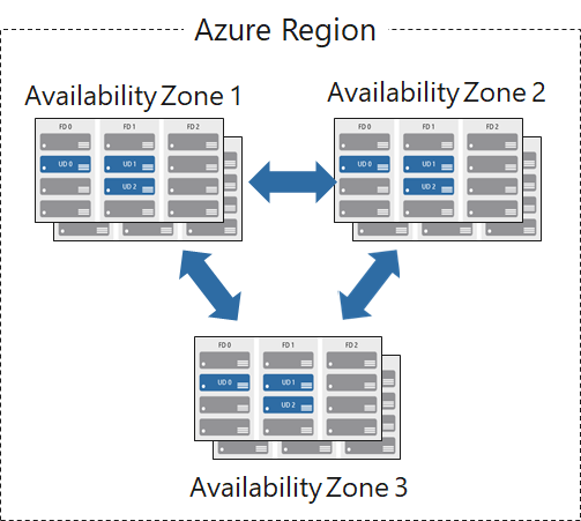
Fig 1: Three Availability Zones within a single Azure region, each with independent power, cooling, and networking
Source: What are Azure Availability Zones? | Microsoft Learn
Which Azure regions are getting new Availability Zones in 2026?
According to Microsoft’s announcement on U.S. cloud infrastructure investment, five existing U.S. Azure regions (North Central US, East US 2, South Central US, US Gov Arizona, and West Central US) will add or expand Availability Zones between 2026 and 2027, alongside the launch of East US 3
Microsoft currently operates six US data center regions with Availability Zones already live. Here’s what’s changing on top of that, according to Microsoft:
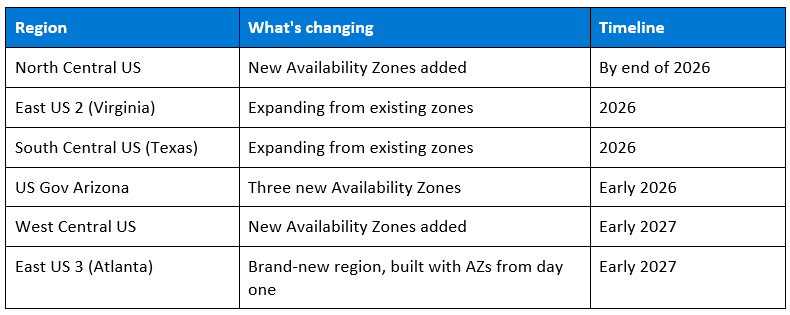
Table 1: US regions receiving Availability Zone expansions, 2026–2027.
For government and defense customers specifically, the US Gov Arizona expansion gives agencies in the Defense Industrial Base a second zone-redundant option alongside US Gov Virginia, improving RTO and RPO for mission-continuity workloads aligned with CMMC and NIST guidance.
Which Azure services support Availability Zones?
Most core Azure services, compute, storage, databases, networking, containers, and messaging, support zone redundancy today through configuration rather than a rebuild. The table below covers the categories architects run into most often.
Zone support isn’t an all-or-nothing setting for an application; it’s enabled on a per-service basis. Knowing which of your dependencies are zone-aware is what turns “we’re in a zone-enabled region” into “our application actually survives a zone failure.”
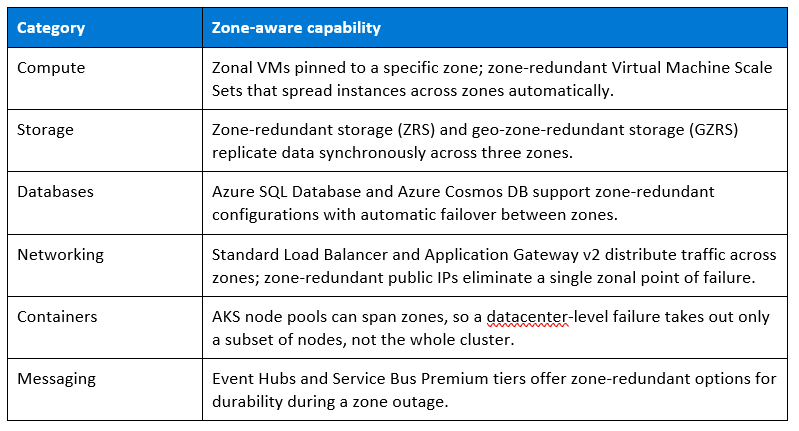
Table 2: Common Azure service categories and their zone-redundant options.
Zone redundancy vs. region pairing: what’s the difference?
Zone redundancy protects against the loss of a single datacenter within a region; region pairing (or a full multi-region architecture) protects against the loss of an entire region. They solve different failure scenarios, and most production workloads need the first as a baseline before deciding whether they need the second.
Zone redundancy is synchronous; data is written to multiple zones at once, so failover is near-instant, and there’s no data loss. Region pairing is typically asynchronous, with replication lag measured in minutes, and failover is a more deliberate, often manual process. That makes zone redundancy the right default for datacenter-level incidents, and region pairing or multi-region design the right tool for regional outages, data-residency requirements, or regulatory separation.
The practical takeaway: treat zone redundancy as the baseline for every production workload in a zone-enabled region, and reserve full multi-region architecture for the smaller set of workloads where a regional outage is unacceptable.
How does this actually improve disaster recovery outcomes?
Zone-redundant architecture shortens recovery time and recovery point objectives (RTO and RPO) by removing the single-datacenter dependency, without forcing a full cross-region failover for every incident. Two organizations already using Azure Availability Zones show what that looks like in practice.
Two organizations already using this show what it looks like in practice. The University of Miami sits in Hurricane Alley, where extreme weather is a recurring operational risk, not a hypothetical one. It migrated key on-premises systems to Azure and adopted Availability Zones specifically to remain operational during outages and maintenance windows, rather than treating disaster recovery as a rare, disruptive event.
The State of Alaska took a different angle on the same problem: it consolidated infrastructure and decommissioned legacy systems on Azure, using zone redundancy to strengthen resiliency and security while cutting the cost of running duplicate on-premises failover capacity.
Neither of these outcomes required rebuilding applications for a multi-region topology. Zone redundancy inside a single region delivered most of the resilience gain.
What should IT teams change in their architecture now?
Start by identifying which workloads currently run in a single datacenter with no zone redundancy; that’s the actual risk this expansion addresses. From there, move critical storage to ZRS, re-run RTO/RPO targets against the new zone timeline, and treat zone redundancy as the default architecture rather than an upgrade.
- Move critical storage to zone-redundant storage (ZRS) in any region getting new zones, so a datacenter-level failure doesn’t take data with it.
- Re-run your RTO/RPO targets against the new zone timeline. A workload in North Central US that couldn’t justify zone redundancy in 2025 may be able to by the end of 2026, once zones go live there.
- Treat zone redundancy as the default, not an upgrade. Microsoft’s own Well-Architected Framework guidance frames zonal resilience as the baseline architecture for production workloads, with cross-region failover reserved for workloads that require regulatory or geographic separation, not for every workload.
A short migration checklist:
- Inventory every production workload and tag which region and zone configuration it currently runs in.
- Flag workloads in regions on the 2026–2027 expansion list (Table 1) that don’t yet use zone redundancy.
- Convert eligible storage accounts to ZRS or GZRS, and confirm zone-redundant configurations for databases and load balancers (see Table 2).
- Re-test failover and re-validate RTO/RPO targets once zones are live in the affected region.
- Reassess which remaining workloads genuinely require full multi-region failover rather than zone redundancy alone.
None of this requires a rebuild. It requires an audit of where workloads currently reside and whether the region they’re in has or will soon have zone coverage. The Azure Well-Architected Framework workshop walks teams through exactly this kind of resiliency audit.
Why this matters beyond disaster recovery
More zone-enabled regions give architects more options for where to place workloads relative to users, which affects latency and application performance, not just uptime, widening the set of regions teams can choose from instead of defaulting to the same two or three.
The Availability Zone expansion isn’t only about surviving outages. More zone-enabled regions give architects more options for where to place workloads relative to users, which affects latency and application performance, not just uptime. A multi-region strategy built on zone-redundant regions gives teams a wider set of viable regions to choose from when balancing performance, data residency, and cost, instead of defaulting to the same two or three regions everyone already uses.
Your next step
Start by auditing workloads that currently depend on a single datacenter. Identify which applications can move to zone-redundant services as Availability Zones become available in their region. Revalidate RTO and RPO targets before your next disaster recovery review cycle. The migration checklist above is a reasonable starting template.
Upskill Your Teams with Enterprise-Ready Tech Training Programs
- Team-wide Customizable Programs
- Measurable Business Outcomes
About CloudThat
FAQs
1. What is the difference between an Azure region and an Availability Zone?
ANS: – A region is a geographic area containing one or more datacenters, such as East US or South Central US. An Availability Zone is a physically separate datacenter within that region, with independent power, cooling, and networking, so a failure in one zone doesn’t affect the others.
2. How many Azure regions have Availability Zones as of 2026?
ANS: – Six US regions currently run Availability Zones. Five more , North Central US, East US 2, South Central US, US Gov Arizona, and West Central US , are adding or expanding zone coverage between early 2026 and early 2027, alongside the new East US 3 region near Atlanta.
3. Do I need to redesign my application to use Availability Zones?
ANS: – Not usually. Most services that support zone redundancy, including zone-redundant storage and zonal virtual machines, can be enabled through configuration changes rather than a full application rebuild. The bigger task is usually auditing which workloads sit in zone-enabled regions today. The Capability Development Framework guide can help identify those gaps.
4. Is a multi-region architecture still necessary if my region has Availability Zones?
ANS: – Zones cover datacenter-level failures within a region; they don’t cover a region-wide event or requirements like data residency across geographies. Multi-region architecture is still the right choice for workloads with regulatory separation requirements or where a full regional outage would be unacceptable , zone redundancy is the baseline underneath that, not a replacement for it.
5. When will East US 3 in Atlanta be available?
ANS: – Microsoft has stated the East US 3 region is planned for early 2027, built with Availability Zones from launch and designed to meet Microsoft’s carbon, water, and LEED Gold sustainability commitments.


WRITTEN BY Mariyam Thomas
Mariyam Thomas is a Subject Matter Expert and Microsoft Certified Trainer at CloudThat, with a strong focus on Microsoft Azure and Hybrid Infrastructure. With over 10 years of experience in training and academics, she has empowered more than 5,000 professionals and learners through her engaging and hands-on training sessions. She was recognised as Top 100 MCT Quality Awards Winner for 2024-25. Mariyam is known for her ability to demystify complex cloud concepts using real-world scenarios, interactive labs, and a learner-first approach. Her deep technical expertise, combined with a passion for teaching, makes her sessions both insightful and impactful. Her dedication to continuous learning and cloud innovation reflects in her dynamic training style, making her a trusted mentor for aspiring cloud professionals.


 PREV
PREV












Comments