

 Login
Login


 September 21, 2026
|
Voiced by Amazon Polly |
Most conversations about GitHub Copilot start and end with developers. That makes sense on the surface; it was built as a coding assistant, and most of the marketing still frames it that way. But spend a week actually watching how product teams work, and a different pattern shows up: the same chat interface that helps an engineer write a function can help a product manager turn a messy idea into a structured, testable requirement in a fraction of the time it used to take.
This isn’t about product managers learning to code. It’s about using a conversational AI tool the same way a developer does, as a thinking partner that takes structured input and returns structured output, except the output is a PRD instead of a function, and the review step is a product manager’s judgment instead of a code review.
Start Learning In-Demand Tech Skills with Expert-Led Training
- Industry-Authorized Curriculum
- Expert-led Training
What GitHub Copilot Actually Offers a Product Manager
Copilot’s chat interface can reason across a conversation, ground its answers in files you give it, and produce long-form structured text. None of that requires writing a single line of code. A product manager can open Copilot Chat, paste in three rough bullet points, and ask for a full requirements document, broken into the sections every engineering team already expects.
The result isn’t perfect on the first try, and it shouldn’t be treated as final. What it does well is remove the blank-page problem. A PRD built from a structured prompt gives a product manager something concrete to edit, argue with, and improve, which is a much faster starting point than staring at an empty document at 9 a.m. on a Monday.
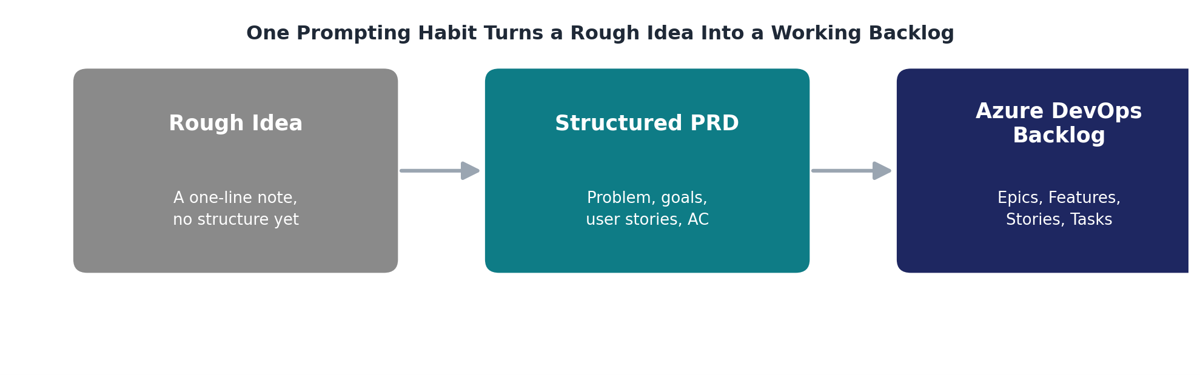
Fig 1: GitHub Copilot helps turn product ideas into structured requirements and actionable backlogs.
A rough idea becomes a structured PRD, and that PRD becomes a real backlog that a team can estimate and sprint against.
The diagram above shows the shape of the whole workflow. Each step is a separate prompt, and each builds on the output of the previous one.
The Prompt Structure That Makes the Difference
Ask Copilot to “build an e-commerce checkout flow,” and you’ll get something generic, a list of features that could describe almost any online store. Ask the same question with context, a clear goal, real constraints, and a defined output format, and the difference in usefulness is immediate.
This is often called the CGCO structure: Context, Goal, Constraints, Output format. It isn’t a trick specific to Copilot; it’s closer to how a good manager briefs a new hire. Tell them what exists today, what you actually want, what limits they’re working within, and what shape you expect the answer in. Skip any of those four, and the result tends to drift toward something plausible-sounding but generic.
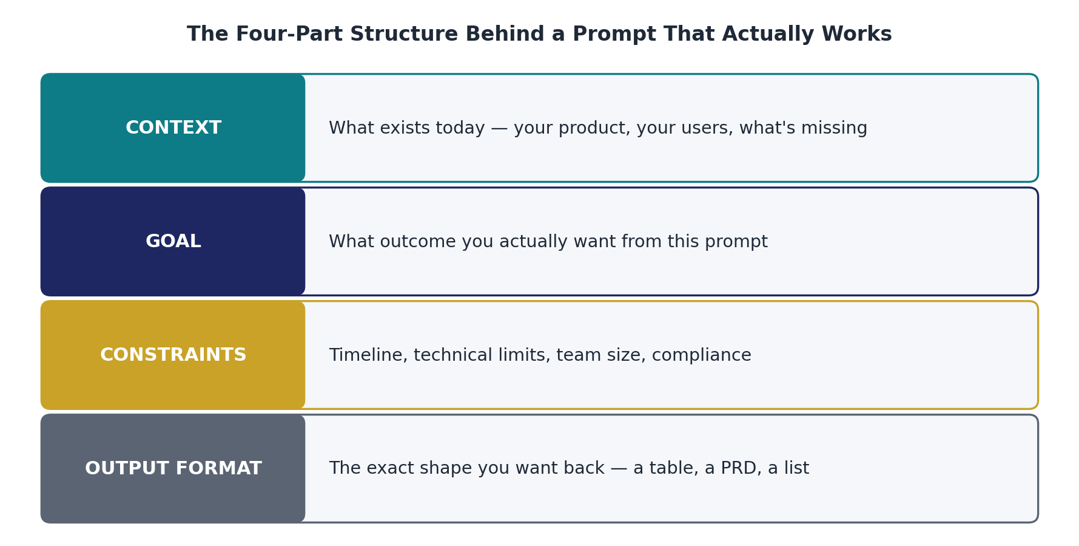
Fig 2: The CGCO framework for creating clearer, more effective AI prompts.
The four-part structure behind a prompt that actually works.
A product manager who internalizes this structure stops treating every prompt as a fresh guess and starts treating it as a specification, the same discipline that goes into writing a good requirement in the first place.
From PRD to an Azure DevOps Backlog
A finished PRD is still just a document until someone breaks it down into work that a team can pick up, estimate, and track. This is where a lot of the time savings actually show up. Instead of manually splitting a requirements document into epics, features, and user stories one at a time, a product manager can ask Copilot to break a completed PRD into a full Azure DevOps hierarchy, including a suggested story-point estimate and a one-line rationale for each item.
The estimates aren’t meant to be final. They’re a starting point for the same team conversation that would happen anyway during sprint planning, except the team walks in with a first draft instead of a blank backlog. The same applies to sequencing: asking for a two-week sprint plan based on dependencies gives a product manager something to bring into planning, not something to skip planning altogether.
Teams already running Azure DevOps as their system of record tend to get the most out of this pairing, since the output maps cleanly onto fields they already use, Story Points, Iteration Path, and Acceptance Criteria, rather than requiring a new tool or a new process.
One Document, Different Readers
A requirements document written for an engineer and a status update written for a steering committee are not the same thing, even when they’re describing the same feature. A common mistake is writing one long document and sending it to everyone, which means executives wade through implementation details they don’t need, and engineers dig through business justifications they’ve already accepted.
Asking Copilot to generate three separate summaries from the same PRD, one for an executive audience, one for engineering, and one for design, produces something closer to what each reader actually needs. The executive version leads with business impact and risk. The engineering version leads with technical scope and open questions. The design version leads with the changes that are visually and interactively different. None of them is a shorter version of the same paragraph; each one reweights what matters for that specific reader.
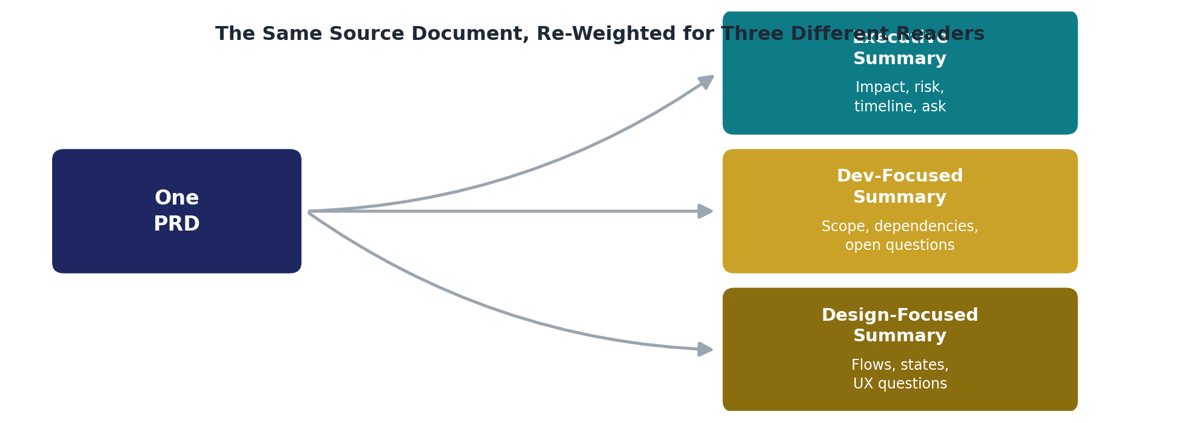
Fig 3: Transform one PRD into tailored summaries for different stakeholders.
The same source document, re-weighted for three different readers.
This is a small habit with an outsized effect on how a product manager is perceived by leadership. A tightly written, right-sized update lands very differently than a forwarded PRD with a note that says “see attached.”
Keeping Judgment in the Loop
None of this works if a product manager stops reading the output critically. A generated story-point estimate is a guess, however well-reasoned it sounds. A generated statistic or competitor claim should be checked before it appears in a real document. Copilot is good at producing plausible, well-structured text; it does not know whether that text is actually true for your specific product, customers, or technical stack.
A useful habit here is to occasionally turn the tool on its own output: ask it to act as a skeptical reviewer and flag anything incomplete, ambiguous, or risky in a PRD before it goes into a sprint. It’s a genuinely different exercise than generating the document in the first place, and it tends to surface gaps a first draft glosses over, an undefined edge case, an assumption nobody wrote down, or a missing rate limit on a public endpoint.
The product manager’s job doesn’t shrink in this workflow. It shifts. Less time goes into formatting and structuring a document from nothing, and more time goes into deciding whether what came back is actually correct for the product in front of them.
Smarter Product Management
Product teams that get real value from this approach tend to treat it as a skill worth practicing deliberately, rather than something picked up passively over a few weeks of ad hoc use. Structured prompting, requirement review, and backlog generation are each distinct habits, and building all three well takes more than trial and error on a live project.
For teams working specifically inside the Microsoft ecosystem, an instructor-led GitHub Copilot course that covers this kind of prompting in depth, and a separate Azure DevOps engineering certification for teams that want to go further into the backlog and sprint-planning side of the workflow.
Either way, the underlying idea is the same one that’s made Copilot useful to developers for years: it’s a fast, capable drafting partner, not a replacement for the judgment that decides whether the draft is actually good. For product managers, that distinction is the whole difference between a tool that produces busywork and one that quietly removes it.
Upskill Your Teams with Enterprise-Ready Tech Training Programs
- Team-wide Customizable Programs
- Measurable Business Outcomes
About CloudThat


WRITTEN BY MD Azhar Uddin
Azhar is a Microsoft Certified Trainer (MCT) and multicloud expert with a Master’s degree in computer applications. With a proven track record of training over 10,000 professionals worldwide, he specializes in cloud, DevOps, and system administration- emphasizing scalable, secure and cost-effective solutions. He brings deep expertise in Azure, AWS and Oracle Cloud, skillfully integrating complex multicloud environments and designing modern cloud-native architectures using microservices and containers. Recognized among the Top 100 MCTs globally acclaimed for delivering real-world, high-impact training in Microsoft Data & AI and cloud technologies.


 PREV
PREV












Comments