

 Login
Login


 September 24, 2026
|
Voiced by Amazon Polly |
Introduction
Most DevOps teams have already solved the problem of getting software into production quickly. CI/CD pipelines can build an application, run tests, scan the image, publish it, and deploy it to Kubernetes with very little manual work.
The harder problem starts after the deployment.
A release can pass every pipeline check and still behave differently once it starts receiving real traffic. Maybe latency increases only under production load. Maybe one API starts returning more errors. Maybe a downstream service behaves differently with the new version. By the time someone notices, the new release may already be serving most of the user base.
This is where Progressive Delivery becomes useful.
Instead of moving directly from “deployment completed” to “100% production traffic,” the new version is introduced gradually. A small portion of traffic is sent to the canary, its behavior is observed, and the rollout continues only when the release meets the expected criteria.
With Kubernetes, Argo Rollouts, traffic management, Prometheus, and automated rollback, release validation becomes part of the deployment process itself.
The idea is simple:
Deploy the release first. Increase exposure only after the release proves that it is healthy.
Pioneers in Cloud Consulting & Migration Services
- Reduced infrastructural costs
- Accelerated application deployment
Architecture Overview
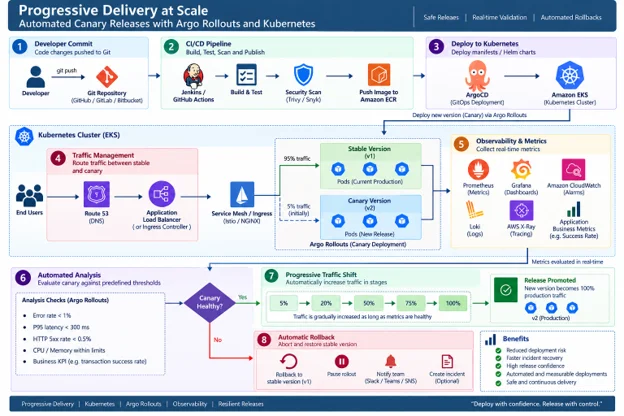
Architecture Explanation:
A typical Progressive Delivery workflow looks like this:
Developer → Git → CI/CD → Build & Test → Security Scan → Container Registry → Kubernetes → Argo Rollouts → Traffic Split → Canary → Observability → Analysis → Promote / Roll Back
The exact components can vary from environment to environment. An ingress controller may handle traffic routing in one setup, while another organization may use a service mesh.
The important part is the control loop.
The new version is deployed alongside the stable version, receives a controlled amount of traffic, and is evaluated using real application signals before more users are exposed to it.
The process begins when a developer pushes a change to the source repository. The CI/CD pipeline builds the application, executes automated tests, performs security checks, and publishes the resulting container image.
The image is then deployed to Kubernetes as a new release.
This is where Argo Rollouts changes the normal deployment process. Rather than immediately replacing the current version, Argo Rollouts manages the new release as a canary.
For example, the initial traffic split could be:
Stable: 95%
Canary: 5%
The canary receives a small portion of actual production traffic while the platform collects metrics such as error rate, latency, HTTP response codes, resource usage, and business-specific indicators.
Prometheus or another supported monitoring system provides the data used for the analysis.
Suppose the canary remains within the defined thresholds. The rollout can then move to the next stage:
5% → 20% → 50% → 75% → 100%
The exact stages depend on the application and its risk profile.
If the canary shows signs of regression, the rollout is stopped. The platform can reduce or remove traffic from the canary and keep the stable version serving users.
That is the key difference from a basic deployment pipeline: the release is not considered successful simply because the deployment completed.
Its behaviour in production also becomes part of the release decision.
The Shift: From Deployment Automation to Release Intelligence
Traditional CI/CD focuses heavily on one question:
“Can we deploy this version?”
Progressive Delivery introduces another question:
“Should we expose more users to this version?”
Those questions are related, but they are not the same.
A build can be completely valid from a CI/CD perspective and still introduce a production problem. Unit tests may pass. Integration tests may pass. Security scans may pass. The application can still show higher latency or an increased error rate once it encounters real customer traffic.
Progressive Delivery creates a checkpoint between deployment and full release.
The process becomes:
Build → Deploy → Observe → Evaluate → Decide → Continue or Roll Back
This makes production behavior part of the delivery process rather than something engineers review only after the release is already complete.
Core Pillars
- Gradual Traffic Exposure
The safest way to introduce an unfamiliar version is to give it a limited audience first.
Instead of immediately moving every request to the new release, traffic can be introduced in stages:
1% → 5% → 25% → 50% → 100%
A critical payment service may need a much slower progression than an internal application.
There is no single percentage sequence that fits every workload. The rollout strategy should reflect the impact of failure and the confidence the team has in the release.
- Automated Canary Analysis
A canary is useful only when the platform has a way to decide whether it is behaving normally.
That usually means defining thresholds around a few important signals.
For example:
- Error rate below the agreed limit
- P95 latency within the expected range
- HTTP 5xx responses below the acceptable threshold
- Resource consumption within expected levels
- Business transaction success rate remaining healthy
The analysis window also matters. A single failed request should not necessarily trigger a rollback. Likewise, a sustained degradation should not be ignored just because the average over a long period looks acceptable.
The analysis needs to reflect how the application actually behaves.
- Observability as Part of the Release Process
Observability is often treated as something engineers use after deployment.
With Progressive Delivery, it becomes part of the release mechanism itself.
The telemetry collected from the canary helps answer:
Is the new version behaving better, worse, or roughly the same as expected?
Metrics, logs, traces, and business indicators can all contribute to that decision.
This turns observability from a passive monitoring layer into an active part of deployment automation.
- Automated Rollback
Rollback should not depend entirely on someone noticing a problem and manually starting a recovery procedure.
When a release fails its analysis, the deployment system should be able to stop progression and return traffic to the stable version.
A typical sequence might be:
Detect regression → Pause rollout → Remove canary exposure → Keep stable version active → Alert engineering team
The faster this happens, the smaller the impact of a bad release.
- Risk-Based Rollout Strategies
Not every service needs the same release process.
For a low-risk service, a rollout might look like:
10% → 50% → 100%
For a business-critical service, a more conservative progression might be:
1% → 5% → 10% → 25% → 50% → 100%
The point is not to add more deployment stages for the sake of complexity.
The point is to make the level of exposure proportional to the consequences of a failed release.
Challenges
- Choosing the Right Success Criteria
One of the easiest mistakes is to define release health only in terms of Kubernetes.
A pod can be running, ready, and consuming a normal amount of CPU while the application itself is performing worse.
The new version could still introduce:
- Higher request latency
- More HTTP errors
- Failed transactions
- Unexpected resource consumption
- A decrease in a business-critical metric
The release criteria therefore need to go beyond infrastructure health.
- Managing Traffic Between Versions
Traffic routing becomes more complicated once stable and canary versions are running together.
The platform needs to reliably distinguish between: Stable Version and Canary Version
That requires appropriate traffic-management capabilities, whether they come from an ingress controller, service mesh, or another routing layer. The routing mechanism also needs to behave predictably when the rollout is paused or rolled back.
- Avoiding False Rollbacks
Automated rollback decisions depend heavily on the quality of the analysis.
Temporary traffic spikes or unrelated infrastructure events can incorrectly make a healthy deployment appear unhealthy.
Deployment analysis therefore needs appropriate thresholds, evaluation windows, and statistical context.
- Stateful and Backward-Incompatible Changes
Progressive Delivery works particularly well when different versions of an application can safely coexist.
That becomes harder when the release contains:
- Database schema changes
- Stateful components
- Breaking API changes
- Session dependencies
- Incompatible message formats
- Distributed transactions
During a canary release, old and new application versions may run at the same time.
The surrounding architecture therefore needs to tolerate that temporary overlap.
- Microservice Dependencies
A service can look healthy on its own and still cause problems because of how it interacts with another service.
For example, a new API version might send a request pattern that an older downstream service does not handle correctly.
This is why canary validation should not stop at pod health and application-level metrics. For important services, teams should also consider dependency behavior and relevant end-to-end transactions.
Best Practices
- Start With a Small Canary
For critical workloads, exposing a small percentage of users to the new release provides a reasonable first checkpoint.
Starting with 1–5% traffic can help teams detect obvious regressions before they become widespread.
The exact percentage should depend on traffic volume and application risk.
- Define the Release Gates Up Front Teams should decide what constitutes a healthy canary before the rollout begins.
Examples include:
Error rate < defined threshold
Latency < defined threshold
Availability > target
Business transaction success > target
This avoids making release decisions based on intuition once the deployment is already underway.
- Look Beyond Infrastructure Metrics
A deployment can be healthy from an infrastructure perspective and still be bad for users.
It is useful to combine three layers of signals:
Infrastructure signals + Application signals + Business signals
For example, CPU and memory may look normal while payment success rate has fallen.
For a customer-facing application, that business metric may be the more important release signal.
- Define Clear Abort Conditions
Every rollout should have an explicit answer to the question:
“What would make us stop this release?”
Possible conditions include:
- Sustained increase in HTTP 5xx responses
- Significant latency regression
- Failed readiness or health checks
- Business KPI degradation
- Dependency failures
- Unexpected resource consumption
The system should be able to stop the rollout without waiting for an engineer to notice the problem manually.
- Design for Version Coexistence
During a progressive rollout, two versions may temporarily be serving traffic.
This means APIs, database changes, events, and message contracts should ideally support backward compatibility during the transition.
This is particularly important for microservice architectures where different services are deployed independently.
- Keep Progressive Delivery Inside the Existing Pipeline
Progressive Delivery should not become another manual operational process.
A mature workflow can look like:
Build → Test → Security Scan → Deploy → Canary → Analyze → Promote / Roll Back
The release remains part of the same delivery pipeline, but now production validation is built into the process.
- Store Rollout Policies in Git
Canary steps, analysis thresholds, traffic percentages, and promotion rules should be treated as configuration. Keeping them in Git provides:
- Reviewable changes
- Version history
- Easier auditing
- Repeatable releases
- Consistent rollout behavior
It also makes it easier to understand why a release behaved differently after a configuration change.
Progressive Delivery Lifecycle
A practical rollout can be broken into these stages:
Define → Build → Deploy → Canary → Observe → Analyze → Promote → Verify
Define: Choose the rollout strategy, traffic stages, analysis criteria, and abort conditions.
Build: Create and test the application artifact through the normal CI/CD process.
Deploy: Deploy the new version into the Kubernetes environment without immediately giving it full production traffic.
Canary: Expose a controlled percentage of users to the new release.
Observe: Collect metrics, logs, traces, and business signals.
Analyze: Compare the observed behavior against the defined release criteria.
Promote: Increase traffic gradually when the canary remains healthy.
Verify: Confirm that the final production state is stable after reaching 100% traffic.
When the analysis fails, the path changes:
Canary → Analyze → Abort → Roll Back
This gives the release process a defined recovery path rather than treating rollback as an emergency procedure.
Outcome
A well-designed Progressive Delivery setup can provide several practical benefits:
- Smaller deployment blast radius because the new version is introduced gradually.
- Quicker response to release regressions because automated analysis can stop a rollout early.
- Safer frequent deployments without adding a manual approval step to every release.
- Better visibility into real production behavior before all customers are exposed.
- Lower change-related risk for important services.
- Clear separation between deployment and release, allowing teams to deploy an artifact without immediately making it the default production version.
- Closer integration between observability and CI/CD, so production signals can influence release decisions.
Conclusion: Making Releases More Controlled
CI/CD solved a major problem for software teams: getting changes from source control into production quickly and consistently.
Progressive Delivery addresses the next problem—how much production exposure a new change should receive before it is considered safe.
With Kubernetes, Argo Rollouts, traffic management, observability, and automated analysis, a release can move through production in controlled steps instead of making one large jump.
That does not remove the possibility of defects. It changes how those defects are handled.
A problematic release can be caught while only a small portion of traffic is affected. A healthy release can move forward automatically without waiting for a manual approval at every stage.
For engineering teams, that means the deployment process becomes more deliberate without necessarily becoming slower.
The goal of Progressive Delivery is simple: give every release the opportunity to prove itself before giving it the full production audience.
Upskill Your Teams with Enterprise-Ready Tech Training Programs
- Team-wide Customizable Programs
- Measurable Business Outcomes
About CloudThat
FAQs
1. What is Progressive Delivery?
ANS: – Progressive Delivery is a release approach in which a new application version is exposed to production traffic gradually while the system evaluates its behavior. Instead of moving directly from deployment to 100% traffic, the release passes through controlled stages.
2. ow is a canary deployment different from a standard rolling deployment?
ANS: – A rolling deployment gradually replaces application instances, but that does not necessarily mean traffic is being evaluated based on the application’s actual behavior. A canary deployment deliberately limits exposure to the new version and uses production signals to decide whether traffic should continue increasing
3. What does Argo Rollouts do?
ANS: – Argo Rollouts extends Kubernetes deployment capabilities with progressive-delivery features such as staged canary releases, pauses, analysis checks, promotion, and automated rollback. It effectively manages the rollout state rather than treating deployment as a simple replacement operation.


WRITTEN BY Sourabh Murgod
Sourabh Murgod works as a Research Associate at CloudThat, focusing on AWS, Kubernetes, and DevOps engineering. He is passionate about designing scalable cloud architectures, automating infrastructure, and optimizing production workloads.


 PREV
PREV












Comments