

 Login
Login


 August 24, 2026
|
Voiced by Amazon Polly |
Overview
AI agents are getting better at reasoning, planning, and using external tools.
An agent can search a database, call an API, create a ticket, check an order, retrieve a document, or trigger a business workflow. On a demo, this can look almost magical.
Then production happens.
The API times out.
The database is temporarily unavailable.
A required field is missing.
The third-party service returns an unexpected response.
The tool works, but returns incomplete data.
And suddenly, the “intelligent” AI agent doesn’t know what to do next.
This is one of the biggest differences between an AI demo and a production-ready AI system:
A production agent isn’t defined by how well it works when everything goes right. It’s defined by how gracefully it behaves when something goes wrong.
Traditional software usually handles failures through explicit conditions:
if API fails:
retry
else:
continue
AI agents operate in a more dynamic environment. The model decides which tool to call, what arguments to provide, and sometimes what to do with the result.
That makes failure recovery much more interesting.
Pioneers in Cloud Consulting & Migration Services
- Reduced infrastructural costs
- Accelerated application deployment
What Exactly Is a Tool Failure?
A tool failure doesn’t necessarily mean that an API crashed.
There are several types of failures an agent can encounter.
- Technical failure
The tool itself fails.
For example:
- HTTP 500
- Connection timeout
- Database unavailable
- Authentication failure
- Rate limit exceeded
- Input failure
The agent calls the tool with invalid or incomplete parameters.
For example:
{
“customer_id”: “”
}
The API may reject the request.
- Business failure
The API works perfectly but the requested operation isn’t possible.
For example:
“Cancel my order.”
The cancellation API responds:
The order cannot be canceled because it has already shipped.
This isn’t a technical error.
It’s a business outcome.
- Data failure
The tool returns successfully, but the result is incomplete, inconsistent, or unexpected.
For example:
{
“order_id”: “12345”,
“status”: null
}
The request succeeded, but the agent doesn’t have enough information to answer the user.
These failures need different recovery strategies.
The First Mistake: Treating Every Failure the Same
One of the simplest mistakes in agent development is implementing a generic:
“Something went wrong. Please try again.”
It technically handles the error.
But it doesn’t recover.
Imagine a customer asks:
“What’s the status of my order?”
The agent calls the order API.
The API times out.
The agent says:
“Sorry, something went wrong.”
The conversation is effectively dead.
A better agent should ask:
Can I recover automatically?
If yes, recover.
If not:
Can I use another source?
If yes, use the fallback.
If not:
Can I continue the conversation without pretending I know the answer?
That is the real idea behind resilient AI agents.
- Give the Agent Failure Context
Don’t hide tool failures from the agent.
Instead of returning:
Error
return useful structured information.
For example:
{
“success”: false,
“error_type”: “TIMEOUT”,
“message”: “Order service did not respond within 3 seconds”,
“retryable”: true
}
Now the agent has context.
It knows this isn’t necessarily a permanent failure.
Compare that with:
The tool failed.
The second message gives the model almost nothing to reason about.
A useful tool response should tell the agent:
- What failed?
- Why did it fail?
- Is the failure temporary?
- Can it retry?
- Is another tool available?
- Does the user need to provide additional information?
This turns an error into actionable information.
- Teach the Agent Which Errors Are Retryable
Not every failure should trigger a retry.
Consider these two scenarios.
Scenario A
HTTP 503 — Service temporarily unavailable
Retrying might make sense.
Scenario B
HTTP 400 — Invalid customer ID
Retrying the same request won’t help.
The agent needs to understand the difference.
A simple classification could be:
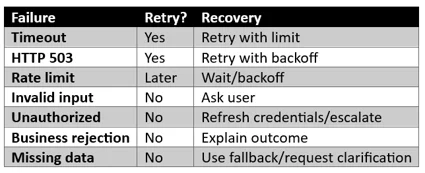
This sounds like normal software engineering, and it is.
The important difference is that an AI agent must also be given enough information to make an appropriate next decision.
- Build Fallback Tools
One of the most powerful recovery strategies is having another way to accomplish the same goal.
Suppose your primary customer lookup service is unavailable.

- Separate Tool Errors From Business Outcomes
This is one of the most important design principles.
Consider:
“Can I cancel my order?”
The API responds:
Order already shipped.
That’s not an error.
The API successfully answered the question.
The agent should not retry it.
Instead, it should communicate the business result:
“Your order has already shipped, so cancellation is no longer available.”
Now compare:
Order API timeout.
That’s a technical failure.
The recovery strategy should be completely different.
If you combine these two concepts, your agent will make poor decisions.
- Keep the Agent From Hallucinating a Successful Tool Call
This is probably the most dangerous failure mode.
Suppose the payment API fails.
The user asks:
“Was my payment successful?”
The agent doesn’t receive a result.
A poorly designed system might generate:
“Yes, your payment was successful.”
Why?
Because the model is optimized to produce useful-looking answers, not because it actually knows the payment succeeded.
The system should make tool state explicit.
For example:
{
“tool_status”: “FAILED”,
“data_available”: false
}
Then your agent instructions should make one rule extremely clear:
Never claim that an external action succeeded unless the tool returned a confirmed success result.
This rule is especially important for:
- Payments
- Orders
- Bookings
- Account changes
- Financial transactions
- Healthcare workflows
- Customer records
A Practical Production Checklist
Before deploying an AI agent, ask:
Tool design
- Does every tool return structured success/failure information?
- Are retryable errors clearly identified?
- Are business failures separated from technical failures?
Recovery
- Is there a retry limit?
- Is exponential backoff implemented?
- Are fallback tools available for critical operations?
- Can the agent request missing information?
Safety
- Can the agent accidentally claim a failed action succeeded?
- Are sensitive operations confirmed before execution?
- Are irreversible operations protected?
Observability
- Are tool failures logged?
- Are retries measured?
- Are fallback attempts tracked?
- Can you identify the root cause of failed conversations?
Human escalation
- Can the agent transfer difficult cases to a human?
- Does the human receive the conversation context?
If the answer to these questions is yes, you’re moving beyond a simple chatbot and toward a production-grade agent.
Final Thoughts
The most impressive AI agent isn’t necessarily the one that performs the most complicated reasoning.
It’s the one that keeps the conversation moving when something goes wrong.
APIs will fail.
Networks will timeout.
Databases will become unavailable.
Third-party services will return unexpected responses.
Users will provide incomplete information.
And, when necessary, it can hand the conversation to a human.
That’s the real difference between an AI agent that looks intelligent in a demo and one that can actually survive in production.
Drop a query if you have any questions regarding the AI Agent, and we will get back to you quickly.
Empowering organizations to become ‘data driven’ enterprises with our Cloud experts.
- Reduced infrastructure costs
- Timely data-driven decisions
About CloudThat
FAQs
1. What is tool failure in an AI agent?
ANS: – A tool failure occurs when an external function used by an AI agent cannot complete successfully. This could be caused by a timeout, invalid input, an API outage, an authentication problem, a rate limit, or a business rule.
2. Should an AI agent always retry a failed tool?
ANS: – No. Only failures that are likely to be temporary should normally be retried. Invalid inputs and business-rule failures usually require a different recovery strategy.
3. How many times should an AI agent retry?
ANS: – There is no universal number, but a small, bounded retry policy, often 1 to 3 attempts, depending on the operation, is safer than unlimited retries.


WRITTEN BY Modi Shubham Rajeshbhai
Shubham Modi is working as a Research Associate - Data and AI/ML in CloudThat. He is a focused and very enthusiastic person, keen to learn new things in Data Science on the Cloud. He has worked on AWS, Azure, Machine Learning, and many more technologies.


 PREV
PREV












Comments