

 Login
Login


 June 23, 2026
|
Voiced by Amazon Polly |
Introduction
As organizations increasingly adopt AI-powered productivity tools, Microsoft offers two key options for building intelligent agents: Copilot Agent Builder and Microsoft Copilot Studio. While both enable the creation of AI agents within the Microsoft ecosystem, they are designed for different users and use cases. Copilot Agent Builder is ideal for business users who need simple, quick-to-build agents, whereas Copilot Studio provides advanced capabilities, integrations, and governance for developers and enterprise-scale solutions. Understanding their differences helps organizations choose the right tool for their AI automation needs.
Pioneers in Cloud Consulting & Migration Services
- Reduced infrastructural costs
- Accelerated application deployment
Understanding Copilot Agent Builder
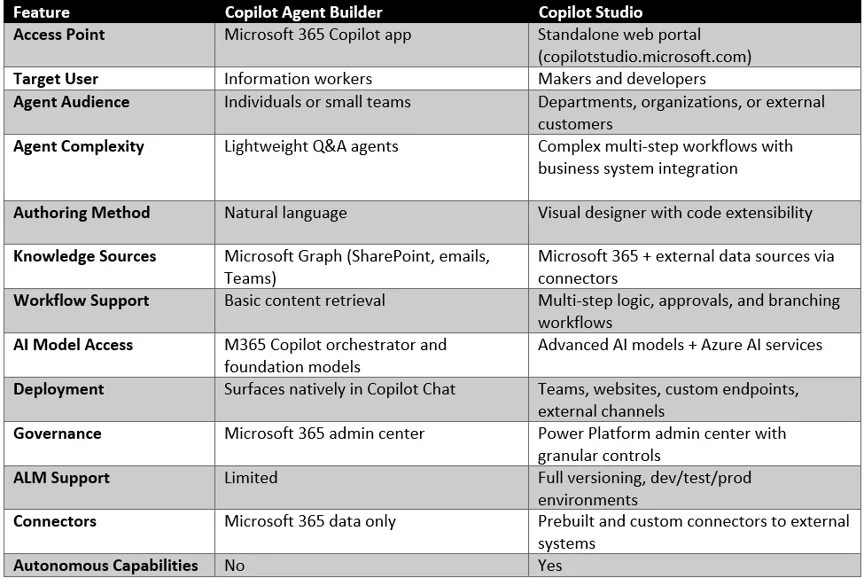
Copilot Agent Builder is a built-in feature of Microsoft 365 Copilot that enables business users to create simple AI agents without coding. Users can build Q&A agents using natural language, leverage knowledge from SharePoint, Teams, emails, and Microsoft Graph, and deploy them directly within Copilot Chat. It also aligns with existing Microsoft 365 permissions, ensuring agents can access only data that users are authorized to view.
Understanding Microsoft Copilot Studio
Microsoft Copilot Studio is a standalone platform designed for developers and makers to build advanced, enterprise-grade AI agents. It supports multi-step workflows, approvals, branching logic, external system integrations, Azure AI services, and autonomous agent capabilities. Copilot Studio also offers full Application Lifecycle Management (ALM), deployment across multiple channels, role-based access controls, telemetry, and analytics, making it ideal for large-scale enterprise AI solutions.
Key Differences Between Copilot Agent Builder and Copilot Studio
The following comparison highlights the fundamental differences between the two platforms:
When to Choose Copilot Agent Builder?
Choose Copilot Agent Builder when you need a simple AI assistant for answering questions based on Microsoft 365 content, with minimal setup and no developer involvement. It is ideal for individual users or small teams working within Microsoft 365 Copilot.
Common use cases: Project FAQs, onboarding assistants, product documentation bots, and team knowledge assistants.
When to Choose Copilot Studio?
Choose Copilot Studio when you need enterprise-grade AI agents with advanced workflows, approvals, external system integrations, multi-channel deployment, and strong governance controls. It is best suited for organization-wide or customer-facing solutions.
Common use cases: Customer support agents, IT helpdesk bots, CRM-integrated sales assistants, HR onboarding solutions, and multi-agent automation scenarios.
Recent Enhancements
Agent Builder: Improved Microsoft Graph grounding, natural language file generation, free web-grounded agents, and a one-click upgrade path to Copilot Studio.
Copilot Studio: Multi-agent orchestration, enhanced authoring experience, computer-use capabilities, Azure AI integration, advanced governance, and scalable deployments.Copilot Studio Enhancements:
Seamless Upgrade Path: Microsoft now allows agents built in Agent Builder to be upgraded to Copilot Studio while preserving their configuration and instructions. This enables organizations to start with simple agents and expand them into more advanced enterprise solutions as requirements grow.
Governance and Compliance
Both Copilot Agent Builder and Copilot Studio integrate with Microsoft’s security and compliance framework, but Copilot Studio offers more advanced governance controls.
- Copilot Agent Builder automatically follows existing Microsoft 365 permissions, DLP policies, retention rules, and audit logging. It is managed through the Microsoft 365 admin center and integrates with Microsoft Purview for compliance and data protection.
- Copilot Studio provides enterprise-grade governance with Application Lifecycle Management (ALM), connector controls, role-based access, environment-level DLP policies, detailed auditing, telemetry, and usage analytics. It also supports secure collaboration and requires administrative approval for broader organizational deployment.
In summary, Agent Builder offers simple, built-in governance for Microsoft 365 users, while Copilot Studio delivers comprehensive controls required for enterprise-scale AI solutions.
Licensing Requirements
Both Agent Builder and Copilot Studio are included with a Microsoft 365 Copilot add-on license for authenticated users. Additional options include:
- Copilot Credits or pay-as-you-go plans for users without a Copilot license
- Free tier for Agent Builder agents based on web knowledge only
- Copilot Studio message-based consumption for advanced scenarios
Note: Microsoft has announced the discontinuation of AI Builder credits and the transition to Copilot Studio credits by November 2026.
Best Practices for Choosing the Right Tool
- Start Simple, Scale When Needed
- Define a Clear Audience and Scope
- Leverage the Upgrade Path
- Implement Governance Early
- Monitor and Iterate
- Align with Security Policies
Outcome and Business Impact
- Reduced time-to-value for AI automation with Agent Builder’s no-code approach
- Improved employee productivity through instant access to organizational knowledge
- Scalable enterprise automation with Copilot Studio’s advanced workflow capabilities
- Stronger governance and compliance posture through integrated Microsoft Purview controls
- Lower development costs by empowering business users to create their own agents
- Seamless growth path from simple agents to complex enterprise solutions
- Enhanced customer experience through multi-channel agent deployment
Conclusion
Both Copilot Agent Builder and Copilot Studio play important roles in Microsoft’s AI ecosystem. Agent Builder is best suited for business users who need to create simple, content-driven assistants within Microsoft 365 quickly. At the same time, Copilot Studio is designed for building advanced, enterprise-grade agents with complex workflows and integrations. By choosing the right tool for their business needs, organizations can start with simple AI solutions and scale to more sophisticated automation as requirements grow, all while maintaining security, governance, and compliance.
Drop a query if you have any questions regarding Copilot Agent Builder, and we will get back to you quickly.
Empowering organizations to become ‘data driven’ enterprises with our Cloud experts.
- Reduced infrastructure costs
- Timely data-driven decisions
About CloudThat
FAQs
1. What is the main difference between Copilot Agent Builder and Copilot Studio?
ANS: – Copilot Agent Builder is a lightweight, no-code tool in Microsoft 365 Copilot that lets users create simple Q&A agents using natural language. Copilot Studio is a standalone, full-featured platform designed for building advanced, enterprise-grade agents with workflows, external integrations, and strong governance controls.
2. Do I need a separate license for Copilot Studio?
ANS: – Both Agent Builder and Copilot Studio are included with a Microsoft 365 Copilot add-on license for authenticated users. If you don’t have a Copilot license, you can use Copilot Credits or a pay-as-you-go plan. Agent Builder also offers a free tier for agents based solely on web knowledge.
3. Can Copilot Studio agents connect to external systems like CRM or ERP?
ANS: – Yes, Copilot Studio supports prebuilt and custom connectors that allow agents to integrate with data sources beyond Microsoft 365, including CRM systems, databases, APIs, and other line-of-business applications. Agent Builder is limited to Microsoft 365 data sources accessed through Microsoft Graph.


WRITTEN BY Ayush Agarwal
Ayush Agarwal works as a Subject Matter Expert at CloudThat. He is a certified AWS Solutions Architect Professional with expertise in designing and implementing scalable cloud infrastructure solutions. Ayush specializes in cloud architecture, infrastructure as code, and multi-cloud deployments, helping organizations optimize their cloud strategies and achieve operational excellence. With a deep understanding of AWS services and best practices, he guides teams in building robust, secure, and cost-effective cloud solutions. Ayush is passionate about emerging cloud technologies and continuously enhances his knowledge to stay at the forefront of cloud innovation. In his free time, he enjoys exploring new AWS services, experimenting with technologies, and trekking to discover new places and connect with nature.


 PREV
PREV












Comments