

 Login
Login

 December 12, 2025
|
Voiced by Amazon Polly |
Overview
Amazon Nova Sonic is Amazon Bedrock’s real-time speech-to-speech AI model, enabling low-latency conversational interactions. Unlike traditional systems that stitch together Speech-to-Text, LLM, and Text-to-Speech, Amazon Nova Sonic processes live audio input and returns streamed audio responses directly, creating natural, human-like voice chat experiences.
In this blog, we will walk through a Python-based real-time audio chat client built using Amazon Nova Sonic’s bidirectional streaming API.
Pioneers in Cloud Consulting & Migration Services
- Reduced infrastructural costs
- Accelerated application deployment
Introduction
Amazon Nova Sonic is an advanced speech-to-speech model on Amazon Bedrock, enabling real-time, conversational interactions through bidirectional audio streaming. In practice, this means your app can send live audio to the model and receive spoken replies almost instantly, producing natural, low-latency conversations. Such a voice chat system is ideal for customer support bots, virtual assistants, hands-free web, and other use cases where users speak and listen (for example, an AI-powered help agent embedded in a web app). Because Amazon Nova Sonic can maintain context and handle multi-turn dialogue, it can support complex tasks like scheduling, troubleshooting, or guided assistance in domains like travel, healthcare, or e-commerce.
Step-by-Step Process
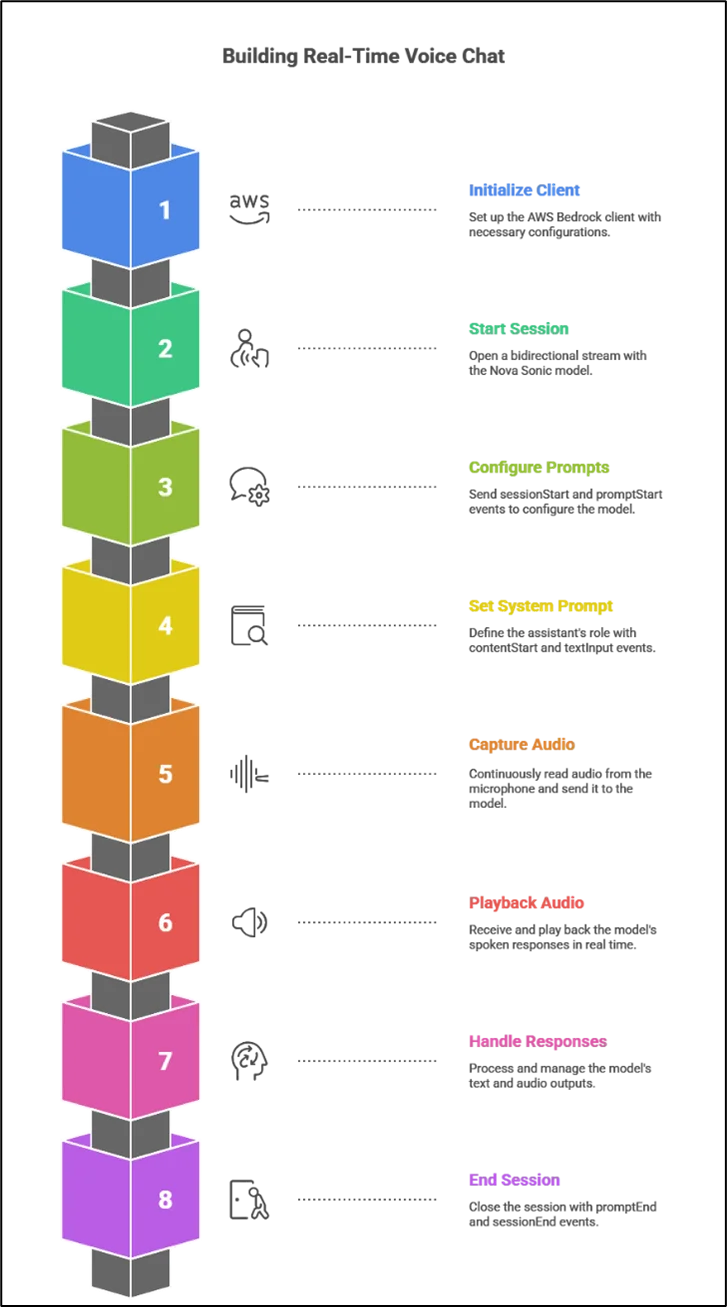
The SimpleNovaSonic class begins by initializing an Amazon Bedrock Runtime client with SigV4 authentication. This client will be used to start a bidirectional streaming session with the Nova Sonic model. In our code, we import the Amazon Bedrock SDK and define an _initialize_client method:
|
1 2 3 4 5 6 7 8 9 10 11 |
def _initialize_client(self): endpoint = f"https://bedrock-runtime.{self.region}.amazonaws.com" config = Config( endpoint_uri=endpoint, region=self.region, aws_credentials_identity_resolver=EnvironmentCredentialsResolver(), auth_scheme_resolver=HTTPAuthSchemeResolver(), auth_schemes={"aws.auth#sigv4": SigV4AuthScheme(service="bedrock")} ) self.client = BedrockRuntimeClient(config=config) logger.info("AWS Bedrock client initialized successfully") |
This code constructs the Amazon Bedrock Runtime endpoint URI and applies AWS credentials via the environment. After calling _initialize_client, self.client can be used to invoke the Nova Sonic model. (We assume the AWS credentials and Bedrock model permissions have been set up separately, as per AWS best practices.)
Starting the Streaming Session
Once the Amazon Bedrock client is ready, the next step is to open a bidirectional stream with the Nova Sonic model. In the start_session method, we do this by calling invoke_model_with_bidirectional_stream with our model ID (e.g. “amazon.nova-2-sonic-v1:0”):
|
1 2 3 4 |
self.stream = await self.client.invoke_model_with_bidirectional_stream( InvokeModelWithBidirectionalStreamOperationInput(model_id=self.model_id) ) self.is_active = True |
This creates a persistent stream through which we can send microphone audio and receive model responses simultaneously. As AWS notes, once the session is active, audio input and model output flow concurrently, allowing the client to continue streaming user speech while listening for replies.
After opening the stream, we send a sessionStart event to set model parameters such as maxTokens, topP, and temperature. The send_event helper wraps this JSON and transmits it to the model. We then send a promptStart event to request both text and audio outputs and to apply the desired voice settings.
|
1 2 3 4 5 6 7 8 9 10 11 12 |
session_start = json.dumps({ "event": { "sessionStart": { "inferenceConfiguration": { "maxTokens": 1024, "topP": 0.9, "temperature": 0.7 } } } }) await self.send_event(session_start) |
This tells Amazon Nova Sonic how to generate its responses. The send_event helper method wraps the JSON into the streaming payload. Following this pattern, we next send a promptStart event to specify the kinds of output we want (both text and audio) and to configure the voice settings:
|
1 2 3 4 5 6 7 8 9 10 11 12 13 14 15 16 17 18 |
prompt_start = json.dumps({ "event": { "promptStart": { "promptName": self.prompt_name, "textOutputConfiguration": {"mediaType": "text/plain"}, "audioOutputConfiguration": { "mediaType": "audio/lpcm", "sampleRateHertz": OUTPUT_SAMPLE_RATE, "sampleSizeBits": 16, "channelCount": CHANNELS, "voiceId": "matthew", "encoding": "base64", "audioType": "SPEECH" } } } }) await self.send_event(prompt_start) |
This configures Amazon Nova Sonic to return both text (for possible display) and base64-encoded PCM audio with the chosen voiceId (e.g., “matthew”). (Nova Sonic supports multiple voices and languages.) Once promptStart is acknowledged, the session is ready to accept user content.
Configuring the Conversation and Prompts
To configure the assistant’s behavior before sending audio, we provide a system prompt. We send a contentStart event to indicate a system text prompt, a textInput event with the actual instruction, and a contentEnd event to finish the block:
|
1 2 3 4 5 6 7 8 9 10 11 12 13 14 15 16 17 18 19 20 21 22 23 24 25 26 27 28 29 30 31 32 33 34 35 |
text_content_start = json.dumps({ "event": { "contentStart": { "promptName": self.prompt_name, "contentName": self.content_name, "type": "TEXT", "interactive": True, "role": "SYSTEM", "textInputConfiguration": {"mediaType": "text/plain"} } } }) await self.send_event(text_content_start) system_prompt = "You are an Airbnb support assistant. You help both guests and hosts..." text_input = json.dumps({ "event": { "textInput": { "promptName": self.prompt_name, "contentName": self.content_name, "content": system_prompt } } }) await self.send_event(text_input) text_content_end = json.dumps({ "event": { "contentEnd": { "promptName": self.prompt_name, "contentName": self.content_name } } }) await self.send_event(text_content_end) |
This initializes Amazon Nova Sonic with the desired system instruction, similar to defining an initial role in a chat model. After setting the prompt, the session begins processing responses in the background, allowing live audio streaming to start.
Real-Time Audio Capture and Playback
To enable real-time voice interaction, we capture microphone audio and play back Amazon Nova Sonic’s responses using PyAudio. We begin by signaling the start of a USER audio stream:
|
1 2 3 4 5 6 7 8 9 10 11 12 13 14 15 16 17 18 19 20 |
audio_start = json.dumps({ "event": { "contentStart": { "promptName": self.prompt_name, "contentName": self.audio_content_name, "type": "AUDIO", "interactive": True, "role": "USER", "audioInputConfiguration": { "mediaType": "audio/lpcm", "sampleRateHertz": INPUT_SAMPLE_RATE, "sampleSizeBits": 16, "channelCount": CHANNELS, "audioType": "SPEECH", "encoding": "base64" } } } }) await self.send_event(audio_start) |
The code then continuously reads audio frames from the microphone and sends them to Amazon Nova Sonic in small chunks. For example:
|
1 2 3 4 5 6 7 8 |
p = pyaudio.PyAudio() stream = p.open(format=FORMAT, channels=CHANNELS, rate=INPUT_SAMPLE_RATE, input=True, frames_per_buffer=CHUNK_SIZE) while self.is_active: audio_chunk = stream.read(CHUNK_SIZE, exception_on_overflow=False) await self.send_audio_chunk(audio_chunk) await asyncio.sleep(0.01) |
Each chunk is encoded and sent as an audio input event, allowing the model to process speech in real-time.
On the output side, a separate coroutine plays the assistant’s audio by reading from an asyncio.Queue:
|
1 2 3 4 5 6 |
p = pyaudio.PyAudio() stream = p.open(format=FORMAT, channels=CHANNELS, rate=OUTPUT_SAMPLE_RATE, output=True) while self.is_active: audio_data = await self.audio_queue.get() stream.write(audio_data) |
This means the user hears the assistant’s voice almost as soon as it is generated. By tuning the CHUNK_SIZE and sample rates, we ensure smooth playback and minimal delay. (Troubleshooting tip: if audio is choppy or silent, double-check that INPUT_SAMPLE_RATE and OUTPUT_SAMPLE_RATE match your hardware and the configuration sent to Nova Sonic.)
Handling Responses and Events
As Amazon Nova Sonic processes the incoming audio, it sends back a variety of events over the stream. The _process_responses coroutine continuously reads these events, decodes them from JSON, and handles text or audio content:
|
1 2 3 4 5 6 7 8 9 10 11 |
output = await self.stream.await_output() result = await output[1].receive() data = result.value.bytes_.decode('utf-8') event = json.loads(data).get('event', {}) if 'textOutput' in event: content = event['textOutput']['content'] print(f"Assistant: {content}") elif 'audioOutput' in event: audio_bytes = base64.b64decode(event['audioOutput']['content']) await self.audio_queue.put(audio_bytes) |
In this loop, each textOutput event provides the assistant’s reply in text form for logging or display, while each audioOutput event is decoded from base64 and queued for playback. The async queue allows audio playback to run independently of event processing. Although Amazon Nova Sonic can also emit ASR transcripts or tool-calling events, our example handles only text and audio. When the conversation ends, we send promptEnd and sessionEnd signals and close the stream, ensuring Amazon Nova Sonic releases resources properly.
Conclusion
Using Amazon Nova Sonic with Python’s async I/O, we created a real-time voice chat client that streams microphone audio to the model and plays responses instantly.
Overall, this approach provides a strong, flexible foundation for building advanced voice-powered applications on AWS.
Drop a query if you have any questions regarding Amazon Nova Sonic and we will get back to you quickly.
Empowering organizations to become ‘data driven’ enterprises with our Cloud experts.
- Reduced infrastructure costs
- Timely data-driven decisions
About CloudThat
FAQs
1. Can I change the assistant voice?
ANS: – Yes, modify voiceId in audioOutputConfiguration. Amazon Nova Sonic supports multiple high-quality voices across languages.
2. How do I reduce latency?
ANS: –
- Smaller CHUNK_SIZE
- Lower buffering intervals
- Stable internet connection
- Async event loop tuning
3. Can I use this for multilingual interactions?
ANS: – Yes, Amazon Nova Sonic 2 supports multilingual understanding and voice output. Adjust:
- System prompt language
- Voice language (e.g., Spanish, Italian voices)


WRITTEN BY Shantanu Singh
Shantanu Singh is a Research Associate at CloudThat with expertise in Data Analytics and Generative AI applications. Driven by a passion for technology, he has chosen data science as his career path and is committed to continuous learning. Shantanu enjoys exploring emerging technologies to enhance both his technical knowledge and interpersonal skills. His dedication to work, eagerness to embrace new advancements, and love for innovation make him a valuable asset to any team.


 PREV
PREV












Comments