

 Login
Login


 March 18, 2026
|
Voiced by Amazon Polly |
As organizations continue to modernize their IT environments, the demand for secure, flexible, and high‑performance virtual desktop solutions has increased significantly. Azure Virtual Desktop (AVD) has already transformed how enterprises deliver virtual apps and desktops in the Azure cloud. However, many industries, such as government, finance, healthcare, and manufacturing, operate under strict data sovereignty, regulatory, or latency requirements that make cloud‑only deployments challenging. This is where Azure Virtual Desktop for Azure Local emerges as a game‑changing hybrid solution.
AVD for Azure Local extends the familiar cloud‑managed AVD experience to customer‑owned, on‑premises Azure Local (Azure Stack HCI) infrastructure, enabling organizations to place session hosts close to their users while benefiting from Azure’s control plane, management tools, and security features. This hybrid model brings together the best of both worlds: cloud simplicity and local control.
Start Learning In-Demand Tech Skills with Expert-Led Training
- Industry-Authorized Curriculum
- Expert-led Training
What Is Azure Virtual Desktop for Azure Local?
Azure Virtual Desktop for Azure Local allows organizations to deploy session hosts on their own on‑premises Azure Local clusters, while continuing to use the AVD service components, such as host pools, workspaces, and application groups, in Azure. This means that management, brokering, authentication, and diagnostics remain cloud-based, while the actual desktops and applications run on infrastructure located within the customer’s data center.
AVD on Azure Local is built to improve performance in areas with poor cloud connectivity, meet data locality requirements, and bring session hosts closer to legacy apps and sensitive data sources. It also supports Windows 10/11 multi‑session, Windows Server editions, and benefits from cloud‑delivered monitoring and management via the Azure portal.
Key Benefits of AVD for Azure Local
Key Benefits of AVD for Azure Local
- Improved Performance and Reduced Latency
Running session hosts on Azure Local significantly reduces latency for users located far from public Azure regions. Microsoft confirms that users benefit from lower‑latency access through features like RDP Shortpath, offering near‑LAN performance.
- Data Sovereignty and Compliance
Many industries require strict control over where data resides. With AVD on Azure Local, user data, profiles, and application data remain on‑premises, helping organizations meet regulatory obligations. This is especially important for governments, defense agencies, and financial institutions that must keep data within national borders.
- Simplified VDI With Cloud Management
Organizations no longer need to maintain traditional VDI components such as gateways, brokers, and complex connection managers. Microsoft manages these in the cloud, while customers focus only on session hosts and applications. Cloud-based management through the Azure portal allows administrators to deploy images, manage host pools, and monitor performance from a unified interface.
- Enhanced Security with Entra ID
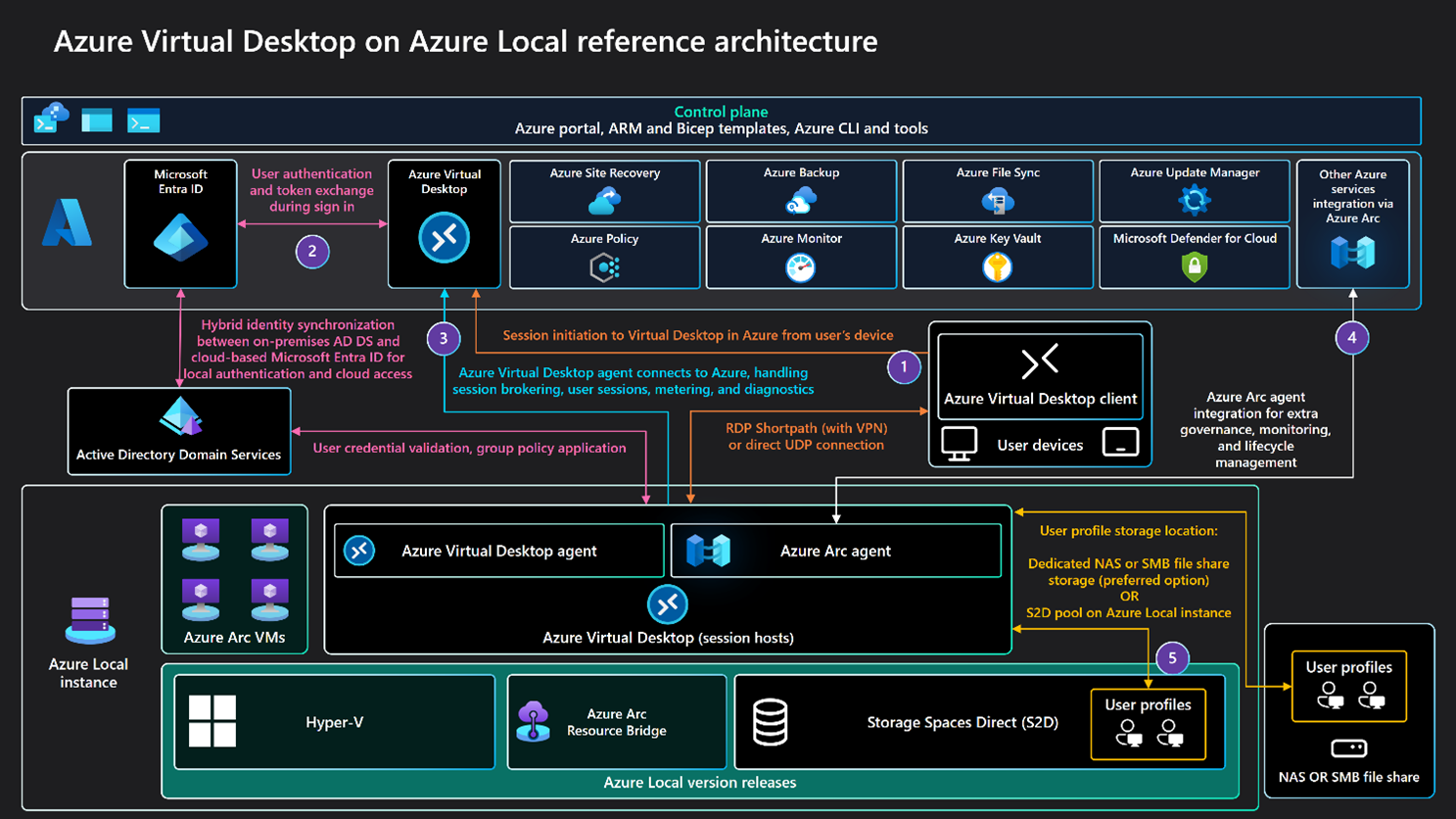
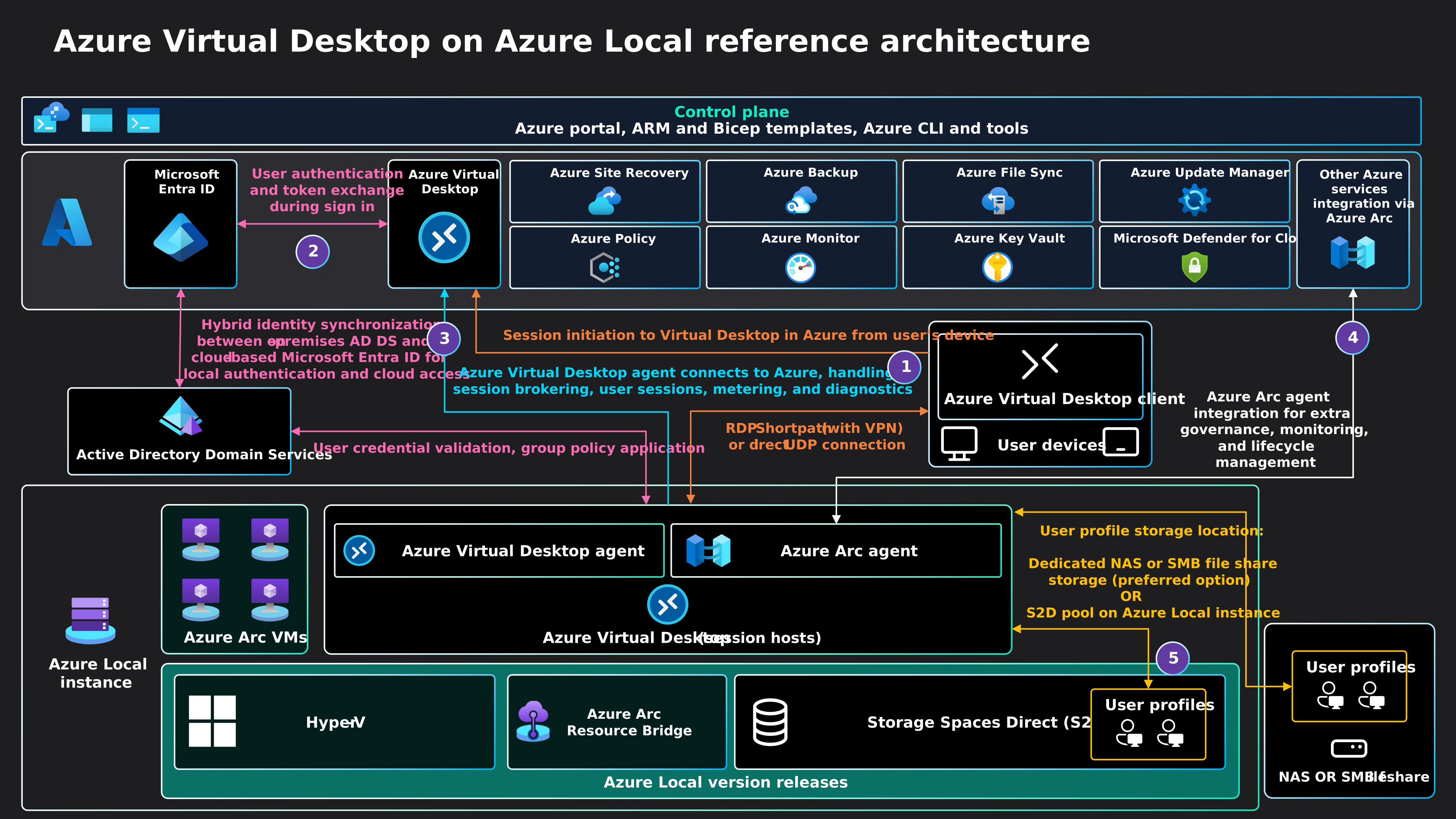
AVD on Azure Local integrates with Microsoft Entra ID, enabling Conditional Access, MFA, and governance across hybrid identities. Authentication still occurs in Azure, while session hosts authenticate users locally through synchronized Active Directory Domain Services (AD DS).
- Cost Efficiency with Multi‑Session Support
Azure Virtual Desktop’s exclusive multi-session Windows 10/11 capability is fully supported on Azure Local. This enables organizations to host multiple users on a single VM, optimizing compute usage and reducing operational costs.
How AVD Works on Azure Local: A Hybrid Architecture
The hybrid architecture keeps the control plane in Azure while hosting the session VMs locally. Microsoft’s architectural guidance explains that session hosts run on Azure Local, FSLogix profiles can be stored locally for fast logins, and identity flows through Entra ID with AD DS synchronization.
This allows organizations to maintain local data paths while leveraging cloud-based orchestration, scaling, and automation.
Use Cases
AVD on Azure Local is particularly well-suited for:
- Government and public sector requiring data sovereignty.
- Healthcare retaining PHI on premises.
- Finance needs near-real-time access to trading systems.
- Manufacturing and industrial sites with poor cloud connectivity
- Education enabling secure local labs and student workstations.
Hybrid VDI Advantage
Azure Virtual Desktop for Azure Local represents a significant evolution in hybrid virtualization. By extending the flexibility and cloud‑native simplicity of AVD to customer‑owned infrastructure, organizations gain unparalleled control over performance, compliance, and data residency. At the same time, they retain the management efficiency, scalability, and cost benefits that come with Microsoft’s cloud ecosystem.
Upskill Your Teams with Enterprise-Ready Tech Training Programs
- Team-wide Customizable Programs
- Measurable Business Outcomes
About CloudThat
CloudThat is an award-winning company and the first in India to offer cloud training and consulting services worldwide. As a Microsoft Solutions Partner, AWS Advanced Tier Training Partner, and Google Cloud Platform Partner, CloudThat has empowered over 850,000 professionals through 600+ cloud certifications winning global recognition for its training excellence including 20 MCT Trainers in Microsoft’s Global Top 100 and an impressive 12 awards in the last 8 years. CloudThat specializes in Cloud Migration, Data Platforms, DevOps, IoT, and cutting-edge technologies like Gen AI & AI/ML. It has delivered over 500 consulting projects for 250+ organizations in 30+ countries as it continues to empower professionals and enterprises to thrive in the digital-first world.


WRITTEN BY Kuino Dalstia
S. Kuino Dalstia is a Subject Matter Expert and MCT at CloudThat, specializing in Microsoft Azure. With 17 years of experience in training and academics, she has trained over 5,000 professionals to upskill in Architect, Administrator and Security. Known for simplifying complex concepts through real-world analogies, she brings deep technical knowledge and practical application into every learning experience. Kuino’s passion for teaching reflects in her unique approach to learning and development.


 PREV
PREV











Comments