

 Login
Login


 March 24, 2026
|
Voiced by Amazon Polly |
Modern IT environments are no longer limited to a single data center. Organizations now operate across on-premises servers, virtual machines, containers, and cloud-native services. Monitoring these distributed systems requires a centralized, intelligent platform, and that is where Azure Monitor becomes essential.
Start Learning In-Demand Tech Skills with Expert-Led Training
- Industry-Authorized Curriculum
- Expert-led Training
What Is Azure Monitor?
Azure Monitor is Microsoft’s comprehensive monitoring solution for collecting, analyzing, and acting on telemetry data from:
- Azure resources
- On-premises servers
- Virtual machines
- Applications
- Containers
- Network resources
It gathers two primary types of data:
- Metrics – Numerical performance values such as CPU usage, memory, disk I/O.
- Logs – Detailed event data collected into a Log Analytics workspace.
Azure Monitor transforms raw operational data into actionable insights through dashboards, alerts, workbooks, and integrations.
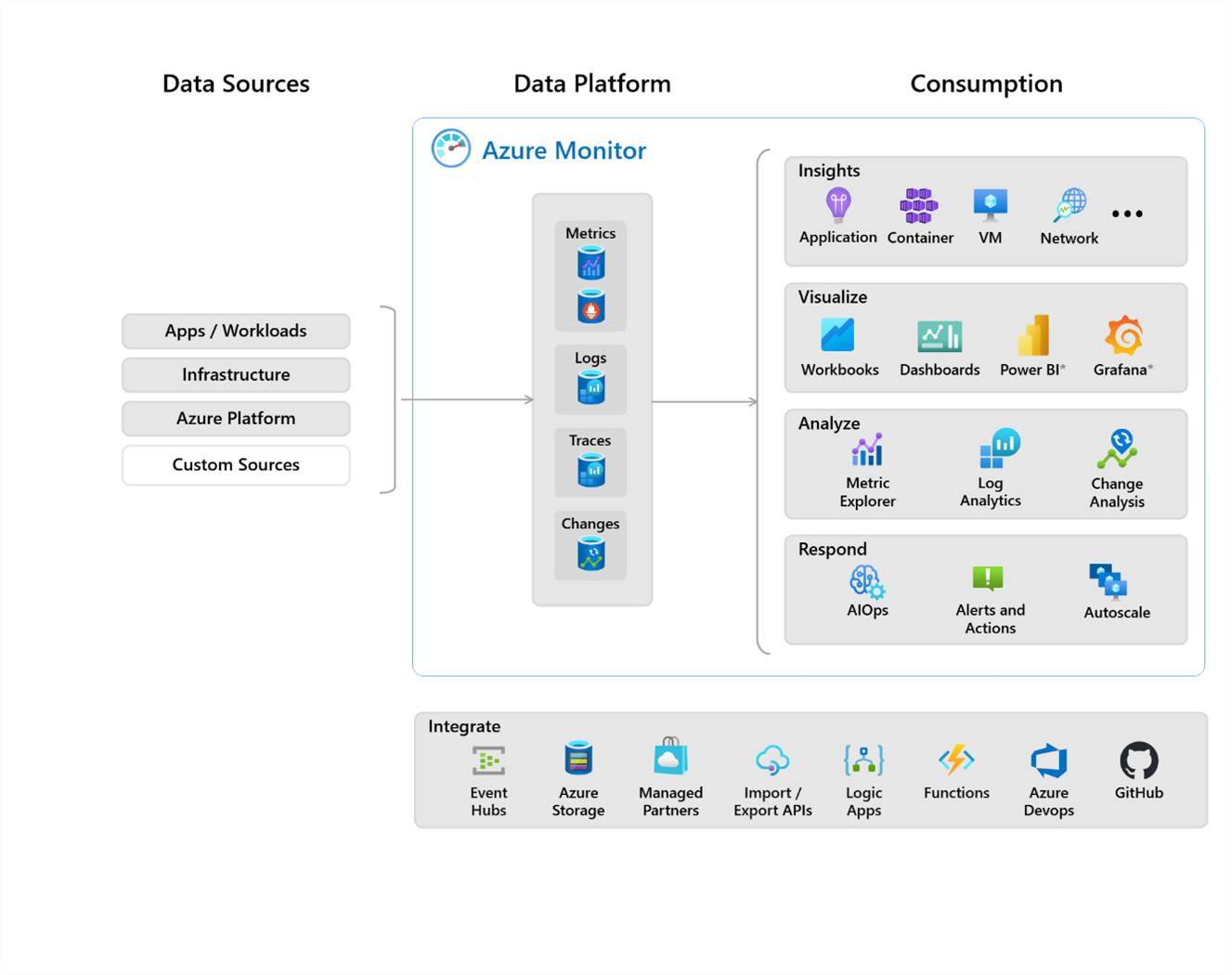
Fig 1: Shows a high-level architecture view of Azure Monitor with Data Sources and Data Platform.
When Should You Use Azure Monitor?
Azure Monitor should be used when you need centralized monitoring across hybrid environments, proactive alerting instead of reactive troubleshooting, security auditing and compliance visibility, management of mission-critical workloads, and support for capacity planning and performance optimization. It becomes especially critical in environments where downtime directly impacts business operations
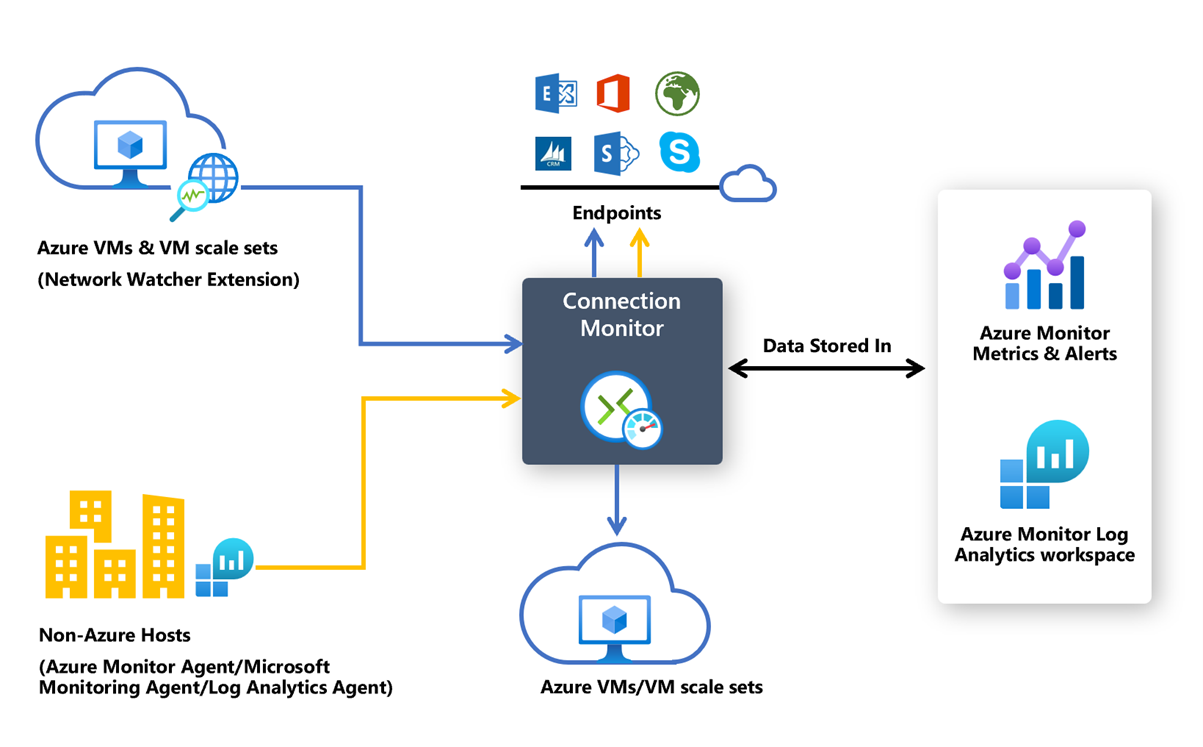
Fig 2: Represents the Azure Connection Monitor architecture under Microsoft Azure.
Key Components of Azure Monitor
Understanding Azure Monitor’s architecture helps you implement and manage it correctly in both cloud and hybrid environments.
- Metrics: Metrics are lightweight and collected in near real time. They are primarily used for performance dashboards and fast alerting scenarios where immediate visibility is important, such as monitoring CPU usage or memory consumption.
- Logs: Logs provide detailed event information and are stored in a Log Analytics workspace. These logs can be queried and analyzed using KQL (Kusto Query Language), allowing administrators to perform deep investigations, correlate events, and identify patterns across multiple resources.
- Alerts: Alerts enable proactive monitoring by notifying administrators when defined conditions are met. Azure Monitor supports metric-based alerts for performance thresholds, log-based alerts for specific query results, and activity log alerts for subscription-level events such as resource changes.
- Workbooks: Workbooks offer customizable dashboards with rich visualizations, enabling teams to create interactive reports and consolidated monitoring views tailored to operational needs.
- Agents: Agents, specifically the Azure Monitor Agent (AMA), are responsible for collecting telemetry data from servers and sending it securely to Azure Monitor for analysis and storage
How to Use Azure Monitor
Below is a practical example of monitoring an Azure Virtual Machine.
Note: The workspace stores logs from monitored resources.
Note: This automatically installs the Azure Monitor Agent.
- View Metrics
- Create an Alert Rule
Note: Now Azure Monitor proactively notifies you when thresholds are exceeded.
Run a query such as: Retrieve failed login attempts, Search for specific Event IDs, Check average CPU usage trends, etc
Benefits of Using Azure Monitor
- Centralized visibility allows organizations to monitor all infrastructure components from a single platform, eliminating the need to switch between multiple tools.
- Proactive alerting enables teams to detect and respond to potential issues before users experience or report them, reducing downtime and service disruption.
- Hybrid monitoring supports both on-premises and cloud environments, providing seamless visibility across distributed infrastructure.
- Scalability ensures the platform can handle enterprise-scale workloads efficiently, regardless of infrastructure size or complexity.
- Security insights help track suspicious authentication activities and compliance-related events, strengthening the overall security posture.
- Cost optimization capabilities identify underutilized or overutilized resources, helping organizations manage and reduce operational expenses.
- Integration with the Azure ecosystem enables seamless connectivity with Azure security tools, automation services, policy enforcement mechanisms, and ITSM systems, creating a unified and automated operational environment.
Real-Time Use Case: Preventing Production Downtime
Scenario
A company runs an e-commerce application hosted on Azure Virtual Machines. During peak hours, customers begin experiencing slow performance.
Without Azure Monitor
Without Azure Monitor, customer complaints typically surface first, prompting the IT team to begin manual investigations. As a result, the root cause is often identified too late, which can negatively impact performance, customer satisfaction, and revenue.
With Azure Monitor
With Azure Monitor in place, CPU usage exceeding 85 per cent is detected automatically, and an alert is triggered immediately. The operations team receives real-time notifications, enabling them to respond quickly. An autoscaling rule activates, or an additional virtual machine is provisioned, ensuring that performance stabilizes before customers experience any noticeable disruption.
Additionally, Log Analytics provides deeper insights by revealing increased database query times, high disk I/O latency, and a spike in traffic from a specific region. The team uses these findings to optimize the infrastructure for the long term and prevent similar issues in the future.
Azure Monitoring Essentials
Azure Monitor is more than a monitoring tool; it is a complete observability platform for hybrid and cloud environments. From collecting raw metrics to triggering alerts and enabling deep log analysis, it provides the visibility required to maintain modern infrastructure efficiently.
For organizations moving toward digital transformation, implementing Azure Monitor is not optional; it is foundational.
Upskill Your Teams with Enterprise-Ready Tech Training Programs
- Team-wide Customizable Programs
- Measurable Business Outcomes
About CloudThat


WRITTEN BY Sheeja Narayanan
Sheeja Narayanan is Champion Amazon Authorized Instructor, Microsoft Certified trainer and Senior Subject Matter Expert at CloudThat, specializing in AWS infra and Migration. With 19 years of experience in Training and consulting, she has trained over 2500 professionals/students to upskill in Networking, Windows and Linux administration, AWS, Azure and Vmware. Known for simplifying complex concepts and delivering highly hands-on sessions, she brings deep technical knowledge and practical expertise into every learning experience. Sheeja's passion for training delivery reflects in her unique approach to learning and development.


 PREV
PREV












Comments