

 Login
Login

 June 19, 2026
|
Voiced by Amazon Polly |
In today’s data-driven landscape, organizations are increasingly adopting Artificial Intelligence (AI) within their applications to gain insights, streamline operations, and improve user experiences. Microsoft Azure provides a powerful ecosystem for developing and deploying AI solutions, commonly referred to as Azure AI workloads. These workloads encompass a wide range of services and tools that enable developers, data scientists, and businesses to build intelligent applications quickly and efficiently without deep machine learning expertise.
Azure AI combines prebuilt AI services, customizable machine learning models, and integrated development tools to deliver enterprise-grade solutions. Whether it’s building chatbots, performing image recognition, analyzing text, or predicting future trends, Azure AI workloads offer scalable and secure infrastructure to handle these tasks seamlessly. This blog explores the components, benefits, and practical use cases of Azure AI workloads.
Start Learning In-Demand Tech Skills with Expert-Led Training
- Industry-Authorized Curriculum
- Expert-led Training
What is an Azure AI Workload?
An Azure Artificial Intelligence workload refers to a solution that uses one or more Azure AI services to solve a specific business problem. These workloads are typically built with fully managed services that abstract the complexities of AI and machine learning, allowing developers to focus on application logic rather than infrastructure.
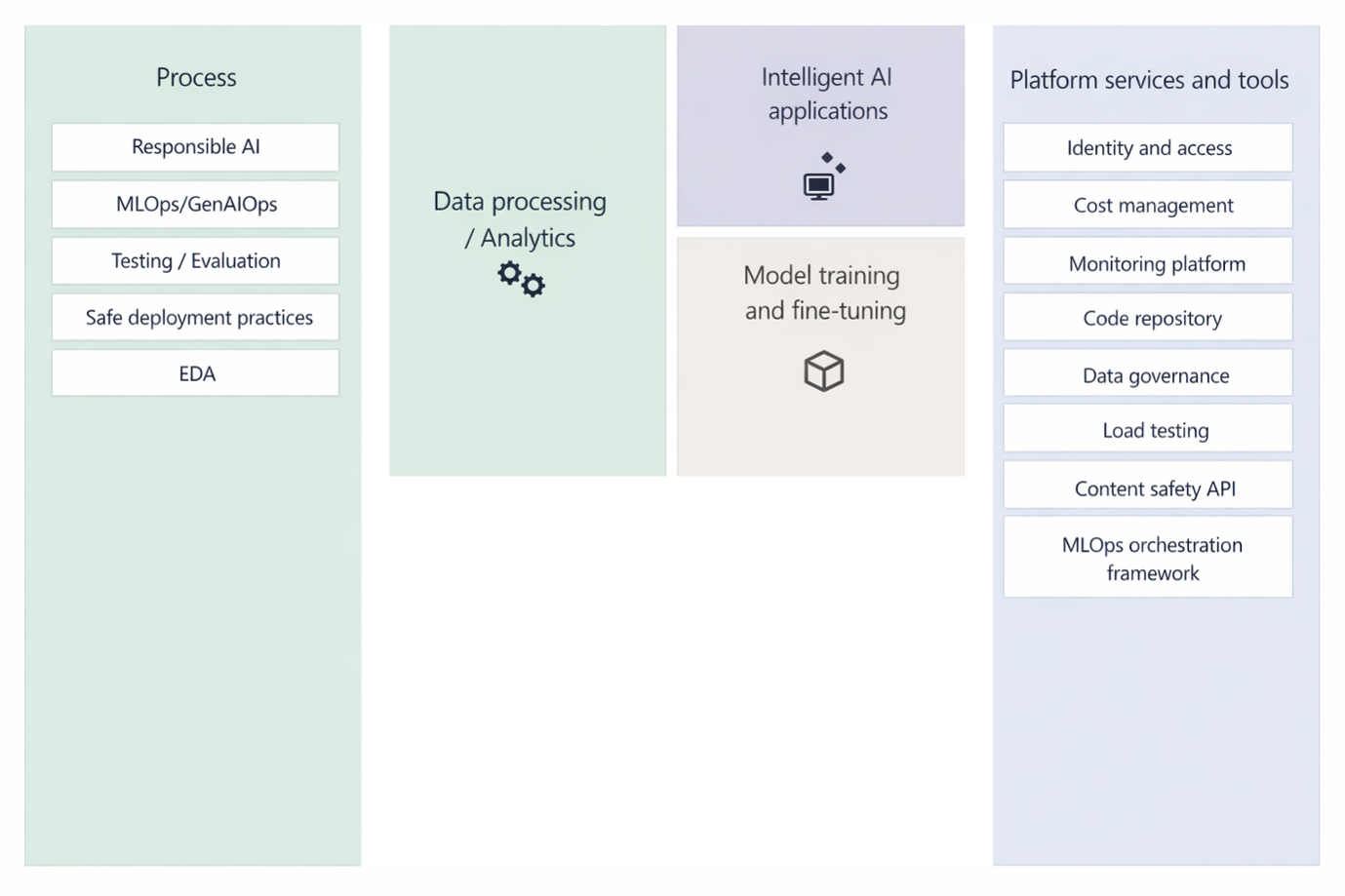
Some core Azure AI services include:
- Azure Vision – Provides capabilities for image analysis, object recognition, and optical character recognition (OCR).
- Azure Language – Offers tools for text analytics, sentiment analysis, and language translation.
- Azure Speech – Enables conversion between spoken language and text in both directions.
- Azure Document Intelligence (Form Recognizer) – Gathers and structures data extracted from documents.
- Azure OpenAI Service – Grants access to powerful generative AI models for advanced use cases.
- Azure Machine Learning – Delivers a comprehensive platform to build, train, and deploy custom machine learning models.
Key Components of Azure AI Workloads
- Data Sources
AI workloads rely heavily on data. Azure supports integration with various data sources, including Azure Blob Storage, Azure SQL Database, and IoT data streams.
- AI Services
Prebuilt AI services enable quick implementation of intelligence without requiring training datasets.
- Custom Models
When prebuilt models are insufficient, Azure Machine Learning enables developers to build custom ML models tailored to specific business needs.
- Application Integration
AI capabilities are integrated into applications using APIs, SDKs, or REST endpoints. These applications can be web, mobile, or enterprise systems.
- Deployment and Monitoring
Azure provides tools to deploy AI models in production and monitor their performance using Azure Monitor and Application Insights.
Benefits of Azure AI Workloads
- Scalability: Azure’s cloud infrastructure enables AI workloads to scale automatically with demand, ensuring high availability and performance.
- Ease of Use: Prebuilt models and low-code/no-code tools significantly reduce the complexity of implementing AI solutions.
- Security and Compliance: Azure ensures enterprise-grade security and compliance with industry standards, making it suitable for sensitive workloads.
- Cost Efficiency: Pay-as-you-go pricing helps organizations optimize costs by only paying for the resources they use.
- Integration: Azure AI services integrate seamlessly with other Azure services, such as Power BI, Azure Functions, and Logic Apps, enabling end-to-end solutions.
Common Use Cases
- Customer Support Chatbots
Businesses use Azure AI to build conversational agents that can handle customer queries using natural language processing.
- Document Processing Automation
Azure Document Intelligence can extract data from invoices, receipts, and forms, reducing manual data entry.
- Sentiment Analysis
Companies examine customer feedback, online reviews, and social media posts to gauge sentiment and enhance their services.
- Image and Video Analysis
Retailers and security firms use Azure AI Vision to detect objects, track movements, and identify patterns.
- Predictive Analytics
Azure Machine Learning helps forecast trends, detect anomalies, and improve decision-making processes.
Building AI-Driven Futures
Azure AI workloads empower organizations to harness the full potential of artificial intelligence with minimal complexity. By combining prebuilt AI services, customizable models, and scalable cloud infrastructure, Azure enables businesses to innovate rapidly and solve real-world problems efficiently. From improving customer engagement to automating business processes and enabling data-driven decision-making, Azure AI plays a critical role in modern digital transformation.
As AI continues to evolve, Azure remains at the forefront, providing cutting-edge tools and services accessible to both beginners and experts. By leveraging Microsoft Learn resources and hands-on experimentation, anyone can start building powerful AI-driven applications and contribute to the future of intelligent technology.
Upskill Your Teams with Enterprise-Ready Tech Training Programs
- Team-wide Customizable Programs
- Measurable Business Outcomes
About CloudThat


WRITTEN BY Kuino Dalstia
S. Kuino Dalstia is a Subject Matter Expert and MCT at CloudThat, specializing in Microsoft Azure. With 17 years of experience in training and academics, she has trained over 5,000 professionals to upskill in Architect, Administrator and Security. Known for simplifying complex concepts through real-world analogies, she brings deep technical knowledge and practical application into every learning experience. Kuino’s passion for teaching reflects in her unique approach to learning and development.


 PREV
PREV












Comments