

 Login
Login


 June 22, 2026
|
Voiced by Amazon Polly |
Introduction
Database migration is one of the most critical tasks in cloud modernization and infrastructure transformation projects. Production databases continuously process live transactions, customer activities, API requests, inventory updates, and payment records.
Some major migration challenges include:
- Continuous live data updates
- Risk of missing transactions
- Downtime during migration
- Data inconsistency issues
- Customer and business impact
To overcome these challenges, organizations use Delta Sync Migration, which synchronizes only changed data continuously until the final cutover window.
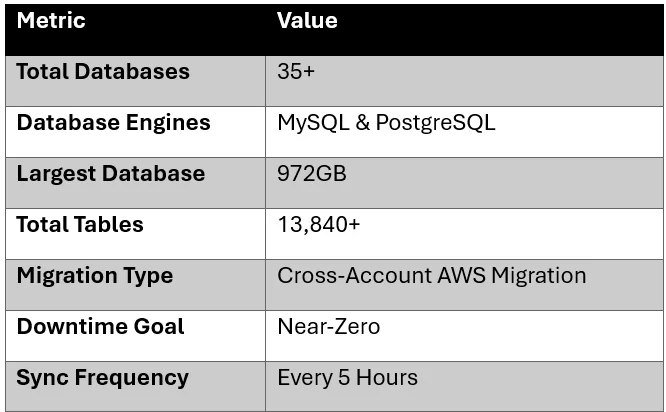
This guide explains a real-world AWS cross-account migration approach used to migrate more than 35 MySQL and PostgreSQL databases, including a massive 972GB production database with over 13,840 tables, while keeping downtime to a minimum.
Pioneers in Cloud Consulting & Migration Services
- Reduced infrastructural costs
- Accelerated application deployment
Overview
This blog covers the complete AWS RDS migration process using a Delta Sync strategy for both MySQL and PostgreSQL databases. It explains:
- Cross-account AWS RDS migration
- MySQL and PostgreSQL synchronization
- Large database migration using parallel processing
- Recurring sync automation
- Validation and verification methods
- Production cutover planning
- Troubleshooting common migration issues
Why Database Migration is Challenging?
Database migration is not simply copying data from one server to another. Production databases continuously receive new updates and transactions.
For example:
- Customers continuously place orders
- Payment systems update records in real time
- Inventory changes frequently
- APIs continuously write data
If the database is copied only once, transactions created after the copy will not exist in the destination environment.
This may lead to:
- Missing orders
- Incorrect reports
- Application issues
- Customer impact
Delta Sync solves this challenge by repeatedly synchronizing only the changed data until the final migration cutover.
Real-World Migration Scenario
In our migration project:
Environment Details
Source Database
|
1 |
source-rds.abc123.ap-southeast-1.rds.amazonaws.com |
Destination Database
|
1 |
dest-rds.xyz789.ap-southeast-1.rds.amazonaws.com |
Method 1 — MySQL Delta Sync Using mysqldump (Small Databases)
For databases smaller than 10GB, a direct mysqldump | mysql pipe works extremely well.
MySQL Delta Sync Command
|
1 2 3 4 5 6 7 8 9 10 11 12 13 14 15 |
mysqldump -h source-rds.abc123.ap-southeast-1.rds.amazonaws.com \ -u db_admin -p'YourP@ssw0rd!' \ --single-transaction \ --set-gtid-purged=OFF \ --column-statistics=0 \ --quick \ --skip-lock-tables \ --max-allowed-packet=1G \ --skip-routines \ my_database | \ mysql -h dest-rds.xyz789.ap-southeast-1.rds.amazonaws.com \ -u db_admin -p'YourP@ssw0rd!' \ --max-allowed-packet=1G \ --init-command="SET SESSION FOREIGN_KEY_CHECKS=0; SET SESSION UNIQUE_CHECKS=0;" \ my_database |
Understanding Important Flags
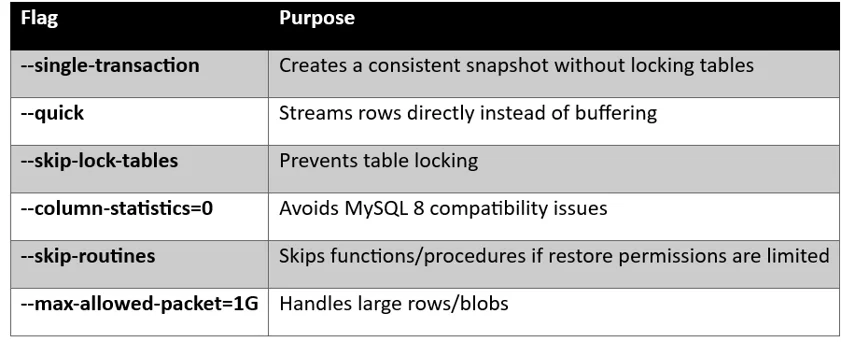
Why –single-transaction Matters
This is one of the most important options during production migrations.
It allows:
- Live application traffic
- No table locking
- Consistent snapshot backup
- Continuous database usage during migration
This works best with InnoDB tables.
Method 2 Large Database Migration Using mydumper/myloader
For very large databases, traditional mysqldump becomes slow because it runs single-threaded.
We migrated a:
- 972GB database
- 13,840+ tables
- Heavy write production workload
using mydumper and myloader.
Why mydumper?
mydumper provides:
- Parallel dumping
- Faster export/import
- Reduced migration time
- Better CPU utilization
- Batch processing
Step 1 — Dump Database from Source
|
1 2 3 4 5 6 7 8 9 10 11 |
mydumper -h source-rds.abc123.ap-southeast-1.rds.amazonaws.com \ -P 3306 \ -u db_admin \ -p 'YourP@ssw0rd!' \ -B gpswox_traccar \ --regex "^gpswox_traccar\.(positions_100|positions_200|positions_300)$" \ -o /data/dump_dir \ -t 8 \ --no-locks \ --less-locking \ --rows 500000 |
Step 2 — Restore Database to Destination
|
1 2 3 4 5 6 7 8 |
myloader -h dest-rds.xyz789.ap-southeast-1.rds.amazonaws.com \ -P 3306 \ -u db_admin \ -p 'YourP@ssw0rd!' \ -B gpswox_traccar \ -d /data/dump_dir \ -t 8 \ --overwrite-tables |
Expected Warning
|
1 2 |
** (mydumper:416808): WARNING **: We are not able to determine if the backup will be consistent. |
This warning is expected on AWS RDS because FLUSH TABLES WITH READ LOCK is restricted.
Performance Results
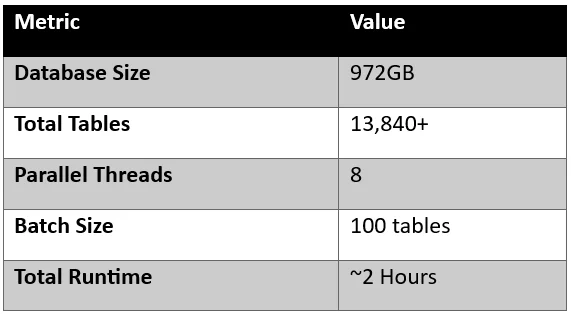
This was significantly faster than standard mysqldump.
PostgreSQL Delta Sync Migration
For PostgreSQL databases, we used:
- pg_dump
- psql
- Direct pipe method
PostgreSQL Delta Sync Command
|
1 2 3 4 5 6 7 8 9 10 11 |
PGPASSWORD='YourP@ssw0rd!' pg_dump \ -h source-rds.abc123.ap-southeast-1.rds.amazonaws.com \ -U pg_admin \ -d ems_production \ --clean \ --if-exists | \ PGPASSWORD='YourP@ssw0rd!' psql \ -h dest-rds.xyz789.ap-southeast-1.rds.amazonaws.com \ -U pg_admin \ -d ems_production \ -q |
Important PostgreSQL Flags
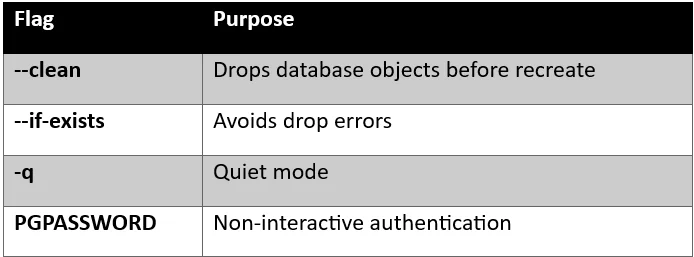
Automating Recurring Delta Sync
To minimize final cutover downtime, we scheduled recurring sync jobs every 5 hours.
Automation Script
|
1 2 3 4 5 6 7 8 9 10 11 12 13 14 15 |
#!/bin/bash # recurring_sync.sh LOG="/data/logs/sync.log" START=$(date +%s) mysqldump -h source-rds... my_database | \ mysql -h dest-rds... my_database END=$(date +%s) echo "[$(date)] my_database: $((END-START))s" >> $LOG Source reference: |
Make Script Executable
|
1 |
chmod +x recurring_sync.sh |
Configure Cron Job
|
1 2 3 4 5 6 7 8 |
Run every 5 hours: crontab -e Add: 0 */5 * * * /data/scripts/recurring_sync.sh Verify cron: crontab -l Expected output: 0 */5 * * * /data/scripts/recurring_sync.sh |
Database Validation After Sync
Never assume migration succeeded without verification.
Compare Table Counts
Source Database
|
1 2 3 |
mysql -h source-rds... -N -e \ "SELECT COUNT(*) FROM information_schema.tables \ WHERE table_schema='my_database';" |
Destination Database
|
1 2 3 |
mysql -h dest-rds... -N -e \ "SELECT COUNT(*) FROM information_schema.tables \ WHERE table_schema='my_database';" |
Example Output
|
1 2 |
Source: 113 Dest: 113 |
Validate Primary Keys & Constraints
|
1 2 3 4 |
mysql -h dest-rds... -N -e \ "SELECT COUNT(*) FROM information_schema.table_constraints \ WHERE table_schema='my_database' \ AND constraint_type='PRIMARY KEY';" |
Expected output:
85
Additional Validation Commands
Check Database Size
|
1 2 3 4 5 |
mysql -h source-rds... -e " SELECT table_schema AS DB_NAME, ROUND(SUM(data_length + index_length) / 1024 / 1024, 2) AS SIZE_MB FROM information_schema.tables GROUP BY table_schema;" |
Validate Row Counts
|
1 2 3 4 |
mysql -h source-rds... -e " SELECT COUNT(*) FROM users;" mysql -h dest-rds... -e " SELECT COUNT(*) FROM users;" |
Validate PostgreSQL Tables
|
1 2 3 |
PGPASSWORD='password' psql -h source-rds... \ -U pg_admin -d ems_production \ -c "\dt" |
Common Issues & Troubleshooting
- Function Restore Error
|
1 2 3 4 5 6 7 8 9 |
Error: ERROR 1419 (HY000): You do not have the SUPER privilege Fix: Enable: log_bin_trust_function_creators = 1 This requires: • RDS parameter group modification • Database reboot |
- Password Special Character Issue
|
1 2 3 4 |
Problematic password example: Pass@word$123# Use single quotes: -p'Pass@word$123#' |
- InnoDB Table Count Mismatch
information_schema.table_rows is unreliable for InnoDB.
- Destination Database Smaller Than Source
This is normal.
Reason:
- Source DB may contain fragmentation
- Restore creates optimized tables/pages
- Unused space gets removed
Conclusion
Drop a query if you have any questions regarding Database migration, and we will get back to you quickly.
Making IT Networks Enterprise-ready – Cloud Management Services
- Accelerated cloud migration
- End-to-end view of the cloud environment
About CloudThat
FAQs
1. Does Delta Sync Lock Production Databases?
ANS: – No. Using: –single-transaction creates a consistent snapshot without locking tables, allowing applications to continue running normally.
2. Why Not Use AWS DMS?
ANS: – For environments with very large schemas, 13,000+ tables, and complex functions, direct dump/restore methods provided better control, easier troubleshooting, and more predictable performance.


WRITTEN BY Shaikh Mohammed Fariyaj Najam
Mohammed Fariyaj Shakh is a Sr. Research Associate – Cloud Engineer at CloudThat with a strong background in AWS and Azure infrastructure management, security, optimization, and automation. Certified in both AWS and Azure, he has hands-on experience in designing, implementing, and managing highly reliable, secure, and scalable cloud solutions. Well-versed in DevOps practices and tools such as Git, GitHub, AWS CI/CD, Jenkins, Docker, Kubernetes, and Terraform, Fariyaj leverages his expertise in automation, Infrastructure as Code (IaC), and container orchestration to build and manage robust deployment pipelines. Known for his strong troubleshooting skills, he delivers effective and scalable solutions to complex cloud challenges.


 PREV
PREV












Comments