

 Login
Login


 June 19, 2026
|
Voiced by Amazon Polly |
Managing Kubernetes clusters has always involved a non-trivial setup ritual, installing the AWS CLI, configuring kubectl, generating or downloading kubeconfig files, and ensuring the correct permissions are in place. For teams that work across multiple environments or frequently onboard engineers, this overhead adds up quickly. AWS has now addressed this friction head-on with a significant update to Amazon Elastic Kubernetes Service (EKS): one-click cluster access through AWS CloudShell, announced in April 2026.
This feature lets developers and platform engineers connect to any EKS cluster directly from the AWS Management Console with a single click, without local tooling, kubeconfig juggling, or environment configuration. In this blog, we explore what the feature does, how it works under the hood, who benefits most, and how you can get started today.
Start Learning In-Demand Tech Skills with Expert-Led Training
- Industry-Authorized Curriculum
- Expert-led Training
What Is Amazon EKS One-Click Cluster Access?
Amazon EKS one-click cluster access integrates EKS directly with AWS CloudShell, a browser-based, managed shell environment that runs inside the AWS Management Console. When you navigate to an EKS cluster in the console and click the Connect button, a CloudShell session launches that is pre-configured with kubectl pointing at that specific cluster. You can immediately start issuing kubectl commands, no additional setup required.
The feature is available at no additional charge in all AWS Regions where Amazon EKS is supported, and it works with clusters that have both public and private API server endpoints. Each session also includes the AWS CLI and standard CloudShell utilities out of the box.
Why This Matters: The Problem It Solves
Before this feature, accessing an EKS cluster programmatically required several steps:
- Installing the AWS CLI and kubectl locally
- Configuring IAM credentials with the correct permissions
- Running aws eks update-kubeconfig to generate a kubeconfig entry
- Validating connectivity and debugging failures when VPC, security group, or endpoint settings were misaligned
For production teams, these steps are second nature. But for developers onboarding to a project, for operators performing a quick troubleshooting session, or for teams working in locked-down environments where local tool installation is restricted, this setup is a real barrier. One-click cluster access removes that barrier entirely.
Key Capabilities
- Instant kubectl access: Launch a CloudShell session pre-configured for the target cluster directly from the EKS console.
- No local installation: kubectl, the AWS CLI, and cluster credentials are all available in the browser-based session.
- Public and private endpoint support: Works regardless of whether the cluster’s API server is publicly accessible or restricted to a VPC.
- Standard CloudShell environment: The session includes all the utilities available in a regular AWS CloudShell session.
- No extra cost: The feature is available at no additional charge; you pay only for normal EKS and CloudShell usage.
How to Get Started
Getting started with one-click cluster access takes less than a minute:
- Open the Amazon EKS console and select your cluster.
- Click the Connect button at the top of the cluster detail page.
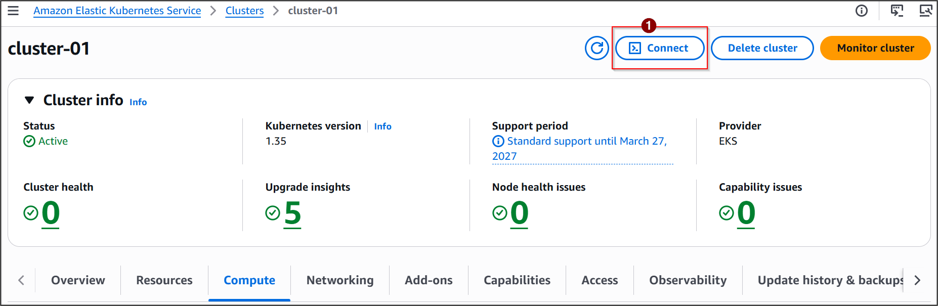
Fig 1: EKS Cluster – AWS Console
- A CloudShell session opens with kubectl already configured for that cluster. Click on the Run Button to connect to your EKS Cluster
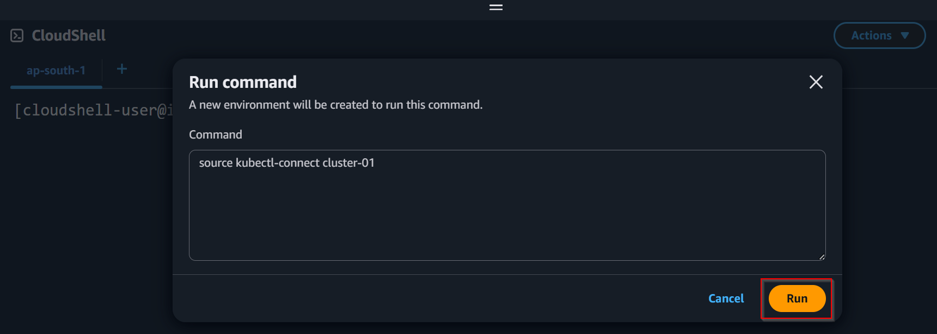
Fig 2: Click on Run to configure CloudShell to connect to your EKS Cluster.
- Run any kubectl command immediately, for example, kubectl get nodes or kubectl get pods –all-namespaces.
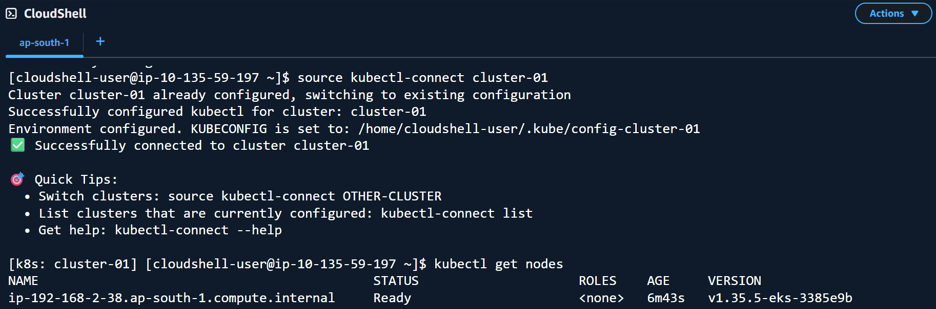
Fig 3: Now you can access your EKS Cluster from CloudShell.
Who Benefits Most?
- Developers and SREs who need fast ad-hoc access to troubleshoot workloads without switching to a local terminal.
- Platform teams are onboarding engineers to Kubernetes projects for the first time.
- Security-conscious organizations that restrict the installation of local tools on developer machines.
- Regulated environments where all administrative access must flow through centrally audited, cloud-native tooling.
Deepen Your Kubernetes and AWS Skills
If features like EKS one-click access inspire you to master Kubernetes and the broader AWS ecosystem, you can connect to an AWS partner or can also look for a course checkout Running Container on Amazon EKS that will help in managing and orchestrating your container workload on Kubernetes.
Explore the Amazon EKS Service Delivery Program to learn how AWS partners help enterprises design, deploy, and operate production-grade EKS clusters at scale.
Simplifying Kubernetes Access
Amazon EKS one-click cluster access through AWS CloudShell is a practical, developer-friendly quality-of-life improvement that removes one of the most consistent friction points in working with Kubernetes on AWS. By eliminating the need to install kubectl, configure the AWS CLI, or manage kubeconfig files locally, AWS has made cluster access as simple as a single click, at no additional cost.
For individual contributors, the benefit is speed and simplicity. For teams and organizations, it is consistency; every engineer accesses the cluster through the same secure, auditable, browser-based interface. As Kubernetes adoption continues to grow, small improvements like this compound into significantly smoother workflows and faster incident response times.
Upskill Your Teams with Enterprise-Ready Tech Training Programs
- Team-wide Customizable Programs
- Measurable Business Outcomes
About CloudThat


WRITTEN BY Kamlesh N
Kamlesh Nenwani is a Subject Matter Expert at CloudThat, specializing in AWS Architecting and DevOps. With 13 years of experience in training and consultancy, he has guided over 2500+ professionals and students in mastering diverse technologies. Renowned for his clarity in explaining complex topics and his commitment to continuous learning, Kamlesh delivers practical, interactive sessions grounded in deep technical expertise.


 PREV
PREV












Comments