

 Login
Login

 September 21, 2026
|
Voiced by Amazon Polly |
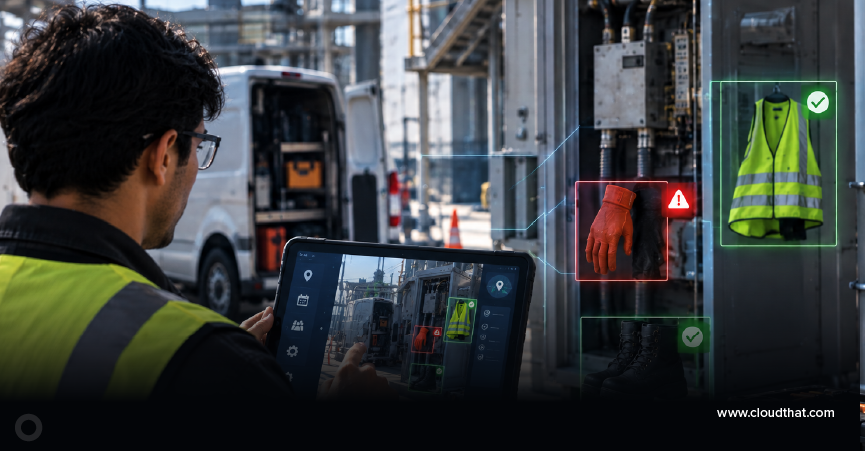
Field service technicians work in dynamic environments where safety inspections are critical before any maintenance activity. While Microsoft Dynamics 365 Field Service streamlines work orders, scheduling, and asset management, safety checks often rely on manual observations and checklists. By integrating AI-powered Computer Vision, organizations can enhance these inspections by automatically analyzing technician-captured images to detect PPE compliance issues and workplace hazards. This future-state solution complements existing Dynamics 365 Field Service workflows, helping improve safety, strengthen compliance, and enable smarter, more efficient field service operations.
Start Learning In-Demand Tech Skills with Expert-Led Training
- Industry-Authorized Curriculum
- Expert-led Training
Objective
Field technicians often operate in environments that contain multiple safety risks. A single overlooked hazard, such as a missing safety helmet, an oil spill near machinery, an open electrical cabinet, or an improperly positioned ladder, can lead to workplace injuries, equipment damage, operational downtime, or regulatory penalties.
The objective of this blog is to demonstrate how Microsoft Dynamics 365 Field Service can be extended with AI-powered Computer Vision to improve workplace safety and streamline compliance processes.
Current Challenges in Traditional Safety Inspections
- Manual Processes: Safety inspections rely on paper forms or digital checklists, making them time-consuming and increasing service duration.
- Human Error: Technicians may overlook hazards such as missing PPE, oil spills, or open electrical panels, especially under time pressure.
- Inconsistent Reporting: Safety assessments can vary between technicians, leading to inconsistent compliance with organizational standards.
- Delayed Hazard Escalation: Critical risks are often reviewed only after inspections are completed, limiting proactive intervention.
- Limited Use of Visual Data: Site photos are typically stored for documentation but are rarely analyzed automatically to identify safety risks.
Understanding Computer Vision
Computer Vision is an AI technology that enables computers to analyze images and videos, recognize objects, detect patterns, and identify potential risks. In field service, it can analyze technician-captured worksite photos to detect safety issues such as missing PPE, oil spills, open electrical panels, unsafe ladder placement, or missing warning signs. Instead of storing images solely for documentation, Computer Vision converts them into actionable insights that integrate with Microsoft Dynamics 365 Field Service, supporting faster inspections, consistent safety assessments, and improved workplace compliance.
Proposed Solution Architecture
Microsoft Dynamics 365 Field Service provides organizations with a comprehensive platform for managing work orders, scheduling technicians, tracking assets, and maintaining service history. However, while the platform excels at managing operational workflows, it does not natively perform visual safety inspections on images captured at customer sites.
To address this gap, the proposed architecture introduces Azure AI Vision as an intelligent image analysis layer. Instead of treating photographs as static documentation, the solution transforms them into actionable safety insights that can be incorporated directly into existing Dynamics 365 Field Service processes.
The overall architecture leverages Microsoft Azure AI services for image understanding, Power Platform for workflow orchestration, Dataverse for centralized data storage, and Microsoft Copilot for conversational assistance and summarization.
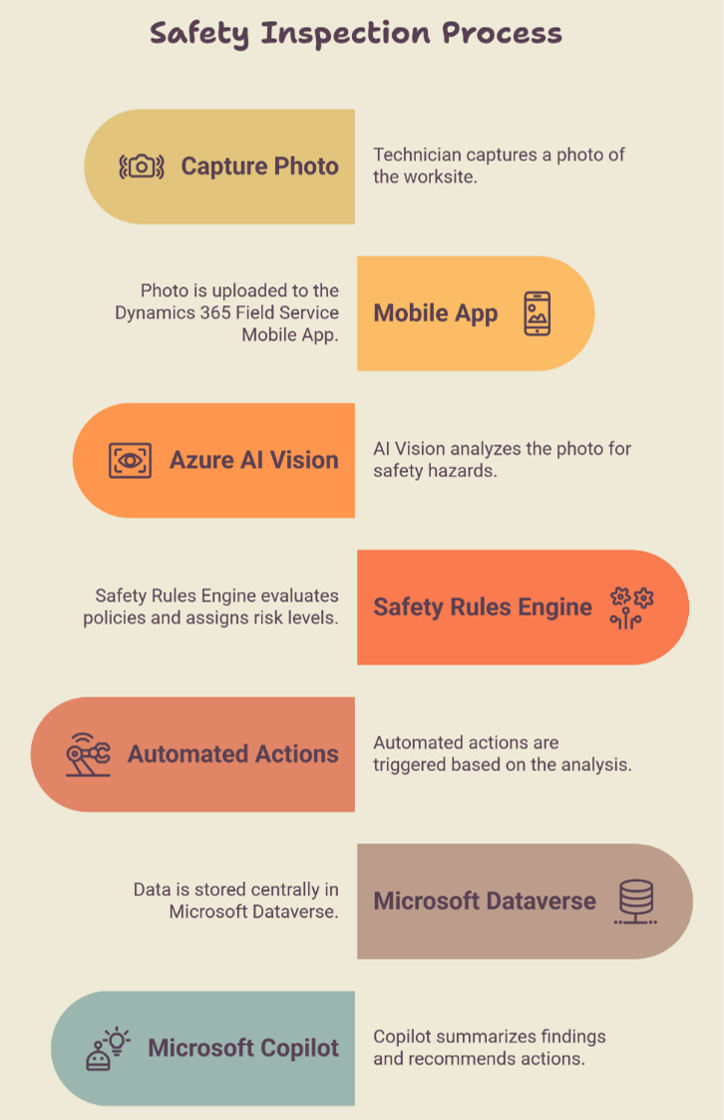
Fig 1: Safety Inspection Process
Microsoft Azure Services Involved
Azure AI Vision
The core AI service for analyzing worksite images. It detects objects, identifies safety hazards, OCRs warning signs, and converts images into structured safety insights.
Power Automate
Automates business workflows based on AI findings, such as updating work orders, creating inspections, sending notifications, and escalating critical safety issues.
Microsoft Dataverse
Acts as the centralized data store for work orders, inspection results, AI observations, technician details, asset history, and compliance records, ensuring seamless integration with Dynamics 365 Field Service.
Role of Microsoft Copilot
Computer Vision identifies visual safety hazards (e.g., missing PPE, oil spills, open electrical panels), while Microsoft Copilot helps users understand and act on those insights. It summarizes inspection results, explains detected risks, recommends next steps, generates work order notes, and assists with safety and compliance queries.
Benefits of AI-Powered Safety Compliance
- Improved Workplace Safety: Automatically detects hazards, such as missing PPE and unsafe conditions, before work begins, reducing risks and enhancing safety.
- Standardized Inspections: Applies consistent AI-based safety checks across all technicians and sites, ensuring uniform compliance.
- Reduced Administrative Effort: Automates hazard detection and inspection records, minimizing manual documentation and saving time.
- Faster Incident Response: Instantly triggers notifications and workflows for critical safety issues, enabling quicker corrective action.
- Better Compliance & Audit Readiness: Stores AI-generated inspection results in Microsoft Dataverse, simplifying compliance tracking and audits.
- Actionable Operational Insights: Analyzes inspection trends to identify recurring risks, improve training, and support data-driven safety decisions.
Implementation Considerations
- Image Quality: Ensure technicians capture clear, well-lit images for accurate AI analysis.
- Configurable Safety Policies: Customize business rules to match industry-specific safety requirements using Power Automate and Dataverse.
- Human Oversight: Use AI as a decision-support tool, with technicians and safety officers validating critical findings.
- Privacy & Security: Protect worksite images through encryption, role-based access, data retention policies, and regulatory compliance.
- Continuous Improvement: Regularly monitor AI performance, review detection accuracy, and retrain models as needed.
Future Enhancements
- Live Video Monitoring: Analyze real-time video streams to detect hazards continuously.
- Thermal Imaging: Detect overheating equipment and electrical hotspots using thermal cameras.
- Drone-Assisted Inspections: Use drones to inspect hazardous or hard-to-reach areas before technician entry.
- AI Risk Scoring: Generate dynamic risk scores based on hazards, asset condition, weather, and historical data.
- Azure Digital Twins Integration: Visualize AI-detected safety issues within a real-time digital twin of the facility.
- Conversational Safety Assistant: Enable Microsoft Copilot to answer safety-related questions, summarize inspection findings, and provide compliance insights in natural language.
As AI adoption continues to grow, professionals can build the skills needed to implement such intelligent field service solutions through structured learning and the Microsoft Dynamics 365 Field Service (MB-240) certification path.
AI-Powered Field Safety
Microsoft Dynamics 365 Field Service streamlines field operations, but workplace safety still relies heavily on manual inspections. By extending the platform with Azure AI Vision, Power Automate, Microsoft Dataverse, and Microsoft Copilot, organizations can transform worksite images into actionable safety insights that improve compliance, reduce operational risks, and standardize inspections.
Upskill Your Teams with Enterprise-Ready Tech Training Programs
- Team-wide Customizable Programs
- Measurable Business Outcomes
About CloudThat


WRITTEN BY Charanya B
Charanya is a Microsoft Certified Trainer specializing in Microsoft Dynamics 365, Power Platform, CRM, and ERP solutions. With experience in delivering technical training to professionals across leading organizations, including MNCs such as Cognizant and Infosys, she brings a strong blend of technical expertise and practical industry experience to her sessions. She holds multiple Microsoft certifications, including PL-200, MB-230, MB-280, AB-900, MB-330, and MB-310. Known for simplifying complex concepts, using practical business scenarios, and encouraging hands-on learning, Charanya focuses on making every learning experience engaging, relevant, and easy to apply in real-world environments.


 PREV
PREV









Comments